mirror of
https://github.com/fluxcd/flagger.git
synced 2026-04-15 06:57:34 +00:00

40 lines
1.9 KiB
Markdown
40 lines
1.9 KiB
Markdown
# Introduction
|
|
|
|
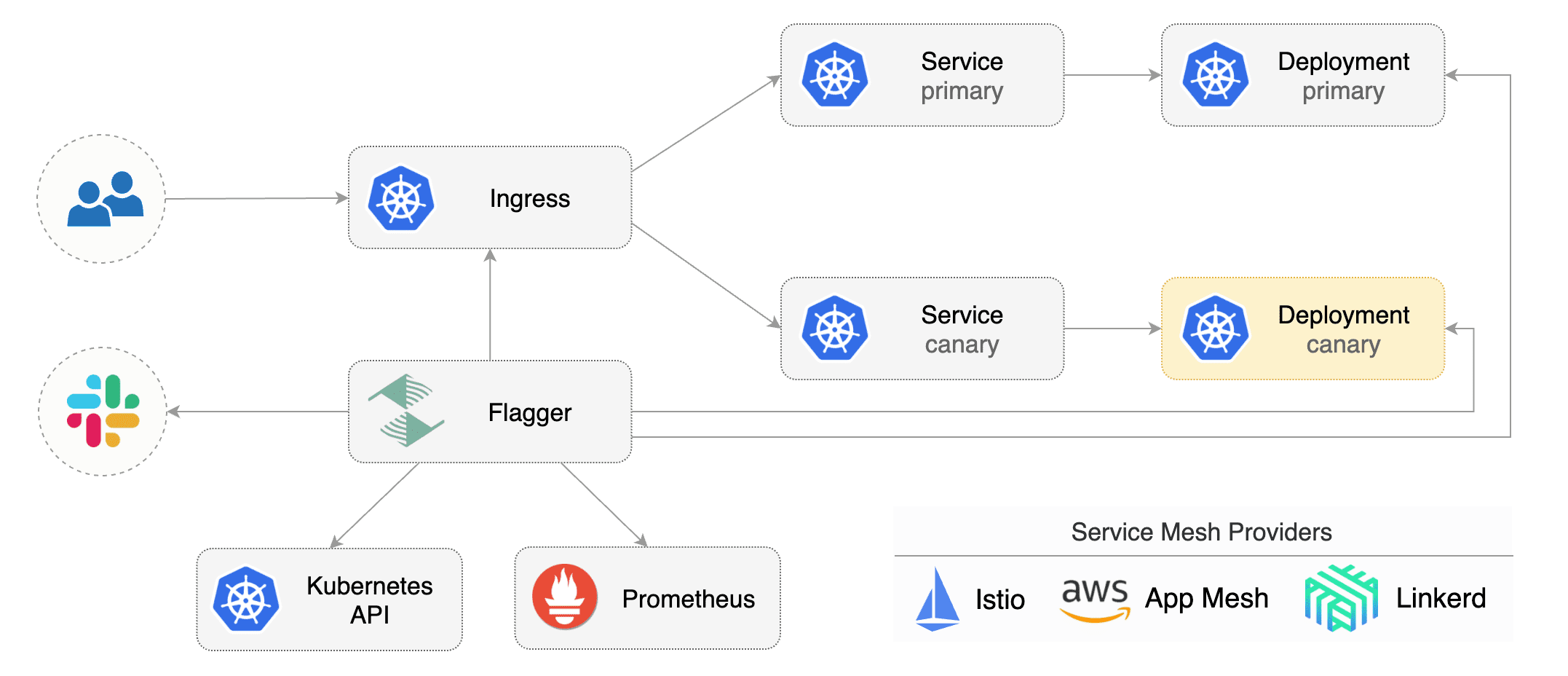
[Flagger](https://github.com/weaveworks/flagger) is a **Kubernetes** operator that automates the promotion of
|
|
canary deployments using **Istio**, **Linkerd**, **App Mesh**, **NGINX**, **Contour** or **Gloo** routing for
|
|
traffic shifting and **Prometheus** metrics for canary analysis. The canary analysis can be extended with webhooks for
|
|
running system integration/acceptance tests, load tests, or any other custom validation.
|
|
|
|
Flagger implements a control loop that gradually shifts traffic to the canary while measuring key performance indicators
|
|
like HTTP requests success rate, requests average duration and pods health.
|
|
Based on analysis of the **KPIs** a canary is promoted or aborted, and the analysis result is published to **Slack** or **MS Teams**.
|
|
|
|
|
|
|
|
Flagger can be configured with Kubernetes custom resources and is compatible with any CI/CD solutions made for Kubernetes.
|
|
Since Flagger is declarative and reacts to Kubernetes events,
|
|
it can be used in **GitOps** pipelines together with Flux CD or JenkinsX.
|
|
|
|
To get started with Flagger, chose one of the supported routing providers
|
|
and [install](../install/flagger-install-on-kubernetes) Flagger with Helm or Kustomize.
|
|
|
|
After install Flagger, you can follow one of the tutorials:
|
|
|
|
**Service mesh tutorials**
|
|
|
|
* [Istio](../tutorials/istio-progressive-delivery)
|
|
* [Linkerd](../tutorials/linkerd-progressive-delivery)
|
|
* [AWS App Mesh](../tutorials/appmesh-progressive-delivery)
|
|
|
|
**Ingress controller tutorials**
|
|
|
|
* [Contour](../tutorials/contour-progressive-delivery)
|
|
* [Gloo](../tutorials/gloo-progressive-delivery)
|
|
* [NGINX Ingress](../tutorials/nginx-progressive-delivery)
|
|
|
|
**Hands-on GitOps workshops**
|
|
|
|
* [Istio](https://github.com/stefanprodan/gitops-istio)
|
|
* [Linkerd](https://helm.workshop.flagger.dev)
|
|
* [AWS App Mesh](https://eks.hands-on.flagger.dev)
|