mirror of
https://github.com/webinstall/webi-installers.git
synced 2026-05-16 05:36:44 +00:00

124 lines
2.2 KiB
Markdown
124 lines
2.2 KiB
Markdown
---
|
|
title: LSDeluxe
|
|
homepage: https://github.com/lsd-rs/lsd
|
|
tagline: |
|
|
LSDeluxe: next gen ls command
|
|
---
|
|
|
|
To update or switch versions, run `webi lsd@stable` (or `@v0.20`, `@beta`, etc).
|
|
|
|
### Files
|
|
|
|
```text
|
|
~/.config/envman/PATH.env
|
|
~/.config/lsd/config.yaml
|
|
~/.local/bin/lsd
|
|
```
|
|
|
|
## Cheat Sheet
|
|
|
|
|
|
|
|
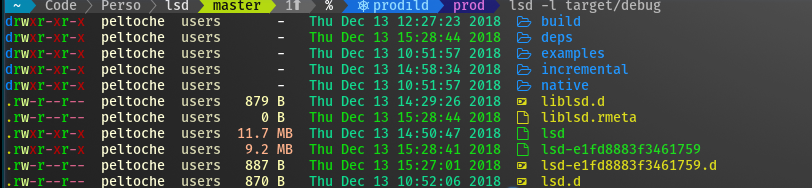
> `lsd` is a modern, cross-platform, drop-in replacement for `ls`. It does
|
|
> everything that you expect it to, plus modern extras that you can check out
|
|
> with `lsd --help`.
|
|
|
|
Note: You must install [the nerdfont](https://webinstall.dev/nerdfont) and
|
|
update the font in your Terminal for `lsd` to show icons.
|
|
|
|
Run `lsd` exactly as you would `ls`:
|
|
|
|
```sh
|
|
lsd
|
|
```
|
|
|
|
But wait, there's more, you can `tree` as well:
|
|
|
|
```sh
|
|
lsd --tree
|
|
```
|
|
|
|
### How to turn off icons and colors
|
|
|
|
If you just want the benefits of a cross-platform `ls` without having to install
|
|
nerdfont or needing a modern terminal, you've got options:
|
|
|
|
```sh
|
|
lsd --icon=never --color=never
|
|
```
|
|
|
|
Since that can be a little awkward to type over and over, you can use an alias:
|
|
|
|
```sh
|
|
alias lsd=lsd --icon=never --color=never
|
|
lsd
|
|
```
|
|
|
|
(you may also enjoy [`aliasman`](../aliasman/))
|
|
|
|
Or update the config file:
|
|
|
|
`~/.config/lsd/config.yaml`
|
|
|
|
```yaml
|
|
classic: true
|
|
```
|
|
|
|
### How to alias as `ls`, `ll`, `la`, etc
|
|
|
|
This will affect the interactive shell, but not scripts.
|
|
|
|
Using [aliasman](/aliasman):
|
|
|
|
```sh
|
|
aliasman ls "lsd -F"
|
|
aliasman la "lsd -AF"
|
|
aliasman ll "lsd -lAF"
|
|
aliasman lg "lsd -F --group-dirs=first"
|
|
```
|
|
|
|
(and follow the on-screen instructions or restart your shell)
|
|
|
|
Or manually update your `.bashrc`, `.zshrc`, or `.profile`
|
|
|
|
```sh
|
|
alias ls="lsd -F"
|
|
alias la="lsd -AF"
|
|
alias ll="lsd -lAF"
|
|
alias lg="lsd -F --group-dirs=first"
|
|
```
|
|
|
|
For situations in which you must use `ls` exactly, remember that you can escape
|
|
the alias:
|
|
|
|
```sh
|
|
\ls -lAF
|
|
```
|
|
|
|
### How to alias as `tree`
|
|
|
|
Using [aliasman](/aliasman):
|
|
|
|
```sh
|
|
aliasman tree "lsd -AF --tree"
|
|
alias tree="lsd -AF --tree"
|
|
```
|
|
|
|
Or manually update your `.bashrc`, `.zshrc`, or `.profile`
|
|
|
|
```sh
|
|
alias tree="lsd -AF --tree"
|
|
```
|
|
|
|
And when you want to use GNU `tree` you can escape the alias in some shells:
|
|
|
|
```sh
|
|
\tree
|
|
```
|
|
|
|
Or use the full path:
|
|
|
|
```sh
|
|
/bin/tree
|
|
```
|