mirror of
https://github.com/webinstall/webi-installers.git
synced 2026-02-14 17:49:53 +00:00

101 lines
4.0 KiB
Markdown
101 lines
4.0 KiB
Markdown
---
|
|
title: vim-nerdtree
|
|
homepage: https://github.com/preservim/nerdtree
|
|
tagline: |
|
|
NERDTree: A tree explorer plugin for vim.
|
|
---
|
|
|
|
To update (replacing the current version) run `webi vim-nerdtree`.
|
|
|
|
### Files
|
|
|
|
These are the files / directories that are created and/or modified with this
|
|
install:
|
|
|
|
```text
|
|
~/.vim/pack/plugins/start/nerdtree.vim/
|
|
~/.vim/plugins/nerdtree.vim
|
|
~/.vimrc
|
|
```
|
|
|
|
## Cheat Sheet
|
|
|
|
|
|
|
|
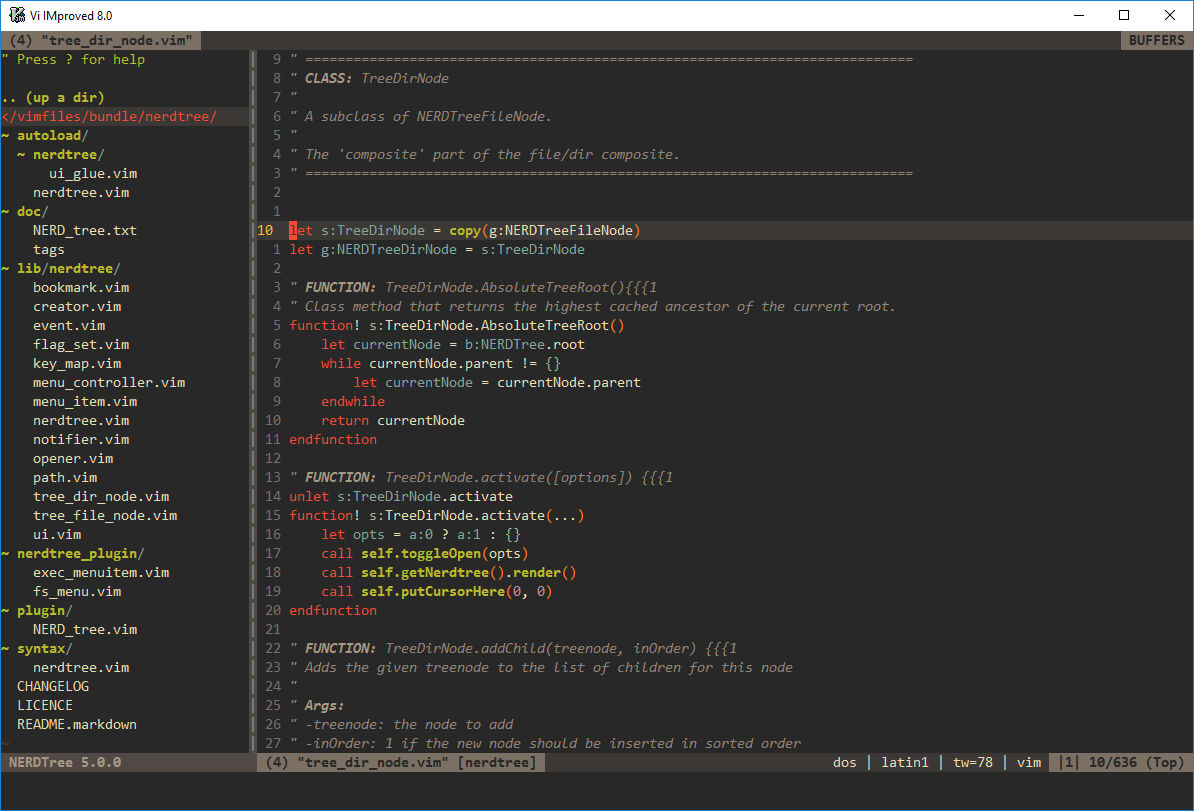
> The NERDTree is a file system explorer for the Vim editor. Using this plugin,
|
|
> users can visually browse complex directory hierarchies, quickly open files
|
|
> for reading or editing, and perform basic file system operations.
|
|
|
|
This installer also includes a few reasonable defaults from the project's
|
|
README:
|
|
|
|
| Key | Action |
|
|
| ---------------------------- | -------------------------------------------------------------------- |
|
|
| **Global Key Bindings** | |
|
|
| `<Leader>n` | Move cursor to NERDTree |
|
|
| `<ctrl>+t`<br>or `<Leader>`t | Toggle NERDTree window on/off |
|
|
| `<ctrl>+f`<br>or `<Leader>`f | Move to current file in NERDTree |
|
|
| **NERDTree Window Bindings** | |
|
|
| `o` | Open a directory to reveal children |
|
|
| `x` | Close directory and go to parent |
|
|
| `shift+o` | Open directory and all children dirs, recursively |
|
|
| `shift+x` | Close all child directories, recursively |
|
|
| `p` | Go to **p**arent directory |
|
|
| `gt` | Go to next Tab (`gT` for previous, naturally) |
|
|
| `/` | Search matches of visible files <br>(use `shift+o` first to see all) |
|
|
| **Normal Vim Stuff** | |
|
|
| `ctrl+w`, w | Rotate between open windows |
|
|
| `:e **/api.js<tab>` | Open and edit file matching api.js, in any subfolder |
|
|
|
|
(if you've installed [`vim-leader`](../vim-leader) then `<Leader>` is Space)
|
|
|
|
### How to install and configure manually
|
|
|
|
Place NerdTree into your `~/.vim/pack/plugins/start`:
|
|
|
|
```sh
|
|
mkdir -p ~/.vim/pack/plugins/start/
|
|
git clone --depth=1 https://github.com/preservim/nerdtree.git ~/.vim/pack/plugins/start/nerdtree
|
|
```
|
|
|
|
Create the file `~/.vim/plugins/nerdtree.vim`. Add the same contents as
|
|
<https://github.com/webinstall/webi-installers/blob/master/vim-nerdtree/nerdtree.vim>.
|
|
|
|
That will look something like this:
|
|
|
|
`~/.vim/plugins/nerdtree.vim`:
|
|
|
|
```vim
|
|
" default mappings for nerdtree
|
|
nnoremap <leader>n :NERDTreeFocus<CR>
|
|
nnoremap <C-n> :NERDTree<CR>
|
|
nnoremap <C-t> :NERDTreeToggle<CR>
|
|
nnoremap <C-f> :NERDTreeFind<CR>
|
|
|
|
" also map with Leader, since ctrl is hard to reach on Mac
|
|
nnoremap <leader>t :NERDTreeToggle<CR>
|
|
nnoremap <leader>f :NERDTreeFind<CR>
|
|
|
|
" show hidden files
|
|
let NERDTreeShowHidden=1
|
|
|
|
" keep ignoring .git, node_modules, vendor, and dist
|
|
let NERDTreeIgnore=["\.git", "node_modules", "vendor", "dist"]
|
|
|
|
" Start NERDTree when Vim is started without file arguments.
|
|
autocmd StdinReadPre * let s:std_in=1
|
|
autocmd VimEnter * if argc() == 0 && !exists('s:std_in') | NERDTree | endif
|
|
|
|
" Exit Vim if NERDTree is the only window left.
|
|
autocmd BufEnter * if tabpagenr('$') == 1 && winnr('$') == 1 && exists('b:NERDTree') && b:NERDTree.isTabTree() |
|
|
\ quit | endif
|
|
|
|
```
|
|
|
|
You'll then need to update `~/.vimrc` to source that plugin:
|
|
|
|
```vim
|
|
" nerdtree: reasonable defaults from webinstall.dev/vim-nerdtree
|
|
source ~/.vim/plugins/nerdtree.vim
|
|
```
|