mirror of
https://github.com/owntracks/frontend.git
synced 2026-05-05 03:06:32 +00:00

160 lines
5.1 KiB
Markdown
160 lines
5.1 KiB
Markdown
# OwnTracks UI
|
|
|
|

|
|
[](https://hub.docker.com/r/owntracks/frontend)
|
|
[](https://travis-ci.org/owntracks/frontend)
|
|
[](https://github.com/owntracks/frontend/blob/master/LICENSE)
|
|
|
|

|
|
|
|
## Introduction
|
|
|
|
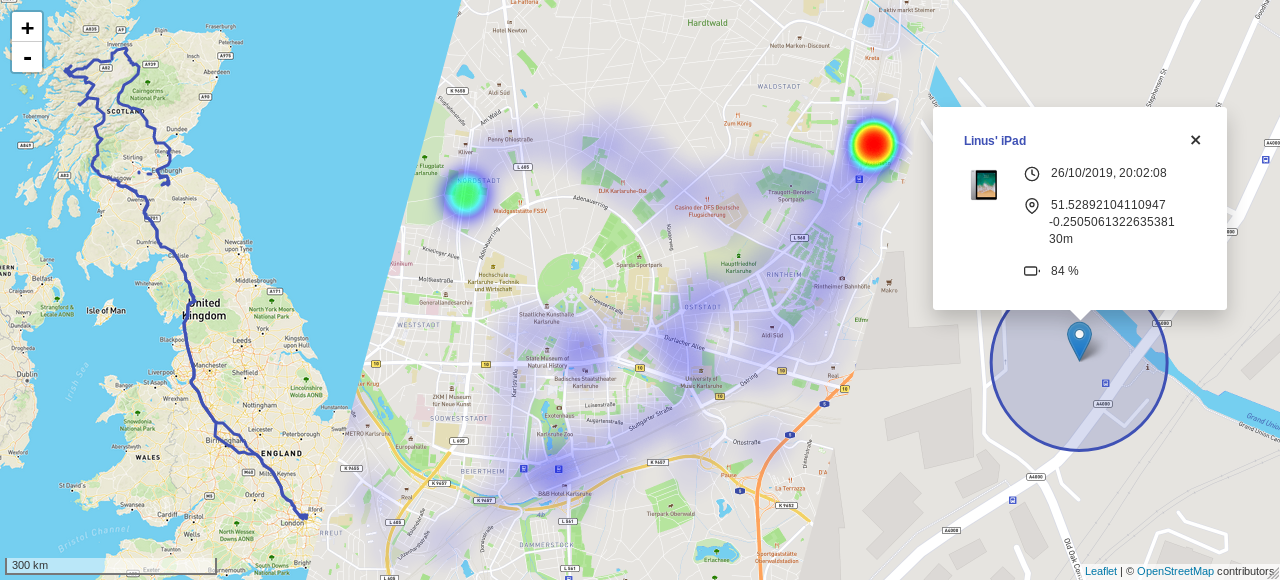
This is a web interface for [OwnTracks](https://github.com/owntracks/recorder) built as
|
|
a Vue.js single page application. The recorder itself already ships with some basic web
|
|
pages, this is a more advanced interface with more functionality, all in one place.
|
|
|
|
|
|
|
|
## Features
|
|
|
|
- Last known (i.e. live) locations:
|
|
- Accuracy visualization (circle)
|
|
- Device friendly name and icon
|
|
- Detailed information (if available): time, latitude, longitude, height, battery and
|
|
speed
|
|
- Location history (data points, line or both)
|
|
- Location heatmap
|
|
- Quickly fit all shown objects on the map into view
|
|
- Display data in a specific date range
|
|
- Filter by user and device
|
|
- Download selected location data as JSON
|
|
- Highly customisable
|
|
|
|
## Installation
|
|
|
|
### Docker
|
|
|
|
A pre-built Docker image is available on Docker Hub as [`owntracks/frontend`](https://hub.docker.com/r/owntracks/frontend).
|
|
|
|
You can start a container directly via `docker run`:
|
|
|
|
```console
|
|
$ docker run -d -p 80:80 -e SERVER_HOST=otrecorder-host -e SERVER_PORT=8083 owntracks/frontend
|
|
```
|
|
|
|
Or you can use `docker-compose` (if you also run the OwnTracks Recorder with the default
|
|
compose config, and the service is named `otrecorder`):
|
|
|
|
```yaml
|
|
version: '3'
|
|
|
|
services:
|
|
owntracks-ui:
|
|
image: owntracks/frontend
|
|
ports:
|
|
- 80:80
|
|
volumes:
|
|
- ./path/to/custom/config.js:/usr/share/nginx/html/config/config.js
|
|
environment:
|
|
- SERVER_HOST=otrecorder
|
|
- SERVER_PORT=8083
|
|
restart: unless-stopped
|
|
```
|
|
|
|
To change the port on which the nginx server will listen on, set the
|
|
`LISTEN_PORT` enviroment variable - default is 80.
|
|
|
|
To build the image from source replace `image:` with:
|
|
|
|
```yaml
|
|
build:
|
|
context: ./owntracks-frontend
|
|
dockerfile: docker/Dockerfile
|
|
```
|
|
|
|
(assuming you have this repository cloned to `owntracks-frontend` in the same
|
|
directory as `docker-compose.yml`)
|
|
|
|
### Manually
|
|
|
|
- Run `yarn install --production` to install dependencies
|
|
- Run `yarn build` to compile and minify for production
|
|
- Copy the content of the `dist/` directory to your webroot
|
|
|
|
## Configuration
|
|
|
|
It's possible to get started without any configuration change whatsoever, assuming your
|
|
OwnTracks API is reachable at the root of the same host as the frontend.
|
|
|
|
Copy [`public/config/config.example.js`](public/config/config.example.js) to
|
|
`public/config/config.js` and make changes as you wish.
|
|
|
|
See [`docs/config.md`](docs/config.md) for all available options.
|
|
|
|
## Development
|
|
|
|
- Run `yarn install` to install dependencies
|
|
- Run `yarn serve` to compile for development and start the hot-reload server
|
|
- Run `yarn lint` to lint and fix files
|
|
- Run `yarn test` to run unit tests
|
|
|
|
### CORS-Proxy
|
|
|
|
You can use the [`corsProxy.js`](scripts/corsProxy.js) script to use your production
|
|
instance of OwnTracks for development without making changes to its CORS-Headers:
|
|
|
|
```console
|
|
$ yarn cors-proxy
|
|
```
|
|
If you have [basic authentication](https://developer.mozilla.org/en-US/docs/Web/HTTP/Authentication#Basic_authentication_scheme)
|
|
enabled, create a `.env` file with your credentials:
|
|
|
|
```text
|
|
OT_BASIC_AUTH_USERNAME=user
|
|
OT_BASIC_AUTH_PASSWORD='P@$$w0rd'
|
|
```
|
|
|
|
Then run:
|
|
|
|
```console
|
|
$ env $(cat .env | xargs) yarn cors-proxy
|
|
```
|
|
|
|
The default host and port it binds to is `0.0.0.0:8888`. Change using the `OT_PROXY_HOST`
|
|
and `OT_PROXY_PORT` environment variables.
|
|
|
|
Finally update `api.baseUrl` in your config to `"http://0.0.0.0:8888/https://owntracks.example.com"`.
|
|
|
|
### I18n
|
|
|
|
This project uses [Vue I18n](https://kazupon.github.io/vue-i18n/). To see missing and
|
|
unused i18n entries, run:
|
|
|
|
```console
|
|
$ yarn i18n:report
|
|
```
|
|
|
|
To add a new locale, copy `en.json` to `<locale>.json` in [`src/locales`](src/locales)
|
|
and start translating the individual strings. Make sure to [mention the new locale to the docs](docs/config.md#locale)!
|
|
|
|
For a specific example see commit [`b2edda4`](https://github.com/owntracks/frontend/commit/b2edda410f16633aa6fd9cd4e5250f2031536c7d)
|
|
where German translations were added.
|
|
|
|
## Screenshots
|
|
|
|
<p align="center">
|
|
<img src="https://raw.githubusercontent.com/owntracks/frontend/master/docs/images/loading.gif" alt="Loading...">
|
|
<br>
|
|
<br>
|
|
<img src="https://raw.githubusercontent.com/owntracks/frontend/master/docs/images/downloader.png" alt="Download location data">
|
|
<br>
|
|
<br>
|
|
<img src="https://raw.githubusercontent.com/owntracks/frontend/master/docs/images/info.png" alt="Info">
|
|
</p>
|
|
|
|
|
|
## Contributing
|
|
|
|
Please feel free to open an issue and discuss your ideas and report bugs. If you think
|
|
you can help out with something, open a PR!
|