mirror of
https://github.com/fluxcd/flagger.git
synced 2026-04-15 06:57:34 +00:00

371 lines
10 KiB
Markdown
371 lines
10 KiB
Markdown
# Skipper Canary Deployments
|
|
|
|
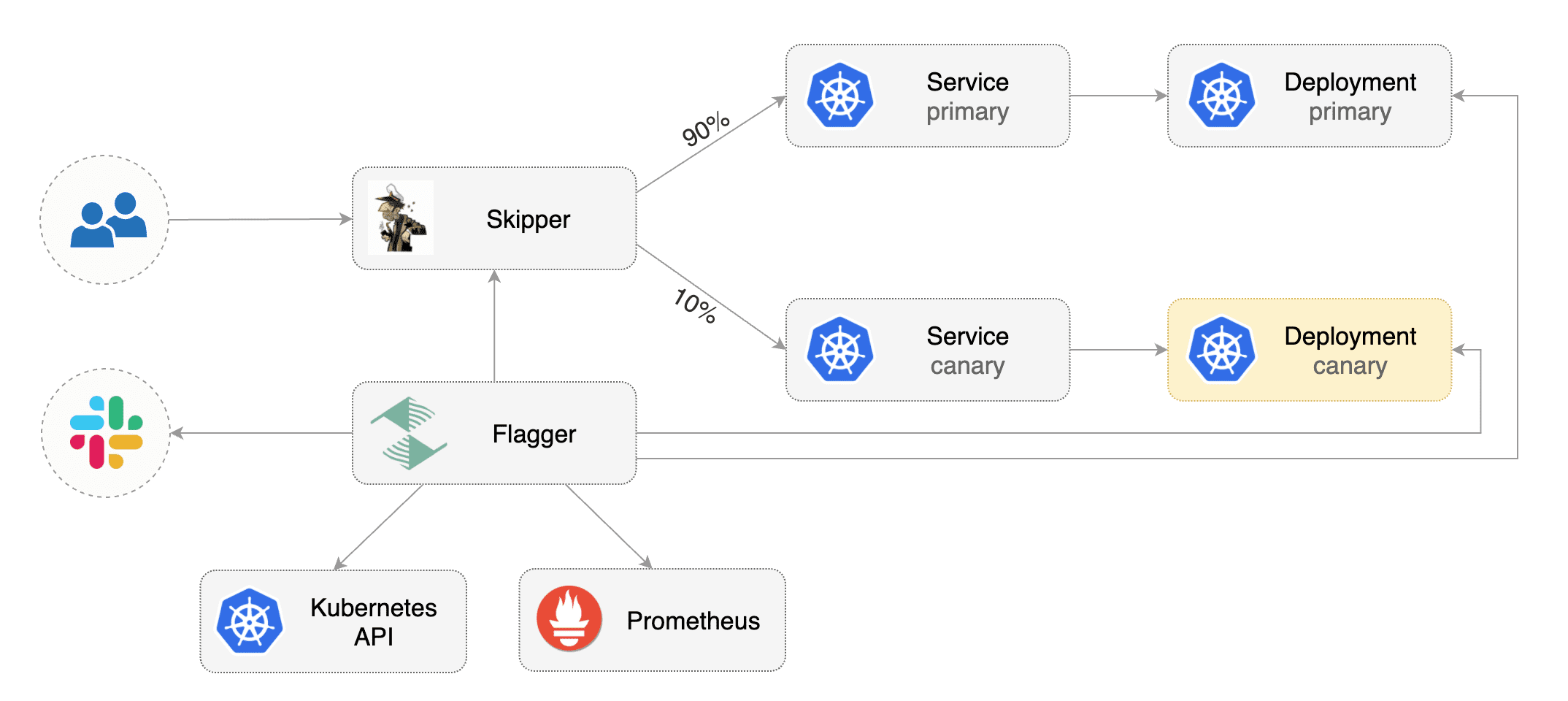
This guide shows you how to use the [Skipper ingress controller](https://opensource.zalando.com/skipper/kubernetes/ingress-controller/) and Flagger to automate canary deployments.
|
|
|
|
|
|
|
|
## Prerequisites
|
|
|
|
Flagger requires a Kubernetes cluster **v1.16** or newer and Skipper ingress **0.11.40** or newer.
|
|
|
|
Install Skipper ingress-controller using [upstream definition](https://opensource.zalando.com/skipper/kubernetes/ingress-controller/#install-skipper-as-ingress-controller).
|
|
|
|
Certain arguments are relevant:
|
|
|
|
```yaml
|
|
- -enable-connection-metrics
|
|
- -histogram-metric-buckets=.01,1,10,100
|
|
- -kubernetes
|
|
- -kubernetes-in-cluster
|
|
- -kubernetes-path-mode=path-prefix
|
|
- -metrics-exp-decay-sample
|
|
- -metrics-flavour=prometheus
|
|
- -route-backend-metrics
|
|
- -route-backend-error-counters
|
|
- -route-response-metrics
|
|
- -serve-host-metrics
|
|
- -serve-route-metrics
|
|
- -whitelisted-healthcheck-cidr=0.0.0.0/0 # permit Kind source health checks
|
|
```
|
|
|
|
Install Flagger using kustomize:
|
|
|
|
```bash
|
|
kustomize build https://github.com/fluxcd/flagger/kustomize/kubernetes | kubectl apply -f -
|
|
```
|
|
|
|
## Bootstrap
|
|
|
|
Flagger takes a Kubernetes deployment and optionally a horizontal pod autoscaler \(HPA\), then creates a series of objects \(Kubernetes deployments, ClusterIP services and canary ingress\). These objects expose the application outside the cluster and drive the canary analysis and promotion.
|
|
|
|
Create a test namespace:
|
|
|
|
```bash
|
|
kubectl create ns test
|
|
```
|
|
|
|
Create a deployment and a horizontal pod autoscaler:
|
|
|
|
```bash
|
|
kubectl apply -k https://github.com/fluxcd/flagger//kustomize/podinfo?ref=main
|
|
```
|
|
|
|
Deploy the load testing service to generate traffic during the canary analysis:
|
|
|
|
```bash
|
|
helm upgrade -i flagger-loadtester flagger/loadtester \
|
|
--namespace=test
|
|
```
|
|
|
|
Create an ingress definition \(replace `app.example.com` with your own domain\):
|
|
|
|
```yaml
|
|
apiVersion: networking.k8s.io/v1beta1
|
|
kind: Ingress
|
|
metadata:
|
|
name: podinfo
|
|
namespace: test
|
|
labels:
|
|
app: podinfo
|
|
annotations:
|
|
kubernetes.io/ingress.class: "skipper"
|
|
spec:
|
|
rules:
|
|
- host: app.example.com
|
|
http:
|
|
paths:
|
|
- backend:
|
|
serviceName: podinfo
|
|
servicePort: 80
|
|
```
|
|
|
|
Save the above resource as podinfo-ingress.yaml and then apply it:
|
|
|
|
```bash
|
|
kubectl apply -f ./podinfo-ingress.yaml
|
|
```
|
|
|
|
Create a canary custom resource \(replace `app.example.com` with your own domain\):
|
|
|
|
```yaml
|
|
apiVersion: flagger.app/v1beta1
|
|
kind: Canary
|
|
metadata:
|
|
name: podinfo
|
|
namespace: test
|
|
spec:
|
|
provider: skipper
|
|
# deployment reference
|
|
targetRef:
|
|
apiVersion: apps/v1
|
|
kind: Deployment
|
|
name: podinfo
|
|
# ingress reference
|
|
ingressRef:
|
|
apiVersion: networking.k8s.io/v1beta1
|
|
kind: Ingress
|
|
name: podinfo
|
|
# HPA reference (optional)
|
|
autoscalerRef:
|
|
apiVersion: autoscaling/v2beta2
|
|
kind: HorizontalPodAutoscaler
|
|
name: podinfo
|
|
# the maximum time in seconds for the canary deployment
|
|
# to make progress before it is rollback (default 600s)
|
|
progressDeadlineSeconds: 60
|
|
service:
|
|
# ClusterIP port number
|
|
port: 80
|
|
# container port number or name
|
|
targetPort: 9898
|
|
analysis:
|
|
# schedule interval (default 60s)
|
|
interval: 10s
|
|
# max number of failed metric checks before rollback
|
|
threshold: 10
|
|
# max traffic percentage routed to canary
|
|
# percentage (0-100)
|
|
maxWeight: 50
|
|
# canary increment step
|
|
# percentage (0-100)
|
|
stepWeight: 5
|
|
# Skipper Prometheus checks
|
|
metrics:
|
|
- name: request-success-rate
|
|
interval: 1m
|
|
# minimum req success rate (non 5xx responses)
|
|
# percentage (0-100)
|
|
thresholdRange:
|
|
min: 99
|
|
- name: request-duration
|
|
interval: 1m
|
|
# maximum req duration P99
|
|
# milliseconds
|
|
thresholdRange:
|
|
max: 500
|
|
webhooks:
|
|
- name: gate
|
|
type: confirm-rollout
|
|
url: http://flagger-loadtester.test/gate/approve
|
|
- name: acceptance-test
|
|
type: pre-rollout
|
|
url: http://flagger-loadtester.test/
|
|
timeout: 10s
|
|
metadata:
|
|
type: bash
|
|
cmd: "curl -sd 'test' http://podinfo-canary/token | grep token"
|
|
- name: load-test
|
|
type: rollout
|
|
url: http://flagger-loadtester.test/
|
|
timeout: 5s
|
|
metadata:
|
|
type: cmd
|
|
cmd: "hey -z 10m -q 10 -c 2 -host app.example.com http://skipper-ingress.kube-system"
|
|
logCmdOutput: "true"
|
|
```
|
|
|
|
Save the above resource as podinfo-canary.yaml and then apply it:
|
|
|
|
```bash
|
|
kubectl apply -f ./podinfo-canary.yaml
|
|
```
|
|
|
|
After a couple of seconds Flagger will create the canary objects:
|
|
|
|
```bash
|
|
# applied
|
|
deployment.apps/podinfo
|
|
horizontalpodautoscaler.autoscaling/podinfo
|
|
ingress.networking.k8s.io/podinfo-ingress
|
|
canary.flagger.app/podinfo
|
|
|
|
# generated
|
|
deployment.apps/podinfo-primary
|
|
horizontalpodautoscaler.autoscaling/podinfo-primary
|
|
service/podinfo
|
|
service/podinfo-canary
|
|
service/podinfo-primary
|
|
ingress.networking.k8s.io/podinfo-canary
|
|
```
|
|
|
|
## Automated canary promotion
|
|
|
|
Flagger implements a control loop that gradually shifts traffic to the canary while measuring key performance indicators like HTTP requests success rate, requests average duration and pod health. Based on analysis of the KPIs a canary is promoted or aborted, and the analysis result is published to Slack or MS Teams.
|
|
|
|

|
|
|
|
Trigger a canary deployment by updating the container image:
|
|
|
|
```bash
|
|
kubectl -n test set image deployment/podinfo \
|
|
podinfod=stefanprodan/podinfo:4.0.6
|
|
```
|
|
|
|
Flagger detects that the deployment revision changed and starts a new rollout:
|
|
|
|
```text
|
|
kubectl -n test describe canary/podinfo
|
|
|
|
Status:
|
|
Canary Weight: 0
|
|
Failed Checks: 0
|
|
Phase: Succeeded
|
|
Events:
|
|
New revision detected! Scaling up podinfo.test
|
|
Waiting for podinfo.test rollout to finish: 0 of 1 updated replicas are available
|
|
Pre-rollout check acceptance-test passed
|
|
Advance podinfo.test canary weight 5
|
|
Advance podinfo.test canary weight 10
|
|
Advance podinfo.test canary weight 15
|
|
Advance podinfo.test canary weight 20
|
|
Advance podinfo.test canary weight 25
|
|
Advance podinfo.test canary weight 30
|
|
Advance podinfo.test canary weight 35
|
|
Advance podinfo.test canary weight 40
|
|
Advance podinfo.test canary weight 45
|
|
Advance podinfo.test canary weight 50
|
|
Copying podinfo.test template spec to podinfo-primary.test
|
|
Waiting for podinfo-primary.test rollout to finish: 1 of 2 updated replicas are available
|
|
Routing all traffic to primary
|
|
Promotion completed! Scaling down podinfo.test
|
|
```
|
|
|
|
**Note** that if you apply new changes to the deployment during the canary analysis, Flagger will restart the analysis.
|
|
|
|
You can monitor all canaries with:
|
|
|
|
```bash
|
|
watch kubectl get canaries --all-namespaces
|
|
|
|
NAMESPACE NAME STATUS WEIGHT LASTTRANSITIONTIME
|
|
test podinfo-2 Progressing 30 2020-08-14T12:32:12Z
|
|
test podinfo Succeeded 0 2020-08-14T11:23:88Z
|
|
```
|
|
|
|
## Automated rollback
|
|
|
|
During the canary analysis you can generate HTTP 500 errors to test if Flagger pauses and rolls back the faulted version.
|
|
|
|
Trigger another canary deployment:
|
|
|
|
```bash
|
|
kubectl -n test set image deployment/podinfo \
|
|
podinfod=stefanprodan/podinfo:4.0.6
|
|
```
|
|
|
|
Exec into the load tester pod with:
|
|
|
|
```bash
|
|
kubectl -n test exec -it deploy/flagger-loadtester bash
|
|
```
|
|
|
|
Generate HTTP 500 errors:
|
|
|
|
```bash
|
|
hey -z 1m -c 5 -q 5 http://app.example.com/status/500
|
|
```
|
|
|
|
Generate latency:
|
|
|
|
```bash
|
|
watch -n 1 curl http://app.example.com/delay/1
|
|
```
|
|
|
|
When the number of failed checks reaches the canary analysis threshold, the traffic is routed back to the primary, the canary is scaled to zero and the rollout is marked as failed.
|
|
|
|
```text
|
|
kubectl -n flagger-system logs deploy/flagger -f | jq .msg
|
|
|
|
New revision detected! Scaling up podinfo.test
|
|
Canary deployment podinfo.test not ready: waiting for rollout to finish: 0 of 1 updated replicas are available
|
|
Starting canary analysis for podinfo.test
|
|
Pre-rollout check acceptance-test passed
|
|
Advance podinfo.test canary weight 5
|
|
Advance podinfo.test canary weight 10
|
|
Advance podinfo.test canary weight 15
|
|
Advance podinfo.test canary weight 20
|
|
Halt podinfo.test advancement success rate 53.42% < 99%
|
|
Halt podinfo.test advancement success rate 53.19% < 99%
|
|
Halt podinfo.test advancement success rate 48.05% < 99%
|
|
Rolling back podinfo.test failed checks threshold reached 3
|
|
Canary failed! Scaling down podinfo.test
|
|
```
|
|
|
|
## Custom metrics
|
|
|
|
The canary analysis can be extended with Prometheus queries.
|
|
|
|
Create a metric template and apply it on the cluster:
|
|
|
|
```yaml
|
|
apiVersion: flagger.app/v1beta1
|
|
kind: MetricTemplate
|
|
metadata:
|
|
name: latency
|
|
namespace: test
|
|
spec:
|
|
provider:
|
|
type: prometheus
|
|
address: http://flagger-prometheus.flagger-system:9090
|
|
query: |
|
|
histogram_quantile(0.99,
|
|
sum(
|
|
rate(
|
|
skipper_serve_route_duration_seconds_bucket{
|
|
route=~"{{ printf "kube(ew)?_%s__%s_canary__.*__%s_canary(_[0-9]+)?" namespace ingress service }}",
|
|
le="+Inf"
|
|
}[1m]
|
|
)
|
|
) by (le)
|
|
)
|
|
```
|
|
|
|
Edit the canary analysis and add the latency check:
|
|
|
|
```yaml
|
|
analysis:
|
|
metrics:
|
|
- name: "latency"
|
|
templateRef:
|
|
name: latency
|
|
thresholdRange:
|
|
max: 0.5
|
|
interval: 1m
|
|
```
|
|
|
|
The threshold is set to 500ms so if the average request duration in the last minute goes over half a second then the analysis will fail and the canary will not be promoted.
|
|
|
|
Trigger a canary deployment by updating the container image:
|
|
|
|
```bash
|
|
kubectl -n test set image deployment/podinfo \
|
|
podinfod=stefanprodan/podinfo:4.0.6
|
|
```
|
|
|
|
Generate high response latency:
|
|
|
|
```bash
|
|
watch curl http://app.example.com/delay/2
|
|
```
|
|
|
|
Watch Flagger logs:
|
|
|
|
```text
|
|
kubectl -n flagger-system logs deployment/flagger -f | jq .msg
|
|
|
|
Starting canary deployment for podinfo.test
|
|
Advance podinfo.test canary weight 5
|
|
Advance podinfo.test canary weight 10
|
|
Advance podinfo.test canary weight 15
|
|
Halt podinfo.test advancement latency 1.20 > 0.5
|
|
Halt podinfo.test advancement latency 1.45 > 0.5
|
|
Halt podinfo.test advancement latency 1.60 > 0.5
|
|
Halt podinfo.test advancement latency 1.69 > 0.5
|
|
Halt podinfo.test advancement latency 1.70 > 0.5
|
|
Rolling back podinfo.test failed checks threshold reached 5
|
|
Canary failed! Scaling down podinfo.test
|
|
```
|
|
|
|
If you have alerting configured, Flagger will send a notification with the reason why the canary failed.
|
|
|