mirror of
https://github.com/fluxcd/flagger.git
synced 2026-04-15 06:57:34 +00:00

875 lines
27 KiB
Markdown
875 lines
27 KiB
Markdown
# How it works
|
|
|
|
[Flagger](https://github.com/weaveworks/flagger) takes a Kubernetes deployment and optionally
|
|
a horizontal pod autoscaler \(HPA\) and creates a series of objects
|
|
\(Kubernetes deployments, ClusterIP services, virtual service, traffic split or ingress\) to drive the canary analysis and promotion.
|
|
|
|
### Canary Custom Resource
|
|
|
|
For a deployment named _podinfo_, a canary promotion can be defined using Flagger's custom resource:
|
|
|
|
```yaml
|
|
apiVersion: flagger.app/v1alpha3
|
|
kind: Canary
|
|
metadata:
|
|
name: podinfo
|
|
namespace: test
|
|
spec:
|
|
# service mesh provider (optional)
|
|
# can be: kubernetes, istio, linkerd, appmesh, nginx, gloo, supergloo
|
|
provider: linkerd
|
|
# deployment reference
|
|
targetRef:
|
|
apiVersion: apps/v1
|
|
kind: Deployment
|
|
name: podinfo
|
|
# the maximum time in seconds for the canary deployment
|
|
# to make progress before it is rollback (default 600s)
|
|
progressDeadlineSeconds: 60
|
|
# HPA reference (optional)
|
|
autoscalerRef:
|
|
apiVersion: autoscaling/v2beta1
|
|
kind: HorizontalPodAutoscaler
|
|
name: podinfo
|
|
service:
|
|
# ClusterIP port number
|
|
port: 9898
|
|
# ClusterIP port name can be http or grpc (default http)
|
|
portName: http
|
|
# container port number or name (optional)
|
|
targetPort: 9898
|
|
# add all the other container ports
|
|
# to the ClusterIP services (default false)
|
|
portDiscovery: false
|
|
# promote the canary without analysing it (default false)
|
|
skipAnalysis: false
|
|
# define the canary analysis timing and KPIs
|
|
canaryAnalysis:
|
|
# schedule interval (default 60s)
|
|
interval: 1m
|
|
# max number of failed metric checks before rollback
|
|
threshold: 10
|
|
# max traffic percentage routed to canary
|
|
# percentage (0-100)
|
|
maxWeight: 50
|
|
# canary increment step
|
|
# percentage (0-100)
|
|
stepWeight: 5
|
|
# Prometheus checks
|
|
metrics:
|
|
- name: request-success-rate
|
|
# minimum req success rate (non 5xx responses)
|
|
# percentage (0-100)
|
|
threshold: 99
|
|
interval: 1m
|
|
- name: request-duration
|
|
# maximum req duration P99
|
|
# milliseconds
|
|
threshold: 500
|
|
interval: 30s
|
|
# testing (optional)
|
|
webhooks:
|
|
- name: load-test
|
|
url: http://flagger-loadtester.test/
|
|
timeout: 5s
|
|
metadata:
|
|
cmd: "hey -z 1m -q 10 -c 2 http://podinfo.test:9898/"
|
|
```
|
|
|
|
**Note** that the target deployment must have a single label selector in the format `app: <DEPLOYMENT-NAME>`:
|
|
|
|
```yaml
|
|
apiVersion: apps/v1
|
|
kind: Deployment
|
|
metadata:
|
|
name: podinfo
|
|
spec:
|
|
selector:
|
|
matchLabels:
|
|
app: podinfo
|
|
template:
|
|
metadata:
|
|
labels:
|
|
app: podinfo
|
|
```
|
|
|
|
Besides `app` Flagger supports `name` and `app.kubernetes.io/name` selectors. If you use a different
|
|
convention you can specify your label with the `-selector-labels` flag.
|
|
|
|
The target deployment should expose a TCP port that will be used by Flagger to create the ClusterIP Services.
|
|
The container port from the target deployment should match the `service.port` or `service.targetPort`.
|
|
|
|
### Canary status
|
|
|
|
Get the current status of canary deployments cluster wide:
|
|
|
|
```bash
|
|
kubectl get canaries --all-namespaces
|
|
|
|
NAMESPACE NAME STATUS WEIGHT LASTTRANSITIONTIME
|
|
test podinfo Progressing 15 2019-06-30T14:05:07Z
|
|
prod frontend Succeeded 0 2019-06-30T16:15:07Z
|
|
prod backend Failed 0 2019-06-30T17:05:07Z
|
|
```
|
|
|
|
The status condition reflects the last know state of the canary analysis:
|
|
|
|
```bash
|
|
kubectl -n test get canary/podinfo -oyaml | awk '/status/,0'
|
|
```
|
|
|
|
A successful rollout status:
|
|
|
|
```yaml
|
|
status:
|
|
canaryWeight: 0
|
|
failedChecks: 0
|
|
iterations: 0
|
|
lastAppliedSpec: "14788816656920327485"
|
|
lastPromotedSpec: "14788816656920327485"
|
|
conditions:
|
|
- lastTransitionTime: "2019-07-10T08:23:18Z"
|
|
lastUpdateTime: "2019-07-10T08:23:18Z"
|
|
message: Canary analysis completed successfully, promotion finished.
|
|
reason: Succeeded
|
|
status: "True"
|
|
type: Promoted
|
|
```
|
|
|
|
The `Promoted` status condition can have one of the following reasons:
|
|
Initialized, Waiting, Progressing, Promoting, Finalising, Succeeded or Failed.
|
|
A failed canary will have the promoted status set to `false`,
|
|
the reason to `failed` and the last applied spec will be different to the last promoted one.
|
|
|
|
Wait for a successful rollout:
|
|
|
|
```bash
|
|
kubectl wait canary/podinfo --for=condition=promoted
|
|
```
|
|
|
|
CI example:
|
|
|
|
```bash
|
|
# update the container image
|
|
kubectl set image deployment/podinfo podinfod=stefanprodan/podinfo:3.0.1
|
|
|
|
# wait for Flagger to detect the change
|
|
ok=false
|
|
until ${ok}; do
|
|
kubectl get canary/podinfo | grep 'Progressing' && ok=true || ok=false
|
|
sleep 5
|
|
done
|
|
|
|
# wait for the canary analysis to finish
|
|
kubectl wait canary/podinfo --for=condition=promoted --timeout=5m
|
|
|
|
# check if the deployment was successful
|
|
kubectl get canary/podinfo | grep Succeeded
|
|
```
|
|
|
|
### Canary Stages
|
|
|
|

|
|
|
|
A canary deployment is triggered by changes in any of the following objects:
|
|
|
|
* Deployment PodSpec (container image, command, ports, env, resources, etc)
|
|
* ConfigMaps mounted as volumes or mapped to environment variables
|
|
* Secrets mounted as volumes or mapped to environment variables
|
|
|
|
Gated canary promotion stages:
|
|
|
|
* scan for canary deployments
|
|
* check primary and canary deployment status
|
|
* halt advancement if a rolling update is underway
|
|
* halt advancement if pods are unhealthy
|
|
* call confirm-rollout webhooks and check results
|
|
* halt advancement if any hook returns a non HTTP 2xx result
|
|
* call pre-rollout webhooks and check results
|
|
* halt advancement if any hook returns a non HTTP 2xx result
|
|
* increment the failed checks counter
|
|
* increase canary traffic weight percentage from 0% to 5% (step weight)
|
|
* call rollout webhooks and check results
|
|
* check canary HTTP request success rate and latency
|
|
* halt advancement if any metric is under the specified threshold
|
|
* increment the failed checks counter
|
|
* check if the number of failed checks reached the threshold
|
|
* route all traffic to primary
|
|
* scale to zero the canary deployment and mark it as failed
|
|
* call post-rollout webhooks
|
|
* post the analysis result to Slack
|
|
* wait for the canary deployment to be updated and start over
|
|
* increase canary traffic weight by 5% (step weight) till it reaches 50% (max weight)
|
|
* halt advancement if any webhook call fails
|
|
* halt advancement while canary request success rate is under the threshold
|
|
* halt advancement while canary request duration P99 is over the threshold
|
|
* halt advancement while any custom metric check fails
|
|
* halt advancement if the primary or canary deployment becomes unhealthy
|
|
* halt advancement while canary deployment is being scaled up/down by HPA
|
|
* call confirm-promotion webhooks and check results
|
|
* halt advancement if any hook returns a non HTTP 2xx result
|
|
* promote canary to primary
|
|
* copy ConfigMaps and Secrets from canary to primary
|
|
* copy canary deployment spec template over primary
|
|
* wait for primary rolling update to finish
|
|
* halt advancement if pods are unhealthy
|
|
* route all traffic to primary
|
|
* scale to zero the canary deployment
|
|
* mark rollout as finished
|
|
* call post-rollout webhooks
|
|
* post the analysis result to Slack or MS Teams
|
|
* wait for the canary deployment to be updated and start over
|
|
|
|
### Canary Analysis
|
|
|
|
The canary analysis runs periodically until it reaches the maximum traffic weight or the failed checks threshold.
|
|
|
|
Spec:
|
|
|
|
```yaml
|
|
canaryAnalysis:
|
|
# schedule interval (default 60s)
|
|
interval: 1m
|
|
# max number of failed metric checks before rollback
|
|
threshold: 10
|
|
# max traffic percentage routed to canary
|
|
# percentage (0-100)
|
|
maxWeight: 50
|
|
# canary increment step
|
|
# percentage (0-100)
|
|
stepWeight: 2
|
|
# deploy straight to production without
|
|
# the metrics and webhook checks
|
|
skipAnalysis: false
|
|
```
|
|
|
|
The above analysis, if it succeeds, will run for 25 minutes while validating the HTTP metrics and webhooks every minute.
|
|
You can determine the minimum time that it takes to validate and promote a canary deployment using this formula:
|
|
|
|
```
|
|
interval * (maxWeight / stepWeight)
|
|
```
|
|
|
|
And the time it takes for a canary to be rollback when the metrics or webhook checks are failing:
|
|
|
|
```
|
|
interval * threshold
|
|
```
|
|
|
|
In emergency cases, you may want to skip the analysis phase and ship changes directly to production.
|
|
At any time you can set the `spec.skipAnalysis: true`.
|
|
When skip analysis is enabled, Flagger checks if the canary deployment is healthy and
|
|
promotes it without analysing it. If an analysis is underway, Flagger cancels it and runs the promotion.
|
|
|
|
### A/B Testing
|
|
|
|
Besides weighted routing, Flagger can be configured to route traffic to the canary based on HTTP match conditions.
|
|
In an A/B testing scenario, you'll be using HTTP headers or cookies to target a certain segment of your users.
|
|
This is particularly useful for frontend applications that require session affinity.
|
|
|
|
You can enable A/B testing by specifying the HTTP match conditions and the number of iterations:
|
|
|
|
```yaml
|
|
canaryAnalysis:
|
|
# schedule interval (default 60s)
|
|
interval: 1m
|
|
# total number of iterations
|
|
iterations: 10
|
|
# max number of failed iterations before rollback
|
|
threshold: 2
|
|
# canary match condition
|
|
match:
|
|
- headers:
|
|
user-agent:
|
|
regex: "^(?!.*Chrome).*Safari.*"
|
|
- headers:
|
|
cookie:
|
|
regex: "^(.*?;)?(user=test)(;.*)?$"
|
|
```
|
|
|
|
If Flagger finds a HTTP match condition, it will ignore the `maxWeight` and `stepWeight` settings.
|
|
|
|
The above configuration will run an analysis for ten minutes targeting the Safari users and those that have a test cookie.
|
|
You can determine the minimum time that it takes to validate and promote a canary deployment using this formula:
|
|
|
|
```
|
|
interval * iterations
|
|
```
|
|
|
|
And the time it takes for a canary to be rollback when the metrics or webhook checks are failing:
|
|
|
|
```
|
|
interval * threshold
|
|
```
|
|
|
|
Make sure that the analysis threshold is lower than the number of iterations.
|
|
|
|
### Blue/Green deployments
|
|
|
|
For applications that are not deployed on a service mesh, Flagger can orchestrate blue/green style deployments
|
|
with Kubernetes L4 networking. When using Istio you have the option to mirror traffic between blue and green.
|
|
|
|
You can use the blue/green deployment strategy by replacing `stepWeight/maxWeight` with `iterations` in the `canaryAnalysis` spec:
|
|
|
|
```yaml
|
|
canaryAnalysis:
|
|
# schedule interval (default 60s)
|
|
interval: 1m
|
|
# total number of iterations
|
|
iterations: 10
|
|
# max number of failed iterations before rollback
|
|
threshold: 2
|
|
# Traffic shadowing (compatible with Istio only)
|
|
mirror: true
|
|
```
|
|
|
|
With the above configuration Flagger will run conformance and load tests on the canary pods for ten minutes.
|
|
If the metrics analysis succeeds, live traffic will be switched from the old version to the new one when the
|
|
canary is promoted.
|
|
|
|
The blue/green deployment strategy is supported for all service mesh providers.
|
|
|
|
Blue/Green rollout steps for service mesh:
|
|
* scale up the canary (green)
|
|
* run conformance tests for the canary pods
|
|
* run load tests and metric checks for the canary pods
|
|
* route traffic to canary
|
|
* promote canary spec over primary (blue)
|
|
* wait for primary rollout
|
|
* route traffic to primary
|
|
* scale down canary
|
|
|
|
After the analysis finishes, the traffic is routed to the canary (green) before triggering the primary (blue)
|
|
rolling update, this ensures a smooth transition to the new version avoiding dropping in-flight requests during
|
|
the Kubernetes deployment rollout.
|
|
|
|
### HTTP Metrics
|
|
|
|
The canary analysis is using the following Prometheus queries:
|
|
|
|
**HTTP requests success rate percentage**
|
|
|
|
Spec:
|
|
|
|
```yaml
|
|
canaryAnalysis:
|
|
metrics:
|
|
- name: request-success-rate
|
|
# minimum req success rate (non 5xx responses)
|
|
# percentage (0-100)
|
|
threshold: 99
|
|
interval: 1m
|
|
```
|
|
|
|
Istio query:
|
|
|
|
```javascript
|
|
sum(
|
|
rate(
|
|
istio_requests_total{
|
|
reporter="destination",
|
|
destination_workload_namespace=~"$namespace",
|
|
destination_workload=~"$workload",
|
|
response_code!~"5.*"
|
|
}[$interval]
|
|
)
|
|
)
|
|
/
|
|
sum(
|
|
rate(
|
|
istio_requests_total{
|
|
reporter="destination",
|
|
destination_workload_namespace=~"$namespace",
|
|
destination_workload=~"$workload"
|
|
}[$interval]
|
|
)
|
|
)
|
|
```
|
|
|
|
Envoy query (App Mesh or Gloo):
|
|
|
|
```javascript
|
|
sum(
|
|
rate(
|
|
envoy_cluster_upstream_rq{
|
|
kubernetes_namespace="$namespace",
|
|
kubernetes_pod_name=~"$workload",
|
|
envoy_response_code!~"5.*"
|
|
}[$interval]
|
|
)
|
|
)
|
|
/
|
|
sum(
|
|
rate(
|
|
envoy_cluster_upstream_rq{
|
|
kubernetes_namespace="$namespace",
|
|
kubernetes_pod_name=~"$workload"
|
|
}[$interval]
|
|
)
|
|
)
|
|
```
|
|
|
|
**HTTP requests milliseconds duration P99**
|
|
|
|
Spec:
|
|
|
|
```yaml
|
|
canaryAnalysis:
|
|
metrics:
|
|
- name: request-duration
|
|
# maximum req duration P99
|
|
# milliseconds
|
|
threshold: 500
|
|
interval: 1m
|
|
```
|
|
|
|
Istio query:
|
|
|
|
```javascript
|
|
histogram_quantile(0.99,
|
|
sum(
|
|
irate(
|
|
istio_request_duration_seconds_bucket{
|
|
reporter="destination",
|
|
destination_workload=~"$workload",
|
|
destination_workload_namespace=~"$namespace"
|
|
}[$interval]
|
|
)
|
|
) by (le)
|
|
)
|
|
```
|
|
|
|
Envoy query (App Mesh or Gloo):
|
|
|
|
```javascript
|
|
histogram_quantile(0.99,
|
|
sum(
|
|
irate(
|
|
envoy_cluster_upstream_rq_time_bucket{
|
|
kubernetes_pod_name=~"$workload",
|
|
kubernetes_namespace=~"$namespace"
|
|
}[$interval]
|
|
)
|
|
) by (le)
|
|
)
|
|
```
|
|
|
|
> **Note** that the metric interval should be lower or equal to the control loop interval.
|
|
|
|
### Custom Metrics
|
|
|
|
The canary analysis can be extended with custom Prometheus queries.
|
|
|
|
```yaml
|
|
canaryAnalysis:
|
|
threshold: 1
|
|
maxWeight: 50
|
|
stepWeight: 5
|
|
metrics:
|
|
- name: "404s percentage"
|
|
threshold: 5
|
|
query: |
|
|
100 - sum(
|
|
rate(
|
|
istio_requests_total{
|
|
reporter="destination",
|
|
destination_workload_namespace="test",
|
|
destination_workload="podinfo",
|
|
response_code!="404"
|
|
}[1m]
|
|
)
|
|
)
|
|
/
|
|
sum(
|
|
rate(
|
|
istio_requests_total{
|
|
reporter="destination",
|
|
destination_workload_namespace="test",
|
|
destination_workload="podinfo"
|
|
}[1m]
|
|
)
|
|
) * 100
|
|
```
|
|
|
|
The above configuration validates the canary by checking
|
|
if the HTTP 404 req/sec percentage is below 5 percent of the total traffic.
|
|
If the 404s rate reaches the 5% threshold, then the canary fails.
|
|
|
|
```yaml
|
|
canaryAnalysis:
|
|
threshold: 1
|
|
maxWeight: 50
|
|
stepWeight: 5
|
|
metrics:
|
|
- name: "rpc error rate"
|
|
threshold: 5
|
|
query: |
|
|
100 - (sum
|
|
rate(
|
|
grpc_server_handled_total{
|
|
grpc_service="my.TestService",
|
|
grpc_code!="OK"
|
|
}[1m]
|
|
)
|
|
)
|
|
/
|
|
sum(
|
|
rate(
|
|
grpc_server_started_total{
|
|
grpc_service="my.TestService"
|
|
}[1m]
|
|
)
|
|
) * 100
|
|
```
|
|
|
|
The above configuration validates the canary by checking if the percentage of
|
|
non-OK GRPC req/sec is below 5 percent of the total requests. If the non-OK
|
|
rate reaches the 5% threshold, then the canary fails.
|
|
|
|
When specifying a query, Flagger will run the promql query and convert the result to float64.
|
|
Then it compares the query result value with the metric threshold value.
|
|
|
|
### Webhooks
|
|
|
|
The canary analysis can be extended with webhooks. Flagger will call each webhook URL and
|
|
determine from the response status code (HTTP 2xx) if the canary is failing or not.
|
|
|
|
There are three types of hooks:
|
|
* Confirm-rollout hooks are executed before scaling up the canary deployment and can be used for manual approval.
|
|
The rollout is paused until the hook returns a successful HTTP status code.
|
|
* Pre-rollout hooks are executed before routing traffic to canary.
|
|
The canary advancement is paused if a pre-rollout hook fails and if the number of failures reach the
|
|
threshold the canary will be rollback.
|
|
* Rollout hooks are executed during the analysis on each iteration before the metric checks.
|
|
If a rollout hook call fails the canary advancement is paused and eventfully rolled back.
|
|
* Confirm-promotion hooks are executed before the promotion step.
|
|
The canary promotion is paused until the hooks return HTTP 200.
|
|
While the promotion is paused, Flagger will continue to run the metrics checks and rollout hooks.
|
|
* Post-rollout hooks are executed after the canary has been promoted or rolled back.
|
|
If a post rollout hook fails the error is logged.
|
|
|
|
Spec:
|
|
|
|
```yaml
|
|
canaryAnalysis:
|
|
webhooks:
|
|
- name: "start gate"
|
|
type: confirm-rollout
|
|
url: http://flagger-loadtester.test/gate/approve
|
|
- name: "smoke test"
|
|
type: pre-rollout
|
|
url: http://flagger-helmtester.kube-system/
|
|
timeout: 3m
|
|
metadata:
|
|
type: "helm"
|
|
cmd: "test podinfo --cleanup"
|
|
- name: "load test"
|
|
type: rollout
|
|
url: http://flagger-loadtester.test/
|
|
timeout: 15s
|
|
metadata:
|
|
cmd: "hey -z 1m -q 5 -c 2 http://podinfo-canary.test:9898/"
|
|
- name: "promotion gate"
|
|
type: confirm-promotion
|
|
url: http://flagger-loadtester.test/gate/approve
|
|
- name: "notify"
|
|
type: post-rollout
|
|
url: http://telegram.bot:8080/
|
|
timeout: 5s
|
|
metadata:
|
|
some: "message"
|
|
```
|
|
|
|
> **Note** that the sum of all rollout webhooks timeouts should be lower than the analysis interval.
|
|
|
|
Webhook payload (HTTP POST):
|
|
|
|
```json
|
|
{
|
|
"name": "podinfo",
|
|
"namespace": "test",
|
|
"phase": "Progressing",
|
|
"metadata": {
|
|
"test": "all",
|
|
"token": "16688eb5e9f289f1991c"
|
|
}
|
|
}
|
|
```
|
|
|
|
Response status codes:
|
|
|
|
* 200-202 - advance canary by increasing the traffic weight
|
|
* timeout or non-2xx - halt advancement and increment failed checks
|
|
|
|
On a non-2xx response Flagger will include the response body (if any) in the failed checks log and Kubernetes events.
|
|
|
|
### Load Testing
|
|
|
|
For workloads that are not receiving constant traffic Flagger can be configured with a webhook,
|
|
that when called, will start a load test for the target workload.
|
|
If the target workload doesn't receive any traffic during the canary analysis,
|
|
Flagger metric checks will fail with "no values found for metric request-success-rate".
|
|
|
|
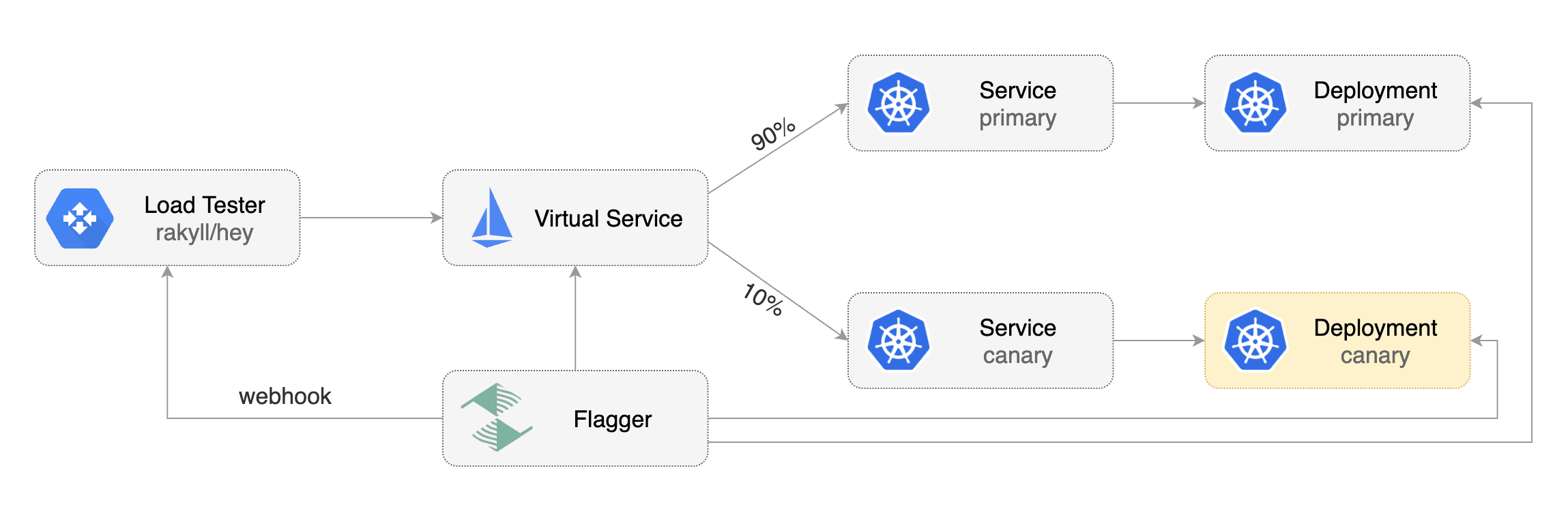
Flagger comes with a load testing service based on [rakyll/hey](https://github.com/rakyll/hey)
|
|
that generates traffic during analysis when configured as a webhook.
|
|
|
|
|
|
|
|
First you need to deploy the load test runner in a namespace with sidecar injection enabled:
|
|
|
|
```bash
|
|
export REPO=https://raw.githubusercontent.com/weaveworks/flagger/master
|
|
|
|
kubectl -n test apply -f ${REPO}/artifacts/loadtester/deployment.yaml
|
|
kubectl -n test apply -f ${REPO}/artifacts/loadtester/service.yaml
|
|
```
|
|
|
|
Or by using Helm:
|
|
|
|
```bash
|
|
helm repo add flagger https://flagger.app
|
|
|
|
helm upgrade -i flagger-loadtester flagger/loadtester \
|
|
--namespace=test \
|
|
--set cmd.timeout=1h
|
|
```
|
|
|
|
When deployed the load tester API will be available at `http://flagger-loadtester.test/`.
|
|
|
|
Now you can add webhooks to the canary analysis spec:
|
|
|
|
```yaml
|
|
webhooks:
|
|
- name: load-test-get
|
|
url: http://flagger-loadtester.test/
|
|
timeout: 5s
|
|
metadata:
|
|
type: cmd
|
|
cmd: "hey -z 1m -q 10 -c 2 http://podinfo-canary.test:9898/"
|
|
- name: load-test-post
|
|
url: http://flagger-loadtester.test/
|
|
timeout: 5s
|
|
metadata:
|
|
type: cmd
|
|
cmd: "hey -z 1m -q 10 -c 2 -m POST -d '{test: 2}' http://podinfo-canary.test:9898/echo"
|
|
```
|
|
|
|
When the canary analysis starts, Flagger will call the webhooks and the load tester will run the `hey` commands
|
|
in the background, if they are not already running. This will ensure that during the
|
|
analysis, the `podinfo-canary.test` service will receive a steady stream of GET and POST requests.
|
|
|
|
If your workload is exposed outside the mesh you can point `hey` to the
|
|
public URL and use HTTP2.
|
|
|
|
```yaml
|
|
webhooks:
|
|
- name: load-test-get
|
|
url: http://flagger-loadtester.test/
|
|
timeout: 5s
|
|
metadata:
|
|
type: cmd
|
|
cmd: "hey -z 1m -q 10 -c 2 -h2 https://podinfo.example.com/"
|
|
```
|
|
|
|
For gRPC services you can use [bojand/ghz](https://github.com/bojand/ghz) which is a similar tool to Hey but for gPRC:
|
|
|
|
```yaml
|
|
webhooks:
|
|
- name: grpc-load-test
|
|
url: http://flagger-loadtester.test/
|
|
timeout: 5s
|
|
metadata:
|
|
type: cmd
|
|
cmd: "ghz -z 1m -q 10 -c 2 --insecure podinfo.test:9898"
|
|
```
|
|
|
|
`ghz` uses reflection to identify which gRPC method to call. If you do not wish to enable reflection for your gRPC service you can implement a standardized health check from the [grpc-proto](https://github.com/grpc/grpc-proto) library. To use this [health check schema](https://github.com/grpc/grpc-proto/blob/master/grpc/health/v1/health.proto) without reflection you can pass a parameter to `ghz` like this
|
|
|
|
```yaml
|
|
webhooks:
|
|
- name: grpc-load-test-no-reflection
|
|
url: http://flagger-loadtester.test/
|
|
timeout: 5s
|
|
metadata:
|
|
type: cmd
|
|
cmd: "ghz --insecure --proto=/tmp/ghz/health.proto --call=grpc.health.v1.Health/Check podinfo.test:9898"
|
|
```
|
|
|
|
The load tester can run arbitrary commands as long as the binary is present in the container image.
|
|
For example if you you want to replace `hey` with another CLI, you can create your own Docker image:
|
|
|
|
```dockerfile
|
|
FROM weaveworks/flagger-loadtester:<VER>
|
|
|
|
RUN curl -Lo /usr/local/bin/my-cli https://github.com/user/repo/releases/download/ver/my-cli \
|
|
&& chmod +x /usr/local/bin/my-cli
|
|
```
|
|
|
|
### Load Testing Delegation
|
|
|
|
The load tester can also forward testing tasks to external tools, by now [nGrinder](https://github.com/naver/ngrinder)
|
|
is supported.
|
|
|
|
To use this feature, add a load test task of type 'ngrinder' to the canary analysis spec:
|
|
|
|
```yaml
|
|
webhooks:
|
|
- name: load-test-post
|
|
url: http://flagger-loadtester.test/
|
|
timeout: 5s
|
|
metadata:
|
|
# type of this load test task, cmd or ngrinder
|
|
type: ngrinder
|
|
# base url of your nGrinder controller server
|
|
server: http://ngrinder-server:port
|
|
# id of the test to clone from, the test must have been defined.
|
|
clone: 100
|
|
# user name and base64 encoded password to authenticate against the nGrinder server
|
|
username: admin
|
|
passwd: YWRtaW4=
|
|
# the interval between between nGrinder test status polling, default to 1s
|
|
pollInterval: 5s
|
|
```
|
|
When the canary analysis starts, the load tester will initiate a [clone_and_start request](https://github.com/naver/ngrinder/wiki/REST-API-PerfTest)
|
|
to the nGrinder server and start a new performance test. the load tester will periodically poll the nGrinder server
|
|
for the status of the test, and prevent duplicate requests from being sent in subsequent analysis loops.
|
|
|
|
### Integration Testing
|
|
|
|
Flagger comes with a testing service that can run Helm tests or Bats tests when configured as a webhook.
|
|
|
|
Deploy the Helm test runner in the `kube-system` namespace using the `tiller` service account:
|
|
|
|
```bash
|
|
helm repo add flagger https://flagger.app
|
|
|
|
helm upgrade -i flagger-helmtester flagger/loadtester \
|
|
--namespace=kube-system \
|
|
--set serviceAccountName=tiller
|
|
```
|
|
|
|
When deployed the Helm tester API will be available at `http://flagger-helmtester.kube-system/`.
|
|
|
|
Now you can add pre-rollout webhooks to the canary analysis spec:
|
|
|
|
```yaml
|
|
canaryAnalysis:
|
|
webhooks:
|
|
- name: "smoke test"
|
|
type: pre-rollout
|
|
url: http://flagger-helmtester.kube-system/
|
|
timeout: 3m
|
|
metadata:
|
|
type: "helm"
|
|
cmd: "test {{ .Release.Name }} --cleanup"
|
|
```
|
|
|
|
When the canary analysis starts, Flagger will call the pre-rollout webhooks before routing traffic to the canary.
|
|
If the helm test fails, Flagger will retry until the analysis threshold is reached and the canary is rolled back.
|
|
|
|
If you are using Helm v3, you'll have to create a dedicated service account and add the release namespace to the test command:
|
|
|
|
```yaml
|
|
canaryAnalysis:
|
|
webhooks:
|
|
- name: "smoke test"
|
|
type: pre-rollout
|
|
url: http://flagger-helmtester.kube-system/
|
|
timeout: 3m
|
|
metadata:
|
|
type: "helmv3"
|
|
cmd: "test run {{ .Release.Name }} --cleanup -n {{ .Release.Namespace }}"
|
|
```
|
|
|
|
As an alternative to Helm you can use the [Bash Automated Testing System](https://github.com/bats-core/bats-core) to run your tests.
|
|
|
|
```yaml
|
|
canaryAnalysis:
|
|
webhooks:
|
|
- name: "acceptance tests"
|
|
type: pre-rollout
|
|
url: http://flagger-batstester.default/
|
|
timeout: 5m
|
|
metadata:
|
|
type: "bash"
|
|
cmd: "bats /tests/acceptance.bats"
|
|
```
|
|
|
|
Note that you should create a ConfigMap with your Bats tests and mount it inside the tester container.
|
|
|
|
### Manual Gating
|
|
|
|
For manual approval of a canary deployment you can use the `confirm-rollout` and `confirm-promotion` webhooks.
|
|
The confirmation rollout hooks are executed before the pre-rollout hooks.
|
|
Flagger will halt the canary traffic shifting and analysis until the confirm webhook returns HTTP status 200.
|
|
|
|
Manual gating with Flagger's tester:
|
|
|
|
```yaml
|
|
canaryAnalysis:
|
|
webhooks:
|
|
- name: "gate"
|
|
type: confirm-rollout
|
|
url: http://flagger-loadtester.test/gate/halt
|
|
```
|
|
|
|
The `/gate/halt` returns HTTP 403 thus blocking the rollout.
|
|
|
|
If you have notifications enabled, Flagger will post a message to Slack or MS Teams if a canary rollout is waiting for approval.
|
|
|
|
Change the URL to `/gate/approve` to start the canary analysis:
|
|
|
|
```yaml
|
|
canaryAnalysis:
|
|
webhooks:
|
|
- name: "gate"
|
|
type: confirm-rollout
|
|
url: http://flagger-loadtester.test/gate/approve
|
|
```
|
|
|
|
Manual gating can be driven with Flagger's tester API. Set the confirmation URL to `/gate/check`:
|
|
|
|
```yaml
|
|
canaryAnalysis:
|
|
webhooks:
|
|
- name: "ask for confirmation"
|
|
type: confirm-rollout
|
|
url: http://flagger-loadtester.test/gate/check
|
|
```
|
|
|
|
By default the gate is closed, you can start or resume the canary rollout with:
|
|
|
|
```bash
|
|
kubectl -n test exec -it flagger-loadtester-xxxx-xxxx sh
|
|
|
|
curl -d '{"name": "podinfo","namespace":"test"}' http://localhost:8080/gate/open
|
|
```
|
|
|
|
You can pause the rollout at any time with:
|
|
|
|
```bash
|
|
curl -d '{"name": "podinfo","namespace":"test"}' http://localhost:8080/gate/close
|
|
```
|
|
|
|
If a canary analysis is paused the status will change to waiting:
|
|
|
|
```bash
|
|
kubectl get canary/podinfo
|
|
|
|
NAME STATUS WEIGHT
|
|
podinfo Waiting 0
|
|
```
|
|
|
|
The `confirm-promotion` hook type can be used to manually approve the canary promotion.
|
|
While the promotion is paused, Flagger will continue to run the metrics checks and load tests.
|
|
|
|
```yaml
|
|
canaryAnalysis:
|
|
webhooks:
|
|
- name: "promotion gate"
|
|
type: confirm-promotion
|
|
url: http://flagger-loadtester.test/gate/halt
|
|
```
|
|
|
|
If you have notifications enabled, Flagger will post a message to Slack or MS Teams if a canary promotion is waiting for approval.
|