mirror of
https://github.com/fluxcd/flagger.git
synced 2026-03-05 11:10:54 +00:00

419 lines
14 KiB
Markdown
419 lines
14 KiB
Markdown
# NGINX Canary Deployments
|
|
|
|
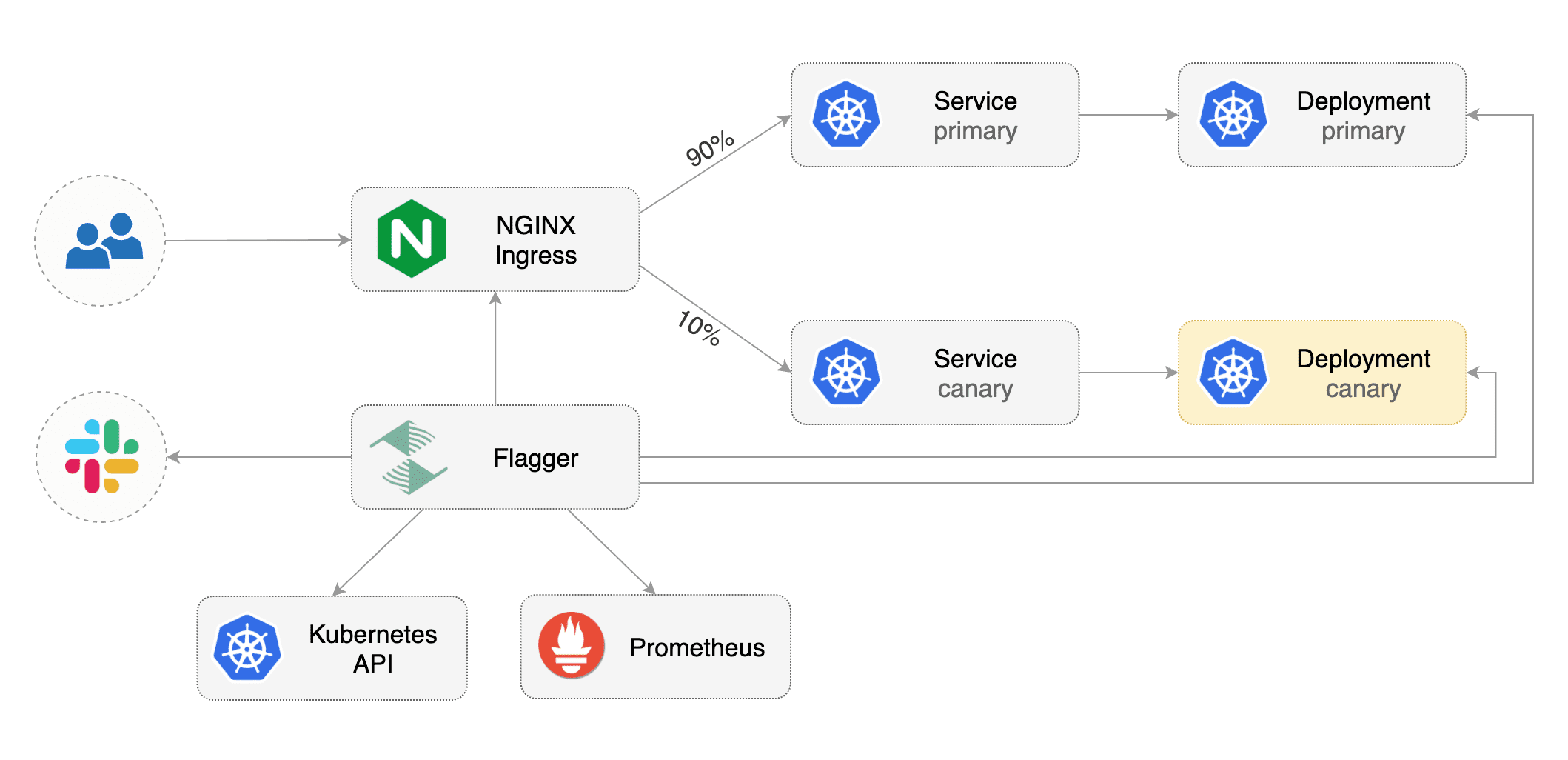
This guide shows you how to use the NGINX ingress controller and Flagger to automate canary deployments and A/B testing.
|
|
|
|
|
|
|
|
## Prerequisites
|
|
|
|
Flagger requires a Kubernetes cluster **v1.11** or newer and NGINX ingress **0.24** or newer.
|
|
|
|
Install NGINX with Helm v3:
|
|
|
|
```bash
|
|
kubectl create ns ingress-nginx
|
|
helm upgrade -i nginx-ingress stable/nginx-ingress \
|
|
--namespace ingress-nginx \
|
|
--set controller.stats.enabled=true \
|
|
--set controller.metrics.enabled=true \
|
|
--set controller.podAnnotations."prometheus\.io/scrape"=true \
|
|
--set controller.podAnnotations."prometheus\.io/port"=10254
|
|
```
|
|
|
|
Install Flagger and the Prometheus add-on in the same namespace as NGINX:
|
|
|
|
```bash
|
|
helm repo add flagger https://flagger.app
|
|
|
|
helm upgrade -i flagger flagger/flagger \
|
|
--namespace ingress-nginx \
|
|
--set prometheus.install=true \
|
|
--set meshProvider=nginx
|
|
```
|
|
|
|
Optionally you can enable Slack notifications:
|
|
|
|
```bash
|
|
helm upgrade -i flagger flagger/flagger \
|
|
--reuse-values \
|
|
--namespace ingress-nginx \
|
|
--set slack.url=https://hooks.slack.com/services/YOUR/SLACK/WEBHOOK \
|
|
--set slack.channel=general \
|
|
--set slack.user=flagger
|
|
```
|
|
|
|
## Bootstrap
|
|
|
|
Flagger takes a Kubernetes deployment and optionally a horizontal pod autoscaler \(HPA\), then creates a series of objects \(Kubernetes deployments, ClusterIP services and canary ingress\). These objects expose the application outside the cluster and drive the canary analysis and promotion.
|
|
|
|
Create a test namespace:
|
|
|
|
```bash
|
|
kubectl create ns test
|
|
```
|
|
|
|
Create a deployment and a horizontal pod autoscaler:
|
|
|
|
```bash
|
|
kubectl apply -k github.com/weaveworks/flagger//kustomize/podinfo
|
|
```
|
|
|
|
Deploy the load testing service to generate traffic during the canary analysis:
|
|
|
|
```bash
|
|
helm upgrade -i flagger-loadtester flagger/loadtester \
|
|
--namespace=test
|
|
```
|
|
|
|
Create an ingress definition \(replace `app.example.com` with your own domain\):
|
|
|
|
```yaml
|
|
apiVersion: extensions/v1beta1
|
|
kind: Ingress
|
|
metadata:
|
|
name: podinfo
|
|
namespace: test
|
|
labels:
|
|
app: podinfo
|
|
annotations:
|
|
kubernetes.io/ingress.class: "nginx"
|
|
spec:
|
|
rules:
|
|
- host: app.example.com
|
|
http:
|
|
paths:
|
|
- backend:
|
|
serviceName: podinfo
|
|
servicePort: 80
|
|
```
|
|
|
|
Save the above resource as podinfo-ingress.yaml and then apply it:
|
|
|
|
```bash
|
|
kubectl apply -f ./podinfo-ingress.yaml
|
|
```
|
|
|
|
Create a canary custom resource \(replace `app.example.com` with your own domain\):
|
|
|
|
```yaml
|
|
apiVersion: flagger.app/v1beta1
|
|
kind: Canary
|
|
metadata:
|
|
name: podinfo
|
|
namespace: test
|
|
spec:
|
|
provider: nginx
|
|
# deployment reference
|
|
targetRef:
|
|
apiVersion: apps/v1
|
|
kind: Deployment
|
|
name: podinfo
|
|
# ingress reference
|
|
ingressRef:
|
|
apiVersion: extensions/v1beta1
|
|
kind: Ingress
|
|
name: podinfo
|
|
# HPA reference (optional)
|
|
autoscalerRef:
|
|
apiVersion: autoscaling/v2beta1
|
|
kind: HorizontalPodAutoscaler
|
|
name: podinfo
|
|
# the maximum time in seconds for the canary deployment
|
|
# to make progress before it is rollback (default 600s)
|
|
progressDeadlineSeconds: 60
|
|
service:
|
|
# ClusterIP port number
|
|
port: 80
|
|
# container port number or name
|
|
targetPort: 9898
|
|
canaryAnalysis:
|
|
# schedule interval (default 60s)
|
|
interval: 10s
|
|
# max number of failed metric checks before rollback
|
|
threshold: 10
|
|
# max traffic percentage routed to canary
|
|
# percentage (0-100)
|
|
maxWeight: 50
|
|
# canary increment step
|
|
# percentage (0-100)
|
|
stepWeight: 5
|
|
# NGINX Prometheus checks
|
|
metrics:
|
|
- name: request-success-rate
|
|
# minimum req success rate (non 5xx responses)
|
|
# percentage (0-100)
|
|
threshold: 99
|
|
interval: 1m
|
|
# testing (optional)
|
|
webhooks:
|
|
- name: acceptance-test
|
|
type: pre-rollout
|
|
url: http://flagger-loadtester.test/
|
|
timeout: 30s
|
|
metadata:
|
|
type: bash
|
|
cmd: "curl -sd 'test' http://podinfo-canary/token | grep token"
|
|
- name: load-test
|
|
url: http://flagger-loadtester.test/
|
|
timeout: 5s
|
|
metadata:
|
|
cmd: "hey -z 1m -q 10 -c 2 http://app.example.com/"
|
|
```
|
|
|
|
Save the above resource as podinfo-canary.yaml and then apply it:
|
|
|
|
```bash
|
|
kubectl apply -f ./podinfo-canary.yaml
|
|
```
|
|
|
|
After a couple of seconds Flagger will create the canary objects:
|
|
|
|
```bash
|
|
# applied
|
|
deployment.apps/podinfo
|
|
horizontalpodautoscaler.autoscaling/podinfo
|
|
ingresses.extensions/podinfo
|
|
canary.flagger.app/podinfo
|
|
|
|
# generated
|
|
deployment.apps/podinfo-primary
|
|
horizontalpodautoscaler.autoscaling/podinfo-primary
|
|
service/podinfo
|
|
service/podinfo-canary
|
|
service/podinfo-primary
|
|
ingresses.extensions/podinfo-canary
|
|
```
|
|
|
|
## Automated canary promotion
|
|
|
|
Flagger implements a control loop that gradually shifts traffic to the canary while measuring key performance indicators like HTTP requests success rate, requests average duration and pod health. Based on analysis of the KPIs a canary is promoted or aborted, and the analysis result is published to Slack.
|
|
|
|

|
|
|
|
Trigger a canary deployment by updating the container image:
|
|
|
|
```bash
|
|
kubectl -n test set image deployment/podinfo \
|
|
podinfod=stefanprodan/podinfo:3.1.1
|
|
```
|
|
|
|
Flagger detects that the deployment revision changed and starts a new rollout:
|
|
|
|
```text
|
|
kubectl -n test describe canary/podinfo
|
|
|
|
Status:
|
|
Canary Weight: 0
|
|
Failed Checks: 0
|
|
Phase: Succeeded
|
|
Events:
|
|
Type Reason Age From Message
|
|
---- ------ ---- ---- -------
|
|
Normal Synced 3m flagger New revision detected podinfo.test
|
|
Normal Synced 3m flagger Scaling up podinfo.test
|
|
Warning Synced 3m flagger Waiting for podinfo.test rollout to finish: 0 of 1 updated replicas are available
|
|
Normal Synced 3m flagger Advance podinfo.test canary weight 5
|
|
Normal Synced 3m flagger Advance podinfo.test canary weight 10
|
|
Normal Synced 3m flagger Advance podinfo.test canary weight 15
|
|
Normal Synced 2m flagger Advance podinfo.test canary weight 20
|
|
Normal Synced 2m flagger Advance podinfo.test canary weight 25
|
|
Normal Synced 1m flagger Advance podinfo.test canary weight 30
|
|
Normal Synced 1m flagger Advance podinfo.test canary weight 35
|
|
Normal Synced 55s flagger Advance podinfo.test canary weight 40
|
|
Normal Synced 45s flagger Advance podinfo.test canary weight 45
|
|
Normal Synced 35s flagger Advance podinfo.test canary weight 50
|
|
Normal Synced 25s flagger Copying podinfo.test template spec to podinfo-primary.test
|
|
Warning Synced 15s flagger Waiting for podinfo-primary.test rollout to finish: 1 of 2 updated replicas are available
|
|
Normal Synced 5s flagger Promotion completed! Scaling down podinfo.test
|
|
```
|
|
|
|
**Note** that if you apply new changes to the deployment during the canary analysis, Flagger will restart the analysis.
|
|
|
|
You can monitor all canaries with:
|
|
|
|
```bash
|
|
watch kubectl get canaries --all-namespaces
|
|
|
|
NAMESPACE NAME STATUS WEIGHT LASTTRANSITIONTIME
|
|
test podinfo Progressing 15 2019-05-06T14:05:07Z
|
|
prod frontend Succeeded 0 2019-05-05T16:15:07Z
|
|
prod backend Failed 0 2019-05-04T17:05:07Z
|
|
```
|
|
|
|
## Automated rollback
|
|
|
|
During the canary analysis you can generate HTTP 500 errors to test if Flagger pauses and rolls back the faulted version.
|
|
|
|
Trigger another canary deployment:
|
|
|
|
```bash
|
|
kubectl -n test set image deployment/podinfo \
|
|
podinfod=stefanprodan/podinfo:3.1.2
|
|
```
|
|
|
|
Generate HTTP 500 errors:
|
|
|
|
```bash
|
|
watch curl http://app.example.com/status/500
|
|
```
|
|
|
|
When the number of failed checks reaches the canary analysis threshold, the traffic is routed back to the primary, the canary is scaled to zero and the rollout is marked as failed.
|
|
|
|
```text
|
|
kubectl -n test describe canary/podinfo
|
|
|
|
Status:
|
|
Canary Weight: 0
|
|
Failed Checks: 10
|
|
Phase: Failed
|
|
Events:
|
|
Type Reason Age From Message
|
|
---- ------ ---- ---- -------
|
|
Normal Synced 3m flagger Starting canary deployment for podinfo.test
|
|
Normal Synced 3m flagger Advance podinfo.test canary weight 5
|
|
Normal Synced 3m flagger Advance podinfo.test canary weight 10
|
|
Normal Synced 3m flagger Advance podinfo.test canary weight 15
|
|
Normal Synced 3m flagger Halt podinfo.test advancement success rate 69.17% < 99%
|
|
Normal Synced 2m flagger Halt podinfo.test advancement success rate 61.39% < 99%
|
|
Normal Synced 2m flagger Halt podinfo.test advancement success rate 55.06% < 99%
|
|
Normal Synced 2m flagger Halt podinfo.test advancement success rate 47.00% < 99%
|
|
Normal Synced 2m flagger (combined from similar events): Halt podinfo.test advancement success rate 38.08% < 99%
|
|
Warning Synced 1m flagger Rolling back podinfo.test failed checks threshold reached 10
|
|
Warning Synced 1m flagger Canary failed! Scaling down podinfo.test
|
|
```
|
|
|
|
## Custom metrics
|
|
|
|
The canary analysis can be extended with Prometheus queries.
|
|
|
|
The demo app is instrumented with Prometheus so you can create a custom check that will use the HTTP request duration histogram to validate the canary.
|
|
|
|
Edit the canary analysis and add the following metric:
|
|
|
|
```yaml
|
|
canaryAnalysis:
|
|
metrics:
|
|
- name: "latency"
|
|
threshold: 0.5
|
|
interval: 1m
|
|
query: |
|
|
histogram_quantile(0.99,
|
|
sum(
|
|
rate(
|
|
http_request_duration_seconds_bucket{
|
|
kubernetes_namespace="test",
|
|
kubernetes_pod_name=~"podinfo-[0-9a-zA-Z]+(-[0-9a-zA-Z]+)"
|
|
}[1m]
|
|
)
|
|
) by (le)
|
|
)
|
|
```
|
|
|
|
The threshold is set to 500ms so if the average request duration in the last minute goes over half a second then the analysis will fail and the canary will not be promoted.
|
|
|
|
Trigger a canary deployment by updating the container image:
|
|
|
|
```bash
|
|
kubectl -n test set image deployment/podinfo \
|
|
podinfod=stefanprodan/podinfo:3.1.3
|
|
```
|
|
|
|
Generate high response latency:
|
|
|
|
```bash
|
|
watch curl http://app.exmaple.com/delay/2
|
|
```
|
|
|
|
Watch Flagger logs:
|
|
|
|
```text
|
|
kubectl -n nginx-ingress logs deployment/flagger -f | jq .msg
|
|
|
|
Starting canary deployment for podinfo.test
|
|
Advance podinfo.test canary weight 5
|
|
Advance podinfo.test canary weight 10
|
|
Advance podinfo.test canary weight 15
|
|
Halt podinfo.test advancement latency 1.20 > 0.5
|
|
Halt podinfo.test advancement latency 1.45 > 0.5
|
|
Halt podinfo.test advancement latency 1.60 > 0.5
|
|
Halt podinfo.test advancement latency 1.69 > 0.5
|
|
Halt podinfo.test advancement latency 1.70 > 0.5
|
|
Rolling back podinfo.test failed checks threshold reached 5
|
|
Canary failed! Scaling down podinfo.test
|
|
```
|
|
|
|
If you have Slack configured, Flagger will send a notification with the reason why the canary failed.
|
|
|
|
## A/B Testing
|
|
|
|
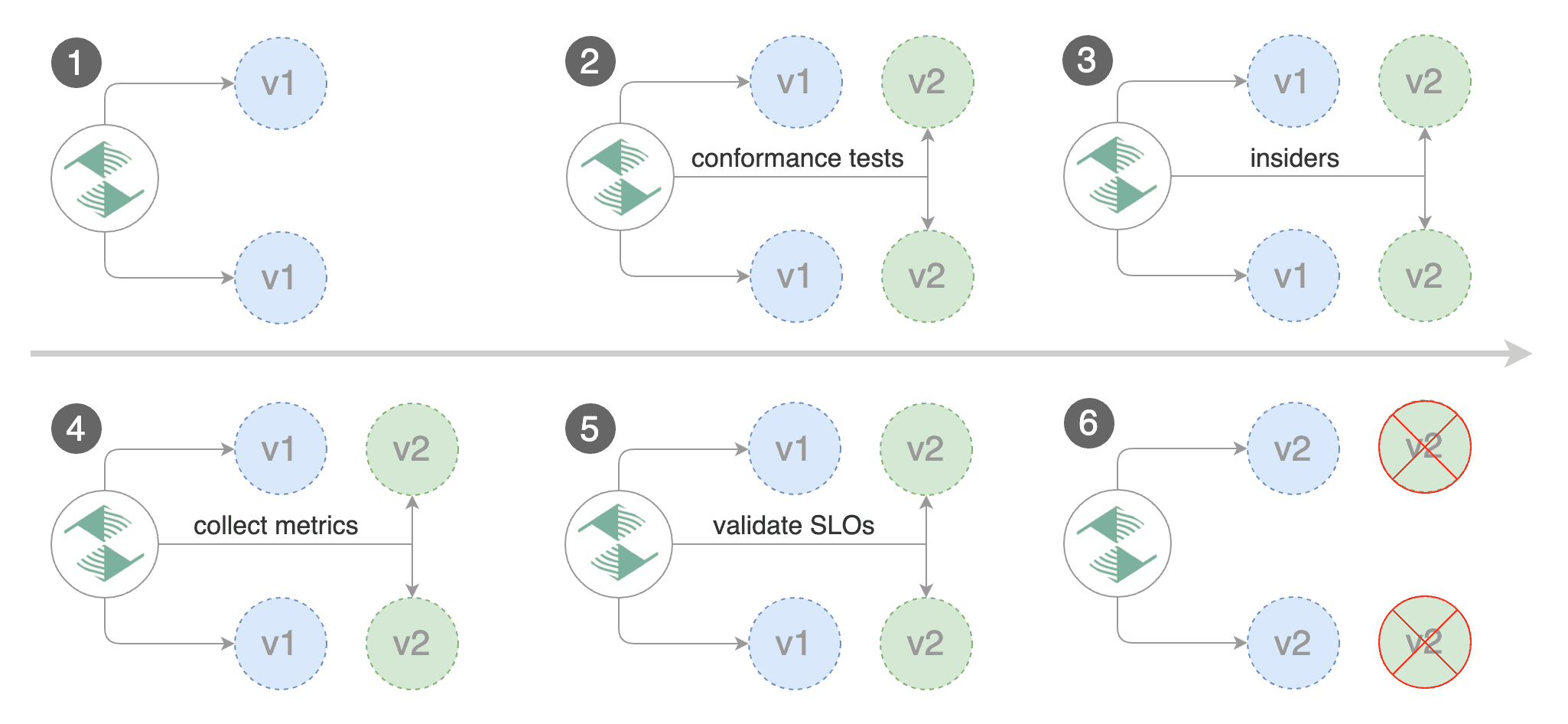
Besides weighted routing, Flagger can be configured to route traffic to the canary based on HTTP match conditions. In an A/B testing scenario, you'll be using HTTP headers or cookies to target a certain segment of your users. This is particularly useful for frontend applications that require session affinity.
|
|
|
|
|
|
|
|
Edit the canary analysis, remove the max/step weight and add the match conditions and iterations:
|
|
|
|
```yaml
|
|
canaryAnalysis:
|
|
interval: 1m
|
|
threshold: 10
|
|
iterations: 10
|
|
match:
|
|
# curl -H 'X-Canary: insider' http://app.example.com
|
|
- headers:
|
|
x-canary:
|
|
exact: "insider"
|
|
# curl -b 'canary=always' http://app.example.com
|
|
- headers:
|
|
cookie:
|
|
exact: "canary"
|
|
metrics:
|
|
- name: request-success-rate
|
|
threshold: 99
|
|
interval: 1m
|
|
webhooks:
|
|
- name: load-test
|
|
url: http://flagger-loadtester.test/
|
|
timeout: 5s
|
|
metadata:
|
|
cmd: "hey -z 1m -q 10 -c 2 -H 'Cookie: canary=always' http://app.example.com/"
|
|
```
|
|
|
|
The above configuration will run an analysis for ten minutes targeting users that have a `canary` cookie set to `always` or those that call the service using the `X-Canary: insider` header.
|
|
|
|
Trigger a canary deployment by updating the container image:
|
|
|
|
```bash
|
|
kubectl -n test set image deployment/podinfo \
|
|
podinfod=stefanprodan/podinfo:3.1.4
|
|
```
|
|
|
|
Flagger detects that the deployment revision changed and starts the A/B testing:
|
|
|
|
```text
|
|
kubectl -n test describe canary/podinfo
|
|
|
|
Status:
|
|
Failed Checks: 0
|
|
Phase: Succeeded
|
|
Events:
|
|
Type Reason Age From Message
|
|
---- ------ ---- ---- -------
|
|
Normal Synced 3m flagger New revision detected podinfo.test
|
|
Normal Synced 3m flagger Scaling up podinfo.test
|
|
Warning Synced 3m flagger Waiting for podinfo.test rollout to finish: 0 of 1 updated replicas are available
|
|
Normal Synced 3m flagger Advance podinfo.test canary iteration 1/10
|
|
Normal Synced 3m flagger Advance podinfo.test canary iteration 2/10
|
|
Normal Synced 3m flagger Advance podinfo.test canary iteration 3/10
|
|
Normal Synced 2m flagger Advance podinfo.test canary iteration 4/10
|
|
Normal Synced 2m flagger Advance podinfo.test canary iteration 5/10
|
|
Normal Synced 1m flagger Advance podinfo.test canary iteration 6/10
|
|
Normal Synced 1m flagger Advance podinfo.test canary iteration 7/10
|
|
Normal Synced 55s flagger Advance podinfo.test canary iteration 8/10
|
|
Normal Synced 45s flagger Advance podinfo.test canary iteration 9/10
|
|
Normal Synced 35s flagger Advance podinfo.test canary iteration 10/10
|
|
Normal Synced 25s flagger Copying podinfo.test template spec to podinfo-primary.test
|
|
Warning Synced 15s flagger Waiting for podinfo-primary.test rollout to finish: 1 of 2 updated replicas are available
|
|
Normal Synced 5s flagger Promotion completed! Scaling down podinfo.test
|
|
```
|
|
|