mirror of
https://github.com/fluxcd/flagger.git
synced 2026-02-14 18:10:00 +00:00

847 lines
26 KiB
Markdown
847 lines
26 KiB
Markdown
# Gateway API Canary Deployments
|
|
|
|
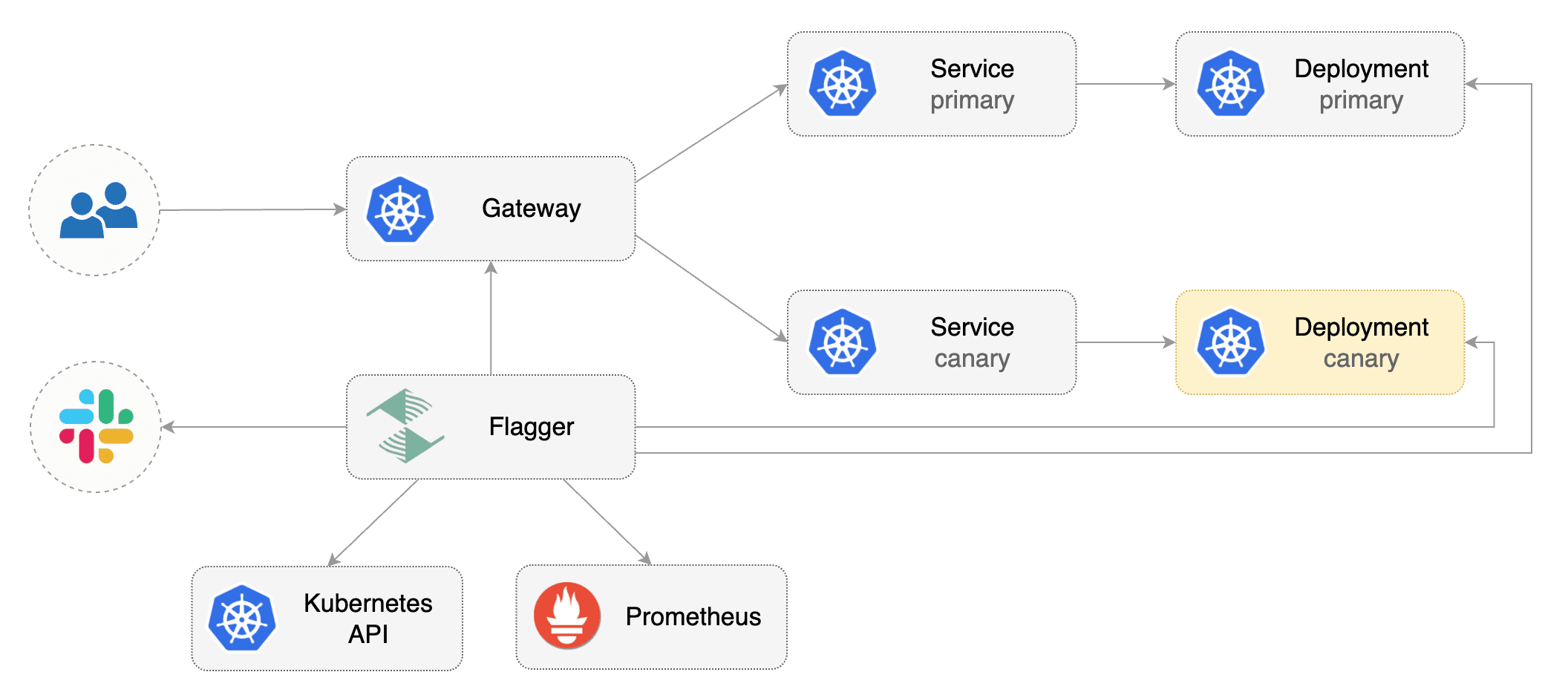
This guide shows you how to use [Gateway API](https://gateway-api.sigs.k8s.io/) and Flagger to automate canary deployments and A/B testing.
|
|
|
|
|
|
|
|
## Prerequisites
|
|
|
|
Flagger requires an ingress controller or service mesh that implements the Gateway API **HTTPRoute** (`v1` or `v1beta1`).
|
|
|
|
We'll be using Istio for the sake of this tutorial, but you can use any other implementation.
|
|
|
|
Install the Gateway API CRDs:
|
|
|
|
```bash
|
|
# Suggestion: Change v1.4.0 in to the latest Gateway API version
|
|
kubectl apply --server-side -k "github.com/kubernetes-sigs/gateway-api/config/crd?ref=v1.4.0"
|
|
```
|
|
|
|
Install Istio:
|
|
|
|
```bash
|
|
istioctl install --set profile=minimal -y
|
|
|
|
# Suggestion: Change release-1.27 in to the latest Istio version
|
|
kubectl apply -f https://raw.githubusercontent.com/istio/istio/release-1.27/samples/addons/prometheus.yaml
|
|
```
|
|
|
|
Install Flagger in the `flagger-system` namespace:
|
|
|
|
```bash
|
|
kubectl create ns flagger-system
|
|
|
|
helm repo add flagger https://flagger.app
|
|
helm upgrade -i flagger flagger/flagger \
|
|
--namespace flagger-system \
|
|
--set prometheus.install=false \
|
|
--set meshProvider=gatewayapi:v1 \
|
|
--set metricsServer=http://prometheus.istio-system:9090
|
|
```
|
|
|
|
Create a namespace for the `Gateway`:
|
|
|
|
```bash
|
|
kubectl create ns istio-ingress
|
|
```
|
|
|
|
Create a `Gateway` that configures load balancing, traffic ACL, etc:
|
|
|
|
```yaml
|
|
apiVersion: gateway.networking.k8s.io/v1
|
|
kind: Gateway
|
|
metadata:
|
|
name: gateway
|
|
namespace: istio-ingress
|
|
spec:
|
|
gatewayClassName: istio
|
|
listeners:
|
|
- name: default
|
|
hostname: "*.example.com"
|
|
port: 80
|
|
protocol: HTTP
|
|
allowedRoutes:
|
|
namespaces:
|
|
from: All
|
|
```
|
|
|
|
## Bootstrap
|
|
|
|
Flagger takes a Kubernetes deployment and optionally a horizontal pod autoscaler \(HPA\),
|
|
then creates a series of objects \(Kubernetes deployments, ClusterIP services, HTTPRoutes for the Gateway\).
|
|
These objects expose the application inside the mesh and drive the canary analysis and promotion.
|
|
|
|
Create a test namespace:
|
|
|
|
```bash
|
|
kubectl create ns test
|
|
```
|
|
|
|
Create a deployment and a horizontal pod autoscaler:
|
|
|
|
```bash
|
|
kubectl apply -k https://github.com/fluxcd/flagger//kustomize/podinfo?ref=main
|
|
```
|
|
|
|
Deploy the load testing service to generate traffic during the canary analysis:
|
|
|
|
```bash
|
|
kubectl apply -k https://github.com/fluxcd/flagger//kustomize/tester?ref=main
|
|
```
|
|
|
|
Create metric templates targeting the Prometheus server in the `flagger-system` namespace.
|
|
The PromQL queries below are meant for `Envoy`,
|
|
but you can [change it to your ingress/mesh provider](https://docs.flagger.app/faq#metrics) accordingly.
|
|
|
|
```yaml
|
|
apiVersion: flagger.app/v1beta1
|
|
kind: MetricTemplate
|
|
metadata:
|
|
name: latency
|
|
namespace: flagger-system
|
|
spec:
|
|
provider:
|
|
type: prometheus
|
|
address: http://prometheus.istio-system:9090
|
|
query: |
|
|
histogram_quantile(0.99,
|
|
sum(
|
|
rate(
|
|
istio_request_duration_milliseconds_bucket{
|
|
reporter="source",
|
|
destination_workload_namespace=~"{{ namespace }}",
|
|
destination_workload=~"{{ target }}",
|
|
}[{{ interval }}]
|
|
)
|
|
) by (le)
|
|
)/1000
|
|
---
|
|
apiVersion: flagger.app/v1beta1
|
|
kind: MetricTemplate
|
|
metadata:
|
|
name: error-rate
|
|
namespace: flagger-system
|
|
spec:
|
|
provider:
|
|
type: prometheus
|
|
address: http://prometheus.istio-system:9090
|
|
query: |
|
|
100 - sum(
|
|
rate(
|
|
istio_requests_total{
|
|
reporter="source",
|
|
destination_workload_namespace=~"{{ namespace }}",
|
|
destination_workload=~"{{ target }}",
|
|
response_code!~"5.*"
|
|
}[{{ interval }}]
|
|
)
|
|
)
|
|
/
|
|
sum(
|
|
rate(
|
|
istio_requests_total{
|
|
reporter="source",
|
|
destination_workload_namespace=~"{{ namespace }}",
|
|
destination_workload=~"{{ target }}",
|
|
}[{{ interval }}]
|
|
)
|
|
)
|
|
* 100
|
|
```
|
|
|
|
Save the above resource as metric-templates.yaml and then apply it:
|
|
|
|
```bash
|
|
kubectl apply -f metric-templates.yaml
|
|
```
|
|
|
|
Create a Canary custom resource \(replace "www.example.com" with your own domain\):
|
|
|
|
```yaml
|
|
apiVersion: flagger.app/v1beta1
|
|
kind: Canary
|
|
metadata:
|
|
name: podinfo
|
|
namespace: test
|
|
spec:
|
|
# deployment reference
|
|
targetRef:
|
|
apiVersion: apps/v1
|
|
kind: Deployment
|
|
name: podinfo
|
|
# the maximum time in seconds for the canary deployment
|
|
# to make progress before it is rollback (default 600s)
|
|
progressDeadlineSeconds: 60
|
|
# HPA reference (optional)
|
|
autoscalerRef:
|
|
apiVersion: autoscaling/v2
|
|
kind: HorizontalPodAutoscaler
|
|
name: podinfo
|
|
service:
|
|
# service port number
|
|
port: 9898
|
|
# container port number or name (optional)
|
|
targetPort: 9898
|
|
# Gateway API HTTPRoute host names
|
|
hosts:
|
|
- www.example.com
|
|
# Reference to the Gateway that the generated HTTPRoute would attach to.
|
|
gatewayRefs:
|
|
- name: gateway
|
|
namespace: istio-ingress
|
|
analysis:
|
|
# schedule interval (default 60s)
|
|
interval: 1m
|
|
# max number of failed metric checks before rollback
|
|
threshold: 5
|
|
# max traffic percentage routed to canary
|
|
# percentage (0-100)
|
|
maxWeight: 50
|
|
# canary increment step
|
|
# percentage (0-100)
|
|
stepWeight: 10
|
|
metrics:
|
|
- name: error-rate
|
|
# max error rate (5xx responses)
|
|
# percentage (0-100)
|
|
templateRef:
|
|
name: error-rate
|
|
namespace: flagger-system
|
|
thresholdRange:
|
|
max: 1
|
|
interval: 1m
|
|
- name: latency
|
|
templateRef:
|
|
name: latency
|
|
namespace: flagger-system
|
|
# seconds
|
|
thresholdRange:
|
|
max: 0.5
|
|
interval: 30s
|
|
# testing (optional)
|
|
webhooks:
|
|
- name: smoke-test
|
|
type: pre-rollout
|
|
url: http://flagger-loadtester.test/
|
|
timeout: 15s
|
|
metadata:
|
|
type: bash
|
|
cmd: "curl -sd 'anon' http://podinfo-canary.test:9898/token | grep token"
|
|
- name: load-test
|
|
url: http://flagger-loadtester.test/
|
|
timeout: 5s
|
|
metadata:
|
|
cmd: "hey -z 2m -q 10 -c 2 -host www.example.com http://gateway-istio.istio-ingress/"
|
|
```
|
|
|
|
Save the above resource as podinfo-canary.yaml and then apply it:
|
|
|
|
```bash
|
|
kubectl apply -f ./podinfo-canary.yaml
|
|
```
|
|
|
|
When the canary analysis starts, Flagger will call the pre-rollout webhooks before routing traffic to the canary.
|
|
The canary analysis will run for five minutes while validating the HTTP metrics and rollout hooks every minute.
|
|
|
|
After a couple of seconds Flagger will create the canary objects:
|
|
|
|
```bash
|
|
# applied
|
|
deployment.apps/podinfo
|
|
horizontalpodautoscaler.autoscaling/podinfo
|
|
canary.flagger.app/podinfo
|
|
|
|
# generated
|
|
deployment.apps/podinfo-primary
|
|
horizontalpodautoscaler.autoscaling/podinfo-primary
|
|
service/podinfo
|
|
service/podinfo-canary
|
|
service/podinfo-primary
|
|
httproutes.gateway.networking.k8s.io/podinfo
|
|
```
|
|
|
|
## Expose the app outside the cluster
|
|
|
|
Find the external address of Istio's load balancer:
|
|
|
|
```bash
|
|
export ADDRESS="$(kubectl -n istio-ingress get svc/gateway-istio -ojson \
|
|
| jq -r ".status.loadBalancer.ingress[].hostname")"
|
|
echo $ADDRESS
|
|
```
|
|
|
|
Configure your DNS server with a CNAME record \(AWS\) or A record \(GKE/AKS/DOKS\) and
|
|
point a domain e.g. `www.example.com` to the LB address.
|
|
|
|
Now you can access the podinfo UI using your domain address.
|
|
|
|
Note that you should be using HTTPS when exposing production workloads on internet.
|
|
If you're using a local cluster you can port forward to the Envoy LoadBalancer service:
|
|
|
|
```bash
|
|
kubectl port-forward -n istio-ingress svc/gateway-istio 8080:80
|
|
```
|
|
|
|
Now you can access podinfo via `curl -H "Host: www.example.com" localhost:8080`.
|
|
|
|
## Automated canary promotion
|
|
|
|
With the application bootstrapped, Flagger will continuously monitor the deployment for changes.
|
|
When a new revision is detected, Flagger will start a canary analysis and gradually shift traffic to the new version.
|
|
|
|

|
|
|
|
Trigger a canary deployment by updating the container image:
|
|
|
|
```bash
|
|
kubectl -n test set image deployment/podinfo \
|
|
podinfod=stefanprodan/podinfo:6.0.1
|
|
```
|
|
|
|
Flagger detects that the deployment revision changed and starts a new rollout:
|
|
|
|
```text
|
|
kubectl -n test describe canary/podinfo
|
|
|
|
Status:
|
|
Canary Weight: 0
|
|
Failed Checks: 0
|
|
Phase: Succeeded
|
|
Events:
|
|
Type Reason Age From Message
|
|
---- ------ ---- ---- -------
|
|
Normal Synced 3m flagger New revision detected podinfo.test
|
|
Normal Synced 3m flagger Scaling up podinfo.test
|
|
Warning Synced 3m flagger Waiting for podinfo.test rollout to finish: 0 of 1 updated replicas are available
|
|
Normal Synced 3m flagger Advance podinfo.test canary weight 5
|
|
Normal Synced 3m flagger Advance podinfo.test canary weight 10
|
|
Normal Synced 3m flagger Advance podinfo.test canary weight 15
|
|
Normal Synced 2m flagger Advance podinfo.test canary weight 20
|
|
Normal Synced 2m flagger Advance podinfo.test canary weight 25
|
|
Normal Synced 1m flagger Advance podinfo.test canary weight 30
|
|
Normal Synced 1m flagger Advance podinfo.test canary weight 35
|
|
Normal Synced 55s flagger Advance podinfo.test canary weight 40
|
|
Normal Synced 45s flagger Advance podinfo.test canary weight 45
|
|
Normal Synced 35s flagger Advance podinfo.test canary weight 50
|
|
Normal Synced 25s flagger Copying podinfo.test template spec to podinfo-primary.test
|
|
Warning Synced 15s flagger Waiting for podinfo-primary.test rollout to finish: 1 of 2 updated replicas are available
|
|
Normal Synced 5s flagger Promotion completed! Scaling down podinfo.test
|
|
```
|
|
|
|
**Note** that if you apply new changes to the deployment during the canary analysis,
|
|
Flagger will restart the analysis.
|
|
|
|
A canary deployment is triggered by changes in any of the following objects:
|
|
|
|
* Deployment PodSpec \(container image, command, ports, env, resources, etc\)
|
|
* ConfigMaps mounted as volumes or mapped to environment variables
|
|
* Secrets mounted as volumes or mapped to environment variables
|
|
|
|
You can monitor how Flagger progressively changes the weights of
|
|
the HTTPRoute object that is attached to the Gateway with:
|
|
|
|
```bash
|
|
watch kubectl get httproute -n test podinfo -o=jsonpath='{.spec.rules}'
|
|
```
|
|
|
|
You can monitor all canaries with:
|
|
|
|
```bash
|
|
watch kubectl get canaries --all-namespaces
|
|
|
|
NAMESPACE NAME STATUS WEIGHT LASTTRANSITIONTIME
|
|
test podinfo Progressing 15 2025-10-16T14:05:07Z
|
|
prod frontend Succeeded 0 2025-10-15T16:15:07Z
|
|
prod backend Failed 0 2025-10-14T17:05:07Z
|
|
```
|
|
|
|
## Automated rollback
|
|
|
|
During the canary analysis you can generate HTTP 500 errors and high latency to test if Flagger pauses the rollout.
|
|
|
|
Trigger another canary deployment:
|
|
|
|
```bash
|
|
kubectl -n test set image deployment/podinfo \
|
|
podinfod=stefanprodan/podinfo:6.0.2
|
|
```
|
|
|
|
Exec into the load tester pod with:
|
|
|
|
```bash
|
|
kubectl -n test exec -it flagger-loadtester-xx-xx sh
|
|
```
|
|
|
|
Generate HTTP 500 errors:
|
|
|
|
```bash
|
|
watch curl http://podinfo-canary:9898/status/500
|
|
```
|
|
|
|
Generate latency:
|
|
|
|
```bash
|
|
watch curl http://podinfo-canary:9898/delay/1
|
|
```
|
|
|
|
When the number of failed checks reaches the canary analysis threshold,
|
|
the traffic is routed back to the primary, the canary is scaled to zero and the rollout is marked as failed.
|
|
|
|
```text
|
|
kubectl -n test describe canary/podinfo
|
|
|
|
Status:
|
|
Canary Weight: 0
|
|
Failed Checks: 10
|
|
Phase: Failed
|
|
Events:
|
|
Type Reason Age From Message
|
|
---- ------ ---- ---- -------
|
|
Normal Synced 3m flagger Starting canary deployment for podinfo.test
|
|
Normal Synced 3m flagger Advance podinfo.test canary weight 5
|
|
Normal Synced 3m flagger Advance podinfo.test canary weight 10
|
|
Normal Synced 3m flagger Advance podinfo.test canary weight 15
|
|
Normal Synced 3m flagger Halt podinfo.test advancement error rate 69.17% > 1%
|
|
Normal Synced 2m flagger Halt podinfo.test advancement error rate 61.39% > 1%
|
|
Normal Synced 2m flagger Halt podinfo.test advancement error rate 55.06% > 1%
|
|
Normal Synced 2m flagger Halt podinfo.test advancement error rate 47.00% > 1%
|
|
Normal Synced 2m flagger (combined from similar events): Halt podinfo.test advancement error rate 38.08% > 1%
|
|
Warning Synced 1m flagger Rolling back podinfo.test failed checks threshold reached 10
|
|
Warning Synced 1m flagger Canary failed! Scaling down podinfo.test
|
|
```
|
|
|
|
## A/B Testing
|
|
|
|
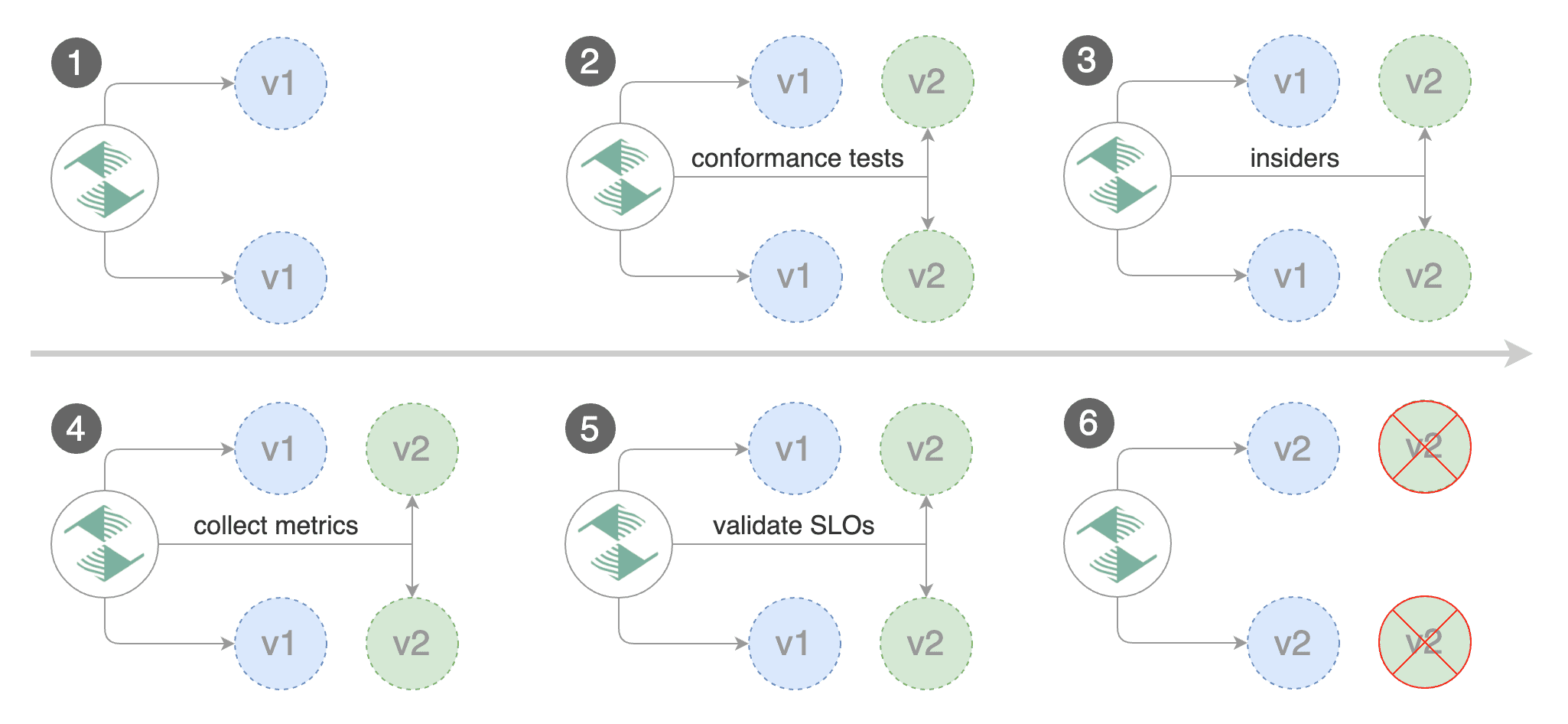
Besides weighted routing, Flagger can be configured to route traffic to the canary based on HTTP match conditions.
|
|
In an A/B testing scenario, you'll be using HTTP headers and cookies to target a certain segment of your users.
|
|
|
|
|
|
|
|
Create a canary custom resource \(replace "www.example.com" with your own domain\):
|
|
|
|
```yaml
|
|
apiVersion: flagger.app/v1beta1
|
|
kind: Canary
|
|
metadata:
|
|
name: podinfo
|
|
namespace: test
|
|
spec:
|
|
# deployment reference
|
|
targetRef:
|
|
apiVersion: apps/v1
|
|
kind: Deployment
|
|
name: podinfo
|
|
# the maximum time in seconds for the canary deployment
|
|
# to make progress before it is rollback (default 600s)
|
|
progressDeadlineSeconds: 60
|
|
# HPA reference (optional)
|
|
autoscalerRef:
|
|
apiVersion: autoscaling/v2
|
|
kind: HorizontalPodAutoscaler
|
|
name: podinfo
|
|
service:
|
|
# service port number
|
|
port: 9898
|
|
# container port number or name (optional)
|
|
targetPort: 9898
|
|
# Gateway API HTTPRoute host names
|
|
hosts:
|
|
- www.example.com
|
|
# Reference to the Gateway that the generated HTTPRoute would attach to.
|
|
gatewayRefs:
|
|
- name: gateway
|
|
namespace: istio-ingress
|
|
analysis:
|
|
# schedule interval (default 60s)
|
|
interval: 1m
|
|
# total number of iterations
|
|
iterations: 10
|
|
# max number of failed iterations before rollback
|
|
threshold: 2
|
|
# canary match condition
|
|
match:
|
|
- headers:
|
|
user-agent:
|
|
regex: ".*Firefox.*"
|
|
- headers:
|
|
cookie:
|
|
regex: "^(.*?;)?(type=insider)(;.*)?$"
|
|
metrics:
|
|
- name: error-rate
|
|
# max error rate (5xx responses)
|
|
# percentage (0-100)
|
|
templateRef:
|
|
name: error-rate
|
|
namespace: flagger-system
|
|
thresholdRange:
|
|
max: 1
|
|
interval: 1m
|
|
- name: latency
|
|
templateRef:
|
|
name: latency
|
|
namespace: flagger-system
|
|
# seconds
|
|
thresholdRange:
|
|
max: 0.5
|
|
interval: 30s
|
|
# testing (optional)
|
|
webhooks:
|
|
- name: load-test
|
|
url: http://flagger-loadtester.test/
|
|
timeout: 5s
|
|
metadata:
|
|
cmd: "hey -z 2m -q 10 -c 2 -host www.example.com -H 'Cookie: type=insider' http://gateway-istio.istio-ingress/"
|
|
```
|
|
|
|
The above configuration will run an analysis for ten minutes targeting those users that
|
|
have an insider cookie or are using Firefox as a browser.
|
|
|
|
Save the above resource as podinfo-ab-canary.yaml and then apply it:
|
|
|
|
```bash
|
|
kubectl apply -f ./podinfo-ab-canary.yaml
|
|
```
|
|
|
|
Trigger a canary deployment by updating the container image:
|
|
|
|
```bash
|
|
kubectl -n test set image deployment/podinfo \
|
|
podinfod=stefanprodan/podinfo:6.0.3
|
|
```
|
|
|
|
Flagger detects that the deployment revision changed and starts a new rollout:
|
|
|
|
```text
|
|
kubectl -n test describe canary/podinfo
|
|
|
|
Status:
|
|
Failed Checks: 0
|
|
Phase: Succeeded
|
|
Events:
|
|
Type Reason Age From Message
|
|
---- ------ ---- ---- -------
|
|
Normal Synced 3m flagger New revision detected podinfo.test
|
|
Normal Synced 3m flagger Scaling up podinfo.test
|
|
Warning Synced 3m flagger Waiting for podinfo.test rollout to finish: 0 of 1 updated replicas are available
|
|
Normal Synced 3m flagger Advance podinfo.test canary iteration 1/10
|
|
Normal Synced 3m flagger Advance podinfo.test canary iteration 2/10
|
|
Normal Synced 3m flagger Advance podinfo.test canary iteration 3/10
|
|
Normal Synced 2m flagger Advance podinfo.test canary iteration 4/10
|
|
Normal Synced 2m flagger Advance podinfo.test canary iteration 5/10
|
|
Normal Synced 1m flagger Advance podinfo.test canary iteration 6/10
|
|
Normal Synced 1m flagger Advance podinfo.test canary iteration 7/10
|
|
Normal Synced 55s flagger Advance podinfo.test canary iteration 8/10
|
|
Normal Synced 45s flagger Advance podinfo.test canary iteration 9/10
|
|
Normal Synced 35s flagger Advance podinfo.test canary iteration 10/10
|
|
Normal Synced 25s flagger Copying podinfo.test template spec to podinfo-primary.test
|
|
Warning Synced 15s flagger Waiting for podinfo-primary.test rollout to finish: 1 of 2 updated replicas are available
|
|
Normal Synced 5s flagger Promotion completed! Scaling down podinfo.test
|
|
```
|
|
|
|
## Session Affinity
|
|
|
|
While Flagger can perform weighted routing and A/B testing individually,
|
|
with Gateway API it can combine the two leading to a Canary release with session affinity.
|
|
For more information you can read the [deployment strategies docs](../usage/deployment-strategies.md#canary-release-with-session-affinity).
|
|
|
|
> **Note:** Session Affinity requires a Gateway API implementation that supports
|
|
> the [`ResponseHeaderModifier`](https://gateway-api.sigs.k8s.io/guides/http-header-modifier/) API.
|
|
|
|
Create a canary custom resource \(replace www.example.com with your own domain\):
|
|
|
|
```yaml
|
|
apiVersion: flagger.app/v1beta1
|
|
kind: Canary
|
|
metadata:
|
|
name: podinfo
|
|
namespace: test
|
|
spec:
|
|
# deployment reference
|
|
targetRef:
|
|
apiVersion: apps/v1
|
|
kind: Deployment
|
|
name: podinfo
|
|
# the maximum time in seconds for the canary deployment
|
|
# to make progress before it is rollback (default 600s)
|
|
progressDeadlineSeconds: 60
|
|
# HPA reference (optional)
|
|
autoscalerRef:
|
|
apiVersion: autoscaling/v2
|
|
kind: HorizontalPodAutoscaler
|
|
name: podinfo
|
|
service:
|
|
# service port number
|
|
port: 9898
|
|
# container port number or name (optional)
|
|
targetPort: 9898
|
|
# Gateway API HTTPRoute host names
|
|
hosts:
|
|
- www.example.com
|
|
# Reference to the Gateway that the generated HTTPRoute would attach to.
|
|
gatewayRefs:
|
|
- name: gateway
|
|
namespace: istio-ingress
|
|
analysis:
|
|
# schedule interval (default 60s)
|
|
interval: 1m
|
|
# max number of failed metric checks before rollback
|
|
threshold: 5
|
|
# max traffic percentage routed to canary
|
|
# percentage (0-100)
|
|
maxWeight: 50
|
|
# canary increment step
|
|
# percentage (0-100)
|
|
stepWeight: 10
|
|
# session affinity config
|
|
sessionAffinity:
|
|
# name of the cookie used
|
|
cookieName: flagger-cookie
|
|
# max age of the cookie (in seconds)
|
|
# optional; defaults to 86400
|
|
maxAge: 21600
|
|
metrics:
|
|
- name: error-rate
|
|
# max error rate (5xx responses)
|
|
# percentage (0-100)
|
|
templateRef:
|
|
name: error-rate
|
|
namespace: flagger-system
|
|
thresholdRange:
|
|
max: 1
|
|
interval: 1m
|
|
- name: latency
|
|
templateRef:
|
|
name: latency
|
|
namespace: flagger-system
|
|
# seconds
|
|
thresholdRange:
|
|
max: 0.5
|
|
interval: 30s
|
|
# testing (optional)
|
|
webhooks:
|
|
- name: load-test
|
|
url: http://flagger-loadtester.test/
|
|
timeout: 5s
|
|
metadata:
|
|
cmd: "hey -z 2m -q 10 -c 2 -host www.example.com http://gateway-istio.istio-ingress/"
|
|
```
|
|
|
|
Save the above resource as podinfo-canary-session-affinity.yaml and then apply it:
|
|
|
|
```bash
|
|
kubectl apply -f ./podinfo-canary-session-affinity.yaml
|
|
```
|
|
|
|
Trigger a canary deployment by updating the container image:
|
|
|
|
```bash
|
|
kubectl -n test set image deployment/podinfo \
|
|
podinfod=ghcr.io/stefanprodan/podinfo:6.0.1
|
|
```
|
|
|
|
You can load `www.example.com` in your browser and refresh it until you see the requests being served by `podinfo:6.0.1`.
|
|
All subsequent requests after that will be served by `podinfo:6.0.1` and not `podinfo:6.0.0` because of the session affinity
|
|
configured by Flagger in the HTTPRoute object.
|
|
|
|
To configure stickiness for the Primary deployment to ensure fair weighted traffic routing, please
|
|
checkout the [deployment strategies docs](../usage/deployment-strategies.md#canary-release-with-session-affinity).
|
|
|
|
## Traffic mirroring
|
|
|
|
|
|
|
|
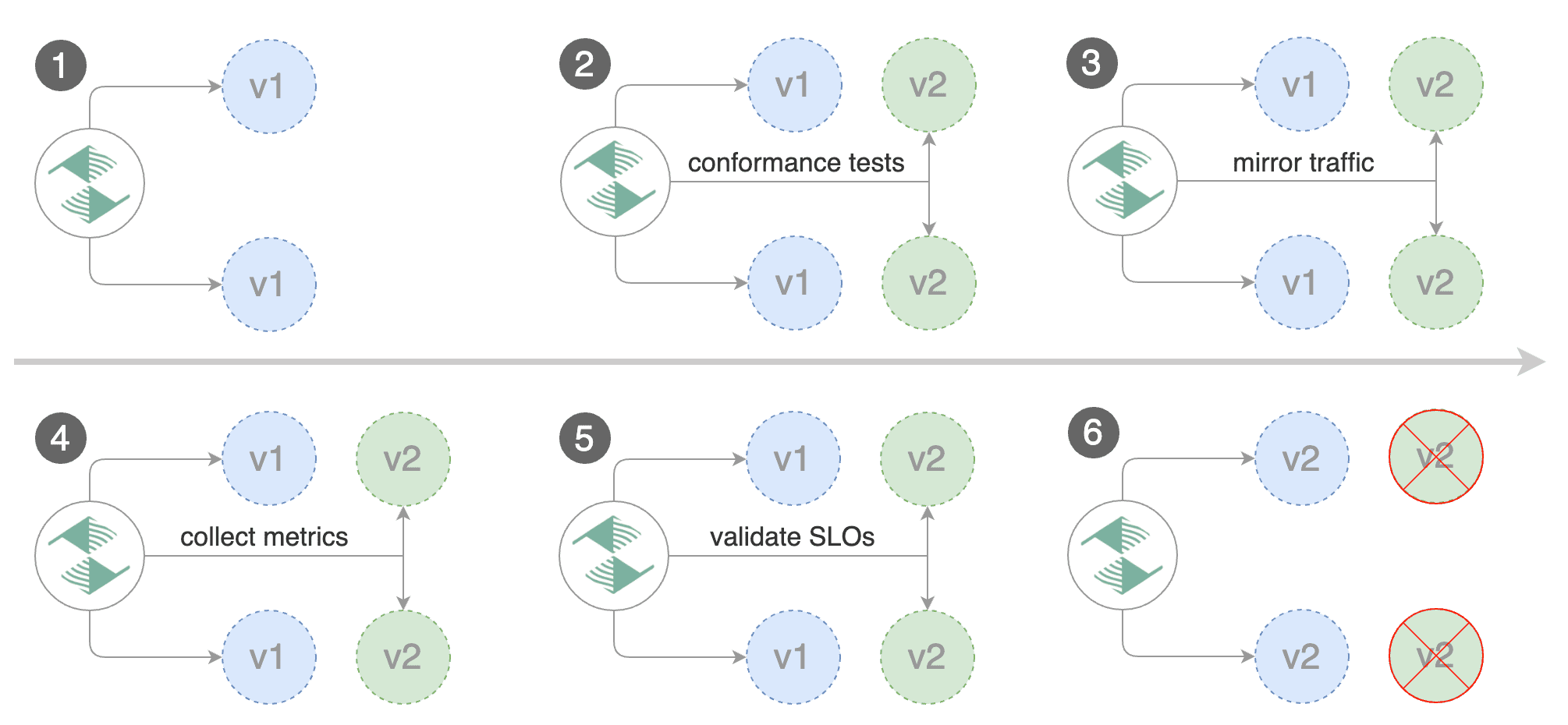
For applications that perform read operations, Flagger can be configured to do B/G tests with traffic mirroring.
|
|
|
|
> **Note:** Traffic mirroring requires a Gateway API implementation that supports
|
|
> the [`RequestMirror`](https://gateway-api.sigs.k8s.io/guides/http-request-mirroring/) filter.
|
|
|
|
You can enable mirroring by replacing `stepWeight` with `iterations` and by setting `analysis.mirror` to `true`:
|
|
|
|
```yaml
|
|
apiVersion: flagger.app/v1beta1
|
|
kind: Canary
|
|
metadata:
|
|
name: podinfo
|
|
namespace: test
|
|
spec:
|
|
# deployment reference
|
|
targetRef:
|
|
apiVersion: apps/v1
|
|
kind: Deployment
|
|
name: podinfo
|
|
service:
|
|
# service port number
|
|
port: 9898
|
|
# container port number or name (optional)
|
|
targetPort: 9898
|
|
# Gateway API HTTPRoute host names
|
|
hosts:
|
|
- www.example.com
|
|
# Reference to the Gateway that the generated HTTPRoute would attach to.
|
|
gatewayRefs:
|
|
- name: gateway
|
|
namespace: istio-ingress
|
|
analysis:
|
|
# schedule interval
|
|
interval: 1m
|
|
# max number of failed metric checks before rollback
|
|
threshold: 5
|
|
# total number of iterations
|
|
iterations: 10
|
|
# enable traffic shadowing
|
|
mirror: true
|
|
# Gateway API HTTPRoute host names
|
|
metrics:
|
|
- name: request-success-rate
|
|
thresholdRange:
|
|
min: 99
|
|
interval: 1m
|
|
- name: request-duration
|
|
thresholdRange:
|
|
max: 500
|
|
interval: 1m
|
|
webhooks:
|
|
- name: load-test
|
|
url: http://flagger-loadtester.test/
|
|
timeout: 5s
|
|
metadata:
|
|
cmd: "hey -z 2m -q 10 -c 2 -host www.example.com http://gateway-istio.istio-ingress/"
|
|
```
|
|
|
|
Gateway API traffic mirroring will copy each incoming request, sending one request to the primary and one to the canary service.
|
|
The response from the primary is sent back to the user and the response from the canary is discarded.
|
|
|
|
Metrics are collected on both requests so that the deployment will only proceed if the canary metrics are within the threshold values.
|
|
|
|
The above procedures can be extended with [custom metrics](../usage/metrics.md) checks, [webhooks](../usage/webhooks.md), [manual promotion](../usage/webhooks.md#manual-gating) approval and [Slack or MS Teams](../usage/alerting.md) notifications.
|
|
|
|
## Customising the HTTPRoute
|
|
|
|
Besides the `hosts` and `gatewayRefs` fields, you can customize the generated HTTPRoute with various options
|
|
exposed under the `spec.service` field of the Canary.
|
|
|
|
### Header Manipulation
|
|
|
|
You can configure request and response header manipulation using the `spec.service.headers` field of the Canary.
|
|
|
|
> **Note:** Header manipulation requires a Gateway API implementation that supports
|
|
> the [`RequestHeaderModifier`](https://gateway-api.sigs.k8s.io/guides/http-header-modifier/) and [`ResponseHeaderModifier`](https://gateway-api.sigs.k8s.io/guides/http-header-modifier/) filters.
|
|
|
|
Example configuration:
|
|
|
|
```yaml
|
|
apiVersion: flagger.app/v1beta1
|
|
kind: Canary
|
|
metadata:
|
|
name: podinfo
|
|
namespace: test
|
|
spec:
|
|
service:
|
|
headers:
|
|
request:
|
|
add:
|
|
x-custom-header: "custom-value"
|
|
set:
|
|
x-api-version: "v1"
|
|
remove:
|
|
- x-debug-header
|
|
response:
|
|
add:
|
|
x-frame-options: "DENY"
|
|
x-content-type-options: "nosniff"
|
|
set:
|
|
cache-control: "no-cache"
|
|
remove:
|
|
- x-powered-by
|
|
```
|
|
|
|
### URL Rewriting
|
|
|
|
You can configure URL rewriting using the `spec.service.rewrite` field of the Canary to modify the path or hostname of requests.
|
|
|
|
> **Note:** URL rewriting requires a Gateway API implementation that supports
|
|
> the [`URLRewrite`](https://gateway-api.sigs.k8s.io/guides/http-redirect-rewrite/?h=urlrewrite#rewrites) filter.
|
|
|
|
Example configuration:
|
|
|
|
```yaml
|
|
apiVersion: flagger.app/v1beta1
|
|
kind: Canary
|
|
metadata:
|
|
name: podinfo
|
|
namespace: test
|
|
spec:
|
|
service:
|
|
rewrite:
|
|
# Rewrite the URI path
|
|
uri: "/v2/api"
|
|
# Optionally specify the rewrite type: "ReplaceFullPath" or "ReplacePrefixMatch"
|
|
# Defaults to "ReplaceFullPath" if not specified
|
|
type: "ReplaceFullPath"
|
|
# Rewrite the hostname/authority header
|
|
authority: "api.example.com"
|
|
```
|
|
|
|
The `type` field determines how the URI rewriting is performed:
|
|
|
|
- **ReplaceFullPath**: Replaces the entire request path with the specified `uri` value
|
|
- **ReplacePrefixMatch**: Replaces only the prefix portion of the path that was matched
|
|
|
|
Example with prefix replacement:
|
|
|
|
```yaml
|
|
apiVersion: flagger.app/v1beta1
|
|
kind: Canary
|
|
metadata:
|
|
name: podinfo
|
|
namespace: test
|
|
spec:
|
|
service:
|
|
rewrite:
|
|
uri: "/api/v2"
|
|
type: "ReplacePrefixMatch"
|
|
```
|
|
|
|
When using `ReplacePrefixMatch`, if a request comes to `/old/path`, and the HTTPRoute matches the prefix `/old`,
|
|
the request will be rewritten to `/api/v2/path`.
|
|
|
|
### CORS Policy
|
|
|
|
The cross-origin resource sharing policy can be configured the `spec.service.corsPolicy` field of the Canary.
|
|
|
|
> **Note:** Cross-origin resource sharing requires a Gateway API implementation that supports
|
|
> the [`CORS`](https://gateway-api.sigs.k8s.io/geps/gep-1767/) filter.
|
|
|
|
Example configuration:
|
|
|
|
```yaml
|
|
apiVersion: flagger.app/v1beta1
|
|
kind: Canary
|
|
metadata:
|
|
name: podinfo
|
|
namespace: test
|
|
spec:
|
|
service:
|
|
corsPolicy:
|
|
allowOrigin:
|
|
- https://foo.example
|
|
- http://foo.example
|
|
allowMethods:
|
|
- GET
|
|
- PUT
|
|
- POST
|
|
- DELETE
|
|
- PATCH
|
|
- OPTIONS
|
|
allowCredentials: true
|
|
allowHeaders:
|
|
- Keep-Alive
|
|
- User-Agent
|
|
- X-Requested-With
|
|
- If-Modified-Since
|
|
- Cache-Control
|
|
- Content-Type
|
|
- Authorization
|
|
maxAge: 24h
|
|
```
|