mirror of
https://github.com/fluxcd/flagger.git
synced 2026-04-15 06:57:34 +00:00

461 lines
10 KiB
Markdown
461 lines
10 KiB
Markdown
# Install Istio
|
||
|
||
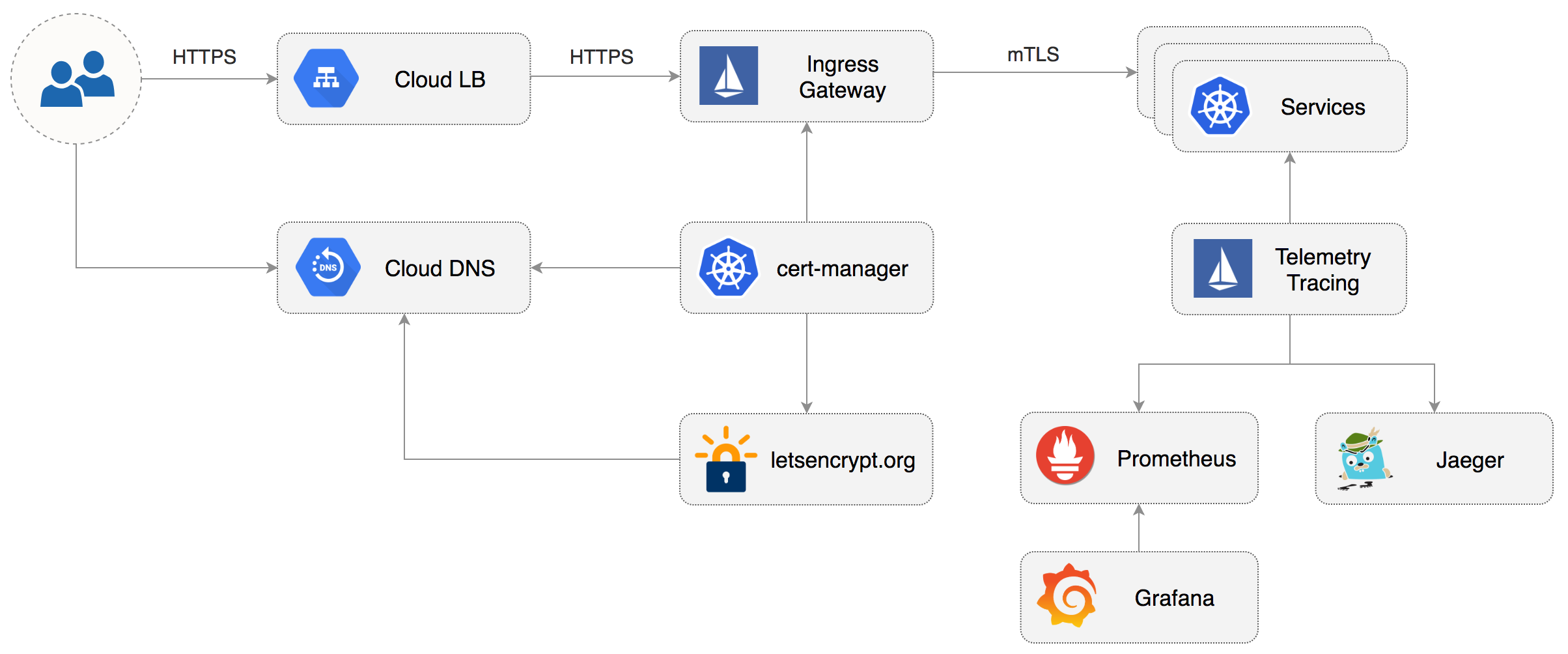
This guide walks you through setting up Istio with Jaeger, Prometheus, Grafana and
|
||
Let’s Encrypt TLS for ingress gateway on Google Kubernetes Engine.
|
||
|
||
|
||
|
||
### Prerequisites
|
||
|
||
You will be creating a cluster on Google’s Kubernetes Engine \(GKE\),
|
||
if you don’t have an account you can sign up [here](https://cloud.google.com/free/) for free credits.
|
||
|
||
Login into GCP, create a project and enable billing for it.
|
||
|
||
Install the [gcloud](https://cloud.google.com/sdk/) command line utility and configure your project with `gcloud init`.
|
||
|
||
Set the default project \(replace `PROJECT_ID` with your own project\):
|
||
|
||
```text
|
||
gcloud config set project PROJECT_ID
|
||
```
|
||
|
||
Set the default compute region and zone:
|
||
|
||
```text
|
||
gcloud config set compute/region europe-west3
|
||
gcloud config set compute/zone europe-west3-a
|
||
```
|
||
|
||
Enable the Kubernetes and Cloud DNS services for your project:
|
||
|
||
```text
|
||
gcloud services enable container.googleapis.com
|
||
gcloud services enable dns.googleapis.com
|
||
```
|
||
|
||
Install the `kubectl` command-line tool:
|
||
|
||
```text
|
||
gcloud components install kubectl
|
||
```
|
||
|
||
Install the `helm` command-line tool:
|
||
|
||
```text
|
||
brew install kubernetes-helm
|
||
```
|
||
|
||
### GKE cluster setup
|
||
|
||
Create a cluster with three nodes using the latest Kubernetes version:
|
||
|
||
```bash
|
||
k8s_version=$(gcloud container get-server-config --format=json \
|
||
| jq -r '.validNodeVersions[0]')
|
||
|
||
gcloud container clusters create istio \
|
||
--cluster-version=${k8s_version} \
|
||
--zone=europe-west3-a \
|
||
--num-nodes=3 \
|
||
--machine-type=n1-highcpu-4 \
|
||
--preemptible \
|
||
--no-enable-cloud-logging \
|
||
--disk-size=30 \
|
||
--enable-autorepair \
|
||
--scopes=gke-default,compute-rw,storage-rw
|
||
```
|
||
|
||
The above command will create a default node pool consisting of `n1-highcpu-4` \(vCPU: 4, RAM 3.60GB, DISK: 30GB\)
|
||
preemptible VMs. Preemptible VMs are up to 80% cheaper than regular instances and are terminated and replaced
|
||
after a maximum of 24 hours.
|
||
|
||
Set up credentials for `kubectl`:
|
||
|
||
```bash
|
||
gcloud container clusters get-credentials istio -z=europe-west3-a
|
||
```
|
||
|
||
Create a cluster admin role binding:
|
||
|
||
```bash
|
||
kubectl create clusterrolebinding "cluster-admin-$(whoami)" \
|
||
--clusterrole=cluster-admin \
|
||
--user="$(gcloud config get-value core/account)"
|
||
```
|
||
|
||
Validate your setup with:
|
||
|
||
```bash
|
||
kubectl get nodes -o wide
|
||
```
|
||
|
||
### Cloud DNS setup
|
||
|
||
You will need an internet domain and access to the registrar to change the name servers to Google Cloud DNS.
|
||
|
||
Create a managed zone named `istio` in Cloud DNS \(replace `example.com` with your domain\):
|
||
|
||
```bash
|
||
gcloud dns managed-zones create \
|
||
--dns-name="example.com." \
|
||
--description="Istio zone" "istio"
|
||
```
|
||
|
||
Look up your zone's name servers:
|
||
|
||
```bash
|
||
gcloud dns managed-zones describe istio
|
||
```
|
||
|
||
Update your registrar's name server records with the records returned by the above command.
|
||
|
||
Wait for the name servers to change \(replace `example.com` with your domain\):
|
||
|
||
```bash
|
||
watch dig +short NS example.com
|
||
```
|
||
|
||
Create a static IP address named `istio-gateway-ip` in the same region as your GKE cluster:
|
||
|
||
```bash
|
||
gcloud compute addresses create istio-gateway-ip --region europe-west3
|
||
```
|
||
|
||
Find the static IP address:
|
||
|
||
```bash
|
||
gcloud compute addresses describe istio-gateway-ip --region europe-west3
|
||
```
|
||
|
||
Create the following DNS records \(replace `example.com` with your domain and set your Istio Gateway IP\):
|
||
|
||
```bash
|
||
DOMAIN="example.com"
|
||
GATEWAYIP="35.198.98.90"
|
||
|
||
gcloud dns record-sets transaction start --zone=istio
|
||
|
||
gcloud dns record-sets transaction add --zone=istio \
|
||
--name="${DOMAIN}" --ttl=300 --type=A ${GATEWAYIP}
|
||
|
||
gcloud dns record-sets transaction add --zone=istio \
|
||
--name="www.${DOMAIN}" --ttl=300 --type=A ${GATEWAYIP}
|
||
|
||
gcloud dns record-sets transaction add --zone=istio \
|
||
--name="*.${DOMAIN}" --ttl=300 --type=A ${GATEWAYIP}
|
||
|
||
gcloud dns record-sets transaction execute --zone istio
|
||
```
|
||
|
||
Verify that the wildcard DNS is working \(replace `example.com` with your domain\):
|
||
|
||
```bash
|
||
watch host test.example.com
|
||
```
|
||
|
||
### Install Istio with Helm
|
||
|
||
Download the latest Istio release:
|
||
|
||
```bash
|
||
curl -L https://git.io/getLatestIstio | sh -
|
||
```
|
||
|
||
Navigate to `istio-x.x.x` dir and copy the Istio CLI in your bin:
|
||
|
||
```bash
|
||
cd istio-x.x.x/
|
||
sudo cp ./bin/istioctl /usr/local/bin/istioctl
|
||
```
|
||
|
||
Apply the Istio CRDs:
|
||
|
||
```bash
|
||
kubectl apply -f ./install/kubernetes/helm/istio/templates/crds.yaml
|
||
```
|
||
|
||
Create a service account and a cluster role binding for Tiller:
|
||
|
||
```bash
|
||
kubectl apply -f ./install/kubernetes/helm/helm-service-account.yaml
|
||
```
|
||
|
||
Deploy Tiller in the `kube-system` namespace:
|
||
|
||
```bash
|
||
helm init --service-account tiller
|
||
```
|
||
|
||
Find the GKE IP ranges:
|
||
|
||
```bash
|
||
gcloud container clusters describe istio --zone=europe-west3-a \
|
||
| grep -e clusterIpv4Cidr -e servicesIpv4Cidr
|
||
```
|
||
|
||
You'll be using the IP ranges to allow unrestricted egress traffic for services running inside the service mesh.
|
||
|
||
Configure Istio with Prometheus, Jaeger, and cert-manager:
|
||
|
||
```yaml
|
||
global:
|
||
nodePort: false
|
||
proxy:
|
||
# replace with your GKE IP ranges
|
||
includeIPRanges: "10.28.0.0/14,10.7.240.0/20"
|
||
|
||
sidecarInjectorWebhook:
|
||
enabled: true
|
||
enableNamespacesByDefault: false
|
||
|
||
gateways:
|
||
enabled: true
|
||
istio-ingressgateway:
|
||
replicaCount: 2
|
||
autoscaleMin: 2
|
||
autoscaleMax: 3
|
||
# replace with your Istio Gateway IP
|
||
loadBalancerIP: "35.198.98.90"
|
||
type: LoadBalancer
|
||
|
||
pilot:
|
||
enabled: true
|
||
replicaCount: 1
|
||
autoscaleMin: 1
|
||
autoscaleMax: 1
|
||
resources:
|
||
requests:
|
||
cpu: 500m
|
||
memory: 1024Mi
|
||
|
||
grafana:
|
||
enabled: true
|
||
security:
|
||
enabled: true
|
||
adminUser: admin
|
||
# change the password
|
||
adminPassword: admin
|
||
|
||
prometheus:
|
||
enabled: true
|
||
|
||
servicegraph:
|
||
enabled: true
|
||
|
||
tracing:
|
||
enabled: true
|
||
jaeger:
|
||
tag: 1.7
|
||
|
||
certmanager:
|
||
enabled: true
|
||
```
|
||
|
||
Save the above file as `my-istio.yaml` and install Istio with Helm:
|
||
|
||
```bash
|
||
helm upgrade --install istio ./install/kubernetes/helm/istio \
|
||
--namespace=istio-system \
|
||
-f ./my-istio.yaml
|
||
```
|
||
|
||
Verify that Istio workloads are running:
|
||
|
||
```text
|
||
kubectl -n istio-system get pods
|
||
```
|
||
|
||
### Configure Istio Gateway with LE TLS
|
||
|
||
|
||
|
||
Create a Istio Gateway in istio-system namespace with HTTPS redirect:
|
||
|
||
```yaml
|
||
apiVersion: networking.istio.io/v1alpha3
|
||
kind: Gateway
|
||
metadata:
|
||
name: public-gateway
|
||
namespace: istio-system
|
||
spec:
|
||
selector:
|
||
istio: ingressgateway
|
||
servers:
|
||
- port:
|
||
number: 80
|
||
name: http
|
||
protocol: HTTP
|
||
hosts:
|
||
- "*"
|
||
tls:
|
||
httpsRedirect: true
|
||
- port:
|
||
number: 443
|
||
name: https
|
||
protocol: HTTPS
|
||
hosts:
|
||
- "*"
|
||
tls:
|
||
mode: SIMPLE
|
||
privateKey: /etc/istio/ingressgateway-certs/tls.key
|
||
serverCertificate: /etc/istio/ingressgateway-certs/tls.crt
|
||
```
|
||
|
||
Save the above resource as istio-gateway.yaml and then apply it:
|
||
|
||
```text
|
||
kubectl apply -f ./istio-gateway.yaml
|
||
```
|
||
|
||
Create a service account with Cloud DNS admin role \(replace `my-gcp-project` with your project ID\):
|
||
|
||
```bash
|
||
GCP_PROJECT=my-gcp-project
|
||
|
||
gcloud iam service-accounts create dns-admin \
|
||
--display-name=dns-admin \
|
||
--project=${GCP_PROJECT}
|
||
|
||
gcloud iam service-accounts keys create ./gcp-dns-admin.json \
|
||
--iam-account=dns-admin@${GCP_PROJECT}.iam.gserviceaccount.com \
|
||
--project=${GCP_PROJECT}
|
||
|
||
gcloud projects add-iam-policy-binding ${GCP_PROJECT} \
|
||
--member=serviceAccount:dns-admin@${GCP_PROJECT}.iam.gserviceaccount.com \
|
||
--role=roles/dns.admin
|
||
```
|
||
|
||
Create a Kubernetes secret with the GCP Cloud DNS admin key:
|
||
|
||
```bash
|
||
kubectl create secret generic cert-manager-credentials \
|
||
--from-file=./gcp-dns-admin.json \
|
||
--namespace=istio-system
|
||
```
|
||
|
||
Create a letsencrypt issuer for CloudDNS \(replace `email@example.com` with a valid email address and
|
||
`my-gcp-project`with your project ID\):
|
||
|
||
```yaml
|
||
apiVersion: v1alpha2
|
||
kind: Issuer
|
||
metadata:
|
||
name: letsencrypt-prod
|
||
namespace: istio-system
|
||
spec:
|
||
acme:
|
||
server: https://acme-v02.api.letsencrypt.org/directory
|
||
email: email@example.com
|
||
privateKeySecretRef:
|
||
name: letsencrypt-prod
|
||
dns01:
|
||
providers:
|
||
- name: cloud-dns
|
||
clouddns:
|
||
serviceAccountSecretRef:
|
||
name: cert-manager-credentials
|
||
key: gcp-dns-admin.json
|
||
project: my-gcp-project
|
||
```
|
||
|
||
Save the above resource as letsencrypt-issuer.yaml and then apply it:
|
||
|
||
```text
|
||
kubectl apply -f ./letsencrypt-issuer.yaml
|
||
```
|
||
|
||
Create a wildcard certificate \(replace `example.com` with your domain\):
|
||
|
||
```yaml
|
||
apiVersion: v1alpha2
|
||
kind: Certificate
|
||
metadata:
|
||
name: istio-gateway
|
||
namespace: istio-system
|
||
spec:
|
||
secretname: istio-ingressgateway-certs
|
||
issuerRef:
|
||
name: letsencrypt-prod
|
||
commonName: "*.example.com"
|
||
acme:
|
||
config:
|
||
- dns01:
|
||
provider: cloud-dns
|
||
domains:
|
||
- "*.example.com"
|
||
- "example.com"
|
||
```
|
||
|
||
Save the above resource as of-cert.yaml and then apply it:
|
||
|
||
```text
|
||
kubectl apply -f ./of-cert.yaml
|
||
```
|
||
|
||
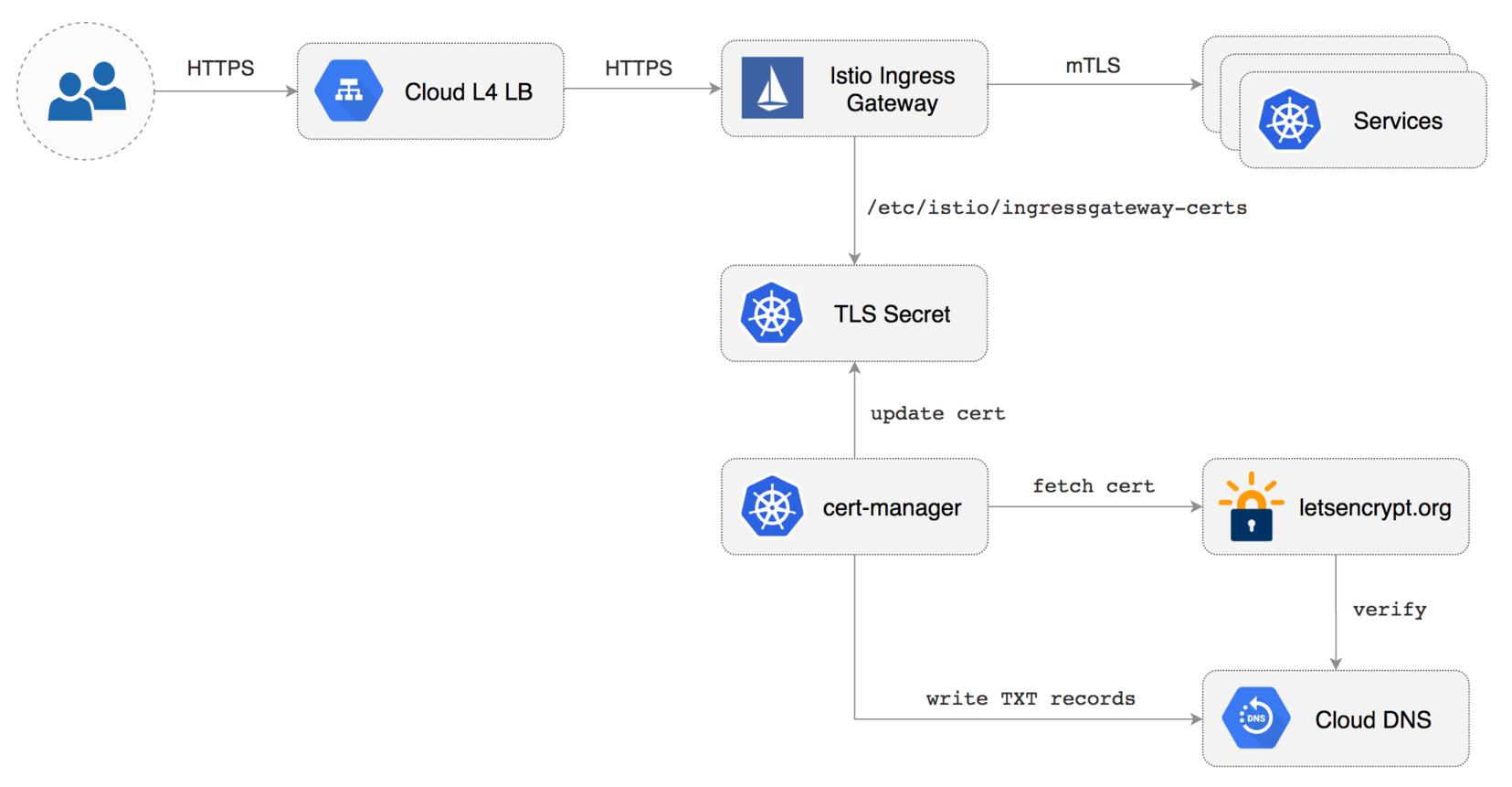
In a couple of seconds cert-manager should fetch a wildcard certificate from letsencrypt.org:
|
||
|
||
```text
|
||
kubectl -n istio-system logs deployment/certmanager -f
|
||
|
||
Certificate issued successfully
|
||
Certificate istio-system/istio-gateway scheduled for renewal in 1438 hours
|
||
```
|
||
|
||
Recreate Istio ingress gateway pods:
|
||
|
||
```bash
|
||
kubectl -n istio-system delete pods -l istio=ingressgateway
|
||
```
|
||
|
||
Note that Istio gateway doesn't reload the certificates from the TLS secret on cert-manager renewal.
|
||
Since the GKE cluster is made out of preemptible VMs the gateway pods will be replaced once every 24h,
|
||
if your not using preemptible nodes then you need to manually kill the gateway pods every two months
|
||
before the certificate expires.
|
||
|
||
### Expose services outside the service mesh
|
||
|
||
In order to expose services via the Istio Gateway you have to create a Virtual Service attached to Istio Gateway.
|
||
|
||
Create a virtual service in `istio-system` namespace for Grafana \(replace `example.com` with your domain\):
|
||
|
||
```yaml
|
||
apiVersion: networking.istio.io/v1alpha3
|
||
kind: VirtualService
|
||
metadata:
|
||
name: grafana
|
||
namespace: istio-system
|
||
spec:
|
||
hosts:
|
||
- "grafana.example.com"
|
||
gateways:
|
||
- public-gateway.istio-system.svc.cluster.local
|
||
http:
|
||
- route:
|
||
- destination:
|
||
host: grafana
|
||
timeout: 30s
|
||
```
|
||
|
||
Save the above resource as grafana-virtual-service.yaml and then apply it:
|
||
|
||
```bash
|
||
kubectl apply -f ./grafana-virtual-service.yaml
|
||
```
|
||
|
||
Navigate to `http://grafana.example.com` in your browser and you should be redirected to the HTTPS version.
|
||
|
||
Check that HTTP2 is enabled:
|
||
|
||
```bash
|
||
curl -I --http2 https://grafana.example.com
|
||
|
||
HTTP/2 200
|
||
content-type: text/html; charset=UTF-8
|
||
x-envoy-upstream-service-time: 3
|
||
server: envoy
|
||
```
|
||
|
||
|
||
|