Compare commits
860 Commits
| Author | SHA1 | Date | |
|---|---|---|---|

|
3f06a0b344 | ||
|
|
cf6e241fa5 | ||
|
|
8128ab3785 | ||
|
|
c0a00e6970 | ||
|
|
2c3259bdb3 | ||
|
|
3d40ee1242 | ||
|
|
dd89cd5625 | ||
|
|
af1e210f08 | ||

|
4932527464 | ||
|
|
862c63e8c3 | ||
|
|
f946e0e9e8 | ||

|
0a2169965a | ||
|
|
169aea200c | ||

|
785db00796 | ||
|
|
a88c056e04 | ||
|
|
6584f452b7 | ||
|
|
16f8e15c98 | ||

|
5f8aeb878b | ||
|
|
d618cfcedd | ||
|
|
471da0abba | ||
|
|
b562ddd3e2 | ||
|
|
82e5e3ad93 | ||
|
|
fa30864580 | ||
|
|
dc9fc923e4 | ||
|
|
6f42af4ade | ||
|
|
28afd0acd6 | ||
|
|
0810972d31 | ||
|
|
64f393fd60 | ||
|
|
a2d147387c | ||
|
|
3a887bd79a | ||
|
|
9f5ad2ec23 | ||
|
|
d1de1d788d | ||
|
|
7e95b1a8a5 | ||
|
|
83b5800009 | ||
|
|
daab49730e | ||
|
|
825b5d103a | ||
|
|
eb8026e22b | ||
|
|
e9b8dee726 | ||
|
|
37621dead8 | ||
|
|
1f2c464b45 | ||
|
|
09b0937e18 | ||
|
|
0d0d0ef811 | ||
|
|
8935ef5e6a | ||
|
|
61eee5750b | ||

|
ad8e7d613a | ||
|
|
3e87c153db | ||
|
|
9189f17ff8 | ||
|
|
749e099ff0 | ||
|
|
63ec848b38 | ||
|
|
8c078e898b | ||
|
|
e784f88045 | ||
|
|
c5369e9113 | ||

|
d196fae71c | ||
|
|
d7bf6a2474 | ||

|
d796c206d3 | ||
|
|
55db424082 | ||
|
|
750a1e53aa | ||
|
|
450abb60b9 | ||
|
|
ce70a50047 | ||
|
|
f465a6cdda | ||
|
|
c1f39443d6 | ||
|
|
6112ad9c54 | ||
|
|
8dbc72d7ff | ||
|
|
dc6dd0661a | ||
|
|
475aff81ae | ||

|
968a193f42 | ||
|
|
22a9fd3d12 | ||
|
|
8ada61edd1 | ||
|
|
cadce1a2c2 | ||
|
|
3a7fd48d3a | ||
|
|
15ef64eb14 | ||
|
|
c0e2096f92 | ||
|
|
e4c05c3034 | ||
|
|
794fea8cc6 | ||

|
56b6339f8c | ||
|
|
788e692e90 | ||
|
|
a517309557 | ||

|
ecdde862bf | ||
|
|
0bcc814154 | ||
|
|
aaafdca6ca | ||

|
22c96c5af5 | ||
|
|
04a1f2fa68 | ||
|
|
efc588001f | ||
|
|
d543c8ef95 | ||
|
|
da7015397c | ||
|
|
fe32b2162d | ||

|
68d306ca83 | ||
|
|
7ab0eb14ea | ||
|
|
0eaf054e8b | ||
|
|
a312f6a5e1 | ||
|
|
00fcf991a6 | ||
|
|
8dbd8d509b | ||

|
ff25d1ee92 | ||
|
|
2d3f039d80 | ||
|
|
69cb3cd881 | ||
|
|
225e968288 | ||
|
|
f0ffb67cff | ||
|
|
dc8fe81c91 | ||
|
|
f29c74b957 | ||
|
|
dfc0c96824 | ||
|
|
1093c64d5a | ||
|
|
993385036c | ||
|
|
0c8b5048dd | ||
|
|
c90da790c5 | ||
|
|
cef1bb8e67 | ||
|
|
34b544bb47 | ||
|
|
2fd45cd0d8 | ||
|
|
aec43794d8 | ||
|
|
d35ecbeba8 | ||
|
|
e1b9d64379 | ||
|
|
137d31ac79 | ||
|
|
b30855480f | ||
|
|
cc08d31622 | ||
|
|
d021e25757 | ||
|
|
7a0e95b498 | ||

|
c812dcffc1 | ||
|
|
e1c4257b68 | ||

|
a31a46f375 | ||
|
|
a41a7bb6a4 | ||
|
|
2992a99bbc | ||
|
|
eb302fe16e | ||
|
|
2e4fe73d34 | ||
|
|
aad4f54afa | ||
|
|
311cb5f2fd | ||
|
|
388c0ef344 | ||
|
|
3feaabea76 | ||
|
|
ddc337b01a | ||
|
|
29c94d5f5e | ||
|
|
7af4498fd4 | ||
|
|
7cce4fd6d8 | ||
|
|
5a809d7b3a | ||
|
|
1802c4b7be | ||
|
|
084daaf3f9 | ||
|
|
7fc007a123 | ||
|
|
6359d5ea19 | ||
|
|
1de46a0bd3 | ||

|
a8769f8cf5 | ||
|
|
67bc27f515 | ||

|
dfb5d0847a | ||
|
|
ee37069385 | ||

|
e5c0ffb693 | ||
|
|
ba7fedf762 | ||
|
|
b25e12d45d | ||
|
|
2944581a70 | ||
|
|
45038cbf9f | ||

|
0bdffc9e10 | ||

|
ca6867a6b1 | ||
|
|
eee3607ab7 | ||
|
|
17075e9006 | ||
|
|
cf037c60ab | ||
|
|
27f354cc24 | ||
|
|
3d583068aa | ||
|
|
00fd1f93a9 | ||
|
|
440b88103a | ||

|
8747d15417 | ||
|
|
ac3140b8a2 | ||

|
310ca7eae8 | ||
|
|
6d6fc94855 | ||

|
7d29af4f41 | ||
|
|
2b80c4756c | ||
|
|
879ea26cf6 | ||

|
7b7cdcf7cd | ||

|
93a3aaa86f | ||
|
|
d960666b68 | ||

|
d2564874ab | ||
|
|
e71ce18b9d | ||
|
|
59849f6c05 | ||
|
|
5a6e2d165b | ||
|
|
6384bfb4a2 | ||
|
|
4303f8edfd | ||
|
|
25754a3f03 | ||
|
|
b71f0ce721 | ||

|
9055f96eeb | ||
|
|
073ac2206f | ||

|
3814e8f19d | ||
|
|
1e5d83ad21 | ||
|
|
68f0920548 | ||
|
|
0d25d84230 | ||
|
|
15a6f742e0 | ||
|
|
495a5b24f4 | ||
|
|
956daea9dd | ||
|
|
7b17286b96 | ||
|
|
e535b01de1 | ||

|
d151a1b5e4 | ||
|
|
7242fa7d5c | ||
|
|
9d4ebd9ddd | ||
|
|
b2e713dbc1 | ||
|
|
8bcc7bf9af | ||
|
|
3078f96830 | ||
|
|
8708e35287 | ||

|
a8b96f053d | ||
|
|
a487357bd5 | ||

|
e8aba087ac | ||
|
|
5b7a679944 | ||
|
|
8229852585 | ||
|
|
f1def19f25 | ||
|
|
44363d5d99 | ||
|
|
f3f62667bf | ||
|
|
3d8615735b | ||
|
|
d1b6b36bcd | ||
|
|
e4755a4567 | ||

|
2ced721cf1 | ||
|
|
cf267d0bbd | ||

|
49d59f3b45 | ||
|
|
699ea2b8aa | ||
|
|
064d867510 | ||
|
|
5f63c4ae63 | ||

|
4ebb38743d | ||
|
|
01a7f3606c | ||

|
699c577fa6 | ||
|
|
6879038a63 | ||
|
|
cc2f9456cf | ||
|
|
7994989b29 | ||
|
|
1206132e0c | ||
|
|
74cfbda40c | ||
|
|
1266ff48d8 | ||
|
|
b1315679b8 | ||
|
|
859fb7e160 | ||
|
|
32077636ff | ||
|
|
e263d6a169 | ||

|
8d517799b5 | ||
|
|
a89cd6d3ba | ||
|
|
4c2de0c716 | ||
|
|
059a304a07 | ||
|
|
317d53a71f | ||
|
|
202b6e7eb1 | ||
|
|
e59e3aedd4 | ||

|
2b45c2013c | ||
|
|
6786668684 | ||
|
|
27eb21ecc8 | ||
|
|
e7d8adecb4 | ||
|
|
aa574d469e | ||
|
|
5ba20c254a | ||
|
|
bb2cf39393 | ||
|
|
05d08d3ff1 | ||
|
|
7ec3774172 | ||
|
|
e9ffef29f6 | ||
|
|
64035b4942 | ||
|
|
925cc37c8f | ||
|
|
1574e29376 | ||
|
|
4a34158587 | ||
|
|
534196adde | ||
|
|
57bf2ab7d1 | ||
|
|
c65d072249 | ||

|
a50d7de86d | ||
|
|
e365c21322 | ||
|
|
7ce679678f | ||

|
685c816a12 | ||

|
5d3ab056f0 | ||
|
|
2587a3d3f1 | ||
|
|
58270dd4b9 | ||
|
|
86081708a4 | ||
|
|
686e8a3e8b | ||
|
|
0aecddb00e | ||
|
|
26518cecbf | ||
|
|
9d1db87592 | ||
|
|
e352010bfd | ||
|
|
58267752b1 | ||
|
|
2dd48c6e79 | ||

|
6c29c21184 | ||
|
|
85fe251991 | ||
|
|
69861e0c8a | ||
|
|
e440be17ae | ||
|
|
ce52408bbc | ||
|
|
badf7b9a4f | ||
|
|
3e9fe97ba3 | ||
|
|
ec7066b31b | ||
|
|
ec74dc5a33 | ||
|
|
cbdc2c5a7c | ||
|
|
228fbeeda4 | ||
|
|
b0d9825afa | ||
|
|
7509264d73 | ||
|
|
f08725d661 | ||
|
|
f2a9a8d645 | ||
|
|
e799030ae3 | ||
|
|
ec0657f436 | ||
|
|
fce46e26d4 | ||

|
e015a409fe | ||
|
|
82ff90ce26 | ||

|
63edc627ad | ||
|
|
c2b4287ce1 | ||
|
|
5b61f15f95 | ||
|
|
9c815f2252 | ||
|
|
d16c9696c3 | ||
|
|
14ccda5506 | ||
|
|
a496b99d6e | ||
|
|
882286dce7 | ||

|
8aa9ca92e3 | ||
|
|
52dd8f8c14 | ||

|
4d28b9074b | ||
|
|
381c19b952 | ||
|
|
50f9255af2 | ||
|
|
a7df3457ad | ||
|
|
647f624554 | ||
|
|
3d3e051f03 | ||
|
|
4c0b2beb63 | ||
|
|
ec44f64465 | ||
|
|
19d4e521a3 | ||
|
|
85a3b7c388 | ||
|
|
26ec719c67 | ||
|
|
66364bb2c9 | ||
|
|
f9f8d7e71e | ||
|
|
bdbd1fb1f0 | ||
|
|
b3112a53f1 | ||
|
|
f1f4e68673 | ||
|
|
9b56445621 | ||
|
|
f5f3d92d3d | ||
|
|
4d074799ca | ||
|
|
d38a2406a7 | ||
|
|
25ccfca835 | ||
|
|
487b6566ee | ||
|
|
14caeb12ad | ||
|
|
cf8fcd0539 | ||
|
|
d8387a351e | ||
|
|
300cd24493 | ||
|
|
fb66d24f89 | ||
|
|
f1fc8c067e | ||
|
|
da1ee05c0a | ||
|
|
57099ecd43 | ||
|
|
8c5b41bbe6 | ||
|
|
7bc716508c | ||
|
|
d82d9765e1 | ||
|
|
74e570c198 | ||
|
|
6adf51083e | ||
|
|
a5be82a7d3 | ||
|
|
83693668ed | ||
|
|
c2929694a6 | ||
|
|
82db9ff213 | ||
|
|
5e853bb589 | ||
|
|
9e1fad3947 | ||
|
|
a4f5a983ba | ||
|
|
08d7520458 | ||
|
|
283de16660 | ||
|
|
5e47ae287b | ||
|
|
e7e155048d | ||
|
|
8197073cf0 | ||
|
|
310111bb8d | ||

|
3dd667f3b3 | ||
|
|
e06334cd12 | ||
|
|
8d8b99dc78 | ||

|
3418488902 | ||
|
|
b96f6f0920 | ||
|
|
e593f2e258 | ||
|
|
7b6c37ea1f | ||
|
|
4dbeec02c8 | ||
|
|
1b2df99799 | ||

|
6d72050e81 | ||

|
b97a87a1b4 | ||
|
|
89b0487376 | ||

|
0ae53e415c | ||
|
|
915c200c7b | ||
|
|
a4941bd764 | ||
|
|
5123cbae00 | ||
|
|
135f96d507 | ||
|
|
aa08ea9160 | ||
|
|
fb80eea144 | ||
|
|
bebcf1c7d4 | ||
|
|
f39f0ef101 | ||
|
|
f2f4c8397d | ||
|
|
ae4613fa76 | ||

|
8b1155123d | ||
|
|
e65dfbb659 | ||
|
|
fe37bdd9c7 | ||
|
|
f449ee1878 | ||
|
|
47b6807471 | ||
|
|
f93708e90f | ||
|
|
5285b76746 | ||
|
|
1a4d8b965a | ||
|
|
11209fe05d | ||
|
|
09c1eec8f3 | ||
|
|
d3373447c3 | ||
|
|
d4e54fe966 | ||
|
|
a5c284cabb | ||
|
|
80bae41df4 | ||
|
|
f5c267144e | ||

|
25a33fe58f | ||

|
bab12dc99b | ||

|
1abb1f16d4 | ||
|
|
7cf843d6f4 | ||
|
|
a8444a6328 | ||
|
|
ca044d3577 | ||
|
|
76bac5d971 | ||
|
|
f68f291b3d | ||
|
|
b108672fad | ||
|
|
377a8f48e2 | ||
|
|
a098d04d64 | ||
|
|
5e4b70bd51 | ||
|
|
9ce931abb4 | ||

|
072d9b9850 | ||

|
1bb4afaeac | ||

|
4dd6102a0f | ||

|
4f64377480 | ||
|
|
31856a2f46 | ||
|
|
358391bfde | ||
|
|
7b2c005d9b | ||
|
|
c31ef8a788 | ||

|
e1bd004683 | ||
|
|
0cecab530f | ||
|
|
844090f842 | ||
|
|
aa48ad45b7 | ||

|
1967e4857b | ||

|
21923d6f87 | ||
|
|
a5912ccd89 | ||
|
|
e4252d8cbd | ||
|
|
b01e4cf9ec | ||

|
703cfd50b2 | ||
|
|
6a1b765a77 | ||
|
|
b2dc762937 | ||
|
|
498f065dea | ||
|
|
9d8941176b | ||
|
|
4d2a03c0b2 | ||
|
|
e0e2d5c0e6 | ||
|
|
9b97bff7b1 | ||
|
|
f23be1d0ec | ||
|
|
fa595e160c | ||
|
|
4ea5a48f43 | ||
|
|
6dd8a755c8 | ||
|
|
063d38dbd2 | ||
|
|
165c953239 | ||
|
|
a0fae153cf | ||
|
|
bfcf288561 | ||
|
|
560f884cc0 | ||

|
d79898848e | ||
|
|
c03d138cd0 | ||
|
|
22d192e7e3 | ||
|
|
a4babd6fc4 | ||
|
|
edd5515bd7 | ||
|
|
00dde2358a | ||
|
|
8e84262a32 | ||
|
|
541696f3f7 | ||
|
|
8051d03f08 | ||
|
|
a78d273aeb | ||
|
|
07bd3563cd | ||
|
|
8c690d1b21 | ||
|
|
a8b4e9cc6d | ||
|
|
30ed9fb75c | ||
|
|
0382d9c1ca | ||
|
|
95381e1892 | ||
|
|
7df1beef85 | ||
|
|
a1e519b352 | ||
|
|
e7f16a8c06 | ||
|
|
a3adae4af0 | ||
|
|
c7c0c76bd3 | ||
|
|
67cc965d31 | ||
|
|
d09969e3b4 | ||
|
|
41904b42f8 | ||
|
|
f638410782 | ||
|
|
48cc7995d7 | ||
|
|
793b93c665 | ||

|
e0186cbe2a | ||
|
|
2cc2b5dce8 | ||

|
ccdbbdb0ec | ||

|
13483321ac | ||
|
|
5547533197 | ||
|
|
c68998d75e | ||
|
|
20f2d3f2f9 | ||
|
|
cc7b35b44a | ||
|
|
67a2cd6a48 | ||
|
|
08deddc4fe | ||
|
|
77b2eb36a5 | ||
|
|
ab84ac207a | ||

|
8957d91e01 | ||

|
c7cbb729b7 | ||
|
|
eca6fa7958 | ||
|
|
ee535afcb9 | ||
|
|
18b64910d7 | ||
|
|
3ca75140d0 | ||
|
|
960f924448 | ||
|
|
eed128a8b4 | ||
|
|
210e21176b | ||
|
|
0a0c3835d6 | ||
|
|
531893b279 | ||
|
|
e6bb47f920 | ||
|
|
307813a628 | ||
|
|
38fc6b567f | ||
|
|
17015b23bf | ||
|
|
c9e53dd069 | ||
|
|
e26a10b481 | ||
|
|
281d869f54 | ||
|
|
91126d102d | ||
|
|
ba4646cddb | ||
|
|
438877674a | ||
|
|
da451a0cf4 | ||
|
|
5e1d00d4d2 | ||
|
|
00d54d268c | ||
|
|
174e9fdc93 | ||

|
f7fd6cce8c | ||
|
|
5dc336d609 | ||
|
|
ae6a683f23 | ||
|
|
5acf189fbe | ||
|
|
090329d0c9 | ||

|
96fd359b99 | ||
|
|
519f343fcc | ||
|
|
5d2a7ba9e7 | ||
|
|
1664ca436e | ||
|
|
84ae65c763 | ||
|
|
6085753d84 | ||

|
da706be4aa | ||
|
|
65e3bcb1d8 | ||

|
582f6eec77 | ||
|
|
4200c0159d | ||
|
|
cf8fe94fca | ||
|
|
30d553c6f3 | ||
|
|
f8f6a994dd | ||

|
085639bbde | ||
|
|
3bfa7c974d | ||
|
|
d29e475277 | ||
|
|
b7ba3ab063 | ||
|
|
9796903c78 | ||

|
2f25fab560 | ||
|
|
215c859619 | ||
|
|
7071d42152 | ||
|
|
08b1e52278 | ||
|
|
801f801e02 | ||
|
|
af5634962f | ||
|
|
fe7615afb4 | ||
|
|
fc6bedda23 | ||
|
|
a7f997c092 | ||

|
121eb767cb | ||
|
|
cd3a1d8478 | ||
|
|
6f6af25467 | ||
|
|
a0f1638f6c | ||
|
|
fc13276f0e | ||
|
|
8a0b92db19 | ||
|
|
2f0d34adb2 | ||
|
|
617f416291 | ||
|
|
7a438ad323 | ||
|
|
5776f0b64b | ||
|
|
96d190a789 | ||

|
d2038699c0 | ||
|
|
cb3b5cba90 | ||

|
8c881ab758 | ||
|
|
caefaf73aa | ||
|
|
e8d7001f5e | ||
|
|
ae0f20a445 | ||
|
|
4ddc12185f | ||
|
|
e81627a96d | ||
|
|
47be2a25f2 | ||
|
|
6832a4ffde | ||
|
|
bd58a47862 | ||
|
|
613fb92a25 | ||
|
|
250d9f2836 | ||
|
|
0cab25e44c | ||
|
|
cbf6b462e4 | ||
|
|
8695660c58 | ||
|
|
1216990f52 | ||
|
|
204228bc8f | ||
|
|
ebc26e9ea0 | ||
|
|
3c03119d2d | ||
|
|
644049092f | ||
|
|
578f447728 | ||
|
|
3bf926e419 | ||
|
|
48ee4f8bd2 | ||
|
|
b4964a0535 | ||
|
|
47ff00e9b9 | ||
|
|
6ca99a5ddb | ||
|
|
30b5054692 | ||
|
|
edf7b90c11 | ||
|
|
7f0f97d14d | ||

|
b03b75cd7e | ||
|
|
f0d2e60a9a | ||
|
|
328f1d9ea2 | ||

|
a14013f393 | ||
|
|
aef1d7904d | ||

|
dc478188c1 | ||
|
|
9fa6e775c0 | ||
|
|
584350623b | ||
|
|
919959b32c | ||

|
ec54eedf93 | ||
|
|
f311797215 | ||
|
|
059b5d0f89 | ||

|
7542640494 | ||

|
52493f181a | ||
|
|
5d95143536 | ||
|
|
a2c5861ca5 | ||
|
|
fcc07f02b0 | ||
|
|
3f43526aac | ||
|
|
cd07da9137 | ||
|
|
30ab182b2e | ||
|
|
2ddd9587f7 | ||

|
50800857b6 | ||

|
8f50521435 | ||
|
|
45ecaa9084 | ||
|
|
9c7db58d87 | ||
|
|
6b11e9714b | ||
|
|
7f5a9ed34a | ||

|
bc9a231d26 | ||

|
0bb3815f73 | ||

|
944cc8ef62 | ||
|
|
e97334d7c1 | ||
|
|
2dacf08c30 | ||
|
|
6f6590774e | ||
|
|
fe5bb3fd26 | ||
|
|
c638edd346 | ||
|
|
c02477a245 | ||
|
|
da6da9c839 | ||
|
|
d83293776d | ||

|
d5994ac127 | ||
|
|
36584826bb | ||

|
7a6fccb70d | ||

|
ca1971c085 | ||
|
|
97eaecec48 | ||
|
|
01d47808a7 | ||

|
7d2f3dea7a | ||
|
|
bce1d02b3b | ||
|
|
9a993b131d | ||
|
|
636a1d7576 | ||

|
fb621ec465 | ||
|
|
00e993c686 | ||
|
|
374a55d8f5 | ||
|
|
1e88e2fa72 | ||
|
|
a2326198f6 | ||
|
|
a0031d626a | ||

|
a2b58d59ab | ||
|
|
e8b17406b7 | ||
|
|
5245045d84 | ||
|
|
b57d39369b | ||
|
|
db72fe3d97 | ||
|
|
3a2f688c56 | ||

|
13a2a5073f | ||
|
|
418853fd0c | ||
|
|
cfb68a6e56 | ||
|
|
88b13274d7 | ||
|
|
056ba675a7 | ||

|
873b74561c | ||
|
|
8b42ce374d | ||
|
|
4871003ff1 | ||
|
|
b4e7ad5575 | ||
|
|
1a246060e2 | ||
|
|
6a3d74c645 | ||
|
|
2073bd2027 | ||
|
|
c63554c534 | ||
|
|
be8ed8a696 | ||
|
|
98530d9968 | ||
|
|
38adc513a6 | ||
|
|
eb12e3bde1 | ||
|
|
8b2839d36e | ||
|
|
f0fa2aa6bb | ||
|
|
33528b073f | ||

|
cf8783ea37 | ||
|
|
00355635f8 | ||

|
aa485f4bf1 | ||
|
|
273b05fb24 | ||
|
|
e470474d6f | ||
|
|
ddfd2fe2ec | ||
|
|
7533d0ae99 | ||
|
|
04ec7f0388 | ||
|
|
419000cc13 | ||
|
|
0dc8edb437 | ||
|
|
0759b6531b | ||
|
|
d8f984de7d | ||

|
82e490a875 | ||
|
|
c6dffd9d3e | ||
|
|
8ee3d5835a | ||
|
|
1209d7e42b | ||

|
cdc05ba506 | ||
|
|
a6fae0195f | ||
|
|
11375b6890 | ||

|
3811470ebf | ||
|
|
e2b08eb4dc | ||

|
38d3ca1022 | ||
|
|
df459c5fe6 | ||
|
|
d1d9c0e2a9 | ||
|
|
c1b1d7d448 | ||
|
|
e6b5ee2042 | ||
|
|
0170fc6166 | ||

|
4cc2ada2a2 | ||

|
a5d3e4f6a6 | ||
|
|
7c92b33886 | ||

|
0f0b9414ae | ||
|
|
6fbb67ee8c | ||
|
|
6634f1a9ae | ||
|
|
8da8138f77 | ||
|
|
588f4c477b | ||
|
|
fda1775d3a | ||
|
|
fc71d53c71 | ||
|
|
ab2a320659 | ||
|
|
7f50f81ac7 | ||
|
|
c36a13ccff | ||
|
|
47de726345 | ||
|
|
7a4fdbddc0 | ||

|
0dc6f33550 | ||
|
|
b2436eb0df | ||
|
|
cc673159d7 | ||
|
|
17c310d66d | ||

|
e7357c4e07 | ||
|
|
c44de2d7c3 | ||
|
|
d82b2c219a | ||
|
|
35c8957a55 | ||
|
|
8555f8250a | ||
|
|
8137a25b13 | ||
|
|
2db5573c0e | ||
|
|
1e382203b8 | ||
|
|
873903a4cb | ||
|
|
e5b8afc085 | ||
|
|
ded658fed9 | ||
|
|
88d8858900 | ||
|
|
737c185aa6 | ||
|
|
0006a68740 | ||
|
|
4db91f7062 | ||
|
|
b8c23967b7 | ||
|
|
2019d048a4 | ||
|
|
fe0a4eb20c | ||
|
|
a35b0e8639 | ||
|
|
4c0843f92a | ||
|
|
867c1af897 | ||
|
|
100308289f | ||
|
|
3d4739760d | ||
|
|
9f321dd685 | ||
|
|
ba6078f235 | ||
|
|
cd2f1a24bd | ||
|
|
b87a81b798 | ||
|
|
0f9dd61786 | ||
|
|
4869a9f3ae | ||

|
cd6f36302d | ||
|
|
e5fdc7a57d | ||
|
|
834a601311 | ||
|
|
a2784c533e | ||
|
|
8e3ee3439c | ||
|
|
f9d40cfe1b | ||

|
b26b49fac2 | ||
|
|
f68d647fd0 | ||
|
|
deb3fb01a2 | ||
|
|
3accd23a19 | ||
|
|
6a66113560 | ||

|
6a7f7415fa | ||
|
|
4654f2cba9 | ||
|
|
17557dc206 | ||
|
|
39a3898234 | ||
|
|
9372cf9f18 | ||
|
|
41e427d645 | ||
|
|
84ff6f7e89 | ||
|
|
a286625ad9 | ||

|
d7999e6627 | ||
|
|
41481c1ca8 | ||
|
|
e926486b0f | ||
|
|
3ad55c9750 | ||
|
|
06c4151ec4 | ||
|
|
51605d9e04 | ||
|
|
438b558809 | ||
|
|
293c44b2a5 | ||
|
|
55de241f48 | ||
|
|
fda1d32dec | ||
|
|
b8d5295690 | ||
|
|
fdc8dd8795 | ||
|
|
99b3775926 | ||
|
|
f0f44c9d35 | ||

|
d7b878f980 | ||
|
|
d8c8b90a95 | ||
|
|
8be3d82ae9 | ||
|
|
fd778be943 | ||
|
|
51936bdc89 | ||
|
|
2935fad54d | ||
|
|
c9257bdb99 | ||
|
|
90a6ace666 | ||
|
|
5eb2b5211c | ||
|
|
2ed9ddcdf8 | ||

|
92f4be79ac | ||
|
|
593f450093 | ||
|
|
d20efe4509 | ||
|
|
fcac992e71 | ||
|
|
d59663810c | ||
|
|
37abdbb774 | ||
|
|
a5909682cd | ||
|
|
927b4324ae | ||
|
|
1ae72dafca | ||

|
392865ec59 | ||
|
|
3f1af1ec85 | ||
|
|
487432d873 | ||
|
|
a1ff44454a | ||

|
05b0557430 | ||
|
|
975b84a2eb | ||
|
|
3e845f1a29 | ||

|
49a266c207 | ||
|
|
7284e55eb0 | ||
|
|
b82fd5e5a5 | ||
|
|
4b084cf685 | ||
|
|
e6c740d917 | ||
|
|
cb93a9a158 | ||
|
|
3ea65ea1ad | ||

|
70d91bb399 | ||

|
f5fa18d7ca | ||
|
|
cb24c74769 | ||
|
|
775dc91ede | ||
|
|
ffef8ba4d9 | ||
|
|
ef2df0d7bc | ||

|
f0bf5219d4 | ||
|
|
c8a1165db2 | ||
|
|
e9c3518ce7 | ||
|
|
a5ea6587c0 | ||
|
|
2792835d66 | ||
|
|
16867db1b4 | ||
|
|
164bbb884d | ||
|
|
873141b9ca | ||

|
4a66a28c01 | ||
|
|
c886c1db62 | ||
|
|
f2d121a13b | ||
|
|
f255938780 | ||
|
|
aa17367de7 | ||
|
|
d5df6df661 | ||
|
|
ec6004963c | ||
|
|
61d272dbbc | ||
|
|
6be97b3fc7 | ||
|
|
6f95275051 | ||

|
49829fc80f | ||
|
|
9112c5a064 | ||

|
73c4833697 | ||
|
|
f3ca6266ab | ||
|
|
03acb869b7 | ||
|
|
8470d728f9 | ||
|
|
71965b199b | ||
|
|
fd47d385c2 | ||
|
|
dfdd8cffd7 | ||
|
|
138c42ec3a | ||
|
|
e53723c9c2 | ||

|
03be6a58ac | ||

|
864f362f7d | ||
|
|
bfb329b2f3 | ||

|
4ce65be0c6 | ||
|
|
6ab598d71b | ||

|
06b8ab4096 | ||
|
|
596bb6487c | ||
|
|
fa33a3e4bb | ||
|
|
abecb891dd | ||
|
|
fa14cebbf4 | ||
|
|
bde24d28b7 | ||
|
|
c0b400eb7c | ||
|
|
4772c91835 | ||
|
|
6da8d919b3 | ||
|
|
10b5504446 | ||

|
76b73a6319 | ||
|
|
0bebfbbb23 | ||
|
|
8cb147920b | ||
|
|
5cb343d89f | ||
|
|
67f34f1b29 | ||
|
|
349d781085 | ||
|
|
d7524414ce | ||

|
2e6cccaa90 | ||
|
|
565b99e210 | ||
|
|
5eb37b8f76 | ||

|
41cb713367 | ||
|
|
b29fe1f13b | ||

|
339780dcc4 | ||
|
|
56c77085bf | ||
|
|
118cac5941 | ||

|
7027f18394 | ||
|
|
99a85205f0 | ||
|
|
4b8d8718c2 | ||
|
|
0c4dd94e38 | ||
|
|
52cec59ca3 | ||
|
|
2c1ba42bcc | ||
|
|
6d204b52ce | ||
|
|
55c3745ef8 | ||
|
|
c876f879de | ||
|
|
f2beab1fdc | ||
|
|
85af1abb26 | ||
|
|
4f54901d08 | ||
|
|
98b10866bf | ||
|
|
ccf4dc55e9 | ||
|
|
8ce90e1814 |
3
.clomonitor.yml
Normal file
@@ -0,0 +1,3 @@
|
||||
exemptions:
|
||||
- check: analytics
|
||||
reason: "We don't track people"
|
||||
@@ -13,3 +13,7 @@ redirects:
|
||||
usage/skipper-progressive-delivery: tutorials/skipper-progressive-delivery.md
|
||||
usage/crossover-progressive-delivery: tutorials/crossover-progressive-delivery.md
|
||||
usage/traefik-progressive-delivery: tutorials/traefik-progressive-delivery.md
|
||||
usage/osm-progressive-delivery: tutorials/osm-progressive-delivery.md
|
||||
usage/kuma-progressive-delivery: tutorials/kuma-progressive-delivery.md
|
||||
usage/gatewayapi-progressive-delivery: tutorials/gatewayapi-progressive-delivery.md
|
||||
usage/apisix-progressive-delivery: tutorials/apisix-progressive-delivery.md
|
||||
|
||||
29
.github/ISSUE_TEMPLATE/bug_report.md
vendored
Normal file
@@ -0,0 +1,29 @@
|
||||
---
|
||||
name: Bug report
|
||||
about: Create a report to help us improve this project
|
||||
title: ''
|
||||
assignees: ''
|
||||
|
||||
---
|
||||
|
||||
### Describe the bug
|
||||
|
||||
A clear and concise description of what the bug is.
|
||||
Please provide the Canary definition and Flagger logs.
|
||||
|
||||
### To Reproduce
|
||||
|
||||
<!--
|
||||
Steps to reproduce the behaviour
|
||||
-->
|
||||
|
||||
### Expected behavior
|
||||
|
||||
A clear and concise description of what you expected to happen.
|
||||
|
||||
### Additional context
|
||||
|
||||
- Flagger version:
|
||||
- Kubernetes version:
|
||||
- Service Mesh provider:
|
||||
- Ingress provider:
|
||||
2
.github/ISSUE_TEMPLATE/config.yml
vendored
Normal file
@@ -0,0 +1,2 @@
|
||||
blank_issues_enabled: true
|
||||
|
||||
19
.github/ISSUE_TEMPLATE/feature_request.md
vendored
Normal file
@@ -0,0 +1,19 @@
|
||||
---
|
||||
name: Feature Request
|
||||
about: I have a suggestion (and may want to implement it 🙂)!
|
||||
title: ''
|
||||
assignees: ''
|
||||
|
||||
---
|
||||
|
||||
## Describe the feature
|
||||
|
||||
What problem are you trying to solve?
|
||||
|
||||
### Proposed solution
|
||||
|
||||
What do you want to happen? Add any considered drawbacks.
|
||||
|
||||
### Any alternatives you've considered?
|
||||
|
||||
Is there another way to solve this problem that isn't as good a solution?
|
||||
17
.github/dependabot.yml
vendored
Normal file
@@ -0,0 +1,17 @@
|
||||
version: 2
|
||||
|
||||
updates:
|
||||
- package-ecosystem: "github-actions"
|
||||
directory: "/"
|
||||
labels: ["area/ci", "dependencies"]
|
||||
groups:
|
||||
# Group all updates together, so that they are all applied in a single PR.
|
||||
# Grouped updates are currently in beta and is subject to change.
|
||||
# xref: https://docs.github.com/en/code-security/dependabot/dependabot-version-updates/configuration-options-for-the-dependabot.yml-file#groups
|
||||
ci:
|
||||
patterns:
|
||||
- "*"
|
||||
schedule:
|
||||
# By default, this will be on a monday.
|
||||
interval: "weekly"
|
||||
|
||||
28
.github/workflows/build.yaml
vendored
@@ -9,29 +9,31 @@ on:
|
||||
branches:
|
||||
- main
|
||||
|
||||
permissions:
|
||||
contents: read
|
||||
|
||||
jobs:
|
||||
container:
|
||||
runs-on: ubuntu-latest
|
||||
build-flagger:
|
||||
runs-on:
|
||||
group: "Default Larger Runners"
|
||||
steps:
|
||||
- name: Checkout
|
||||
uses: actions/checkout@v2
|
||||
- name: Restore Go cache
|
||||
uses: actions/cache@v1
|
||||
with:
|
||||
path: ~/go/pkg/mod
|
||||
key: ${{ runner.os }}-go-${{ hashFiles('**/go.sum') }}
|
||||
restore-keys: |
|
||||
${{ runner.os }}-go-
|
||||
uses: actions/checkout@v4
|
||||
- name: Setup Go
|
||||
uses: actions/setup-go@v2
|
||||
uses: actions/setup-go@v5
|
||||
with:
|
||||
go-version: 1.15.x
|
||||
go-version: 1.21.x
|
||||
cache-dependency-path: |
|
||||
**/go.sum
|
||||
**/go.mod
|
||||
- name: Download modules
|
||||
run: |
|
||||
go mod download
|
||||
go install golang.org/x/tools/cmd/goimports
|
||||
- name: Run linters
|
||||
run: make test-fmt test-codegen
|
||||
- name: Verify CRDs
|
||||
run: make verify-crd
|
||||
- name: Run tests
|
||||
run: go test -race -coverprofile=coverage.txt -covermode=atomic $(go list ./pkg/...)
|
||||
- name: Check if working tree is dirty
|
||||
@@ -42,7 +44,7 @@ jobs:
|
||||
exit 1
|
||||
fi
|
||||
- name: Upload coverage to Codecov
|
||||
uses: codecov/codecov-action@v1
|
||||
uses: codecov/codecov-action@v4
|
||||
with:
|
||||
file: ./coverage.txt
|
||||
- name: Build container image
|
||||
|
||||
31
.github/workflows/e2e.yaml
vendored
@@ -9,25 +9,48 @@ on:
|
||||
branches:
|
||||
- main
|
||||
|
||||
permissions:
|
||||
contents: read
|
||||
|
||||
jobs:
|
||||
kind:
|
||||
runs-on: ubuntu-latest
|
||||
e2e-test:
|
||||
runs-on:
|
||||
group: "Default Larger Runners"
|
||||
strategy:
|
||||
fail-fast: false
|
||||
matrix:
|
||||
provider:
|
||||
# service mesh
|
||||
- istio
|
||||
- linkerd
|
||||
- kuma
|
||||
# ingress controllers
|
||||
- contour
|
||||
- nginx
|
||||
- traefik
|
||||
- gloo
|
||||
- skipper
|
||||
- kubernetes
|
||||
- gatewayapi
|
||||
- keda
|
||||
- apisix
|
||||
steps:
|
||||
- name: Checkout
|
||||
uses: actions/checkout@v2
|
||||
uses: actions/checkout@v4
|
||||
- name: Setup Kubernetes
|
||||
uses: engineerd/setup-kind@v0.5.0
|
||||
uses: helm/kind-action@v1.8.0
|
||||
if: matrix.provider != 'skipper'
|
||||
with:
|
||||
version: v0.20.0
|
||||
cluster_name: kind
|
||||
node_image: kindest/node:v1.27.3@sha256:9dd3392d79af1b084671b05bcf65b21de476256ad1dcc853d9f3b10b4ac52dde
|
||||
- name: Setup Kubernetes for skipper
|
||||
uses: helm/kind-action@v1.8.0
|
||||
if: matrix.provider == 'skipper'
|
||||
with:
|
||||
version: v0.20.0
|
||||
cluster_name: kind
|
||||
node_image: kindest/node:v1.24.12@sha256:0bdca26bd7fe65c823640b14253ea7bac4baad9336b332c94850f84d8102f873
|
||||
- name: Build container image
|
||||
run: |
|
||||
docker build -t test/flagger:latest .
|
||||
|
||||
20
.github/workflows/helm.yaml
vendored
Normal file
@@ -0,0 +1,20 @@
|
||||
name: helm
|
||||
|
||||
on:
|
||||
workflow_dispatch:
|
||||
|
||||
permissions:
|
||||
contents: read
|
||||
|
||||
jobs:
|
||||
release-charts:
|
||||
runs-on: ubuntu-latest
|
||||
permissions:
|
||||
contents: write
|
||||
steps:
|
||||
- uses: actions/checkout@v4
|
||||
- name: Publish Helm charts
|
||||
uses: stefanprodan/helm-gh-pages@v1.7.0
|
||||
with:
|
||||
token: ${{ secrets.GITHUB_TOKEN }}
|
||||
charts_url: https://flagger.app
|
||||
63
.github/workflows/push-ld.yml
vendored
Normal file
@@ -0,0 +1,63 @@
|
||||
name: push-ld
|
||||
on:
|
||||
workflow_dispatch:
|
||||
|
||||
env:
|
||||
IMAGE: "ghcr.io/fluxcd/flagger-loadtester"
|
||||
|
||||
permissions:
|
||||
contents: read
|
||||
|
||||
jobs:
|
||||
release-load-tester:
|
||||
runs-on:
|
||||
group: "Default Larger Runners"
|
||||
permissions:
|
||||
id-token: write
|
||||
packages: write
|
||||
steps:
|
||||
- uses: actions/checkout@v4
|
||||
- uses: sigstore/cosign-installer@v3.4.0
|
||||
- name: Prepare
|
||||
id: prep
|
||||
run: |
|
||||
VERSION=$(grep 'VERSION' cmd/loadtester/main.go | head -1 | awk '{ print $4 }' | tr -d '"')
|
||||
echo "BUILD_DATE=$(date -u +'%Y-%m-%dT%H:%M:%SZ')" >> $GITHUB_OUTPUT
|
||||
echo "VERSION=${VERSION}" >> $GITHUB_OUTPUT
|
||||
- name: Setup QEMU
|
||||
uses: docker/setup-qemu-action@v3
|
||||
- name: Setup Docker Buildx
|
||||
id: buildx
|
||||
uses: docker/setup-buildx-action@v3
|
||||
- name: Login to GitHub Container Registry
|
||||
uses: docker/login-action@v3
|
||||
with:
|
||||
registry: ghcr.io
|
||||
username: fluxcdbot
|
||||
password: ${{ secrets.GHCR_TOKEN }}
|
||||
- name: Generate image meta
|
||||
id: meta
|
||||
uses: docker/metadata-action@v5
|
||||
with:
|
||||
images: |
|
||||
${{ env.IMAGE }}
|
||||
tags: |
|
||||
type=raw,value=${{ steps.prep.outputs.VERSION }}
|
||||
- name: Publish image
|
||||
id: build-push
|
||||
uses: docker/build-push-action@v5
|
||||
with:
|
||||
push: true
|
||||
builder: ${{ steps.buildx.outputs.name }}
|
||||
context: .
|
||||
file: ./Dockerfile.loadtester
|
||||
platforms: linux/amd64,linux/arm64
|
||||
build-args: |
|
||||
REVISION=${{ github.sha }}
|
||||
tags: ${{ steps.meta.outputs.tags }}
|
||||
labels: ${{ steps.meta.outputs.labels }}
|
||||
- name: Sign image
|
||||
env:
|
||||
COSIGN_EXPERIMENTAL: 1
|
||||
run: |
|
||||
cosign sign --yes ${{ env.IMAGE }}@${{ steps.build-push.outputs.digest }}
|
||||
151
.github/workflows/release.yml
vendored
@@ -3,38 +3,70 @@ on:
|
||||
push:
|
||||
tags:
|
||||
- 'v*'
|
||||
workflow_dispatch:
|
||||
inputs:
|
||||
tag:
|
||||
description: 'image tag prefix'
|
||||
default: 'rc'
|
||||
required: true
|
||||
|
||||
permissions:
|
||||
contents: read
|
||||
|
||||
env:
|
||||
IMAGE: "ghcr.io/fluxcd/${{ github.event.repository.name }}"
|
||||
|
||||
jobs:
|
||||
build-push:
|
||||
runs-on: ubuntu-latest
|
||||
release-flagger:
|
||||
outputs:
|
||||
hashes: ${{ steps.slsa.outputs.hashes }}
|
||||
runs-on:
|
||||
group: "Default Larger Runners"
|
||||
permissions:
|
||||
contents: write # needed to write releases
|
||||
id-token: write # needed for keyless signing
|
||||
packages: write # needed for ghcr access
|
||||
steps:
|
||||
- uses: actions/checkout@v2
|
||||
- uses: actions/checkout@v4
|
||||
- uses: fluxcd/flux2/action@main
|
||||
- uses: sigstore/cosign-installer@v3.4.0
|
||||
- name: Prepare
|
||||
id: prep
|
||||
run: |
|
||||
VERSION=$(grep 'VERSION' pkg/version/version.go | awk '{ print $4 }' | tr -d '"')
|
||||
if [[ ${GITHUB_EVENT_NAME} = "workflow_dispatch" ]]; then
|
||||
VERSION="${{ github.event.inputs.tag }}-${GITHUB_SHA::8}"
|
||||
else
|
||||
VERSION=$(grep 'VERSION' pkg/version/version.go | awk '{ print $4 }' | tr -d '"')
|
||||
fi
|
||||
CHANGELOG="https://github.com/fluxcd/flagger/blob/main/CHANGELOG.md#$(echo $VERSION | tr -d '.')"
|
||||
echo ::set-output name=BUILD_DATE::$(date -u +'%Y-%m-%dT%H:%M:%SZ')
|
||||
echo ::set-output name=VERSION::${VERSION}
|
||||
echo ::set-output name=CHANGELOG::${CHANGELOG}
|
||||
echo "[CHANGELOG](${CHANGELOG})" > notes.md
|
||||
echo "BUILD_DATE=$(date -u +'%Y-%m-%dT%H:%M:%SZ')" >> $GITHUB_OUTPUT
|
||||
echo "VERSION=${VERSION}" >> $GITHUB_OUTPUT
|
||||
- name: Setup QEMU
|
||||
uses: docker/setup-qemu-action@v1
|
||||
with:
|
||||
platforms: all
|
||||
uses: docker/setup-qemu-action@v3
|
||||
- name: Setup Docker Buildx
|
||||
id: buildx
|
||||
uses: docker/setup-buildx-action@v1
|
||||
with:
|
||||
buildkitd-flags: "--debug"
|
||||
uses: docker/setup-buildx-action@v3
|
||||
- name: Login to GitHub Container Registry
|
||||
uses: docker/login-action@v1
|
||||
uses: docker/login-action@v3
|
||||
with:
|
||||
registry: ghcr.io
|
||||
username: fluxcdbot
|
||||
password: ${{ secrets.GHCR_TOKEN }}
|
||||
- name: Publish image
|
||||
uses: docker/build-push-action@v2
|
||||
- name: Generate image meta
|
||||
id: meta
|
||||
uses: docker/metadata-action@v5
|
||||
with:
|
||||
images: |
|
||||
${{ env.IMAGE }}
|
||||
tags: |
|
||||
type=raw,value=${{ steps.prep.outputs.VERSION }}
|
||||
- name: Publish image
|
||||
id: build-push
|
||||
uses: docker/build-push-action@v5
|
||||
with:
|
||||
sbom: true
|
||||
provenance: true
|
||||
push: true
|
||||
builder: ${{ steps.buildx.outputs.name }}
|
||||
context: .
|
||||
@@ -42,33 +74,76 @@ jobs:
|
||||
platforms: linux/amd64,linux/arm64,linux/arm/v7
|
||||
build-args: |
|
||||
REVISON=${{ github.sha }}
|
||||
tags: |
|
||||
ghcr.io/fluxcd/flagger:${{ steps.prep.outputs.VERSION }}
|
||||
labels: |
|
||||
org.opencontainers.image.title=${{ github.event.repository.name }}
|
||||
org.opencontainers.image.description=${{ github.event.repository.description }}
|
||||
org.opencontainers.image.url=${{ github.event.repository.html_url }}
|
||||
org.opencontainers.image.source=${{ github.event.repository.html_url }}
|
||||
org.opencontainers.image.revision=${{ github.sha }}
|
||||
org.opencontainers.image.version=${{ steps.prep.outputs.VERSION }}
|
||||
org.opencontainers.image.created=${{ steps.prep.outputs.BUILD_DATE }}
|
||||
- name: Check images
|
||||
tags: ${{ steps.meta.outputs.tags }}
|
||||
labels: ${{ steps.meta.outputs.labels }}
|
||||
- name: Sign image
|
||||
env:
|
||||
COSIGN_EXPERIMENTAL: 1
|
||||
run: |
|
||||
docker buildx imagetools inspect ghcr.io/fluxcd/flagger:${{ steps.prep.outputs.VERSION }}
|
||||
cosign sign --yes ${{ env.IMAGE }}@${{ steps.build-push.outputs.digest }}
|
||||
- name: Publish signed manifests to GHCR
|
||||
if: startsWith(github.ref, 'refs/tags/v')
|
||||
env:
|
||||
COSIGN_EXPERIMENTAL: 1
|
||||
run: |
|
||||
OCI_URL=$(flux push artifact \
|
||||
oci://ghcr.io/fluxcd/flagger-manifests:${{ steps.prep.outputs.VERSION }} \
|
||||
--path="./kustomize" \
|
||||
--source="$(git config --get remote.origin.url)" \
|
||||
--revision="${{ steps.prep.outputs.VERSION }}/$(git rev-parse HEAD)" \
|
||||
--output json | \
|
||||
jq -r '. | .repository + "@" + .digest')
|
||||
cosign sign --yes ${OCI_URL}
|
||||
- name: Publish Helm charts
|
||||
uses: stefanprodan/helm-gh-pages@v1.3.0
|
||||
if: startsWith(github.ref, 'refs/tags/v')
|
||||
uses: stefanprodan/helm-gh-pages@v1.7.0
|
||||
with:
|
||||
token: ${{ secrets.GITHUB_TOKEN }}
|
||||
charts_url: https://flagger.app
|
||||
linting: off
|
||||
- name: Create release
|
||||
uses: actions/create-release@latest
|
||||
- uses: fluxcd/pkg/actions/helm@main
|
||||
with:
|
||||
version: 3.12.3
|
||||
- name: Publish signed Helm chart to GHCR
|
||||
if: startsWith(github.ref, 'refs/tags/v')
|
||||
env:
|
||||
COSIGN_EXPERIMENTAL: 1
|
||||
run: |
|
||||
helm package charts/flagger
|
||||
helm push flagger-${{ steps.prep.outputs.VERSION }}.tgz oci://ghcr.io/fluxcd/charts |& tee .digest
|
||||
cosign sign --yes ghcr.io/fluxcd/charts/flagger@$(cat .digest | awk -F "[, ]+" '/Digest/{print $NF}')
|
||||
rm flagger-${{ steps.prep.outputs.VERSION }}.tgz
|
||||
rm .digest
|
||||
- uses: anchore/sbom-action/download-syft@v0
|
||||
- name: Create release and SBOM
|
||||
id: run-goreleaser
|
||||
uses: goreleaser/goreleaser-action@v5
|
||||
if: startsWith(github.ref, 'refs/tags/v')
|
||||
with:
|
||||
version: latest
|
||||
args: release --release-notes=notes.md --rm-dist --skip-validate
|
||||
env:
|
||||
GITHUB_TOKEN: ${{ secrets.GITHUB_TOKEN }}
|
||||
with:
|
||||
tag_name: ${{ github.ref }}
|
||||
release_name: ${{ github.ref }}
|
||||
draft: false
|
||||
prerelease: false
|
||||
body: |
|
||||
[CHANGELOG](${{ steps.prep.outputs.CHANGELOG }})
|
||||
- name: Generate SLSA metadata
|
||||
id: slsa
|
||||
if: startsWith(github.ref, 'refs/tags/v')
|
||||
env:
|
||||
ARTIFACTS: "${{ steps.run-goreleaser.outputs.artifacts }}"
|
||||
run: |
|
||||
set -euo pipefail
|
||||
|
||||
hashes=$(echo -E $ARTIFACTS | jq --raw-output '.[] | {name, "digest": (.extra.Digest // .extra.Checksum)} | select(.digest) | {digest} + {name} | join(" ") | sub("^sha256:";"")' | base64 -w0)
|
||||
echo "hashes=$hashes" >> $GITHUB_OUTPUT
|
||||
|
||||
release-provenance:
|
||||
needs: [release-flagger]
|
||||
if: startsWith(github.ref, 'refs/tags/v')
|
||||
permissions:
|
||||
actions: read # for detecting the Github Actions environment.
|
||||
id-token: write # for creating OIDC tokens for signing.
|
||||
contents: write # for uploading attestations to GitHub releases.
|
||||
uses: slsa-framework/slsa-github-generator/.github/workflows/generator_generic_slsa3.yml@v1.9.0
|
||||
with:
|
||||
provenance-name: "provenance.intoto.jsonl"
|
||||
base64-subjects: "${{ needs.release-flagger.outputs.hashes }}"
|
||||
upload-assets: true
|
||||
|
||||
42
.github/workflows/scan.yml
vendored
Normal file
@@ -0,0 +1,42 @@
|
||||
name: scan
|
||||
|
||||
on:
|
||||
push:
|
||||
branches: [ main ]
|
||||
pull_request:
|
||||
branches: [ main ]
|
||||
schedule:
|
||||
- cron: '18 10 * * 3'
|
||||
|
||||
permissions:
|
||||
contents: read
|
||||
|
||||
jobs:
|
||||
scan-fossa:
|
||||
runs-on: ubuntu-latest
|
||||
permissions:
|
||||
security-events: write
|
||||
steps:
|
||||
- uses: actions/checkout@v4
|
||||
- name: Run FOSSA scan and upload build data
|
||||
uses: fossa-contrib/fossa-action@v3
|
||||
with:
|
||||
# FOSSA Push-Only API Token
|
||||
fossa-api-key: 5ee8bf422db1471e0bcf2bcb289185de
|
||||
github-token: ${{ github.token }}
|
||||
scan-codeql:
|
||||
runs-on:
|
||||
group: "Default Larger Runners"
|
||||
permissions:
|
||||
security-events: write
|
||||
steps:
|
||||
- name: Checkout repository
|
||||
uses: actions/checkout@v4
|
||||
- name: Initialize CodeQL
|
||||
uses: github/codeql-action/init@v3
|
||||
with:
|
||||
languages: go
|
||||
- name: Autobuild
|
||||
uses: github/codeql-action/autobuild@v3
|
||||
- name: Perform CodeQL Analysis
|
||||
uses: github/codeql-action/analyze@v3
|
||||
@@ -1,14 +1,31 @@
|
||||
project_name: flagger
|
||||
|
||||
builds:
|
||||
- main: ./cmd/flagger
|
||||
binary: flagger
|
||||
ldflags: -s -w -X github.com/fluxcd/flagger/pkg/version.REVISION={{.Commit}}
|
||||
goos:
|
||||
- linux
|
||||
goarch:
|
||||
- amd64
|
||||
- skip: true
|
||||
|
||||
release:
|
||||
prerelease: auto
|
||||
|
||||
source:
|
||||
enabled: true
|
||||
name_template: "{{ .ProjectName }}_{{ .Version }}_source_code"
|
||||
|
||||
sboms:
|
||||
- id: source
|
||||
artifacts: source
|
||||
documents:
|
||||
- "{{ .ProjectName }}_{{ .Version }}_sbom.spdx.json"
|
||||
|
||||
signs:
|
||||
- cmd: cosign
|
||||
env:
|
||||
- CGO_ENABLED=0
|
||||
archives:
|
||||
- name_template: "{{ .Binary }}_{{ .Version }}_{{ .Os }}_{{ .Arch }}"
|
||||
files:
|
||||
- none*
|
||||
- COSIGN_EXPERIMENTAL=1
|
||||
certificate: '${artifact}.pem'
|
||||
args:
|
||||
- sign-blob
|
||||
- "--yes"
|
||||
- '--output-certificate=${certificate}'
|
||||
- '--output-signature=${signature}'
|
||||
- '${artifact}'
|
||||
artifacts: checksum
|
||||
output: true
|
||||
|
||||
1112
CHANGELOG.md
@@ -29,7 +29,7 @@ you can sign your commit automatically with `git commit -s`.
|
||||
|
||||
The project uses Slack: To join the conversation, simply join the
|
||||
[CNCF](https://slack.cncf.io/) Slack workspace and use the
|
||||
[#flux](https://cloud-native.slack.com/messages/flux/) channel.
|
||||
[#flagger](https://cloud-native.slack.com/messages/flagger/) channel.
|
||||
|
||||
The developers use a mailing list to discuss development as well.
|
||||
Simply subscribe to [flux-dev on cncf.io](https://lists.cncf.io/g/cncf-flux-dev)
|
||||
|
||||
@@ -1,4 +1,4 @@
|
||||
FROM golang:1.15-alpine as builder
|
||||
FROM golang:1.21-alpine as builder
|
||||
|
||||
ARG TARGETPLATFORM
|
||||
ARG REVISON
|
||||
@@ -21,7 +21,7 @@ RUN CGO_ENABLED=0 go build \
|
||||
-ldflags "-s -w -X github.com/fluxcd/flagger/pkg/version.REVISION=${REVISON}" \
|
||||
-a -o flagger ./cmd/flagger
|
||||
|
||||
FROM alpine:3.12
|
||||
FROM alpine:3.19
|
||||
|
||||
RUN apk --no-cache add ca-certificates
|
||||
|
||||
|
||||
@@ -1,59 +1,64 @@
|
||||
FROM alpine:3.11 as build
|
||||
FROM golang:1.21-alpine as builder
|
||||
|
||||
RUN apk --no-cache add alpine-sdk perl curl
|
||||
ARG TARGETPLATFORM
|
||||
ARG TARGETARCH
|
||||
ARG REVISION
|
||||
|
||||
RUN curl -sSLo hey "https://storage.googleapis.com/hey-release/hey_linux_amd64" && \
|
||||
chmod +x hey && mv hey /usr/local/bin/hey
|
||||
RUN apk --no-cache add alpine-sdk perl curl bash tar
|
||||
|
||||
RUN HELM2_VERSION=2.16.8 && \
|
||||
curl -sSL "https://get.helm.sh/helm-v${HELM2_VERSION}-linux-amd64.tar.gz" | tar xvz && \
|
||||
chmod +x linux-amd64/helm && mv linux-amd64/helm /usr/local/bin/helm && \
|
||||
chmod +x linux-amd64/tiller && mv linux-amd64/tiller /usr/local/bin/tiller
|
||||
RUN HELM3_VERSION=3.12.0 && \
|
||||
curl -sSL "https://get.helm.sh/helm-v${HELM3_VERSION}-linux-${TARGETARCH}.tar.gz" | tar xvz && \
|
||||
chmod +x linux-${TARGETARCH}/helm && mv linux-${TARGETARCH}/helm /usr/local/bin/helm
|
||||
|
||||
RUN HELM3_VERSION=3.2.3 && \
|
||||
curl -sSL "https://get.helm.sh/helm-v${HELM3_VERSION}-linux-amd64.tar.gz" | tar xvz && \
|
||||
chmod +x linux-amd64/helm && mv linux-amd64/helm /usr/local/bin/helmv3
|
||||
RUN KUBECTL_VERSION=v1.28.0 && \
|
||||
curl -LO "https://dl.k8s.io/release/${KUBECTL_VERSION}/bin/linux/${TARGETARCH}/kubectl" && \
|
||||
chmod +x kubectl && mv kubectl /usr/local/bin/kubectl
|
||||
|
||||
RUN GRPC_HEALTH_PROBE_VERSION=v0.3.1 && \
|
||||
wget -qO /usr/local/bin/grpc_health_probe https://github.com/grpc-ecosystem/grpc-health-probe/releases/download/${GRPC_HEALTH_PROBE_VERSION}/grpc_health_probe-linux-amd64 && \
|
||||
RUN GRPC_HEALTH_PROBE_VERSION=v0.4.19 && \
|
||||
wget -qO /usr/local/bin/grpc_health_probe https://github.com/grpc-ecosystem/grpc-health-probe/releases/download/${GRPC_HEALTH_PROBE_VERSION}/grpc_health_probe-linux-${TARGETARCH} && \
|
||||
chmod +x /usr/local/bin/grpc_health_probe
|
||||
|
||||
RUN GHZ_VERSION=0.39.0 && \
|
||||
curl -sSL "https://github.com/bojand/ghz/releases/download/v${GHZ_VERSION}/ghz_${GHZ_VERSION}_Linux_x86_64.tar.gz" | tar xz -C /tmp && \
|
||||
mv /tmp/ghz /usr/local/bin && chmod +x /usr/local/bin/ghz
|
||||
RUN GHZ_VERSION=0.117.0 && \
|
||||
curl -sSL "https://github.com/bojand/ghz/archive/refs/tags/v${GHZ_VERSION}.tar.gz" | tar xz -C /tmp && \
|
||||
cd /tmp/ghz-${GHZ_VERSION}/cmd/ghz && GOARCH=$TARGETARCH go build . && mv ghz /usr/local/bin && \
|
||||
chmod +x /usr/local/bin/ghz
|
||||
|
||||
RUN HELM_TILLER_VERSION=0.9.3 && \
|
||||
curl -sSL "https://github.com/rimusz/helm-tiller/archive/v${HELM_TILLER_VERSION}.tar.gz" | tar xz -C /tmp && \
|
||||
mv /tmp/helm-tiller-${HELM_TILLER_VERSION} /tmp/helm-tiller
|
||||
WORKDIR /workspace
|
||||
|
||||
RUN WRK_VERSION=4.0.2 && \
|
||||
cd /tmp && git clone -b ${WRK_VERSION} https://github.com/wg/wrk
|
||||
RUN cd /tmp/wrk && make
|
||||
# copy modules manifests
|
||||
COPY go.mod go.mod
|
||||
COPY go.sum go.sum
|
||||
|
||||
# cache modules
|
||||
RUN go mod download
|
||||
|
||||
# copy source code
|
||||
COPY cmd/ cmd/
|
||||
COPY pkg/ pkg/
|
||||
|
||||
# build
|
||||
RUN CGO_ENABLED=0 go build -o loadtester ./cmd/loadtester/*
|
||||
|
||||
FROM bash:5.0
|
||||
|
||||
ARG TARGETPLATFORM
|
||||
|
||||
RUN addgroup -S app && \
|
||||
adduser -S -g app app && \
|
||||
apk --no-cache add ca-certificates curl jq libgcc
|
||||
apk --no-cache add ca-certificates curl jq libgcc wrk hey git
|
||||
|
||||
WORKDIR /home/app
|
||||
|
||||
COPY --from=bats/bats:v1.1.0 /opt/bats/ /opt/bats/
|
||||
RUN ln -s /opt/bats/bin/bats /usr/local/bin/
|
||||
|
||||
COPY --from=build /usr/local/bin/hey /usr/local/bin/
|
||||
COPY --from=build /tmp/wrk/wrk /usr/local/bin/
|
||||
COPY --from=build /usr/local/bin/helm /usr/local/bin/
|
||||
COPY --from=build /usr/local/bin/tiller /usr/local/bin/
|
||||
COPY --from=build /usr/local/bin/ghz /usr/local/bin/
|
||||
COPY --from=build /usr/local/bin/helmv3 /usr/local/bin/
|
||||
COPY --from=build /usr/local/bin/grpc_health_probe /usr/local/bin/
|
||||
COPY --from=build /tmp/helm-tiller /tmp/helm-tiller
|
||||
COPY --from=builder /usr/local/bin/helm /usr/local/bin/
|
||||
COPY --from=builder /usr/local/bin/ghz /usr/local/bin/
|
||||
COPY --from=builder /usr/local/bin/grpc_health_probe /usr/local/bin/
|
||||
COPY --from=builder /usr/local/bin/kubectl /usr/local/bin/
|
||||
|
||||
ADD https://raw.githubusercontent.com/grpc/grpc-proto/master/grpc/health/v1/health.proto /tmp/ghz/health.proto
|
||||
|
||||
COPY ./bin/loadtester .
|
||||
|
||||
RUN chown -R app:app ./
|
||||
RUN chown -R app:app /tmp/ghz
|
||||
|
||||
@@ -63,7 +68,6 @@ USER app
|
||||
RUN hey -n 1 -c 1 https://flagger.app > /dev/null && echo $? | grep 0
|
||||
RUN wrk -d 1s -c 1 -t 1 https://flagger.app > /dev/null && echo $? | grep 0
|
||||
|
||||
# install Helm v2 plugins
|
||||
RUN helm init --client-only && helm plugin install /tmp/helm-tiller
|
||||
COPY --from=builder --chown=app:app /workspace/loadtester .
|
||||
|
||||
ENTRYPOINT ["./loadtester"]
|
||||
|
||||
5
GOVERNANCE.md
Normal file
@@ -0,0 +1,5 @@
|
||||
# Flagger Governance
|
||||
|
||||
The Flagger project is governed by the [Flux governance document](https://github.com/fluxcd/community/blob/main/GOVERNANCE.md),
|
||||
involvement is defined in the [Flux community roles document](chttps://github.com/fluxcd/community/blob/main/community-roles.md),
|
||||
and processes can be found in the [Flux process document](https://github.com/fluxcd/community/blob/main/PROCESS.md).
|
||||
11
MAINTAINERS
@@ -1,6 +1,9 @@
|
||||
The maintainers are generally available in Slack at
|
||||
https://weave-community.slack.com/messages/flagger/ (obtain an invitation
|
||||
at https://slack.weave.works/).
|
||||
https://cloud-native.slack.com/messages/flagger/ (obtain an invitation
|
||||
at https://slack.cncf.io/).
|
||||
|
||||
Stefan Prodan, Weaveworks <stefan@weave.works> (Slack: @stefan Twitter: @stefanprodan)
|
||||
Takeshi Yoneda, DMM.com <cz.rk.t0415y.g@gmail.com> (Slack: @mathetake Twitter: @mathetake)
|
||||
In alphabetical order:
|
||||
|
||||
Sanskar Jaiswal, Independent <jaiswalsanskar078@gmail.com> (github: @aryan9600, slack: aryan9600)
|
||||
Stefan Prodan, ControlPlane <stefan.prodan@gmail.com> (github: @stefanprodan, slack: stefanprodan)
|
||||
Takeshi Yoneda, Tetrate <takeshi@tetrate.io> (github: @mathetake, slack: mathetake)
|
||||
|
||||
28
Makefile
@@ -5,7 +5,14 @@ LT_VERSION?=$(shell grep 'VERSION' cmd/loadtester/main.go | awk '{ print $$4 }'
|
||||
build:
|
||||
CGO_ENABLED=0 go build -a -o ./bin/flagger ./cmd/flagger
|
||||
|
||||
tidy:
|
||||
rm -f go.sum; go mod tidy -compat=1.21
|
||||
|
||||
vet:
|
||||
go vet ./...
|
||||
|
||||
fmt:
|
||||
go mod tidy
|
||||
gofmt -l -s -w ./
|
||||
goimports -l -w ./
|
||||
|
||||
@@ -22,19 +29,27 @@ test-codegen:
|
||||
test: test-fmt test-codegen
|
||||
go test ./...
|
||||
|
||||
test-coverage: test-fmt test-codegen
|
||||
go test -coverprofile cover.out ./...
|
||||
go tool cover -html=cover.out
|
||||
rm cover.out
|
||||
|
||||
crd:
|
||||
cat artifacts/flagger/crd.yaml > charts/flagger/crds/crd.yaml
|
||||
cat artifacts/flagger/crd.yaml > kustomize/base/flagger/crd.yaml
|
||||
|
||||
verify-crd:
|
||||
./hack/verify-crd.sh
|
||||
|
||||
version-set:
|
||||
@next="$(TAG)" && \
|
||||
current="$(VERSION)" && \
|
||||
sed -i '' "s/$$current/$$next/g" pkg/version/version.go && \
|
||||
sed -i '' "s/flagger:$$current/flagger:$$next/g" artifacts/flagger/deployment.yaml && \
|
||||
sed -i '' "s/tag: $$current/tag: $$next/g" charts/flagger/values.yaml && \
|
||||
sed -i '' "s/appVersion: $$current/appVersion: $$next/g" charts/flagger/Chart.yaml && \
|
||||
sed -i '' "s/version: $$current/version: $$next/g" charts/flagger/Chart.yaml && \
|
||||
sed -i '' "s/newTag: $$current/newTag: $$next/g" kustomize/base/flagger/kustomization.yaml && \
|
||||
sed -i "s/$$current/$$next/g" pkg/version/version.go && \
|
||||
sed -i "s/flagger:$$current/flagger:$$next/g" artifacts/flagger/deployment.yaml && \
|
||||
sed -i "s/tag: $$current/tag: $$next/g" charts/flagger/values.yaml && \
|
||||
sed -i "s/appVersion: $$current/appVersion: $$next/g" charts/flagger/Chart.yaml && \
|
||||
sed -i "s/version: $$current/version: $$next/g" charts/flagger/Chart.yaml && \
|
||||
sed -i "s/newTag: $$current/newTag: $$next/g" kustomize/base/flagger/kustomization.yaml && \
|
||||
echo "Version $$next set in code, deployment, chart and kustomize"
|
||||
|
||||
release:
|
||||
@@ -42,7 +57,6 @@ release:
|
||||
git push origin "v$(VERSION)"
|
||||
|
||||
loadtester-build:
|
||||
CGO_ENABLED=0 GOOS=linux go build -a -installsuffix cgo -o ./bin/loadtester ./cmd/loadtester/*
|
||||
docker build -t ghcr.io/fluxcd/flagger-loadtester:$(LT_VERSION) . -f Dockerfile.loadtester
|
||||
|
||||
loadtester-push:
|
||||
|
||||
198
README.md
@@ -1,67 +1,66 @@
|
||||
# flagger
|
||||
# flagger
|
||||
|
||||
[](https://github.com/fluxcd/flagger/actions)
|
||||
[](https://goreportcard.com/report/github.com/fluxcd/flagger)
|
||||
[](https://github.com/fluxcd/flagger/blob/main/LICENSE)
|
||||
[](https://github.com/fluxcd/flagger/releases)
|
||||
[](https://bestpractices.coreinfrastructure.org/projects/4783)
|
||||
[](https://goreportcard.com/report/github.com/fluxcd/flagger)
|
||||
[](https://app.fossa.com/projects/custom%2B162%2Fgithub.com%2Ffluxcd%2Fflagger?ref=badge_shield)
|
||||
[](https://artifacthub.io/packages/search?repo=flagger)
|
||||
[](https://clomonitor.io/projects/cncf/flagger)
|
||||
|
||||
Flagger is a progressive delivery tool that automates the release process for applications running on Kubernetes.
|
||||
It reduces the risk of introducing a new software version in production
|
||||
by gradually shifting traffic to the new version while measuring metrics and running conformance tests.
|
||||
|
||||
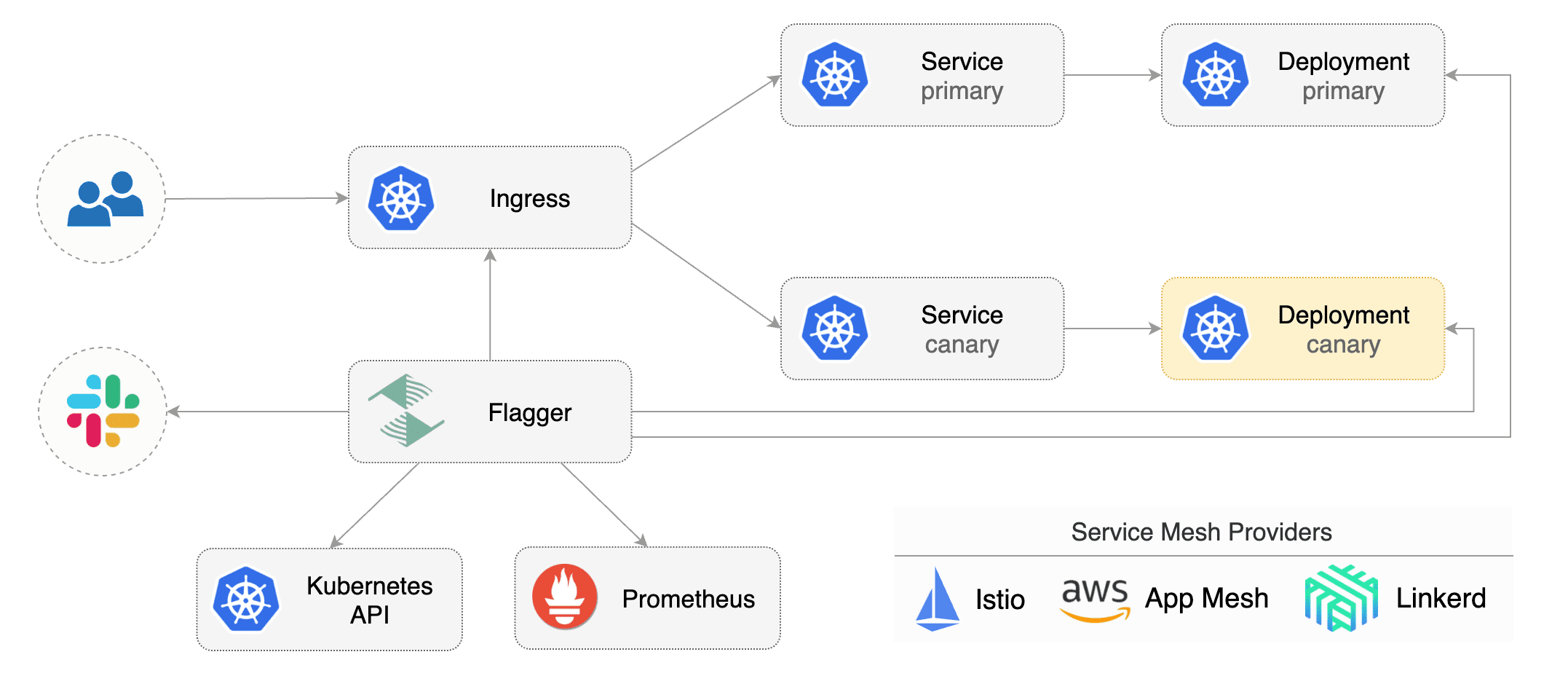
|
||||
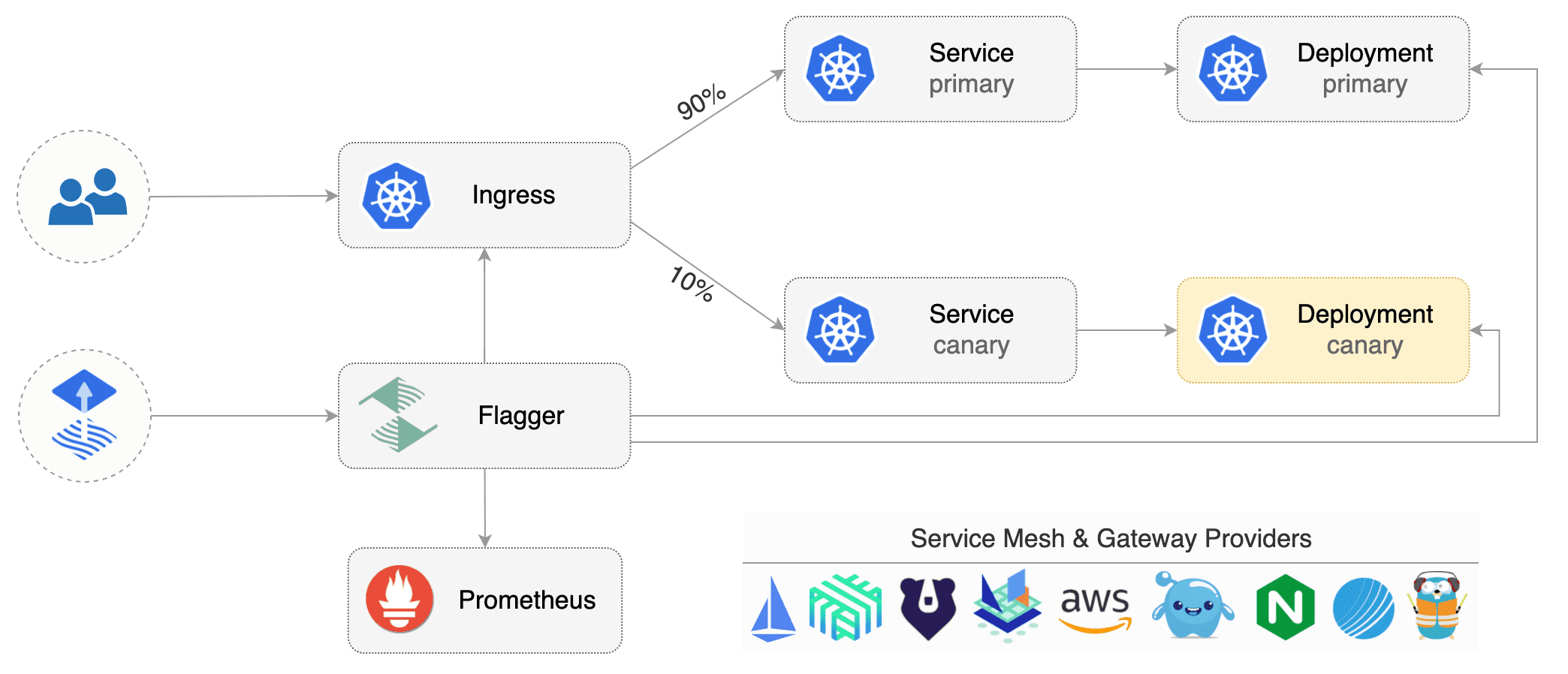
|
||||
|
||||
Flagger implements several deployment strategies (Canary releases, A/B testing, Blue/Green mirroring)
|
||||
using a service mesh (App Mesh, Istio, Linkerd) or an ingress controller (Contour, Gloo, NGINX, Skipper, Traefik) for traffic routing.
|
||||
For release analysis, Flagger can query Prometheus, Datadog or CloudWatch
|
||||
and for alerting it uses Slack, MS Teams, Discord and Rocket.
|
||||
and integrates with various Kubernetes ingress controllers, service mesh, and monitoring solutions.
|
||||
|
||||
Flagger is a [Cloud Native Computing Foundation](https://cncf.io/) project
|
||||
and part of the [Flux](https://fluxcd.io) family of GitOps tools.
|
||||
|
||||
### Documentation
|
||||
|
||||
Flagger documentation can be found at [docs.flagger.app](https://docs.flagger.app).
|
||||
Flagger documentation can be found at [fluxcd.io/flagger](https://fluxcd.io/flagger/).
|
||||
|
||||
* Install
|
||||
* [Flagger install on Kubernetes](https://docs.flagger.app/install/flagger-install-on-kubernetes)
|
||||
* [Flagger install on Kubernetes](https://fluxcd.io/flagger/install/flagger-install-on-kubernetes)
|
||||
* Usage
|
||||
* [How it works](https://docs.flagger.app/usage/how-it-works)
|
||||
* [Deployment strategies](https://docs.flagger.app/usage/deployment-strategies)
|
||||
* [Metrics analysis](https://docs.flagger.app/usage/metrics)
|
||||
* [Webhooks](https://docs.flagger.app/usage/webhooks)
|
||||
* [Alerting](https://docs.flagger.app/usage/alerting)
|
||||
* [Monitoring](https://docs.flagger.app/usage/monitoring)
|
||||
* [How it works](https://fluxcd.io/flagger/usage/how-it-works)
|
||||
* [Deployment strategies](https://fluxcd.io/flagger/usage/deployment-strategies)
|
||||
* [Metrics analysis](https://fluxcd.io/flagger/usage/metrics)
|
||||
* [Webhooks](https://fluxcd.io/flagger/usage/webhooks)
|
||||
* [Alerting](https://fluxcd.io/flagger/usage/alerting)
|
||||
* [Monitoring](https://fluxcd.io/flagger/usage/monitoring)
|
||||
* Tutorials
|
||||
* [App Mesh](https://docs.flagger.app/tutorials/appmesh-progressive-delivery)
|
||||
* [Istio](https://docs.flagger.app/tutorials/istio-progressive-delivery)
|
||||
* [Linkerd](https://docs.flagger.app/tutorials/linkerd-progressive-delivery)
|
||||
* [Contour](https://docs.flagger.app/tutorials/contour-progressive-delivery)
|
||||
* [Gloo](https://docs.flagger.app/tutorials/gloo-progressive-delivery)
|
||||
* [NGINX Ingress](https://docs.flagger.app/tutorials/nginx-progressive-delivery)
|
||||
* [Skipper](https://docs.flagger.app/tutorials/skipper-progressive-delivery)
|
||||
* [Traefik](https://docs.flagger.app/tutorials/traefik-progressive-delivery)
|
||||
* [Kubernetes Blue/Green](https://docs.flagger.app/tutorials/kubernetes-blue-green)
|
||||
* [App Mesh](https://fluxcd.io/flagger/tutorials/appmesh-progressive-delivery)
|
||||
* [Istio](https://fluxcd.io/flagger/tutorials/istio-progressive-delivery)
|
||||
* [Linkerd](https://fluxcd.io/flagger/tutorials/linkerd-progressive-delivery)
|
||||
* [Open Service Mesh (OSM)](https://dfluxcd.io/flagger/tutorials/osm-progressive-delivery)
|
||||
* [Kuma Service Mesh](https://fluxcd.io/flagger/tutorials/kuma-progressive-delivery)
|
||||
* [Contour](https://fluxcd.io/flagger/tutorials/contour-progressive-delivery)
|
||||
* [Gloo](https://fluxcd.io/flagger/tutorials/gloo-progressive-delivery)
|
||||
* [NGINX Ingress](https://fluxcd.io/flagger/tutorials/nginx-progressive-delivery)
|
||||
* [Skipper](https://fluxcd.io/flagger/tutorials/skipper-progressive-delivery)
|
||||
* [Traefik](https://fluxcd.io/flagger/tutorials/traefik-progressive-delivery)
|
||||
* [Gateway API](https://fluxcd.io/flagger/tutorials/gatewayapi-progressive-delivery/)
|
||||
* [Kubernetes Blue/Green](https://fluxcd.io/flagger/tutorials/kubernetes-blue-green)
|
||||
|
||||
### Who is using Flagger
|
||||
### Adopters
|
||||
|
||||
List of organizations using Flagger:
|
||||
**Our list of production users has moved to <https://fluxcd.io/adopters/#flagger>**.
|
||||
|
||||
* [Chick-fil-A](https://www.chick-fil-a.com)
|
||||
* [Capra Consulting](https://www.capraconsulting.no)
|
||||
* [DMM.com](https://dmm-corp.com)
|
||||
* [MediaMarktSaturn](https://www.mediamarktsaturn.com)
|
||||
* [Weaveworks](https://weave.works)
|
||||
* [Jumia Group](https://group.jumia.com)
|
||||
* [eLife](https://elifesciences.org/)
|
||||
|
||||
If you are using Flagger, please submit a PR to add your organization to the list!
|
||||
If you are using Flagger, please
|
||||
[submit a PR to add your organization](https://github.com/fluxcd/website/tree/main/adopters#readme) to the list!
|
||||
|
||||
### Canary CRD
|
||||
|
||||
Flagger takes a Kubernetes deployment and optionally a horizontal pod autoscaler (HPA),
|
||||
then creates a series of objects (Kubernetes deployments, ClusterIP services, service mesh or ingress routes).
|
||||
then creates a series of objects (Kubernetes deployments, ClusterIP services, service mesh, or ingress routes).
|
||||
These objects expose the application on the mesh and drive the canary analysis and promotion.
|
||||
|
||||
Flagger keeps track of ConfigMaps and Secrets referenced by a Kubernetes Deployment and triggers a canary analysis if any of those objects change.
|
||||
When promoting a workload in production, both code (container images) and configuration (config maps and secrets) are being synchronised.
|
||||
When promoting a workload in production, both code (container images) and configuration (config maps and secrets) are being synchronized.
|
||||
|
||||
For a deployment named _podinfo_, a canary promotion can be defined using Flagger's custom resource:
|
||||
|
||||
@@ -73,7 +72,8 @@ metadata:
|
||||
namespace: test
|
||||
spec:
|
||||
# service mesh provider (optional)
|
||||
# can be: kubernetes, istio, linkerd, appmesh, nginx, skipper, contour, gloo, supergloo, traefik
|
||||
# can be: kubernetes, istio, linkerd, appmesh, nginx, skipper, contour, gloo, supergloo, traefik, osm
|
||||
# for SMI TrafficSplit can be: smi:v1alpha1, smi:v1alpha2, smi:v1alpha3
|
||||
provider: istio
|
||||
# deployment reference
|
||||
targetRef:
|
||||
@@ -85,7 +85,7 @@ spec:
|
||||
progressDeadlineSeconds: 60
|
||||
# HPA reference (optional)
|
||||
autoscalerRef:
|
||||
apiVersion: autoscaling/v2beta1
|
||||
apiVersion: autoscaling/v2
|
||||
kind: HorizontalPodAutoscaler
|
||||
name: podinfo
|
||||
service:
|
||||
@@ -178,75 +178,103 @@ spec:
|
||||
name: on-call-msteams
|
||||
```
|
||||
|
||||
For more details on how the canary analysis and promotion works please [read the docs](https://docs.flagger.app/usage/how-it-works).
|
||||
For more details on how the canary analysis and promotion works please [read the docs](https://fluxcd.io/flagger/usage/how-it-works).
|
||||
|
||||
### Features
|
||||
|
||||
**Service Mesh**
|
||||
|
||||
| Feature | App Mesh | Istio | Linkerd | Kubernetes CNI |
|
||||
| ------------------------------------------ | ------------------ | ------------------ | ------------------ | ----------------- |
|
||||
| Canary deployments (weighted traffic) | :heavy_check_mark: | :heavy_check_mark: | :heavy_check_mark: | :heavy_minus_sign: |
|
||||
| A/B testing (headers and cookies routing) | :heavy_check_mark: | :heavy_check_mark: | :heavy_minus_sign: | :heavy_minus_sign: |
|
||||
| Blue/Green deployments (traffic switch) | :heavy_check_mark: | :heavy_check_mark: | :heavy_check_mark: | :heavy_check_mark: |
|
||||
| Blue/Green deployments (traffic mirroring) | :heavy_minus_sign: | :heavy_check_mark: | :heavy_minus_sign: | :heavy_minus_sign: |
|
||||
| Webhooks (acceptance/load testing) | :heavy_check_mark: | :heavy_check_mark: | :heavy_check_mark: | :heavy_check_mark: |
|
||||
| Manual gating (approve/pause/resume) | :heavy_check_mark: | :heavy_check_mark: | :heavy_check_mark: | :heavy_check_mark: |
|
||||
| Request success rate check (L7 metric) | :heavy_check_mark: | :heavy_check_mark: | :heavy_check_mark: | :heavy_minus_sign: |
|
||||
| Request duration check (L7 metric) | :heavy_check_mark: | :heavy_check_mark: | :heavy_check_mark: | :heavy_minus_sign: |
|
||||
| Custom metric checks | :heavy_check_mark: | :heavy_check_mark: | :heavy_check_mark: | :heavy_check_mark: |
|
||||
| Feature | App Mesh | Istio | Linkerd | Kuma | OSM | Kubernetes CNI |
|
||||
|--------------------------------------------|--------------------|--------------------|--------------------|--------------------|--------------------|--------------------|
|
||||
| Canary deployments (weighted traffic) | :heavy_check_mark: | :heavy_check_mark: | :heavy_check_mark: | :heavy_check_mark: | :heavy_check_mark: | :heavy_minus_sign: |
|
||||
| A/B testing (headers and cookies routing) | :heavy_check_mark: | :heavy_check_mark: | :heavy_minus_sign: | :heavy_minus_sign: | :heavy_minus_sign: | :heavy_minus_sign: |
|
||||
| Blue/Green deployments (traffic switch) | :heavy_check_mark: | :heavy_check_mark: | :heavy_check_mark: | :heavy_check_mark: | :heavy_check_mark: | :heavy_check_mark: |
|
||||
| Blue/Green deployments (traffic mirroring) | :heavy_minus_sign: | :heavy_check_mark: | :heavy_minus_sign: | :heavy_minus_sign: | :heavy_minus_sign: | :heavy_minus_sign: |
|
||||
| Webhooks (acceptance/load testing) | :heavy_check_mark: | :heavy_check_mark: | :heavy_check_mark: | :heavy_check_mark: | :heavy_check_mark: | :heavy_check_mark: |
|
||||
| Manual gating (approve/pause/resume) | :heavy_check_mark: | :heavy_check_mark: | :heavy_check_mark: | :heavy_check_mark: | :heavy_check_mark: | :heavy_check_mark: |
|
||||
| Request success rate check (L7 metric) | :heavy_check_mark: | :heavy_check_mark: | :heavy_check_mark: | :heavy_check_mark: | :heavy_check_mark: | :heavy_minus_sign: |
|
||||
| Request duration check (L7 metric) | :heavy_check_mark: | :heavy_check_mark: | :heavy_check_mark: | :heavy_check_mark: | :heavy_check_mark: | :heavy_minus_sign: |
|
||||
| Custom metric checks | :heavy_check_mark: | :heavy_check_mark: | :heavy_check_mark: | :heavy_check_mark: | :heavy_check_mark: | :heavy_check_mark: |
|
||||
|
||||
**Ingress**
|
||||
|
||||
| Feature | Contour | Gloo | NGINX | Skipper | Traefik |
|
||||
| ------------------------------------------ | ------------------ | ------------------ | ------------------ | ------------------ | ------------------ |
|
||||
| Canary deployments (weighted traffic) | :heavy_check_mark: | :heavy_check_mark: | :heavy_check_mark: | :heavy_check_mark: | :heavy_check_mark: |
|
||||
| A/B testing (headers and cookies routing) | :heavy_check_mark: | :heavy_check_mark: | :heavy_check_mark: | :heavy_minus_sign: | :heavy_minus_sign: |
|
||||
| Blue/Green deployments (traffic switch) | :heavy_check_mark: | :heavy_check_mark: | :heavy_check_mark: | :heavy_check_mark: | :heavy_check_mark: |
|
||||
| Webhooks (acceptance/load testing) | :heavy_check_mark: | :heavy_check_mark: | :heavy_check_mark: | :heavy_check_mark: | :heavy_check_mark: |
|
||||
| Manual gating (approve/pause/resume) | :heavy_check_mark: | :heavy_check_mark: | :heavy_check_mark: | :heavy_check_mark: | :heavy_check_mark: |
|
||||
| Request success rate check (L7 metric) | :heavy_check_mark: | :heavy_check_mark: | :heavy_minus_sign: | :heavy_check_mark: | :heavy_check_mark: |
|
||||
| Request duration check (L7 metric) | :heavy_check_mark: | :heavy_check_mark: | :heavy_minus_sign: | :heavy_check_mark: | :heavy_check_mark: |
|
||||
| Custom metric checks | :heavy_check_mark: | :heavy_check_mark: | :heavy_check_mark: | :heavy_check_mark: | :heavy_check_mark: |
|
||||
| Feature | Contour | Gloo | NGINX | Skipper | Traefik | Apache APISIX |
|
||||
|-------------------------------------------|--------------------|--------------------|--------------------|--------------------|--------------------|--------------------|
|
||||
| Canary deployments (weighted traffic) | :heavy_check_mark: | :heavy_check_mark: | :heavy_check_mark: | :heavy_check_mark: | :heavy_check_mark: | :heavy_check_mark: |
|
||||
| A/B testing (headers and cookies routing) | :heavy_check_mark: | :heavy_check_mark: | :heavy_check_mark: | :heavy_minus_sign: | :heavy_minus_sign: | :heavy_minus_sign: |
|
||||
| Blue/Green deployments (traffic switch) | :heavy_check_mark: | :heavy_check_mark: | :heavy_check_mark: | :heavy_check_mark: | :heavy_check_mark: | :heavy_check_mark: |
|
||||
| Webhooks (acceptance/load testing) | :heavy_check_mark: | :heavy_check_mark: | :heavy_check_mark: | :heavy_check_mark: | :heavy_check_mark: | :heavy_check_mark: |
|
||||
| Manual gating (approve/pause/resume) | :heavy_check_mark: | :heavy_check_mark: | :heavy_check_mark: | :heavy_check_mark: | :heavy_check_mark: | :heavy_check_mark: |
|
||||
| Request success rate check (L7 metric) | :heavy_check_mark: | :heavy_check_mark: | :heavy_minus_sign: | :heavy_check_mark: | :heavy_check_mark: | :heavy_check_mark: |
|
||||
| Request duration check (L7 metric) | :heavy_check_mark: | :heavy_check_mark: | :heavy_minus_sign: | :heavy_check_mark: | :heavy_check_mark: | :heavy_check_mark: |
|
||||
| Custom metric checks | :heavy_check_mark: | :heavy_check_mark: | :heavy_check_mark: | :heavy_check_mark: | :heavy_check_mark: | :heavy_check_mark: |
|
||||
|
||||
**Networking Interface**
|
||||
|
||||
| Feature | Gateway API | SMI |
|
||||
|-----------------------------------------------|--------------------|--------------------|
|
||||
| Canary deployments (weighted traffic) | :heavy_check_mark: | :heavy_check_mark: |
|
||||
| A/B testing (headers and cookies routing) | :heavy_check_mark: | :heavy_minus_sign: |
|
||||
| Blue/Green deployments (traffic switch) | :heavy_check_mark: | :heavy_check_mark: |
|
||||
| Blue/Green deployments (traffic mirrroring) | :heavy_minus_sign: | :heavy_minus_sign: |
|
||||
| Webhooks (acceptance/load testing) | :heavy_check_mark: | :heavy_check_mark: |
|
||||
| Manual gating (approve/pause/resume) | :heavy_check_mark: | :heavy_check_mark: |
|
||||
| Request success rate check (L7 metric) | :heavy_minus_sign: | :heavy_minus_sign: |
|
||||
| Request duration check (L7 metric) | :heavy_minus_sign: | :heavy_minus_sign: |
|
||||
| Custom metric checks | :heavy_check_mark: | :heavy_check_mark: |
|
||||
|
||||
For all [Gateway API](https://gateway-api.sigs.k8s.io/) implementations like
|
||||
[Contour](https://projectcontour.io/guides/gateway-api/) or
|
||||
[Istio](https://istio.io/latest/docs/tasks/traffic-management/ingress/gateway-api/)
|
||||
and [SMI](https://smi-spec.io) compatible service mesh solutions like
|
||||
[Nginx Service Mesh](https://docs.nginx.com/nginx-service-mesh/),
|
||||
[Prometheus MetricTemplates](https://docs.flagger.app/usage/metrics#prometheus)
|
||||
can be used to implement the request success rate and request duration checks.
|
||||
|
||||
### Roadmap
|
||||
|
||||
#### [GitOps Toolkit](https://github.com/fluxcd/flux2) compatibility
|
||||
|
||||
* Migrate Flagger to Kubernetes controller-runtime and [kubebuilder](https://github.com/kubernetes-sigs/kubebuilder)
|
||||
* Make the Canary status compatible with [kstatus](https://github.com/kubernetes-sigs/cli-utils)
|
||||
* Make Flagger emit Kubernetes events compatible with Flux v2 notification API
|
||||
* Integrate Flagger into Flux v2 as the progressive delivery component
|
||||
- Migrate Flagger to Kubernetes controller-runtime and [kubebuilder](https://github.com/kubernetes-sigs/kubebuilder)
|
||||
- Make the Canary status compatible with [kstatus](https://github.com/kubernetes-sigs/cli-utils)
|
||||
- Make Flagger emit Kubernetes events compatible with Flux v2 notification API
|
||||
- Integrate Flagger into Flux v2 as the progressive delivery component
|
||||
|
||||
#### Integrations
|
||||
|
||||
* Add support for Kubernetes [Ingress v2](https://github.com/kubernetes-sigs/service-apis)
|
||||
* Add support for SMI compatible service mesh solutions like Open Service Mesh and Consul Connect
|
||||
* Add support for ingress controllers like HAProxy and ALB
|
||||
* Add support for metrics providers like InfluxDB, Stackdriver, SignalFX
|
||||
- Add support for ingress controllers like HAProxy, ALB, and Apache APISIX
|
||||
- Add support for Knative Serving
|
||||
|
||||
### Contributing
|
||||
|
||||
Flagger is Apache 2.0 licensed and accepts contributions via GitHub pull requests.
|
||||
To start contributing please read the [development guide](https://docs.flagger.app/dev/dev-guide).
|
||||
|
||||
When submitting bug reports please include as much details as possible:
|
||||
When submitting bug reports please include as many details as possible:
|
||||
|
||||
* which Flagger version
|
||||
* which Flagger CRD version
|
||||
* which Kubernetes version
|
||||
* what configuration (canary, ingress and workloads definitions)
|
||||
* what happened (Flagger and Proxy logs)
|
||||
- which Flagger version
|
||||
- which Kubernetes version
|
||||
- what configuration (canary, ingress and workloads definitions)
|
||||
- what happened (Flagger and Proxy logs)
|
||||
|
||||
### Getting Help
|
||||
### Communication
|
||||
|
||||
If you have any questions about Flagger and progressive delivery:
|
||||
Here is a list of good entry points into our community, how we stay in touch and how you can meet us as a team.
|
||||
|
||||
* Read the Flagger [docs](https://docs.flagger.app).
|
||||
* Invite yourself to the [Weave community slack](https://slack.weave.works/)
|
||||
and join the [#flagger](https://weave-community.slack.com/messages/flagger/) channel.
|
||||
* Join the [Weave User Group](https://www.meetup.com/pro/Weave/) and get invited to online talks,
|
||||
hands-on training and meetups in your area.
|
||||
* File an [issue](https://github.com/fluxcd/flagger/issues/new).
|
||||
- Slack: Join in and talk to us in the `#flagger` channel on [CNCF Slack](https://slack.cncf.io/).
|
||||
- Public meetings: We run weekly meetings - join one of the upcoming dev meetings from the [Flux calendar](https://fluxcd.io/#calendar).
|
||||
- Blog: Stay up to date with the latest news on [the Flux blog](https://fluxcd.io/blog/).
|
||||
- Mailing list: To be updated on Flux and Flagger progress regularly, please [join the flux-dev mailing list](https://lists.cncf.io/g/cncf-flux-dev).
|
||||
|
||||
Your feedback is always welcome!
|
||||
#### Subscribing to the flux-dev calendar
|
||||
|
||||
To add the meetings to your e.g. Google calendar
|
||||
|
||||
1. visit the [Flux calendar](https://lists.cncf.io/g/cncf-flux-dev/calendar)
|
||||
2. click on "Subscribe to Calendar" at the very bottom of the page
|
||||
3. copy the iCalendar URL
|
||||
4. open e.g. your Google calendar
|
||||
5. find the "add calendar" option
|
||||
6. choose "add by URL"
|
||||
7. paste iCalendar URL (ends with `.ics`)
|
||||
8. done
|
||||
|
||||
@@ -11,7 +11,7 @@ spec:
|
||||
kind: Deployment
|
||||
name: podinfo
|
||||
autoscalerRef:
|
||||
apiVersion: autoscaling/v2beta1
|
||||
apiVersion: autoscaling/v2
|
||||
kind: HorizontalPodAutoscaler
|
||||
name: podinfo
|
||||
service:
|
||||
|
||||
@@ -11,7 +11,7 @@ spec:
|
||||
kind: Deployment
|
||||
name: podinfo
|
||||
autoscalerRef:
|
||||
apiVersion: autoscaling/v2beta1
|
||||
apiVersion: autoscaling/v2
|
||||
kind: HorizontalPodAutoscaler
|
||||
name: podinfo
|
||||
service:
|
||||
|
||||
@@ -10,7 +10,7 @@ spec:
|
||||
kind: Deployment
|
||||
name: podinfo
|
||||
autoscalerRef:
|
||||
apiVersion: autoscaling/v2beta1
|
||||
apiVersion: autoscaling/v2
|
||||
kind: HorizontalPodAutoscaler
|
||||
name: podinfo
|
||||
service:
|
||||
@@ -20,7 +20,7 @@ spec:
|
||||
portName: http
|
||||
portDiscovery: true
|
||||
gateways:
|
||||
- public-gateway.istio-system.svc.cluster.local
|
||||
- istio-system/public-gateway
|
||||
- mesh
|
||||
hosts:
|
||||
- app.example.com
|
||||
|
||||
@@ -11,7 +11,7 @@ spec:
|
||||
kind: Deployment
|
||||
name: podinfo
|
||||
autoscalerRef:
|
||||
apiVersion: autoscaling/v2beta1
|
||||
apiVersion: autoscaling/v2
|
||||
kind: HorizontalPodAutoscaler
|
||||
name: podinfo
|
||||
service:
|
||||
@@ -21,7 +21,7 @@ spec:
|
||||
portName: http
|
||||
portDiscovery: true
|
||||
gateways:
|
||||
- public-gateway.istio-system.svc.cluster.local
|
||||
- istio-system/public-gateway
|
||||
- mesh
|
||||
hosts:
|
||||
- app.example.com
|
||||
|
||||
50
artifacts/examples/kuma-canary.yaml
Normal file
@@ -0,0 +1,50 @@
|
||||
apiVersion: flagger.app/v1beta1
|
||||
kind: Canary
|
||||
metadata:
|
||||
name: podinfo
|
||||
namespace: test
|
||||
annotations:
|
||||
kuma.io/mesh: default
|
||||
spec:
|
||||
targetRef:
|
||||
apiVersion: apps/v1
|
||||
kind: Deployment
|
||||
name: podinfo
|
||||
progressDeadlineSeconds: 60
|
||||
service:
|
||||
port: 9898
|
||||
targetPort: 9898
|
||||
apex:
|
||||
annotations:
|
||||
9898.service.kuma.io/protocol: "http"
|
||||
canary:
|
||||
annotations:
|
||||
9898.service.kuma.io/protocol: "http"
|
||||
primary:
|
||||
annotations:
|
||||
9898.service.kuma.io/protocol: "http"
|
||||
analysis:
|
||||
interval: 15s
|
||||
threshold: 15
|
||||
maxWeight: 50
|
||||
stepWeight: 10
|
||||
metrics:
|
||||
- name: request-success-rate
|
||||
threshold: 99
|
||||
interval: 1m
|
||||
- name: request-duration
|
||||
threshold: 500
|
||||
interval: 30s
|
||||
webhooks:
|
||||
- name: acceptance-test
|
||||
type: pre-rollout
|
||||
url: http://flagger-loadtester.test/
|
||||
timeout: 30s
|
||||
metadata:
|
||||
type: bash
|
||||
cmd: "curl -sd 'test' http://podinfo-canary.test:9898/token | grep token"
|
||||
- name: load-test
|
||||
type: rollout
|
||||
url: http://flagger-loadtester.test/
|
||||
metadata:
|
||||
cmd: "hey -z 2m -q 10 -c 2 http://podinfo-canary.test:9898/"
|
||||
@@ -11,7 +11,7 @@ spec:
|
||||
kind: Deployment
|
||||
name: podinfo
|
||||
autoscalerRef:
|
||||
apiVersion: autoscaling/v2beta1
|
||||
apiVersion: autoscaling/v2
|
||||
kind: HorizontalPodAutoscaler
|
||||
name: podinfo
|
||||
service:
|
||||
|
||||
@@ -11,7 +11,7 @@ spec:
|
||||
kind: Deployment
|
||||
name: podinfo
|
||||
autoscalerRef:
|
||||
apiVersion: autoscaling/v2beta1
|
||||
apiVersion: autoscaling/v2
|
||||
kind: HorizontalPodAutoscaler
|
||||
name: podinfo
|
||||
service:
|
||||
|
||||
42
artifacts/examples/osm-canary-steps.yaml
Normal file
@@ -0,0 +1,42 @@
|
||||
apiVersion: flagger.app/v1beta1
|
||||
kind: Canary
|
||||
metadata:
|
||||
name: podinfo
|
||||
namespace: test
|
||||
spec:
|
||||
provider: osm
|
||||
targetRef:
|
||||
apiVersion: apps/v1
|
||||
kind: Deployment
|
||||
name: podinfo
|
||||
progressDeadlineSeconds: 600
|
||||
service:
|
||||
port: 9898
|
||||
targetPort: 9898
|
||||
analysis:
|
||||
interval: 15s
|
||||
threshold: 10
|
||||
stepWeights: [5, 10, 15, 20, 25, 30, 35, 40, 45, 50, 55]
|
||||
metrics:
|
||||
- name: request-success-rate
|
||||
thresholdRange:
|
||||
min: 99
|
||||
interval: 1m
|
||||
- name: request-duration
|
||||
thresholdRange:
|
||||
max: 500
|
||||
interval: 30s
|
||||
webhooks:
|
||||
- name: acceptance-test
|
||||
type: pre-rollout
|
||||
url: http://flagger-loadtester.test/
|
||||
timeout: 15s
|
||||
metadata:
|
||||
type: bash
|
||||
cmd: "curl -sd 'test' http://podinfo-canary.test:9898/token | grep token"
|
||||
- name: load-test
|
||||
type: rollout
|
||||
url: http://flagger-loadtester.test/
|
||||
timeout: 5s
|
||||
metadata:
|
||||
cmd: "hey -z 1m -q 10 -c 2 http://podinfo-canary.test:9898/"
|
||||
43
artifacts/examples/osm-canary.yaml
Normal file
@@ -0,0 +1,43 @@
|
||||
apiVersion: flagger.app/v1beta1
|
||||
kind: Canary
|
||||
metadata:
|
||||
name: podinfo
|
||||
namespace: test
|
||||
spec:
|
||||
provider: osm
|
||||
targetRef:
|
||||
apiVersion: apps/v1
|
||||
kind: Deployment
|
||||
name: podinfo
|
||||
progressDeadlineSeconds: 600
|
||||
service:
|
||||
port: 9898
|
||||
targetPort: 9898
|
||||
analysis:
|
||||
interval: 15s
|
||||
threshold: 10
|
||||
maxWeight: 50
|
||||
stepWeight: 5
|
||||
metrics:
|
||||
- name: request-success-rate
|
||||
thresholdRange:
|
||||
min: 99
|
||||
interval: 1m
|
||||
- name: request-duration
|
||||
thresholdRange:
|
||||
max: 500
|
||||
interval: 30s
|
||||
webhooks:
|
||||
- name: acceptance-test
|
||||
type: pre-rollout
|
||||
url: http://flagger-loadtester.test/
|
||||
timeout: 15s
|
||||
metadata:
|
||||
type: bash
|
||||
cmd: "curl -sd 'test' http://podinfo-canary.test:9898/token | grep token"
|
||||
- name: load-test
|
||||
type: rollout
|
||||
url: http://flagger-loadtester.test/
|
||||
timeout: 5s
|
||||
metadata:
|
||||
cmd: "hey -z 1m -q 10 -c 2 http://podinfo-canary.test:9898/"
|
||||
@@ -6,7 +6,7 @@ metadata:
|
||||
labels:
|
||||
app: flagger
|
||||
---
|
||||
apiVersion: rbac.authorization.k8s.io/v1beta1
|
||||
apiVersion: rbac.authorization.k8s.io/v1
|
||||
kind: ClusterRole
|
||||
metadata:
|
||||
name: flagger
|
||||
@@ -31,6 +31,18 @@ rules:
|
||||
- update
|
||||
- patch
|
||||
- delete
|
||||
- apiGroups:
|
||||
- "coordination.k8s.io"
|
||||
resources:
|
||||
- leases
|
||||
verbs:
|
||||
- get
|
||||
- list
|
||||
- watch
|
||||
- create
|
||||
- update
|
||||
- patch
|
||||
- delete
|
||||
- apiGroups:
|
||||
- apps
|
||||
resources:
|
||||
@@ -78,6 +90,7 @@ rules:
|
||||
resources:
|
||||
- canaries
|
||||
- canaries/status
|
||||
- canaries/finalizers
|
||||
- metrictemplates
|
||||
- metrictemplates/status
|
||||
- alertproviders
|
||||
@@ -187,12 +200,63 @@ rules:
|
||||
- update
|
||||
- patch
|
||||
- delete
|
||||
- apiGroups:
|
||||
- kuma.io
|
||||
resources:
|
||||
- trafficroutes
|
||||
- trafficroutes/finalizers
|
||||
verbs:
|
||||
- get
|
||||
- list
|
||||
- watch
|
||||
- create
|
||||
- update
|
||||
- patch
|
||||
- delete
|
||||
- apiGroups:
|
||||
- gateway.networking.k8s.io
|
||||
resources:
|
||||
- httproutes
|
||||
- httproutes/finalizers
|
||||
verbs:
|
||||
- get
|
||||
- list
|
||||
- watch
|
||||
- create
|
||||
- update
|
||||
- patch
|
||||
- delete
|
||||
- apiGroups:
|
||||
- keda.sh
|
||||
resources:
|
||||
- scaledobjects
|
||||
- scaledobjects/finalizers
|
||||
verbs:
|
||||
- get
|
||||
- list
|
||||
- watch
|
||||
- create
|
||||
- update
|
||||
- patch
|
||||
- delete
|
||||
- apiGroups:
|
||||
- apisix.apache.org
|
||||
resources:
|
||||
- apisixroutes
|
||||
verbs:
|
||||
- get
|
||||
- list
|
||||
- watch
|
||||
- create
|
||||
- update
|
||||
- patch
|
||||
- delete
|
||||
- nonResourceURLs:
|
||||
- /version
|
||||
verbs:
|
||||
- get
|
||||
---
|
||||
apiVersion: rbac.authorization.k8s.io/v1beta1
|
||||
apiVersion: rbac.authorization.k8s.io/v1
|
||||
kind: ClusterRoleBinding
|
||||
metadata:
|
||||
name: flagger
|
||||
|
||||
@@ -27,6 +27,10 @@ spec:
|
||||
- name: Weight
|
||||
type: string
|
||||
jsonPath: .status.canaryWeight
|
||||
- name: Suspended
|
||||
type: boolean
|
||||
jsonPath: .spec.suspend
|
||||
priority: 1
|
||||
- name: FailedChecks
|
||||
type: string
|
||||
jsonPath: .status.failedChecks
|
||||
@@ -104,7 +108,7 @@ spec:
|
||||
name:
|
||||
type: string
|
||||
autoscalerRef:
|
||||
description: HPA selector
|
||||
description: Scaler selector
|
||||
type: object
|
||||
required: ["apiVersion", "kind", "name"]
|
||||
properties:
|
||||
@@ -114,8 +118,20 @@ spec:
|
||||
type: string
|
||||
enum:
|
||||
- HorizontalPodAutoscaler
|
||||
- ScaledObject
|
||||
name:
|
||||
type: string
|
||||
primaryScalerQueries:
|
||||
type: object
|
||||
additionalProperties:
|
||||
type: string
|
||||
primaryScalerReplicas:
|
||||
type: object
|
||||
properties:
|
||||
minReplicas:
|
||||
type: number
|
||||
maxReplicas:
|
||||
type: number
|
||||
ingressRef:
|
||||
description: Ingress selector
|
||||
type: object
|
||||
@@ -129,6 +145,34 @@ spec:
|
||||
- Ingress
|
||||
name:
|
||||
type: string
|
||||
routeRef:
|
||||
description: APISIX route selector
|
||||
type: object
|
||||
required: [ "apiVersion", "kind", "name" ]
|
||||
properties:
|
||||
apiVersion:
|
||||
type: string
|
||||
kind:
|
||||
type: string
|
||||
enum:
|
||||
- ApisixRoute
|
||||
name:
|
||||
type: string
|
||||
upstreamRef:
|
||||
description: Gloo Upstream selector
|
||||
type: object
|
||||
required: [ "apiVersion", "kind", "name" ]
|
||||
properties:
|
||||
apiVersion:
|
||||
type: string
|
||||
kind:
|
||||
type: string
|
||||
enum:
|
||||
- Upstream
|
||||
name:
|
||||
type: string
|
||||
namespace:
|
||||
type: string
|
||||
service:
|
||||
description: Kubernetes Service spec
|
||||
type: object
|
||||
@@ -143,6 +187,9 @@ spec:
|
||||
portName:
|
||||
description: Container port name
|
||||
type: string
|
||||
appProtocol:
|
||||
description: Application protocol of the port
|
||||
type: string
|
||||
targetPort:
|
||||
description: Container target port name
|
||||
x-kubernetes-int-or-string: true
|
||||
@@ -435,6 +482,54 @@ spec:
|
||||
uri:
|
||||
format: string
|
||||
type: string
|
||||
authority:
|
||||
format: string
|
||||
type: string
|
||||
type:
|
||||
format: string
|
||||
type: string
|
||||
mirror:
|
||||
description: Mirror defines a schema for a filter that mirrors requests.
|
||||
type: array
|
||||
items:
|
||||
type: object
|
||||
properties:
|
||||
backendRef:
|
||||
properties:
|
||||
group:
|
||||
default: ""
|
||||
maxLength: 253
|
||||
pattern: ^$|^[a-z0-9]([-a-z0-9]*[a-z0-9])?(\.[a-z0-9]([-a-z0-9]*[a-z0-9])?)*$
|
||||
type: string
|
||||
kind:
|
||||
default: Service
|
||||
maxLength: 63
|
||||
minLength: 1
|
||||
pattern: ^[a-zA-Z]([-a-zA-Z0-9]*[a-zA-Z0-9])?$
|
||||
type: string
|
||||
name:
|
||||
maxLength: 253
|
||||
minLength: 1
|
||||
type: string
|
||||
namespace:
|
||||
maxLength: 63
|
||||
minLength: 1
|
||||
pattern: ^[a-z0-9]([-a-z0-9]*[a-z0-9])?$
|
||||
type: string
|
||||
port:
|
||||
format: int32
|
||||
maximum: 65535
|
||||
minimum: 1
|
||||
type: integer
|
||||
required:
|
||||
- name
|
||||
type: object
|
||||
x-kubernetes-validations:
|
||||
- message: Must have port for Service reference
|
||||
rule: '(size(self.group) == 0 && self.kind == ''Service'')
|
||||
? has(self.port) : true'
|
||||
required:
|
||||
- backendRef
|
||||
headers:
|
||||
description: Headers operations
|
||||
type: object
|
||||
@@ -480,6 +575,45 @@ spec:
|
||||
type: array
|
||||
items:
|
||||
type: string
|
||||
gatewayRefs:
|
||||
description: The list of parent Gateways for a HTTPRoute
|
||||
maxItems: 32
|
||||
type: array
|
||||
items:
|
||||
required:
|
||||
- name
|
||||
type: object
|
||||
properties:
|
||||
group:
|
||||
default: gateway.networking.k8s.io
|
||||
maxLength: 253
|
||||
pattern: ^$|^[a-z0-9]([-a-z0-9]*[a-z0-9])?(\.[a-z0-9]([-a-z0-9]*[a-z0-9])?)*$
|
||||
type: string
|
||||
kind:
|
||||
default: Gateway
|
||||
maxLength: 63
|
||||
minLength: 1
|
||||
pattern: ^[a-zA-Z]([-a-zA-Z0-9]*[a-zA-Z0-9])?$
|
||||
type: string
|
||||
name:
|
||||
maxLength: 253
|
||||
minLength: 1
|
||||
type: string
|
||||
namespace:
|
||||
maxLength: 63
|
||||
minLength: 1
|
||||
pattern: ^[a-z0-9]([-a-z0-9]*[a-z0-9])?$
|
||||
type: string
|
||||
sectionName:
|
||||
maxLength: 253
|
||||
minLength: 1
|
||||
pattern: ^[a-z0-9]([-a-z0-9]*[a-z0-9])?(\.[a-z0-9]([-a-z0-9]*[a-z0-9])?)*$
|
||||
type: string
|
||||
port:
|
||||
format: int32
|
||||
maximum: 65535
|
||||
minimum: 1
|
||||
type: integer
|
||||
corsPolicy:
|
||||
description: Istio Cross-Origin Resource Sharing policy (CORS)
|
||||
type: object
|
||||
@@ -670,6 +804,10 @@ spec:
|
||||
- LEAST_CONN
|
||||
- RANDOM
|
||||
- PASSTHROUGH
|
||||
- LEAST_REQUEST
|
||||
type: string
|
||||
warmupDurationSecs:
|
||||
description: Represents the warmup duration of Service.
|
||||
type: string
|
||||
outlierDetection:
|
||||
description: Settings controlling eviction of unhealthy hosts from the load balancing pool.
|
||||
@@ -773,6 +911,9 @@ spec:
|
||||
revertOnDeletion:
|
||||
description: Revert mutated resources to original spec on deletion
|
||||
type: boolean
|
||||
suspend:
|
||||
description: Suspend Canary disabling/pausing all canary runs
|
||||
type: boolean
|
||||
analysis:
|
||||
description: Canary analysis for this canary
|
||||
type: object
|
||||
@@ -811,6 +952,12 @@ spec:
|
||||
mirrorWeight:
|
||||
description: Weight of traffic to be mirrored
|
||||
type: number
|
||||
primaryReadyThreshold:
|
||||
description: Percentage of pods that need to be available to consider primary as ready
|
||||
type: number
|
||||
canaryReadyThreshold:
|
||||
description: Percentage of pods that need to be available to consider canary as ready
|
||||
type: number
|
||||
match:
|
||||
description: A/B testing match conditions
|
||||
type: array
|
||||
@@ -840,6 +987,34 @@ spec:
|
||||
description: RE2 style regex-based match (https://github.com/google/re2/wiki/Syntax)
|
||||
format: string
|
||||
type: string
|
||||
queryParams:
|
||||
description: Query parameters for matching.
|
||||
type: object
|
||||
additionalProperties:
|
||||
oneOf:
|
||||
- not:
|
||||
anyOf:
|
||||
- required:
|
||||
- exact
|
||||
- required:
|
||||
- prefix
|
||||
- required:
|
||||
- regex
|
||||
- required:
|
||||
- exact
|
||||
- required:
|
||||
- prefix
|
||||
- required:
|
||||
- regex
|
||||
properties:
|
||||
exact:
|
||||
type: string
|
||||
prefix:
|
||||
type: string
|
||||
regex:
|
||||
description: RE2 style regex-based match (https://github.com/google/re2/wiki/Syntax).
|
||||
type: string
|
||||
type: object
|
||||
sourceLabels:
|
||||
description: Applicable only when the 'mesh' gateway is included in the service.gateways list
|
||||
type: object
|
||||
@@ -887,6 +1062,42 @@ spec:
|
||||
namespace:
|
||||
description: Namespace of this metric template
|
||||
type: string
|
||||
templateVariables:
|
||||
description: Additional variables to be used in the metrics query (key-value pairs)
|
||||
type: object
|
||||
additionalProperties:
|
||||
type: string
|
||||
alerts:
|
||||
description: Alert list for this canary analysis
|
||||
type: array
|
||||
items:
|
||||
type: object
|
||||
required:
|
||||
- providerRef
|
||||
- name
|
||||
properties:
|
||||
name:
|
||||
description: Name of the this alert
|
||||
type: string
|
||||
severity:
|
||||
description: Severity level can be info, warn, error (default info)
|
||||
type: string
|
||||
enum:
|
||||
- ""
|
||||
- info
|
||||
- warn
|
||||
- error
|
||||
providerRef:
|
||||
description: Alert provider reference
|
||||
type: object
|
||||
required: ["name"]
|
||||
properties:
|
||||
name:
|
||||
description: Name of the alert provider
|
||||
type: string
|
||||
namespace:
|
||||
description: Namespace of the alert provider
|
||||
type: string
|
||||
webhooks:
|
||||
description: Webhook list for this canary
|
||||
type: array
|
||||
@@ -909,6 +1120,10 @@ spec:
|
||||
- post-rollout
|
||||
- event
|
||||
- rollback
|
||||
- confirm-traffic-increase
|
||||
muteAlert:
|
||||
description: Mute all alerts for the webhook
|
||||
type: boolean
|
||||
url:
|
||||
description: URL address of this webhook
|
||||
type: string
|
||||
@@ -917,11 +1132,26 @@ spec:
|
||||
description: Request timeout for this webhook
|
||||
type: string
|
||||
pattern: "^[0-9]+(m|s)"
|
||||
retries:
|
||||
description: Number of retries for this webhook
|
||||
type: number
|
||||
metadata:
|
||||
description: Metadata (key-value pairs) for this webhook
|
||||
type: object
|
||||
additionalProperties:
|
||||
type: string
|
||||
sessionAffinity:
|
||||
description: SessionAffinity represents the session affinity settings for a canary run.
|
||||
type: object
|
||||
required: [ "cookieName" ]
|
||||
properties:
|
||||
cookieName:
|
||||
description: CookieName is the key that will be used for the session affinity cookie.
|
||||
type: string
|
||||
maxAge:
|
||||
description: MaxAge indicates the number of seconds until the session affinity cookie will expire.
|
||||
default: 86400
|
||||
type: number
|
||||
status:
|
||||
description: CanaryStatus defines the observed state of a canary.
|
||||
type: object
|
||||
@@ -935,33 +1165,43 @@ spec:
|
||||
- Initialized
|
||||
- Waiting
|
||||
- Progressing
|
||||
- WaitingPromotion
|
||||
- Promoting
|
||||
- Finalising
|
||||
- Succeeded
|
||||
- Failed
|
||||
- Terminating
|
||||
- Terminated
|
||||
failedChecks:
|
||||
description: Failed check count of the current canary analysis
|
||||
type: number
|
||||
canaryWeight:
|
||||
description: Traffic weight routed to canary
|
||||
type: number
|
||||
iterations:
|
||||
description: Iteration count of the current canary analysis
|
||||
type: number
|
||||
trackedConfigs:
|
||||
description: TrackedConfig of this canary
|
||||
additionalProperties:
|
||||
type: string
|
||||
type: object
|
||||
canaryWeight:
|
||||
description: Traffic weight routed to canary
|
||||
type: number
|
||||
failedChecks:
|
||||
description: Failed check count of the current canary analysis
|
||||
type: number
|
||||
iterations:
|
||||
description: Iteration count of the current canary analysis
|
||||
type: number
|
||||
lastAppliedSpec:
|
||||
description: LastAppliedSpec of this canary
|
||||
type: string
|
||||
lastPromotedSpec:
|
||||
description: LastPromotedSpec of this canary
|
||||
type: string
|
||||
lastTransitionTime:
|
||||
description: LastTransitionTime of this canary
|
||||
format: date-time
|
||||
type: string
|
||||
sessionAffinityCookie:
|
||||
description: Session affinity cookie of the current canary run
|
||||
type: string
|
||||
previousSessionAffinityCookie:
|
||||
description: Session affinity cookie of the previous canary run
|
||||
type: string
|
||||
conditions:
|
||||
description: Status conditions of this canary
|
||||
type: array
|
||||
@@ -1053,8 +1293,11 @@ spec:
|
||||
- prometheus
|
||||
- influxdb
|
||||
- datadog
|
||||
- stackdriver
|
||||
- cloudwatch
|
||||
- newrelic
|
||||
- graphite
|
||||
- dynatrace
|
||||
address:
|
||||
description: API address of this provider
|
||||
type: string
|
||||
@@ -1070,6 +1313,9 @@ spec:
|
||||
region:
|
||||
description: Region of the provider
|
||||
type: string
|
||||
insecureSkipVerify:
|
||||
description: Disable SSL certificate validation for the provider address
|
||||
type: boolean
|
||||
query:
|
||||
description: Query of this metric template
|
||||
type: string
|
||||
@@ -1136,9 +1382,19 @@ spec:
|
||||
- msteams
|
||||
- discord
|
||||
- rocket
|
||||
- gchat
|
||||
channel:
|
||||
description: Alert channel for this provider
|
||||
type: string
|
||||
username:
|
||||
description: Bot username for this provider
|
||||
type: string
|
||||
address:
|
||||
description: Hook URL address of this provider
|
||||
type: string
|
||||
proxy:
|
||||
description: Http/s proxy of this provider
|
||||
type: string
|
||||
secretRef:
|
||||
description: Kubernetes secret reference containing the provider address
|
||||
type: object
|
||||
|
||||
@@ -22,7 +22,7 @@ spec:
|
||||
serviceAccountName: flagger
|
||||
containers:
|
||||
- name: flagger
|
||||
image: ghcr.io/fluxcd/flagger:1.6.1
|
||||
image: ghcr.io/fluxcd/flagger:1.36.0
|
||||
imagePullPolicy: IfNotPresent
|
||||
ports:
|
||||
- name: http
|
||||
|
||||
@@ -1,12 +1,12 @@
|
||||
apiVersion: v1
|
||||
name: flagger
|
||||
version: 1.6.1
|
||||
appVersion: 1.6.1
|
||||
kubeVersion: ">=1.16.0-0"
|
||||
version: 1.36.0
|
||||
appVersion: 1.36.0
|
||||
kubeVersion: ">=1.19.0-0"
|
||||
engine: gotpl
|
||||
description: Flagger is a progressive delivery operator for Kubernetes
|
||||
home: https://flagger.app
|
||||
icon: https://raw.githubusercontent.com/fluxcd/flagger/main/docs/logo/weaveworks.png
|
||||
icon: https://raw.githubusercontent.com/fluxcd/flagger/main/docs/logo/flagger-icon.png
|
||||
sources:
|
||||
- https://github.com/fluxcd/flagger
|
||||
maintainers:
|
||||
@@ -18,8 +18,12 @@ keywords:
|
||||
- istio
|
||||
- appmesh
|
||||
- linkerd
|
||||
- kuma
|
||||
- osm
|
||||
- smi
|
||||
- gloo
|
||||
- contour
|
||||
- nginx
|
||||
- traefik
|
||||
- gitops
|
||||
- canary
|
||||
|
||||
@@ -1,19 +1,18 @@
|
||||
# Flagger
|
||||
|
||||
[Flagger](https://github.com/fluxcd/flagger) is an operator that automates the release process of applications on Kubernetes.
|
||||
[Flagger](https://github.com/fluxcd/flagger) is a progressive delivery tool that automates the release process
|
||||
for applications running on Kubernetes. It reduces the risk of introducing a new software version in production
|
||||
by gradually shifting traffic to the new version while measuring metrics and running conformance tests.
|
||||
|
||||
Flagger can run automated application analysis, testing, promotion and rollback for the following deployment strategies:
|
||||
* Canary Release (progressive traffic shifting)
|
||||
* A/B Testing (HTTP headers and cookies traffic routing)
|
||||
* Blue/Green (traffic switching and mirroring)
|
||||
Flagger implements several deployment strategies (Canary releases, A/B testing, Blue/Green mirroring)
|
||||
and integrates with various Kubernetes ingress controllers, service mesh and monitoring solutions.
|
||||
|
||||
Flagger works with service mesh solutions (Istio, Linkerd, AWS App Mesh) and with Kubernetes ingress controllers
|
||||
(NGINX, Skipper, Gloo, Contour, Traefik).
|
||||
Flagger can be configured to send alerts to various chat platforms such as Slack, Microsoft Teams, Discord and Rocket.
|
||||
Flagger is a [Cloud Native Computing Foundation](https://cncf.io/) project
|
||||
and part of [Flux](https://fluxcd.io) family of GitOps tools.
|
||||
|
||||
## Prerequisites
|
||||
|
||||
* Kubernetes >= 1.16
|
||||
* Kubernetes >= 1.19
|
||||
|
||||
## Installing the Chart
|
||||
|
||||
@@ -38,13 +37,16 @@ $ helm upgrade -i flagger flagger/flagger \
|
||||
--set metricsServer=http://prometheus:9090
|
||||
```
|
||||
|
||||
To install Flagger for **Linkerd**:
|
||||
To install Flagger for **Linkerd** (requires Linkerd Viz extension):
|
||||
|
||||
```console
|
||||
# Note that linkerdAuthPolicy.create=true is only required for Linkerd 2.12 and
|
||||
# later
|
||||
$ helm upgrade -i flagger flagger/flagger \
|
||||
--namespace=linkerd \
|
||||
--namespace=flagger-system \
|
||||
--set meshProvider=linkerd \
|
||||
--set metricsServer=http://linkerd-prometheus:9090
|
||||
--set metricsServer=http://prometheus.linkerd-viz:9090 \
|
||||
--set linkerdAuthPolicy.create=true
|
||||
```
|
||||
|
||||
To install Flagger for **AWS App Mesh**:
|
||||
@@ -56,6 +58,25 @@ $ helm upgrade -i flagger flagger/flagger \
|
||||
--set metricsServer=http://appmesh-prometheus:9090
|
||||
```
|
||||
|
||||
|
||||
To install Flagger for **Open Service Mesh** (requires OSM to have been installed with Prometheus):
|
||||
|
||||
```console
|
||||
$ helm upgrade -i flagger flagger/flagger \
|
||||
--namespace=osm-system \
|
||||
--set meshProvider=osm \
|
||||
--set metricsServer=http://osm-prometheus.osm-system.svc:7070
|
||||
```
|
||||
|
||||
To install Flagger for **Kuma Service Mesh** (requires Kuma to have been installed with Prometheus):
|
||||
|
||||
```console
|
||||
$ helm upgrade -i flagger flagger/flagger \
|
||||
--namespace=kuma-system \
|
||||
--set meshProvider=kuma \
|
||||
--set metricsServer=http://prometheus-server.kuma-metrics:80
|
||||
```
|
||||
|
||||
To install Flagger and Prometheus for **NGINX** Ingress (requires controller metrics enabled):
|
||||
|
||||
```console
|
||||
@@ -65,7 +86,7 @@ $ helm upgrade -i flagger flagger/flagger \
|
||||
--set prometheus.install=true
|
||||
```
|
||||
|
||||
To install Flagger and Prometheus for **Gloo** (requires Gloo discovery enabled):
|
||||
To install Flagger and Prometheus for **Gloo** (no longer requires Gloo discovery):
|
||||
|
||||
```console
|
||||
$ helm upgrade -i flagger flagger/flagger \
|
||||
@@ -109,51 +130,61 @@ The command removes all the Kubernetes components associated with the chart and
|
||||
|
||||
The following tables lists the configurable parameters of the Flagger chart and their default values.
|
||||
|
||||
Parameter | Description | Default
|
||||
--- | --- | ---
|
||||
`image.repository` | Image repository | `ghcr.io/fluxcd/flagger`
|
||||
`image.tag` | Image tag | `<VERSION>`
|
||||
`image.pullPolicy` | Image pull policy | `IfNotPresent`
|
||||
`logLevel` | Log level | `info`
|
||||
`metricsServer` | Prometheus URL, used when `prometheus.install` is `false` | `http://prometheus.istio-system:9090`
|
||||
`prometheus.install` | If `true`, installs Prometheus configured to scrape all pods in the custer | `false`
|
||||
`prometheus.retention` | Prometheus data retention | `2h`
|
||||
`selectorLabels` | List of labels that Flagger uses to create pod selectors | `app,name,app.kubernetes.io/name`
|
||||
`configTracking.enabled` | If `true`, flagger will track changes in Secrets and ConfigMaps referenced in the target deployment | `true`
|
||||
`eventWebhook` | If set, Flagger will publish events to the given webhook | None
|
||||
`slack.url` | Slack incoming webhook | None
|
||||
`slack.channel` | Slack channel | None
|
||||
`slack.user` | Slack username | `flagger`
|
||||
`msteams.url` | Microsoft Teams incoming webhook | None
|
||||
`podMonitor.enabled` | If `true`, create a PodMonitor for [monitoring the metrics](https://docs.flagger.app/usage/monitoring#metrics) | `false`
|
||||
`podMonitor.namespace` | Namespace where the PodMonitor is created | the same namespace
|
||||
`podMonitor.interval` | Interval at which metrics should be scraped | `15s`
|
||||
`podMonitor.podMonitor` | Additional labels to add to the PodMonitor | `{}`
|
||||
`leaderElection.enabled` | If `true`, Flagger will run in HA mode | `false`
|
||||
`leaderElection.replicaCount` | Number of replicas | `1`
|
||||
`serviceAccount.create` | If `true`, Flagger will create service account | `true`
|
||||
`serviceAccount.name` | The name of the service account to create or use. If not set and `serviceAccount.create` is `true`, a name is generated using the Flagger fullname | `""`
|
||||
`serviceAccount.annotations` | Annotations for service account | `{}`
|
||||
`ingressAnnotationsPrefix` | Annotations prefix for ingresses | `custom.ingress.kubernetes.io`
|
||||
`includeLabelPrefix` | List of prefixes of labels that are copied when creating primary deployments or daemonsets. Use * to include all | `""`
|
||||
`rbac.create` | If `true`, create and use RBAC resources | `true`
|
||||
`rbac.pspEnabled` | If `true`, create and use a restricted pod security policy | `false`
|
||||
`crd.create` | If `true`, create Flagger's CRDs (should be enabled for Helm v2 only) | `false`
|
||||
`resources.requests/cpu` | Pod CPU request | `10m`
|
||||
`resources.requests/memory` | Pod memory request | `32Mi`
|
||||
`resources.limits/cpu` | Pod CPU limit | `1000m`
|
||||
`resources.limits/memory` | Pod memory limit | `512Mi`
|
||||
`affinity` | Node/pod affinities | None
|
||||
`nodeSelector` | Node labels for pod assignment | `{}`
|
||||
`threadiness` | Number of controller workers | `2`
|
||||
`tolerations` | List of node taints to tolerate | `[]`
|
||||
`istio.kubeconfig.secretName` | The name of the Kubernetes secret containing the Istio shared control plane kubeconfig | None
|
||||
`istio.kubeconfig.key` | The name of Kubernetes secret data key that contains the Istio control plane kubeconfig | `kubeconfig`
|
||||
`ingressAnnotationsPrefix` | Annotations prefix for NGINX ingresses | None
|
||||
`ingressClass` | Ingress class used for annotating HTTPProxy objects, e.g. `contour` | None
|
||||
`podPriorityClassName` | PriorityClass name for pod priority configuration | ""
|
||||
`podDisruptionBudget.enabled` | A PodDisruptionBudget will be created if `true` | `false`
|
||||
`podDisruptionBudget.minAvailable` | The minimal number of available replicas that will be set in the PodDisruptionBudget | `1`
|
||||
| Parameter | Description | Default |
|
||||
|--------------------------------------|----------------------------------------------------------------------------------------------------------------------------------------------------|---------------------------------------|
|
||||
| `image.repository` | Image repository | `ghcr.io/fluxcd/flagger` |
|
||||
| `image.tag` | Image tag | `<VERSION>` |
|
||||
| `image.pullPolicy` | Image pull policy | `IfNotPresent` |
|
||||
| `logLevel` | Log level | `info` |
|
||||
| `metricsServer` | Prometheus URL, used when `prometheus.install` is `false` | `http://prometheus.istio-system:9090` |
|
||||
| `prometheus.install` | If `true`, installs Prometheus configured to scrape all pods in the custer | `false` |
|
||||
| `prometheus.retention` | Prometheus data retention | `2h` |
|
||||
| `selectorLabels` | List of labels that Flagger uses to create pod selectors | `app,name,app.kubernetes.io/name` |
|
||||
| `serviceMonitor.enabled` | If `true`, creates service and serviceMonitor for monitoring Flagger metrics | `false` |
|
||||
| `serviceMonitor.honorLabels` | If `true`, label conflicts are resolved by keeping label values from the scraped data and ignoring the conflicting server-side labels | `false` |
|
||||
| `serviceMonitor.namespace` | Namespace Servicemonitor is installed in | the same namespace |
|
||||
| `serviceMonitor.labels` | labels for the ServiceMonitor passed to Prometheus Operator | `{}` |
|
||||
| `configTracking.enabled` | If `true`, flagger will track changes in Secrets and ConfigMaps referenced in the target deployment | `true` |
|
||||
| `eventWebhook` | If set, Flagger will publish events to the given webhook | None |
|
||||
| `slack.url` | Slack incoming webhook | None |
|
||||
| `slack.proxyUrl` | Slack proxy url | None |
|
||||
| `slack.channel` | Slack channel | None |
|
||||
| `slack.user` | Slack username | `flagger` |
|
||||
| `msteams.url` | Microsoft Teams incoming webhook | None |
|
||||
| `msteams.proxyUrl` | Microsoft Teams proxy url | None |
|
||||
| `clusterName` | When specified, Flagger will add the cluster name to alerts | `""` |
|
||||
| `podMonitor.enabled` | If `true`, create a PodMonitor for [monitoring the metrics](https://docs.flagger.app/usage/monitoring#metrics) | `false` |
|
||||
| `podMonitor.namespace` | Namespace where the PodMonitor is created | the same namespace |
|
||||
| `podMonitor.interval` | Interval at which metrics should be scraped | `15s` |
|
||||
| `podMonitor.podMonitor` | Additional labels to add to the PodMonitor | `{}` |
|
||||
| `leaderElection.enabled` | If `true`, Flagger will run in HA mode | `false` |
|
||||
| `leaderElection.replicaCount` | Number of replicas | `1` |
|
||||
| `serviceAccount.create` | If `true`, Flagger will create service account | `true` |
|
||||
| `serviceAccount.name` | The name of the service account to create or use. If not set and `serviceAccount.create` is `true`, a name is generated using the Flagger fullname | `""` |
|
||||
| `serviceAccount.annotations` | Annotations for service account | `{}` |
|
||||
| `ingressAnnotationsPrefix` | Annotations prefix for ingresses | `custom.ingress.kubernetes.io` |
|
||||
| `includeLabelPrefix` | List of prefixes of labels that are copied when creating primary deployments or daemonsets. Use * to include all | `""` |
|
||||
| `rbac.create` | If `true`, create and use RBAC resources | `true` |
|
||||
| `rbac.pspEnabled` | If `true`, create and use a restricted pod security policy | `false` |
|
||||
| `crd.create` | If `true`, create Flagger's CRDs (should be enabled for Helm v2 only) | `false` |
|
||||
| `resources.requests/cpu` | Pod CPU request | `10m` |
|
||||
| `resources.requests/memory` | Pod memory request | `32Mi` |
|
||||
| `resources.limits/cpu` | Pod CPU limit | `1000m` |
|
||||
| `resources.limits/memory` | Pod memory limit | `512Mi` |
|
||||
| `affinity` | Node/pod affinities | prefer spread across hosts |
|
||||
| `nodeSelector` | Node labels for pod assignment | `{}` |
|
||||
| `threadiness` | Number of controller workers | `2` |
|
||||
| `tolerations` | List of node taints to tolerate | `[]` |
|
||||
| `controlplane.kubeconfig.secretName` | The name of the Kubernetes secret containing the service mesh control plane kubeconfig | None |
|
||||
| `controlplane.kubeconfig.key` | The name of Kubernetes secret data key that contains the service mesh control plane kubeconfig | `kubeconfig` |
|
||||
| `ingressAnnotationsPrefix` | Annotations prefix for NGINX ingresses | None |
|
||||
| `ingressClass` | Ingress class used for annotating HTTPProxy objects, e.g. `contour` | None |
|
||||
| `podPriorityClassName` | PriorityClass name for pod priority configuration | "" |
|
||||
| `podDisruptionBudget.enabled` | A PodDisruptionBudget will be created if `true` | `false` |
|
||||
| `podDisruptionBudget.minAvailable` | The minimal number of available replicas that will be set in the PodDisruptionBudget | `1` |
|
||||
| `podDisruptionBudget.minAvailable` | The minimal number of available replicas that will be set in the PodDisruptionBudget | `1` |
|
||||
| `noCrossNamespaceRefs` | If `true`, cross namespace references to custom resources will be disabled | `false` |
|
||||
| `namespace` | When specified, Flagger will restrict itself to watching Canary objects from that namespace | `""` |
|
||||
|
||||
Specify each parameter using the `--set key=value[,key=value]` argument to `helm upgrade`. For example,
|
||||
|
||||
|
||||
@@ -27,6 +27,10 @@ spec:
|
||||
- name: Weight
|
||||
type: string
|
||||
jsonPath: .status.canaryWeight
|
||||
- name: Suspended
|
||||
type: boolean
|
||||
jsonPath: .spec.suspend
|
||||
priority: 1
|
||||
- name: FailedChecks
|
||||
type: string
|
||||
jsonPath: .status.failedChecks
|
||||
@@ -104,7 +108,7 @@ spec:
|
||||
name:
|
||||
type: string
|
||||
autoscalerRef:
|
||||
description: HPA selector
|
||||
description: Scaler selector
|
||||
type: object
|
||||
required: ["apiVersion", "kind", "name"]
|
||||
properties:
|
||||
@@ -114,8 +118,20 @@ spec:
|
||||
type: string
|
||||
enum:
|
||||
- HorizontalPodAutoscaler
|
||||
- ScaledObject
|
||||
name:
|
||||
type: string
|
||||
primaryScalerQueries:
|
||||
type: object
|
||||
additionalProperties:
|
||||
type: string
|
||||
primaryScalerReplicas:
|
||||
type: object
|
||||
properties:
|
||||
minReplicas:
|
||||
type: number
|
||||
maxReplicas:
|
||||
type: number
|
||||
ingressRef:
|
||||
description: Ingress selector
|
||||
type: object
|
||||
@@ -129,6 +145,34 @@ spec:
|
||||
- Ingress
|
||||
name:
|
||||
type: string
|
||||
routeRef:
|
||||
description: APISIX route selector
|
||||
type: object
|
||||
required: [ "apiVersion", "kind", "name" ]
|
||||
properties:
|
||||
apiVersion:
|
||||
type: string
|
||||
kind:
|
||||
type: string
|
||||
enum:
|
||||
- ApisixRoute
|
||||
name:
|
||||
type: string
|
||||
upstreamRef:
|
||||
description: Gloo Upstream selector
|
||||
type: object
|
||||
required: [ "apiVersion", "kind", "name" ]
|
||||
properties:
|
||||
apiVersion:
|
||||
type: string
|
||||
kind:
|
||||
type: string
|
||||
enum:
|
||||
- Upstream
|
||||
name:
|
||||
type: string
|
||||
namespace:
|
||||
type: string
|
||||
service:
|
||||
description: Kubernetes Service spec
|
||||
type: object
|
||||
@@ -143,6 +187,9 @@ spec:
|
||||
portName:
|
||||
description: Container port name
|
||||
type: string
|
||||
appProtocol:
|
||||
description: Application protocol of the port
|
||||
type: string
|
||||
targetPort:
|
||||
description: Container target port name
|
||||
x-kubernetes-int-or-string: true
|
||||
@@ -435,6 +482,54 @@ spec:
|
||||
uri:
|
||||
format: string
|
||||
type: string
|
||||
authority:
|
||||
format: string
|
||||
type: string
|
||||
type:
|
||||
format: string
|
||||
type: string
|
||||
mirror:
|
||||
description: Mirror defines a schema for a filter that mirrors requests.
|
||||
type: array
|
||||
items:
|
||||
type: object
|
||||
properties:
|
||||
backendRef:
|
||||
properties:
|
||||
group:
|
||||
default: ""
|
||||
maxLength: 253
|
||||
pattern: ^$|^[a-z0-9]([-a-z0-9]*[a-z0-9])?(\.[a-z0-9]([-a-z0-9]*[a-z0-9])?)*$
|
||||
type: string
|
||||
kind:
|
||||
default: Service
|
||||
maxLength: 63
|
||||
minLength: 1
|
||||
pattern: ^[a-zA-Z]([-a-zA-Z0-9]*[a-zA-Z0-9])?$
|
||||
type: string
|
||||
name:
|
||||
maxLength: 253
|
||||
minLength: 1
|
||||
type: string
|
||||
namespace:
|
||||
maxLength: 63
|
||||
minLength: 1
|
||||
pattern: ^[a-z0-9]([-a-z0-9]*[a-z0-9])?$
|
||||
type: string
|
||||
port:
|
||||
format: int32
|
||||
maximum: 65535
|
||||
minimum: 1
|
||||
type: integer
|
||||
required:
|
||||
- name
|
||||
type: object
|
||||
x-kubernetes-validations:
|
||||
- message: Must have port for Service reference
|
||||
rule: '(size(self.group) == 0 && self.kind == ''Service'')
|
||||
? has(self.port) : true'
|
||||
required:
|
||||
- backendRef
|
||||
headers:
|
||||
description: Headers operations
|
||||
type: object
|
||||
@@ -480,6 +575,45 @@ spec:
|
||||
type: array
|
||||
items:
|
||||
type: string
|
||||
gatewayRefs:
|
||||
description: The list of parent Gateways for a HTTPRoute
|
||||
maxItems: 32
|
||||
type: array
|
||||
items:
|
||||
required:
|
||||
- name
|
||||
type: object
|
||||
properties:
|
||||
group:
|
||||
default: gateway.networking.k8s.io
|
||||
maxLength: 253
|
||||
pattern: ^$|^[a-z0-9]([-a-z0-9]*[a-z0-9])?(\.[a-z0-9]([-a-z0-9]*[a-z0-9])?)*$
|
||||
type: string
|
||||
kind:
|
||||
default: Gateway
|
||||
maxLength: 63
|
||||
minLength: 1
|
||||
pattern: ^[a-zA-Z]([-a-zA-Z0-9]*[a-zA-Z0-9])?$
|
||||
type: string
|
||||
name:
|
||||
maxLength: 253
|
||||
minLength: 1
|
||||
type: string
|
||||
namespace:
|
||||
maxLength: 63
|
||||
minLength: 1
|
||||
pattern: ^[a-z0-9]([-a-z0-9]*[a-z0-9])?$
|
||||
type: string
|
||||
sectionName:
|
||||
maxLength: 253
|
||||
minLength: 1
|
||||
pattern: ^[a-z0-9]([-a-z0-9]*[a-z0-9])?(\.[a-z0-9]([-a-z0-9]*[a-z0-9])?)*$
|
||||
type: string
|
||||
port:
|
||||
format: int32
|
||||
maximum: 65535
|
||||
minimum: 1
|
||||
type: integer
|
||||
corsPolicy:
|
||||
description: Istio Cross-Origin Resource Sharing policy (CORS)
|
||||
type: object
|
||||
@@ -670,6 +804,10 @@ spec:
|
||||
- LEAST_CONN
|
||||
- RANDOM
|
||||
- PASSTHROUGH
|
||||
- LEAST_REQUEST
|
||||
type: string
|
||||
warmupDurationSecs:
|
||||
description: Represents the warmup duration of Service.
|
||||
type: string
|
||||
outlierDetection:
|
||||
description: Settings controlling eviction of unhealthy hosts from the load balancing pool.
|
||||
@@ -773,6 +911,9 @@ spec:
|
||||
revertOnDeletion:
|
||||
description: Revert mutated resources to original spec on deletion
|
||||
type: boolean
|
||||
suspend:
|
||||
description: Suspend Canary disabling/pausing all canary runs
|
||||
type: boolean
|
||||
analysis:
|
||||
description: Canary analysis for this canary
|
||||
type: object
|
||||
@@ -811,6 +952,12 @@ spec:
|
||||
mirrorWeight:
|
||||
description: Weight of traffic to be mirrored
|
||||
type: number
|
||||
primaryReadyThreshold:
|
||||
description: Percentage of pods that need to be available to consider primary as ready
|
||||
type: number
|
||||
canaryReadyThreshold:
|
||||
description: Percentage of pods that need to be available to consider canary as ready
|
||||
type: number
|
||||
match:
|
||||
description: A/B testing match conditions
|
||||
type: array
|
||||
@@ -840,6 +987,34 @@ spec:
|
||||
description: RE2 style regex-based match (https://github.com/google/re2/wiki/Syntax)
|
||||
format: string
|
||||
type: string
|
||||
queryParams:
|
||||
description: Query parameters for matching.
|
||||
type: object
|
||||
additionalProperties:
|
||||
oneOf:
|
||||
- not:
|
||||
anyOf:
|
||||
- required:
|
||||
- exact
|
||||
- required:
|
||||
- prefix
|
||||
- required:
|
||||
- regex
|
||||
- required:
|
||||
- exact
|
||||
- required:
|
||||
- prefix
|
||||
- required:
|
||||
- regex
|
||||
properties:
|
||||
exact:
|
||||
type: string
|
||||
prefix:
|
||||
type: string
|
||||
regex:
|
||||
description: RE2 style regex-based match (https://github.com/google/re2/wiki/Syntax).
|
||||
type: string
|
||||
type: object
|
||||
sourceLabels:
|
||||
description: Applicable only when the 'mesh' gateway is included in the service.gateways list
|
||||
type: object
|
||||
@@ -887,6 +1062,42 @@ spec:
|
||||
namespace:
|
||||
description: Namespace of this metric template
|
||||
type: string
|
||||
templateVariables:
|
||||
description: Additional variables to be used in the metrics query (key-value pairs)
|
||||
type: object
|
||||
additionalProperties:
|
||||
type: string
|
||||
alerts:
|
||||
description: Alert list for this canary analysis
|
||||
type: array
|
||||
items:
|
||||
type: object
|
||||
required:
|
||||
- providerRef
|
||||
- name
|
||||
properties:
|
||||
name:
|
||||
description: Name of the this alert
|
||||
type: string
|
||||
severity:
|
||||
description: Severity level can be info, warn, error (default info)
|
||||
type: string
|
||||
enum:
|
||||
- ""
|
||||
- info
|
||||
- warn
|
||||
- error
|
||||
providerRef:
|
||||
description: Alert provider reference
|
||||
type: object
|
||||
required: ["name"]
|
||||
properties:
|
||||
name:
|
||||
description: Name of the alert provider
|
||||
type: string
|
||||
namespace:
|
||||
description: Namespace of the alert provider
|
||||
type: string
|
||||
webhooks:
|
||||
description: Webhook list for this canary
|
||||
type: array
|
||||
@@ -909,6 +1120,10 @@ spec:
|
||||
- post-rollout
|
||||
- event
|
||||
- rollback
|
||||
- confirm-traffic-increase
|
||||
muteAlert:
|
||||
description: Mute all alerts for the webhook
|
||||
type: boolean
|
||||
url:
|
||||
description: URL address of this webhook
|
||||
type: string
|
||||
@@ -917,11 +1132,26 @@ spec:
|
||||
description: Request timeout for this webhook
|
||||
type: string
|
||||
pattern: "^[0-9]+(m|s)"
|
||||
retries:
|
||||
description: Number of retries for this webhook
|
||||
type: number
|
||||
metadata:
|
||||
description: Metadata (key-value pairs) for this webhook
|
||||
type: object
|
||||
additionalProperties:
|
||||
type: string
|
||||
sessionAffinity:
|
||||
description: SessionAffinity represents the session affinity settings for a canary run.
|
||||
type: object
|
||||
required: [ "cookieName" ]
|
||||
properties:
|
||||
cookieName:
|
||||
description: CookieName is the key that will be used for the session affinity cookie.
|
||||
type: string
|
||||
maxAge:
|
||||
description: MaxAge indicates the number of seconds until the session affinity cookie will expire.
|
||||
default: 86400
|
||||
type: number
|
||||
status:
|
||||
description: CanaryStatus defines the observed state of a canary.
|
||||
type: object
|
||||
@@ -935,33 +1165,43 @@ spec:
|
||||
- Initialized
|
||||
- Waiting
|
||||
- Progressing
|
||||
- WaitingPromotion
|
||||
- Promoting
|
||||
- Finalising
|
||||
- Succeeded
|
||||
- Failed
|
||||
- Terminating
|
||||
- Terminated
|
||||
failedChecks:
|
||||
description: Failed check count of the current canary analysis
|
||||
type: number
|
||||
canaryWeight:
|
||||
description: Traffic weight routed to canary
|
||||
type: number
|
||||
iterations:
|
||||
description: Iteration count of the current canary analysis
|
||||
type: number
|
||||
trackedConfigs:
|
||||
description: TrackedConfig of this canary
|
||||
additionalProperties:
|
||||
type: string
|
||||
type: object
|
||||
canaryWeight:
|
||||
description: Traffic weight routed to canary
|
||||
type: number
|
||||
failedChecks:
|
||||
description: Failed check count of the current canary analysis
|
||||
type: number
|
||||
iterations:
|
||||
description: Iteration count of the current canary analysis
|
||||
type: number
|
||||
lastAppliedSpec:
|
||||
description: LastAppliedSpec of this canary
|
||||
type: string
|
||||
lastPromotedSpec:
|
||||
description: LastPromotedSpec of this canary
|
||||
type: string
|
||||
lastTransitionTime:
|
||||
description: LastTransitionTime of this canary
|
||||
format: date-time
|
||||
type: string
|
||||
sessionAffinityCookie:
|
||||
description: Session affinity cookie of the current canary run
|
||||
type: string
|
||||
previousSessionAffinityCookie:
|
||||
description: Session affinity cookie of the previous canary run
|
||||
type: string
|
||||
conditions:
|
||||
description: Status conditions of this canary
|
||||
type: array
|
||||
@@ -1053,8 +1293,11 @@ spec:
|
||||
- prometheus
|
||||
- influxdb
|
||||
- datadog
|
||||
- stackdriver
|
||||
- cloudwatch
|
||||
- newrelic
|
||||
- graphite
|
||||
- dynatrace
|
||||
address:
|
||||
description: API address of this provider
|
||||
type: string
|
||||
@@ -1070,6 +1313,9 @@ spec:
|
||||
region:
|
||||
description: Region of the provider
|
||||
type: string
|
||||
insecureSkipVerify:
|
||||
description: Disable SSL certificate validation for the provider address
|
||||
type: boolean
|
||||
query:
|
||||
description: Query of this metric template
|
||||
type: string
|
||||
@@ -1136,9 +1382,19 @@ spec:
|
||||
- msteams
|
||||
- discord
|
||||
- rocket
|
||||
- gchat
|
||||
channel:
|
||||
description: Alert channel for this provider
|
||||
type: string
|
||||
username:
|
||||
description: Bot username for this provider
|
||||
type: string
|
||||
address:
|
||||
description: Hook URL address of this provider
|
||||
type: string
|
||||
proxy:
|
||||
description: Http/s proxy of this provider
|
||||
type: string
|
||||
secretRef:
|
||||
description: Kubernetes secret reference containing the provider address
|
||||
type: object
|
||||
|
||||
@@ -3,6 +3,7 @@ apiVersion: v1
|
||||
kind: ServiceAccount
|
||||
metadata:
|
||||
name: {{ template "flagger.serviceAccountName" . }}
|
||||
namespace: {{ .Release.Namespace }}
|
||||
annotations:
|
||||
{{- if .Values.serviceAccount.annotations }}
|
||||
{{ toYaml .Values.serviceAccount.annotations | indent 4 }}
|
||||
|
||||
16
charts/flagger/templates/authorizationpolicy.yaml
Normal file
@@ -0,0 +1,16 @@
|
||||
{{- if .Values.linkerdAuthPolicy.create }}
|
||||
apiVersion: policy.linkerd.io/v1alpha1
|
||||
kind: AuthorizationPolicy
|
||||
metadata:
|
||||
namespace: {{ .Values.linkerdAuthPolicy.namespace }}
|
||||
name: prometheus-admin-flagger
|
||||
spec:
|
||||
targetRef:
|
||||
group: policy.linkerd.io
|
||||
kind: Server
|
||||
name: prometheus-admin
|
||||
requiredAuthenticationRefs:
|
||||
- kind: ServiceAccount
|
||||
name: {{ template "flagger.serviceAccountName" . }}
|
||||
namespace: {{ .Release.Namespace }}
|
||||
{{- end }}
|
||||
@@ -2,11 +2,17 @@ apiVersion: apps/v1
|
||||
kind: Deployment
|
||||
metadata:
|
||||
name: {{ include "flagger.fullname" . }}
|
||||
namespace: {{ .Release.Namespace }}
|
||||
labels:
|
||||
helm.sh/chart: {{ template "flagger.chart" . }}
|
||||
app.kubernetes.io/name: {{ template "flagger.name" . }}
|
||||
app.kubernetes.io/managed-by: {{ .Release.Service }}
|
||||
app.kubernetes.io/instance: {{ .Release.Name }}
|
||||
app.kubernetes.io/version: {{ .Chart.AppVersion }}
|
||||
{{- with .Values.annotations }}
|
||||
annotations:
|
||||
{{- toYaml . | nindent 4 }}
|
||||
{{- end }}
|
||||
spec:
|
||||
replicas: {{ .Values.leaderElection.replicaCount }}
|
||||
{{- if eq .Values.leaderElection.enabled false }}
|
||||
@@ -22,31 +28,34 @@ spec:
|
||||
labels:
|
||||
app.kubernetes.io/name: {{ template "flagger.name" . }}
|
||||
app.kubernetes.io/instance: {{ .Release.Name }}
|
||||
app.kubernetes.io/version: {{ .Chart.AppVersion }}
|
||||
{{- if .Values.podLabels }}
|
||||
{{- range $key, $value := .Values.podLabels }}
|
||||
{{ $key }}: {{ $value | quote }}
|
||||
{{- end }}
|
||||
{{- end }}
|
||||
annotations:
|
||||
{{- if .Values.podAnnotations }}
|
||||
{{ toYaml .Values.podAnnotations | indent 8 }}
|
||||
{{- end }}
|
||||
spec:
|
||||
serviceAccountName: {{ template "flagger.serviceAccountName" . }}
|
||||
{{- if .Values.affinity }}
|
||||
affinity:
|
||||
podAntiAffinity:
|
||||
preferredDuringSchedulingIgnoredDuringExecution:
|
||||
- weight: 100
|
||||
podAffinityTerm:
|
||||
labelSelector:
|
||||
matchLabels:
|
||||
app.kubernetes.io/name: {{ template "flagger.name" . }}
|
||||
app.kubernetes.io/instance: {{ .Release.Name }}
|
||||
topologyKey: kubernetes.io/hostname
|
||||
{{- tpl (toYaml .Values.affinity) . | nindent 8 }}
|
||||
{{- end }}
|
||||
{{- if .Values.image.pullSecret }}
|
||||
imagePullSecrets:
|
||||
- name: {{ .Values.image.pullSecret }}
|
||||
{{- end }}
|
||||
volumes:
|
||||
{{- if .Values.istio.kubeconfig.secretName }}
|
||||
{{- if .Values.controlplane.kubeconfig.secretName }}
|
||||
- name: kubeconfig
|
||||
secret:
|
||||
secretName: "{{ .Values.istio.kubeconfig.secretName }}"
|
||||
secretName: "{{ .Values.controlplane.kubeconfig.secretName }}"
|
||||
{{- end }}
|
||||
{{- if .Values.additionalVolumes }}
|
||||
{{- toYaml .Values.additionalVolumes | nindent 8 -}}
|
||||
{{- end }}
|
||||
{{- if .Values.podPriorityClassName }}
|
||||
priorityClassName: {{ .Values.podPriorityClassName }}
|
||||
@@ -58,9 +67,9 @@ spec:
|
||||
{{ toYaml .Values.securityContext.context | indent 12 }}
|
||||
{{- end }}
|
||||
volumeMounts:
|
||||
{{- if .Values.istio.kubeconfig.secretName }}
|
||||
{{- if .Values.controlplane.kubeconfig.secretName }}
|
||||
- name: kubeconfig
|
||||
mountPath: "/tmp/istio-host"
|
||||
mountPath: "/tmp/controlplane"
|
||||
{{- end }}
|
||||
image: "{{ .Values.image.repository }}:{{ .Values.image.tag }}"
|
||||
imagePullPolicy: {{ .Values.image.pullPolicy }}
|
||||
@@ -90,6 +99,9 @@ spec:
|
||||
{{- if .Values.slack.url }}
|
||||
- -slack-url={{ .Values.slack.url }}
|
||||
{{- end }}
|
||||
{{- if .Values.slack.proxyUrl }}
|
||||
- -slack-proxy-url={{ .Values.slack.proxyUrl }}
|
||||
{{- end }}
|
||||
{{- if .Values.slack.user }}
|
||||
- -slack-user={{ .Values.slack.user }}
|
||||
{{- end }}
|
||||
@@ -99,6 +111,9 @@ spec:
|
||||
{{- if .Values.msteams.url }}
|
||||
- -msteams-url={{ .Values.msteams.url }}
|
||||
{{- end }}
|
||||
{{- if .Values.msteams.proxyUrl }}
|
||||
- -msteams-proxy-url={{ .Values.msteams.proxyUrl }}
|
||||
{{- end }}
|
||||
{{- if .Values.leaderElection.enabled }}
|
||||
- -enable-leader-election=true
|
||||
- -leader-election-namespace={{ .Release.Namespace }}
|
||||
@@ -121,12 +136,18 @@ spec:
|
||||
{{- if .Values.kubeconfigBurst }}
|
||||
- -kubeconfig-burst={{ .Values.kubeconfigBurst }}
|
||||
{{- end }}
|
||||
{{- if .Values.istio.kubeconfig.secretName }}
|
||||
- -kubeconfig-service-mesh=/tmp/istio-host/{{ .Values.istio.kubeconfig.key }}
|
||||
{{- if .Values.controlplane.kubeconfig.secretName }}
|
||||
- -kubeconfig-service-mesh=/tmp/controlplane/{{ .Values.controlplane.kubeconfig.key }}
|
||||
{{- end }}
|
||||
{{- if .Values.threadiness }}
|
||||
- -threadiness={{ .Values.threadiness }}
|
||||
{{- end }}
|
||||
{{- if .Values.clusterName }}
|
||||
- -cluster-name={{ .Values.clusterName }}
|
||||
{{- end }}
|
||||
{{- if .Values.noCrossNamespaceRefs }}
|
||||
- -no-cross-namespace-refs={{ .Values.noCrossNamespaceRefs }}
|
||||
{{- end }}
|
||||
livenessProbe:
|
||||
exec:
|
||||
command:
|
||||
|
||||
@@ -1,8 +1,13 @@
|
||||
{{- if .Values.podDisruptionBudget.enabled }}
|
||||
{{- if .Capabilities.APIVersions.Has "policy/v1/PodDisruptionBudget" -}}
|
||||
apiVersion: policy/v1
|
||||
{{- else }}
|
||||
apiVersion: policy/v1beta1
|
||||
{{- end }}
|
||||
kind: PodDisruptionBudget
|
||||
metadata:
|
||||
name: {{ template "flagger.name" . }}
|
||||
namespace: {{ .Release.Namespace }}
|
||||
spec:
|
||||
minAvailable: {{ .Values.podDisruptionBudget.minAvailable }}
|
||||
selector:
|
||||
|
||||
@@ -1,5 +1,5 @@
|
||||
{{- if .Values.prometheus.install }}
|
||||
apiVersion: rbac.authorization.k8s.io/v1beta1
|
||||
apiVersion: rbac.authorization.k8s.io/v1
|
||||
kind: ClusterRole
|
||||
metadata:
|
||||
name: {{ template "flagger.fullname" . }}-prometheus
|
||||
@@ -24,7 +24,7 @@ rules:
|
||||
- nonResourceURLs: ["/metrics"]
|
||||
verbs: ["get"]
|
||||
---
|
||||
apiVersion: rbac.authorization.k8s.io/v1beta1
|
||||
apiVersion: rbac.authorization.k8s.io/v1
|
||||
kind: ClusterRoleBinding
|
||||
metadata:
|
||||
name: {{ template "flagger.fullname" . }}-prometheus
|
||||
@@ -255,7 +255,14 @@ spec:
|
||||
mountPath: /etc/prometheus
|
||||
- name: data-volume
|
||||
mountPath: /prometheus/data
|
||||
|
||||
{{- if .Values.prometheus.securityContext.enabled }}
|
||||
securityContext:
|
||||
{{ toYaml .Values.prometheus.securityContext.context | indent 12 }}
|
||||
{{- end }}
|
||||
{{- if .Values.prometheus.pullSecret }}
|
||||
imagePullSecrets:
|
||||
- name: {{ .Values.prometheus.pullSecret }}
|
||||
{{- end }}
|
||||
volumes:
|
||||
- name: config-volume
|
||||
configMap:
|
||||
|
||||
@@ -50,6 +50,7 @@ apiVersion: rbac.authorization.k8s.io/v1
|
||||
kind: RoleBinding
|
||||
metadata:
|
||||
name: {{ template "flagger.fullname" . }}-psp
|
||||
namespace: {{ .Release.Namespace }}
|
||||
labels:
|
||||
helm.sh/chart: {{ template "flagger.chart" . }}
|
||||
app.kubernetes.io/name: {{ template "flagger.name" . }}
|
||||
|
||||
@@ -1,5 +1,5 @@
|
||||
{{- if .Values.rbac.create }}
|
||||
apiVersion: rbac.authorization.k8s.io/v1beta1
|
||||
apiVersion: rbac.authorization.k8s.io/v1
|
||||
kind: ClusterRole
|
||||
metadata:
|
||||
name: {{ template "flagger.fullname" . }}
|
||||
@@ -27,6 +27,18 @@ rules:
|
||||
- update
|
||||
- patch
|
||||
- delete
|
||||
- apiGroups:
|
||||
- "coordination.k8s.io"
|
||||
resources:
|
||||
- leases
|
||||
verbs:
|
||||
- get
|
||||
- list
|
||||
- watch
|
||||
- create
|
||||
- update
|
||||
- patch
|
||||
- delete
|
||||
- apiGroups:
|
||||
- apps
|
||||
resources:
|
||||
@@ -74,6 +86,7 @@ rules:
|
||||
resources:
|
||||
- canaries
|
||||
- canaries/status
|
||||
- canaries/finalizers
|
||||
- metrictemplates
|
||||
- metrictemplates/status
|
||||
- alertproviders
|
||||
@@ -195,12 +208,63 @@ rules:
|
||||
- update
|
||||
- patch
|
||||
- delete
|
||||
- apiGroups:
|
||||
- kuma.io
|
||||
resources:
|
||||
- trafficroutes
|
||||
- trafficroutes/finalizers
|
||||
verbs:
|
||||
- get
|
||||
- list
|
||||
- watch
|
||||
- create
|
||||
- update
|
||||
- patch
|
||||
- delete
|
||||
- apiGroups:
|
||||
- gateway.networking.k8s.io
|
||||
resources:
|
||||
- httproutes
|
||||
- httproutes/finalizers
|
||||
verbs:
|
||||
- get
|
||||
- list
|
||||
- watch
|
||||
- create
|
||||
- update
|
||||
- patch
|
||||
- delete
|
||||
- apiGroups:
|
||||
- keda.sh
|
||||
resources:
|
||||
- scaledobjects
|
||||
- scaledobjects/finalizers
|
||||
verbs:
|
||||
- get
|
||||
- list
|
||||
- watch
|
||||
- create
|
||||
- update
|
||||
- patch
|
||||
- delete
|
||||
- apiGroups:
|
||||
- apisix.apache.org
|
||||
resources:
|
||||
- apisixroutes
|
||||
verbs:
|
||||
- get
|
||||
- list
|
||||
- watch
|
||||
- create
|
||||
- update
|
||||
- patch
|
||||
- delete
|
||||
- nonResourceURLs:
|
||||
- /version
|
||||
verbs:
|
||||
- get
|
||||
---
|
||||
apiVersion: rbac.authorization.k8s.io/v1beta1
|
||||
apiVersion: rbac.authorization.k8s.io/v1
|
||||
kind: ClusterRoleBinding
|
||||
metadata:
|
||||
name: {{ template "flagger.fullname" . }}
|
||||
|
||||
19
charts/flagger/templates/service.yaml
Normal file
@@ -0,0 +1,19 @@
|
||||
{{- if .Values.serviceMonitor.enabled }}
|
||||
apiVersion: v1
|
||||
kind: Service
|
||||
metadata:
|
||||
name: {{ template "flagger.name" . }}
|
||||
namespace: {{ .Release.Namespace }}
|
||||
labels:
|
||||
app.kubernetes.io/name: {{ template "flagger.name" . }}
|
||||
app.kubernetes.io/instance: {{ .Release.Name }}
|
||||
spec:
|
||||
ports:
|
||||
- name: http
|
||||
port: 8080
|
||||
targetPort: http
|
||||
protocol: TCP
|
||||
selector:
|
||||
app.kubernetes.io/name: {{ template "flagger.name" . }}
|
||||
app.kubernetes.io/instance: {{ .Release.Name }}
|
||||
{{- end }}
|
||||
29
charts/flagger/templates/servicemonitor.yaml
Normal file
@@ -0,0 +1,29 @@
|
||||
{{- if .Values.serviceMonitor.enabled }}
|
||||
apiVersion: monitoring.coreos.com/v1
|
||||
kind: ServiceMonitor
|
||||
metadata:
|
||||
name: {{ template "flagger.name" . }}
|
||||
{{- if .Values.serviceMonitor.namespace }}
|
||||
namespace: {{ .Release.Namespace }}
|
||||
{{- end }}
|
||||
labels:
|
||||
app.kubernetes.io/name: {{ template "flagger.name" . }}
|
||||
app.kubernetes.io/instance: {{ .Release.Name }}
|
||||
{{- with .Values.serviceMonitor.labels }}
|
||||
{{- toYaml . | nindent 4 }}
|
||||
{{- end }}
|
||||
spec:
|
||||
endpoints:
|
||||
- path: /metrics
|
||||
port: http
|
||||
interval: 30s
|
||||
scrapeTimeout: 30s
|
||||
honorLabels: {{ .Values.serviceMonitor.honorLabels }}
|
||||
namespaceSelector:
|
||||
matchNames:
|
||||
- {{ .Release.Namespace }}
|
||||
selector:
|
||||
matchLabels:
|
||||
app.kubernetes.io/name: {{ template "flagger.name" . }}
|
||||
app.kubernetes.io/instance: {{ .Release.Name }}
|
||||
{{- end }}
|
||||
@@ -1,8 +1,11 @@
|
||||
# Default values for flagger.
|
||||
|
||||
## Deployment annotations
|
||||
# annotations: {}
|
||||
|
||||
image:
|
||||
repository: ghcr.io/fluxcd/flagger
|
||||
tag: 1.6.1
|
||||
tag: 1.36.0
|
||||
pullPolicy: IfNotPresent
|
||||
pullSecret:
|
||||
|
||||
@@ -13,13 +16,23 @@ podAnnotations:
|
||||
prometheus.io/scrape: "true"
|
||||
prometheus.io/port: "8080"
|
||||
appmesh.k8s.aws/sidecarInjectorWebhook: disabled
|
||||
linkerd.io/inject: enabled
|
||||
|
||||
# priority class name for pod priority configuration
|
||||
podPriorityClassName: ""
|
||||
|
||||
metricsServer: "http://prometheus:9090"
|
||||
|
||||
# accepted values are kubernetes, istio, linkerd, appmesh, contour, nginx, gloo, skipper, traefik
|
||||
# creates serviceMonitor for monitoring Flagger metrics
|
||||
serviceMonitor:
|
||||
enabled: false
|
||||
honorLabels: false
|
||||
# Set the namespace the ServiceMonitor should be deployed
|
||||
# namespace: monitoring
|
||||
# Set labels for the ServiceMonitor, use this to define your scrape label for Prometheus Operator
|
||||
# labels:
|
||||
|
||||
# accepted values are kubernetes, istio, linkerd, appmesh, contour, nginx, gloo, skipper, traefik, apisix, osm
|
||||
meshProvider: ""
|
||||
|
||||
# single namespace restriction
|
||||
@@ -50,11 +63,15 @@ securityContext:
|
||||
# when specified, flagger will publish events to the provided webhook
|
||||
eventWebhook: ""
|
||||
|
||||
# when specified, flagger will add the cluster name to alerts
|
||||
clusterName: ""
|
||||
|
||||
slack:
|
||||
user: flagger
|
||||
channel:
|
||||
# incoming webhook https://api.slack.com/incoming-webhooks
|
||||
url:
|
||||
proxy:
|
||||
|
||||
msteams:
|
||||
# MS Teams incoming webhook URL
|
||||
@@ -72,11 +89,21 @@ podMonitor:
|
||||
# secretKeyRef:
|
||||
# name: slack
|
||||
# key: url
|
||||
#- name: SLACK_PROXY_URL
|
||||
# valueFrom:
|
||||
# secretKeyRef:
|
||||
# name: slack
|
||||
# key: proxy-url
|
||||
#- name: MSTEAMS_URL
|
||||
# valueFrom:
|
||||
# secretKeyRef:
|
||||
# name: msteams
|
||||
# key: url
|
||||
#- name: MSTEAMS_PROXY_URL
|
||||
# valueFrom:
|
||||
# secretKeyRef:
|
||||
# name: msteams
|
||||
# key: proxy-url
|
||||
#- name: EVENT_WEBHOOK_URL
|
||||
# valueFrom:
|
||||
# secretKeyRef:
|
||||
@@ -106,6 +133,13 @@ crd:
|
||||
# crd.create: `true` if custom resource definitions should be created
|
||||
create: false
|
||||
|
||||
linkerdAuthPolicy:
|
||||
# linkerdAuthPolicy.create: Whether to create an AuthorizationPolicy in
|
||||
# linkerd viz' namespace to allow flagger to reach viz' prometheus service
|
||||
create: false
|
||||
# linkerdAuthPolicy.namespace: linkerd-viz' namespace
|
||||
namespace: linkerd-viz
|
||||
|
||||
nameOverride: ""
|
||||
fullnameOverride: ""
|
||||
|
||||
@@ -121,24 +155,50 @@ nodeSelector: {}
|
||||
|
||||
tolerations: []
|
||||
|
||||
affinity:
|
||||
podAntiAffinity:
|
||||
preferredDuringSchedulingIgnoredDuringExecution:
|
||||
- weight: 100
|
||||
podAffinityTerm:
|
||||
labelSelector:
|
||||
matchLabels:
|
||||
app.kubernetes.io/name: '{{ template "flagger.name" . }}'
|
||||
app.kubernetes.io/instance: '{{ .Release.Name }}'
|
||||
topologyKey: kubernetes.io/hostname
|
||||
|
||||
prometheus:
|
||||
# to be used with ingress controllers
|
||||
install: false
|
||||
image: docker.io/prom/prometheus:v2.23.0
|
||||
image: docker.io/prom/prometheus:v2.41.0
|
||||
pullSecret:
|
||||
retention: 2h
|
||||
# when enabled, it will add a security context for the prometheus pod
|
||||
securityContext:
|
||||
enabled: false
|
||||
context:
|
||||
readOnlyRootFilesystem: true
|
||||
runAsUser: 10001
|
||||
|
||||
kubeconfigQPS: ""
|
||||
kubeconfigBurst: ""
|
||||
|
||||
# Istio multi-cluster service mesh (shared control plane single-network)
|
||||
# https://istio.io/docs/setup/install/multicluster/shared-vpn/
|
||||
istio:
|
||||
# Multi-cluster service mesh (shared control plane single-network)
|
||||
controlplane:
|
||||
kubeconfig:
|
||||
# istio.kubeconfig.secretName: The name of the secret containing the Istio control plane kubeconfig
|
||||
# controlplane.kubeconfig.secretName: The name of the secret containing the mesh control plane kubeconfig
|
||||
secretName: ""
|
||||
# istio.kubeconfig.key: The name of secret data key that contains the Istio control plane kubeconfig
|
||||
# controlplane.kubeconfig.key: The name of secret data key that contains the mesh control plane kubeconfig
|
||||
key: "kubeconfig"
|
||||
|
||||
podDisruptionBudget:
|
||||
enabled: false
|
||||
minAvailable: 1
|
||||
|
||||
podLabels: {}
|
||||
|
||||
noCrossNamespaceRefs: false
|
||||
|
||||
#Placeholder to supply additional volumes to the flagger pod
|
||||
additionalVolumes: {}
|
||||
# - name: tmpfs
|
||||
# emptyDir: {}
|
||||
|
||||
@@ -1,9 +1,9 @@
|
||||
apiVersion: v1
|
||||
name: grafana
|
||||
version: 1.5.0
|
||||
version: 1.7.0
|
||||
appVersion: 7.2.0
|
||||
description: Grafana dashboards for monitoring Flagger canary deployments
|
||||
icon: https://raw.githubusercontent.com/fluxcd/flagger/main/docs/logo/weaveworks.png
|
||||
icon: https://raw.githubusercontent.com/fluxcd/flagger/main/docs/logo/flagger-icon.png
|
||||
home: https://flagger.app
|
||||
sources:
|
||||
- https://github.com/fluxcd/flagger
|
||||
|
||||
@@ -1146,7 +1146,6 @@
|
||||
"list": [
|
||||
{
|
||||
"allValue": null,
|
||||
"current": null,
|
||||
"datasource": "prometheus",
|
||||
"definition": "query_result(sum(envoy_cluster_upstream_rq) by (kubernetes_namespace))",
|
||||
"hide": 0,
|
||||
@@ -1168,7 +1167,6 @@
|
||||
},
|
||||
{
|
||||
"allValue": null,
|
||||
"current": null,
|
||||
"datasource": "prometheus",
|
||||
"definition": "query_result(sum(envoy_cluster_upstream_rq{kubernetes_namespace=\"$namespace\",app=~\".*-primary\"}) by (app))",
|
||||
"hide": 0,
|
||||
@@ -1190,7 +1188,6 @@
|
||||
},
|
||||
{
|
||||
"allValue": null,
|
||||
"current": null,
|
||||
"datasource": "prometheus",
|
||||
"definition": "query_result(sum(envoy_cluster_upstream_rq{kubernetes_namespace=\"$namespace\",app!~\".*-primary\"}) by (app))",
|
||||
"hide": 0,
|
||||
|
||||
@@ -403,7 +403,7 @@
|
||||
"steppedLine": false,
|
||||
"targets": [
|
||||
{
|
||||
"expr": "histogram_quantile(0.50, sum(irate(istio_request_duration_milliseconds_bucket{reporter=\"destination\",destination_workload=~\"$primary\", destination_workload_namespace=~\"$namespace\"}[1m])) by (le))",
|
||||
"expr": "histogram_quantile(0.50, sum(irate(istio_request_duration_milliseconds_bucket{reporter=\"destination\",destination_workload=~\"$primary\", destination_workload_namespace=~\"$namespace\"}[1m])) by (le)) / 1000",
|
||||
"format": "time_series",
|
||||
"interval": "",
|
||||
"intervalFactor": 1,
|
||||
@@ -411,7 +411,7 @@
|
||||
"refId": "A"
|
||||
},
|
||||
{
|
||||
"expr": "histogram_quantile(0.90, sum(irate(istio_request_duration_milliseconds_bucket{reporter=\"destination\",destination_workload=~\"$primary\", destination_workload_namespace=~\"$namespace\"}[1m])) by (le))",
|
||||
"expr": "histogram_quantile(0.90, sum(irate(istio_request_duration_milliseconds_bucket{reporter=\"destination\",destination_workload=~\"$primary\", destination_workload_namespace=~\"$namespace\"}[1m])) by (le)) / 1000",
|
||||
"format": "time_series",
|
||||
"hide": false,
|
||||
"intervalFactor": 1,
|
||||
@@ -419,7 +419,7 @@
|
||||
"refId": "B"
|
||||
},
|
||||
{
|
||||
"expr": "histogram_quantile(0.99, sum(irate(istio_request_duration_milliseconds_bucket{reporter=\"destination\",destination_workload=~\"$primary\", destination_workload_namespace=~\"$namespace\"}[1m])) by (le))",
|
||||
"expr": "histogram_quantile(0.99, sum(irate(istio_request_duration_milliseconds_bucket{reporter=\"destination\",destination_workload=~\"$primary\", destination_workload_namespace=~\"$namespace\"}[1m])) by (le)) / 1000",
|
||||
"format": "time_series",
|
||||
"hide": false,
|
||||
"intervalFactor": 1,
|
||||
@@ -509,7 +509,7 @@
|
||||
"steppedLine": false,
|
||||
"targets": [
|
||||
{
|
||||
"expr": "histogram_quantile(0.50, sum(irate(istio_request_duration_milliseconds_bucket{reporter=\"destination\",destination_workload=~\"$canary\", destination_workload_namespace=~\"$namespace\"}[1m])) by (le))",
|
||||
"expr": "histogram_quantile(0.50, sum(irate(istio_request_duration_milliseconds_bucket{reporter=\"destination\",destination_workload=~\"$canary\", destination_workload_namespace=~\"$namespace\"}[1m])) by (le)) / 1000",
|
||||
"format": "time_series",
|
||||
"interval": "",
|
||||
"intervalFactor": 1,
|
||||
@@ -517,7 +517,7 @@
|
||||
"refId": "A"
|
||||
},
|
||||
{
|
||||
"expr": "histogram_quantile(0.90, sum(irate(istio_request_duration_milliseconds_bucket{reporter=\"destination\",destination_workload=~\"$canary\", destination_workload_namespace=~\"$namespace\"}[1m])) by (le))",
|
||||
"expr": "histogram_quantile(0.90, sum(irate(istio_request_duration_milliseconds_bucket{reporter=\"destination\",destination_workload=~\"$canary\", destination_workload_namespace=~\"$namespace\"}[1m])) by (le)) / 1000",
|
||||
"format": "time_series",
|
||||
"hide": false,
|
||||
"intervalFactor": 1,
|
||||
@@ -525,7 +525,7 @@
|
||||
"refId": "B"
|
||||
},
|
||||
{
|
||||
"expr": "histogram_quantile(0.99, sum(irate(istio_request_duration_milliseconds_bucket{reporter=\"destination\",destination_workload=~\"$canary\", destination_workload_namespace=~\"$namespace\"}[1m])) by (le))",
|
||||
"expr": "histogram_quantile(0.99, sum(irate(istio_request_duration_milliseconds_bucket{reporter=\"destination\",destination_workload=~\"$canary\", destination_workload_namespace=~\"$namespace\"}[1m])) by (le)) / 1000",
|
||||
"format": "time_series",
|
||||
"hide": false,
|
||||
"intervalFactor": 1,
|
||||
|
||||
@@ -1,12 +1,12 @@
|
||||
apiVersion: v1
|
||||
name: loadtester
|
||||
version: 0.18.0
|
||||
appVersion: 0.18.0
|
||||
kubeVersion: ">=1.11.0-0"
|
||||
version: 0.31.0
|
||||
appVersion: 0.31.0
|
||||
kubeVersion: ">=1.19.0-0"
|
||||
engine: gotpl
|
||||
description: Flagger's load testing services based on rakyll/hey and bojand/ghz that generates traffic during canary analysis when configured as a webhook.
|
||||
home: https://docs.flagger.app
|
||||
icon: https://raw.githubusercontent.com/fluxcd/flagger/main/docs/logo/weaveworks.png
|
||||
icon: https://raw.githubusercontent.com/fluxcd/flagger/main/docs/logo/flagger-icon.png
|
||||
sources:
|
||||
- https://github.com/fluxcd/flagger
|
||||
maintainers:
|
||||
@@ -19,5 +19,7 @@ keywords:
|
||||
- appmesh
|
||||
- linkerd
|
||||
- gloo
|
||||
- osm
|
||||
- smi
|
||||
- gitops
|
||||
- load testing
|
||||
|
||||
@@ -1,13 +1,13 @@
|
||||
# Flagger load testing service
|
||||
|
||||
[Flagger's](https://github.com/fluxcd/flagger) load testing service is based on
|
||||
[rakyll/hey](https://github.com/rakyll/hey) and
|
||||
[Flagger's](https://github.com/fluxcd/flagger) load testing service is based on
|
||||
[rakyll/hey](https://github.com/rakyll/hey) and
|
||||
[bojand/ghz](https://github.com/bojand/ghz).
|
||||
It can be used to generate HTTP and gRPC traffic during canary analysis when configured as a webhook.
|
||||
|
||||
## Prerequisites
|
||||
|
||||
* Kubernetes >= 1.11
|
||||
* Kubernetes >= 1.19
|
||||
|
||||
## Installing the Chart
|
||||
|
||||
@@ -26,7 +26,7 @@ helm upgrade -i flagger-loadtester flagger/loadtester
|
||||
The command deploys loadtester on the Kubernetes cluster in the default namespace.
|
||||
|
||||
> **Tip**: Note that the namespace where you deploy the load tester should
|
||||
> have the Istio, App Mesh or Linkerd sidecar injection enabled
|
||||
> have the Istio, App Mesh, Linkerd or Open Service Mesh sidecar injection enabled
|
||||
|
||||
The [configuration](#configuration) section lists the parameters that can be configured during installation.
|
||||
|
||||
@@ -44,32 +44,35 @@ The command removes all the Kubernetes components associated with the chart and
|
||||
|
||||
The following tables lists the configurable parameters of the load tester chart and their default values.
|
||||
|
||||
Parameter | Description | Default
|
||||
--- | --- | ---
|
||||
`image.repository` | Image repository | `quay.io/stefanprodan/flagger-loadtester`
|
||||
`image.pullPolicy` | Image pull policy | `IfNotPresent`
|
||||
`image.tag` | Image tag | `<VERSION>`
|
||||
`replicaCount` | Desired number of pods | `1`
|
||||
`serviceAccountName` | Kubernetes service account name | `none`
|
||||
`resources.requests.cpu` | CPU requests | `10m`
|
||||
`resources.requests.memory` | Memory requests | `64Mi`
|
||||
`tolerations` | List of node taints to tolerate | `[]`
|
||||
`affinity` | node/pod affinities | `node`
|
||||
`nodeSelector` | Node labels for pod assignment | `{}`
|
||||
`service.type` | Type of service | `ClusterIP`
|
||||
`service.port` | ClusterIP port | `80`
|
||||
`cmd.timeout` | Command execution timeout | `1h`
|
||||
`logLevel` | Log level can be debug, info, warning, error or panic | `info`
|
||||
`appmesh.enabled` | Create AWS App Mesh v1beta2 virtual node | `false`
|
||||
`appmesh.backends` | AWS App Mesh virtual services | `none`
|
||||
`istio.enabled` | Create Istio virtual service | `false`
|
||||
`istio.host` | Loadtester hostname | `flagger-loadtester.flagger`
|
||||
`istio.gateway.enabled` | Create Istio gateway in namespace | `false`
|
||||
`istio.tls.enabled` | Enable TLS in gateway ( TLS secrets should be in namespace ) | `false`
|
||||
`istio.tls.httpsRedirect` | Redirect traffic to TLS port | `false`
|
||||
`podPriorityClassName` | PriorityClass name for pod priority configuration | ""
|
||||
`securityContext.enabled` | Add securityContext to container | ""
|
||||
`securityContext.context` | securityContext to add | ""
|
||||
| Parameter | Description | Default |
|
||||
|------------------------------------|--------------------------------------------------------------------------------------|-------------------------------------|
|
||||
| `image.repository` | Image repository | `ghcr.io/fluxcd/flagger-loadtester` |
|
||||
| `image.pullPolicy` | Image pull policy | `IfNotPresent` |
|
||||
| `image.tag` | Image tag | `<VERSION>` |
|
||||
| `replicaCount` | Desired number of pods | `1` |
|
||||
| `serviceAccountName` | Kubernetes service account name | `none` |
|
||||
| `resources.requests.cpu` | CPU requests | `10m` |
|
||||
| `resources.requests.memory` | Memory requests | `64Mi` |
|
||||
| `tolerations` | List of node taints to tolerate | `[]` |
|
||||
| `affinity` | node/pod affinities | `node` |
|
||||
| `nodeSelector` | Node labels for pod assignment | `{}` |
|
||||
| `service.type` | Type of service | `ClusterIP` |
|
||||
| `service.port` | ClusterIP port | `80` |
|
||||
| `cmd.timeout` | Command execution timeout | `1h` |
|
||||
| `cmd.namespaceRegexp` | Restrict access to canaries in matching namespaces | "" |
|
||||
| `logLevel` | Log level can be debug, info, warning, error or panic | `info` |
|
||||
| `appmesh.enabled` | Create AWS App Mesh v1beta2 virtual node | `false` |
|
||||
| `appmesh.backends` | AWS App Mesh virtual services | `none` |
|
||||
| `istio.enabled` | Create Istio virtual service | `false` |
|
||||
| `istio.host` | Loadtester hostname | `flagger-loadtester.flagger` |
|
||||
| `istio.gateway.enabled` | Create Istio gateway in namespace | `false` |
|
||||
| `istio.tls.enabled` | Enable TLS in gateway ( TLS secrets should be in namespace ) | `false` |
|
||||
| `istio.tls.httpsRedirect` | Redirect traffic to TLS port | `false` |
|
||||
| `podPriorityClassName` | PriorityClass name for pod priority configuration | "" |
|
||||
| `securityContext.enabled` | Add securityContext to container | "" |
|
||||
| `securityContext.context` | securityContext to add | "" |
|
||||
| `podDisruptionBudget.enabled` | A PodDisruptionBudget will be created if `true` | `false` |
|
||||
| `podDisruptionBudget.minAvailable` | The minimal number of available replicas that will be set in the PodDisruptionBudget | `1` |
|
||||
|
||||
Specify each parameter using the `--set key=value[,key=value]` argument to `helm upgrade`. For example,
|
||||
|
||||
@@ -87,5 +90,3 @@ helm install flagger/loadtester --name flagger-loadtester -f values.yaml
|
||||
```
|
||||
|
||||
> **Tip**: You can use the default [values.yaml](values.yaml)
|
||||
|
||||
|
||||
|
||||
@@ -16,8 +16,13 @@ spec:
|
||||
metadata:
|
||||
labels:
|
||||
app: {{ include "loadtester.name" . }}
|
||||
app.kubernetes.io/name: {{ include "loadtester.name" . }}
|
||||
{{- range $key, $value := .Values.podLabels }}
|
||||
{{ $key }}: {{ $value | quote }}
|
||||
{{- end }}
|
||||
annotations:
|
||||
appmesh.k8s.aws/ports: "444"
|
||||
openservicemesh.io/inbound-port-exclusion-list: "80, 8080"
|
||||
{{- if .Values.podAnnotations }}
|
||||
{{ toYaml .Values.podAnnotations | indent 8 }}
|
||||
{{- end }}
|
||||
@@ -29,7 +34,7 @@ spec:
|
||||
{{- end }}
|
||||
{{- if .Values.podPriorityClassName }}
|
||||
priorityClassName: {{ .Values.podPriorityClassName }}
|
||||
{{- end }}
|
||||
{{- end }}
|
||||
containers:
|
||||
- name: {{ .Chart.Name }}
|
||||
{{- if .Values.securityContext.enabled }}
|
||||
@@ -46,6 +51,7 @@ spec:
|
||||
- -port=8080
|
||||
- -log-level={{ .Values.logLevel }}
|
||||
- -timeout={{ .Values.cmd.timeout }}
|
||||
- -namespace-regexp={{ .Values.cmd.namespaceRegexp }}
|
||||
livenessProbe:
|
||||
exec:
|
||||
command:
|
||||
@@ -66,8 +72,24 @@ spec:
|
||||
- --spider
|
||||
- http://localhost:8080/healthz
|
||||
timeoutSeconds: 5
|
||||
{{- if .Values.env }}
|
||||
env:
|
||||
{{- toYaml .Values.env | nindent 12 }}
|
||||
{{- end }}
|
||||
resources:
|
||||
{{- toYaml .Values.resources | nindent 12 }}
|
||||
{{- with .Values.volumeMounts }}
|
||||
volumeMounts:
|
||||
{{- toYaml . | nindent 12 }}
|
||||
{{- end }}
|
||||
{{- if .Values.image.pullSecret }}
|
||||
imagePullSecrets:
|
||||
- name: {{ .Values.image.pullSecret }}
|
||||
{{- end }}
|
||||
{{ with .Values.volumes }}
|
||||
volumes:
|
||||
{{- toYaml . | nindent 8 }}
|
||||
{{- end }}
|
||||
{{- with .Values.nodeSelector }}
|
||||
nodeSelector:
|
||||
{{- toYaml . | nindent 8 }}
|
||||
|
||||
15
charts/loadtester/templates/pdb.yaml
Normal file
@@ -0,0 +1,15 @@
|
||||
{{- if .Values.podDisruptionBudget.enabled }}
|
||||
{{- if .Capabilities.APIVersions.Has "policy/v1/PodDisruptionBudget" -}}
|
||||
apiVersion: policy/v1
|
||||
{{- else }}
|
||||
apiVersion: policy/v1beta1
|
||||
{{- end }}
|
||||
kind: PodDisruptionBudget
|
||||
metadata:
|
||||
name: {{ include "loadtester.fullname" . }}
|
||||
spec:
|
||||
minAvailable: {{ .Values.podDisruptionBudget.minAvailable }}
|
||||
selector:
|
||||
matchLabels:
|
||||
app.kubernetes.io/name: {{ include "loadtester.name" . }}
|
||||
{{- end }}
|
||||
@@ -2,22 +2,28 @@ replicaCount: 1
|
||||
|
||||
image:
|
||||
repository: ghcr.io/fluxcd/flagger-loadtester
|
||||
tag: 0.18.0
|
||||
tag: 0.31.0
|
||||
pullPolicy: IfNotPresent
|
||||
pullSecret:
|
||||
|
||||
podLabels: {}
|
||||
|
||||
podAnnotations:
|
||||
prometheus.io/scrape: "true"
|
||||
prometheus.io/port: "8080"
|
||||
|
||||
podPriorityClassName: ""
|
||||
podPriorityClassName: ""
|
||||
|
||||
logLevel: info
|
||||
cmd:
|
||||
timeout: 1h
|
||||
namespaceRegexp: ""
|
||||
|
||||
nameOverride: ""
|
||||
fullnameOverride: ""
|
||||
|
||||
env: []
|
||||
|
||||
service:
|
||||
type: ClusterIP
|
||||
port: 80
|
||||
@@ -27,6 +33,9 @@ resources:
|
||||
cpu: 10m
|
||||
memory: 64Mi
|
||||
|
||||
volumes: []
|
||||
volumeMounts: []
|
||||
|
||||
nodeSelector: {}
|
||||
|
||||
tolerations: []
|
||||
@@ -62,15 +71,15 @@ appmesh:
|
||||
- podinfo
|
||||
- podinfo-canary
|
||||
|
||||
#Istio virtual service and gatway settings. TLS secrets should be in namespace before enbaled it. ( secret format loadtester.fullname )
|
||||
#Istio virtual service and gatway settings. TLS secrets should be in namespace before enbaled it. ( secret format loadtester.fullname )
|
||||
istio:
|
||||
enabled: false
|
||||
host: flagger-loadtester.flagger
|
||||
gateway:
|
||||
enabled: false
|
||||
enabled: false
|
||||
tls:
|
||||
enabled: false
|
||||
httpsRedirect: false
|
||||
httpsRedirect: false
|
||||
|
||||
# when enabled, it will add a security context for the loadtester pod
|
||||
securityContext:
|
||||
@@ -79,3 +88,7 @@ securityContext:
|
||||
readOnlyRootFilesystem: true
|
||||
runAsUser: 100
|
||||
runAsGroup: 101
|
||||
|
||||
podDisruptionBudget:
|
||||
enabled: false
|
||||
minAvailable: 1
|
||||
|
||||
@@ -1,11 +1,11 @@
|
||||
apiVersion: v1
|
||||
version: 5.0.0
|
||||
appVersion: 5.0.0
|
||||
version: 6.1.3
|
||||
appVersion: 6.1.3
|
||||
name: podinfo
|
||||
engine: gotpl
|
||||
description: Flagger canary deployment demo application
|
||||
home: https://docs.flagger.app
|
||||
icon: https://raw.githubusercontent.com/fluxcd/flagger/main/docs/logo/weaveworks.png
|
||||
icon: https://raw.githubusercontent.com/fluxcd/flagger/main/docs/logo/flagger-icon.png
|
||||
sources:
|
||||
- https://github.com/stefanprodan/podinfo
|
||||
maintainers:
|
||||
|
||||
@@ -20,7 +20,7 @@ helm upgrade -i frontend flagger/podinfo \
|
||||
--set backend=http://backend.test:9898/echo \
|
||||
--set canary.enabled=true \
|
||||
--set canary.istioIngress.enabled=true \
|
||||
--set canary.istioIngress.gateway=public-gateway.istio-system.svc.cluster.local \
|
||||
--set canary.istioIngress.gateway=istio-system/public-gateway \
|
||||
--set canary.istioIngress.host=frontend.istio.example.com
|
||||
```
|
||||
|
||||
|
||||
@@ -14,7 +14,7 @@ spec:
|
||||
kind: Deployment
|
||||
name: {{ template "podinfo.fullname" . }}
|
||||
autoscalerRef:
|
||||
apiVersion: autoscaling/v2beta1
|
||||
apiVersion: autoscaling/v2
|
||||
kind: HorizontalPodAutoscaler
|
||||
name: {{ template "podinfo.fullname" . }}
|
||||
service:
|
||||
@@ -57,4 +57,4 @@ spec:
|
||||
metadata:
|
||||
cmd: "hey -z 1m -q 5 -c 2 http://{{ template "podinfo.fullname" . }}.{{ .Release.Namespace }}:{{ .Values.service.port }}"
|
||||
{{- end }}
|
||||
{{- end }}
|
||||
{{- end }}
|
||||
|
||||
@@ -1,5 +1,5 @@
|
||||
{{- if .Values.hpa.enabled -}}
|
||||
apiVersion: autoscaling/v2beta1
|
||||
apiVersion: autoscaling/v2
|
||||
kind: HorizontalPodAutoscaler
|
||||
metadata:
|
||||
name: {{ template "podinfo.fullname" . }}
|
||||
|
||||
@@ -1,4 +1,4 @@
|
||||
{{- if not .Values.canary.enabled }}
|
||||
{{- if and .Values.service.enabled (not .Values.canary.enabled) }}
|
||||
apiVersion: v1
|
||||
kind: Service
|
||||
metadata:
|
||||
|
||||
@@ -12,6 +12,7 @@ metadata:
|
||||
sidecar.istio.io/inject: "false"
|
||||
linkerd.io/inject: disabled
|
||||
appmesh.k8s.aws/sidecarInjectorWebhook: disabled
|
||||
openservicemesh.io/sidecar-injection: disabled
|
||||
spec:
|
||||
containers:
|
||||
- name: tools
|
||||
|
||||
@@ -1,7 +1,7 @@
|
||||
# Default values for podinfo.
|
||||
image:
|
||||
repository: ghcr.io/stefanprodan/podinfo
|
||||
tag: 5.0.0
|
||||
tag: 6.1.3
|
||||
pullPolicy: IfNotPresent
|
||||
|
||||
podAnnotations: {}
|
||||
@@ -25,7 +25,7 @@ canary:
|
||||
istioIngress:
|
||||
enabled: false
|
||||
# Istio ingress gateway name
|
||||
gateway: public-gateway.istio-system.svc.cluster.local
|
||||
gateway: istio-system/public-gateway
|
||||
# external host name eg. podinfo.example.com
|
||||
host:
|
||||
analysis:
|
||||
|
||||
@@ -63,8 +63,11 @@ var (
|
||||
logLevel string
|
||||
port string
|
||||
msteamsURL string
|
||||
msteamsProxyURL string
|
||||
includeLabelPrefix string
|
||||
slackURL string
|
||||
slackToken string
|
||||
slackProxyURL string
|
||||
slackUser string
|
||||
slackChannel string
|
||||
eventWebhook string
|
||||
@@ -81,6 +84,8 @@ var (
|
||||
enableConfigTracking bool
|
||||
ver bool
|
||||
kubeconfigServiceMesh string
|
||||
clusterName string
|
||||
noCrossNamespaceRefs bool
|
||||
)
|
||||
|
||||
func init() {
|
||||
@@ -93,16 +98,19 @@ func init() {
|
||||
flag.StringVar(&logLevel, "log-level", "debug", "Log level can be: debug, info, warning, error.")
|
||||
flag.StringVar(&port, "port", "8080", "Port to listen on.")
|
||||
flag.StringVar(&slackURL, "slack-url", "", "Slack hook URL.")
|
||||
flag.StringVar(&slackToken, "slack-token", "", "Slack bot token.")
|
||||
flag.StringVar(&slackProxyURL, "slack-proxy-url", "", "Slack proxy URL.")
|
||||
flag.StringVar(&slackUser, "slack-user", "flagger", "Slack user name.")
|
||||
flag.StringVar(&slackChannel, "slack-channel", "", "Slack channel.")
|
||||
flag.StringVar(&eventWebhook, "event-webhook", "", "Webhook for publishing flagger events")
|
||||
flag.StringVar(&msteamsURL, "msteams-url", "", "MS Teams incoming webhook URL.")
|
||||
flag.StringVar(&msteamsProxyURL, "msteams-proxy-url", "", "MS Teams proxy URL.")
|
||||
flag.StringVar(&includeLabelPrefix, "include-label-prefix", "", "List of prefixes of labels that are copied when creating primary deployments or daemonsets. Use * to include all.")
|
||||
flag.IntVar(&threadiness, "threadiness", 2, "Worker concurrency.")
|
||||
flag.BoolVar(&zapReplaceGlobals, "zap-replace-globals", false, "Whether to change the logging level of the global zap logger.")
|
||||
flag.StringVar(&zapEncoding, "zap-encoding", "json", "Zap logger encoding.")
|
||||
flag.StringVar(&namespace, "namespace", "", "Namespace that flagger would watch canary object.")
|
||||
flag.StringVar(&meshProvider, "mesh-provider", "istio", "Service mesh provider, can be istio, linkerd, appmesh, contour, gloo, nginx, skipper or traefik.")
|
||||
flag.StringVar(&meshProvider, "mesh-provider", "istio", "Service mesh provider, can be istio, linkerd, appmesh, contour, gloo, nginx, skipper, traefik, apisix, osm or kuma.")
|
||||
flag.StringVar(&selectorLabels, "selector-labels", "app,name,app.kubernetes.io/name", "List of pod labels that Flagger uses to create pod selectors.")
|
||||
flag.StringVar(&ingressAnnotationsPrefix, "ingress-annotations-prefix", "nginx.ingress.kubernetes.io", "Annotations prefix for NGINX ingresses.")
|
||||
flag.StringVar(&ingressClass, "ingress-class", "", "Ingress class used for annotating HTTPProxy objects.")
|
||||
@@ -111,6 +119,8 @@ func init() {
|
||||
flag.BoolVar(&enableConfigTracking, "enable-config-tracking", true, "Enable secrets and configmaps tracking.")
|
||||
flag.BoolVar(&ver, "version", false, "Print version")
|
||||
flag.StringVar(&kubeconfigServiceMesh, "kubeconfig-service-mesh", "", "Path to a kubeconfig for the service mesh control plane cluster.")
|
||||
flag.StringVar(&clusterName, "cluster-name", "", "Cluster name to be included in alert msgs.")
|
||||
flag.BoolVar(&noCrossNamespaceRefs, "no-cross-namespace-refs", false, "When set to true, Flagger can only refer to resources in the same namespace.")
|
||||
}
|
||||
|
||||
func main() {
|
||||
@@ -160,15 +170,15 @@ func main() {
|
||||
if kubeconfigServiceMesh == "" {
|
||||
kubeconfigServiceMesh = kubeconfig
|
||||
}
|
||||
cfgHost, err := clientcmd.BuildConfigFromFlags(masterURL, kubeconfigServiceMesh)
|
||||
serviceMeshCfg, err := clientcmd.BuildConfigFromFlags(masterURL, kubeconfigServiceMesh)
|
||||
if err != nil {
|
||||
logger.Fatalf("Error building host kubeconfig: %v", err)
|
||||
}
|
||||
|
||||
cfgHost.QPS = float32(kubeconfigQPS)
|
||||
cfgHost.Burst = kubeconfigBurst
|
||||
serviceMeshCfg.QPS = float32(kubeconfigQPS)
|
||||
serviceMeshCfg.Burst = kubeconfigBurst
|
||||
|
||||
meshClient, err := clientset.NewForConfig(cfgHost)
|
||||
meshClient, err := clientset.NewForConfig(serviceMeshCfg)
|
||||
if err != nil {
|
||||
logger.Fatalf("Error building mesh clientset: %v", err)
|
||||
}
|
||||
@@ -204,7 +214,14 @@ func main() {
|
||||
// start HTTP server
|
||||
go server.ListenAndServe(port, 3*time.Second, logger, stopCh)
|
||||
|
||||
routerFactory := router.NewFactory(cfg, kubeClient, flaggerClient, ingressAnnotationsPrefix, ingressClass, logger, meshClient)
|
||||
setOwnerRefs := true
|
||||
// Router shouldn't set OwnerRefs on resources that they create since the
|
||||
// service mesh/ingress controller is in a different cluster.
|
||||
if cfg.Host != serviceMeshCfg.Host {
|
||||
setOwnerRefs = false
|
||||
}
|
||||
|
||||
routerFactory := router.NewFactory(cfg, kubeClient, flaggerClient, ingressAnnotationsPrefix, ingressClass, logger, meshClient, setOwnerRefs)
|
||||
|
||||
var configTracker canary.Tracker
|
||||
if enableConfigTracking {
|
||||
@@ -234,6 +251,8 @@ func main() {
|
||||
meshProvider,
|
||||
version.VERSION,
|
||||
fromEnv("EVENT_WEBHOOK_URL", eventWebhook),
|
||||
clusterName,
|
||||
noCrossNamespaceRefs,
|
||||
)
|
||||
|
||||
// leader election context
|
||||
@@ -308,7 +327,7 @@ func startLeaderElection(ctx context.Context, run func(), ns string, kubeClient
|
||||
id = id + "_" + string(uuid.NewUUID())
|
||||
|
||||
lock, err := resourcelock.New(
|
||||
resourcelock.ConfigMapsResourceLock,
|
||||
resourcelock.ConfigMapsLeasesResourceLock,
|
||||
ns,
|
||||
configMapName,
|
||||
kubeClient.CoreV1(),
|
||||
@@ -348,12 +367,15 @@ func startLeaderElection(ctx context.Context, run func(), ns string, kubeClient
|
||||
|
||||
func initNotifier(logger *zap.SugaredLogger) (client notifier.Interface) {
|
||||
provider := "slack"
|
||||
token := fromEnv("SLACK_TOKEN", slackToken)
|
||||
notifierURL := fromEnv("SLACK_URL", slackURL)
|
||||
notifierProxyURL := fromEnv("SLACK_PROXY_URL", slackProxyURL)
|
||||
if msteamsURL != "" || os.Getenv("MSTEAMS_URL") != "" {
|
||||
provider = "msteams"
|
||||
notifierURL = fromEnv("MSTEAMS_URL", msteamsURL)
|
||||
notifierProxyURL = fromEnv("MSTEAMS_PROXY_URL", msteamsProxyURL)
|
||||
}
|
||||
notifierFactory := notifier.NewFactory(notifierURL, slackUser, slackChannel)
|
||||
notifierFactory := notifier.NewFactory(notifierURL, token, notifierProxyURL, slackUser, slackChannel)
|
||||
|
||||
var err error
|
||||
client, err = notifierFactory.Notifier(provider)
|
||||
|
||||
@@ -1,5 +1,5 @@
|
||||
/*
|
||||
Copyright 2020 The Flux authors
|
||||
Copyright 2020, 2022 The Flux authors
|
||||
|
||||
Licensed under the Apache License, Version 2.0 (the "License");
|
||||
you may not use this file except in compliance with the License.
|
||||
@@ -19,19 +19,22 @@ package main
|
||||
import (
|
||||
"flag"
|
||||
"log"
|
||||
"regexp"
|
||||
"time"
|
||||
|
||||
"go.uber.org/zap"
|
||||
|
||||
"github.com/fluxcd/flagger/pkg/loadtester"
|
||||
"github.com/fluxcd/flagger/pkg/logger"
|
||||
"github.com/fluxcd/flagger/pkg/signals"
|
||||
"go.uber.org/zap"
|
||||
)
|
||||
|
||||
var VERSION = "0.18.0"
|
||||
var VERSION = "0.31.0"
|
||||
var (
|
||||
logLevel string
|
||||
port string
|
||||
timeout time.Duration
|
||||
namespaceRegexp string
|
||||
zapReplaceGlobals bool
|
||||
zapEncoding string
|
||||
)
|
||||
@@ -40,6 +43,7 @@ func init() {
|
||||
flag.StringVar(&logLevel, "log-level", "debug", "Log level can be: debug, info, warning, error.")
|
||||
flag.StringVar(&port, "port", "9090", "Port to listen on.")
|
||||
flag.DurationVar(&timeout, "timeout", time.Hour, "Load test exec timeout.")
|
||||
flag.StringVar(&namespaceRegexp, "namespace-regexp", "", "Restrict access to canaries in matching namespaces.")
|
||||
flag.BoolVar(&zapReplaceGlobals, "zap-replace-globals", false, "Whether to change the logging level of the global zap logger.")
|
||||
flag.StringVar(&zapEncoding, "zap-encoding", "json", "Zap logger encoding.")
|
||||
}
|
||||
@@ -66,5 +70,12 @@ func main() {
|
||||
logger.Infof("Starting load tester v%s API on port %s", VERSION, port)
|
||||
|
||||
gateStorage := loadtester.NewGateStorage("in-memory")
|
||||
loadtester.ListenAndServe(port, time.Minute, logger, taskRunner, gateStorage, stopCh)
|
||||
|
||||
var namespaceRegexpCompiled *regexp.Regexp
|
||||
if namespaceRegexp != "" {
|
||||
namespaceRegexpCompiled = regexp.MustCompile(namespaceRegexp)
|
||||
}
|
||||
authorizer := loadtester.NewAuthorizer(namespaceRegexpCompiled)
|
||||
|
||||
loadtester.ListenAndServe(port, time.Minute, logger, taskRunner, gateStorage, authorizer, stopCh)
|
||||
}
|
||||
|
||||

|
Before Width: | Height: | Size: 30 KiB After Width: | Height: | Size: 36 KiB |
BIN
docs/diagrams/flagger-apisix-overview.png
Normal file

|
After Width: | Height: | Size: 7.4 MiB |

|
Before Width: | Height: | Size: 31 KiB After Width: | Height: | Size: 35 KiB |

|
Before Width: | Height: | Size: 220 KiB After Width: | Height: | Size: 40 KiB |

|
Before Width: | Height: | Size: 49 KiB After Width: | Height: | Size: 48 KiB |

|
Before Width: | Height: | Size: 36 KiB After Width: | Height: | Size: 33 KiB |

|
Before Width: | Height: | Size: 39 KiB After Width: | Height: | Size: 34 KiB |

|
Before Width: | Height: | Size: 40 KiB After Width: | Height: | Size: 38 KiB |

|
Before Width: | Height: | Size: 130 KiB After Width: | Height: | Size: 39 KiB |
BIN
docs/diagrams/flagger-gatewayapi-canary.png
Normal file

|
After Width: | Height: | Size: 39 KiB |

|
Before Width: | Height: | Size: 32 KiB After Width: | Height: | Size: 40 KiB |

|
Before Width: | Height: | Size: 37 KiB After Width: | Height: | Size: 38 KiB |

|
Before Width: | Height: | Size: 35 KiB After Width: | Height: | Size: 38 KiB |

|
Before Width: | Height: | Size: 41 KiB After Width: | Height: | Size: 41 KiB |
BIN
docs/diagrams/flagger-kuma-canary.png
Normal file

|
After Width: | Height: | Size: 121 KiB |

|
Before Width: | Height: | Size: 38 KiB |

|
Before Width: | Height: | Size: 159 KiB After Width: | Height: | Size: 29 KiB |

|
Before Width: | Height: | Size: 39 KiB After Width: | Height: | Size: 38 KiB |

|
Before Width: | Height: | Size: 40 KiB After Width: | Height: | Size: 39 KiB |
BIN
docs/diagrams/flagger-osm-traffic-split.png
Normal file

|
After Width: | Height: | Size: 124 KiB |

|
Before Width: | Height: | Size: 49 KiB After Width: | Height: | Size: 56 KiB |

|
Before Width: | Height: | Size: 47 KiB After Width: | Height: | Size: 45 KiB |
BIN
docs/diagrams/flagger-traefik-overview.png
Normal file

|
After Width: | Height: | Size: 40 KiB |
@@ -4,39 +4,42 @@ description: Flagger is a progressive delivery Kubernetes operator
|
||||
|
||||
# Introduction
|
||||
|
||||
[Flagger](https://github.com/fluxcd/flagger) is a **Kubernetes** operator
|
||||
that automates the promotion of canary deployments using
|
||||
**Istio**, **Linkerd**, **App Mesh**, **NGINX**, **Skipper**, **Contour**, **Gloo** or **Traefik**
|
||||
routing for traffic shifting and **Prometheus** metrics for canary analysis.
|
||||
The canary analysis can be extended with webhooks for running
|
||||
system integration/acceptance tests, load tests, or any other custom validation.
|
||||
[Flagger](https://github.com/fluxcd/flagger) is a progressive delivery tool that automates the release
|
||||
process for applications running on Kubernetes. It reduces the risk of introducing a new software
|
||||
version in production by gradually shifting traffic to the new version while measuring metrics
|
||||
and running conformance tests.
|
||||
|
||||
Flagger implements a control loop that gradually shifts traffic to the canary
|
||||
while measuring key performance indicators like HTTP requests success rate,
|
||||
requests average duration and pods health.
|
||||
Based on analysis of the **KPIs** a canary is promoted or aborted,
|
||||
and the analysis result is published to **Slack** or **MS Teams**.
|
||||
Flagger implements several deployment strategies (Canary releases, A/B testing, Blue/Green mirroring)
|
||||
using a service mesh (App Mesh, Istio, Linkerd, Kuma, Open Service Mesh)
|
||||
or an ingress controller (Contour, Gloo, NGINX, Skipper, Traefik, APISIX) for traffic routing.
|
||||
For release analysis, Flagger can query Prometheus, InfluxDB, Datadog, New Relic, CloudWatch, Stackdriver
|
||||
or Graphite and for alerting it uses Slack, MS Teams, Discord and Rocket.
|
||||
|
||||

|
||||

|
||||
|
||||
Flagger can be configured with Kubernetes custom resources and is compatible with any CI/CD solutions made for Kubernetes.
|
||||
Since Flagger is declarative and reacts to Kubernetes events,
|
||||
it can be used in **GitOps** pipelines together with Flux CD or JenkinsX.
|
||||
Flagger can be configured with Kubernetes custom resources and is compatible with
|
||||
any CI/CD solutions made for Kubernetes. Since Flagger is declarative and reacts to Kubernetes events,
|
||||
it can be used in **GitOps** pipelines together with tools like [Flux](install/flagger-install-with-flux.md),
|
||||
JenkinsX, Carvel, Argo, etc.
|
||||
|
||||
Flagger is a [Cloud Native Computing Foundation](https://cncf.io/) project.
|
||||
Flagger is a [Cloud Native Computing Foundation](https://cncf.io/) project
|
||||
and part of [Flux](https://fluxcd.io) family of GitOps tools.
|
||||
|
||||
## Getting started
|
||||
|
||||
To get started with Flagger, chose one of the supported routing providers and
|
||||
To get started with Flagger, choose one of the supported routing providers and
|
||||
[install](install/flagger-install-on-kubernetes.md) Flagger with Helm or Kustomize.
|
||||
|
||||
After install Flagger, you can follow one of these tutorials to get started:
|
||||
After installing Flagger, you can follow one of these tutorials to get started:
|
||||
|
||||
**Service mesh tutorials**
|
||||
|
||||
* [Istio](tutorials/istio-progressive-delivery.md)
|
||||
* [Linkerd](tutorials/linkerd-progressive-delivery.md)
|
||||
* [AWS App Mesh](tutorials/appmesh-progressive-delivery.md)
|
||||
* [AWS App Mesh: Canary Deployment Using Flagger](https://www.eksworkshop.com/advanced/340_appmesh_flagger/)
|
||||
* [Open Service Mesh](tutorials/osm-progressive-delivery.md)
|
||||
* [Kuma](tutorials/kuma-progressive-delivery.md)
|
||||
|
||||
**Ingress controller tutorials**
|
||||
|
||||
@@ -45,9 +48,13 @@ After install Flagger, you can follow one of these tutorials to get started:
|
||||
* [NGINX Ingress](tutorials/nginx-progressive-delivery.md)
|
||||
* [Skipper Ingress](tutorials/skipper-progressive-delivery.md)
|
||||
* [Traefik](tutorials/traefik-progressive-delivery.md)
|
||||
* [Apache APISIX](tutorials/apisix-progressive-delivery.md)
|
||||
|
||||
**Hands-on GitOps workshops**
|
||||
|
||||
* [Istio](https://github.com/stefanprodan/gitops-istio)
|
||||
* [Linkerd](https://helm.workshop.flagger.dev)
|
||||
* [AWS App Mesh](https://eks.handson.flagger.dev)
|
||||
|
||||
The Linux Foundation has registered trademarks and uses trademarks. For a list of trademarks of The Linux Foundation,
|
||||
please see our [Trademark Usage page](https://www.linuxfoundation.org/legal/trademark-usage).
|
||||
|
||||
@@ -6,8 +6,10 @@
|
||||
## Install
|
||||
|
||||
* [Flagger Install on Kubernetes](install/flagger-install-on-kubernetes.md)
|
||||
* [Flagger Install with Flux](install/flagger-install-with-flux.md)
|
||||
* [Flagger Install on GKE Istio](install/flagger-install-on-google-cloud.md)
|
||||
* [Flagger Install on EKS App Mesh](install/flagger-install-on-eks-appmesh.md)
|
||||
* [Flagger Install on Alibaba ServiceMesh](install/flagger-install-on-alibaba-servicemesh.md)
|
||||
|
||||
## Usage
|
||||
|
||||
@@ -29,10 +31,14 @@
|
||||
* [NGINX Canary Deployments](tutorials/nginx-progressive-delivery.md)
|
||||
* [Skipper Canary Deployments](tutorials/skipper-progressive-delivery.md)
|
||||
* [Traefik Canary Deployments](tutorials/traefik-progressive-delivery.md)
|
||||
* [Apache APISIX Canary Deployments](tutorials/apisix-progressive-delivery.md)
|
||||
* [Open Service Mesh Deployments](tutorials/osm-progressive-delivery.md)
|
||||
* [Kuma Canary Deployments](tutorials/kuma-progressive-delivery.md)
|
||||
* [Gateway API Canary Deployments](tutorials/gatewayapi-progressive-delivery.md)
|
||||
* [Blue/Green Deployments](tutorials/kubernetes-blue-green.md)
|
||||
* [Canary analysis with Prometheus Operator](tutorials/prometheus-operator.md)
|
||||
* [Canary analysis with KEDA ScaledObjects](tutorials/keda-scaledobject.md)
|
||||
* [Zero downtime deployments](tutorials/zero-downtime-deployments.md)
|
||||
* [Rollout Weights](tutorials/rollout-weights.md)
|
||||
|
||||
## Dev
|
||||
|
||||
|
||||
@@ -8,17 +8,17 @@ Flagger is written in Go and uses Go modules for dependency management.
|
||||
|
||||
On your dev machine install the following tools:
|
||||
|
||||
* go >= 1.14
|
||||
* git >= 2.20
|
||||
* bash >= 5.0
|
||||
* make >= 3.81
|
||||
* kubectl >= 1.16
|
||||
* kustomize >= 3.5
|
||||
* helm >= 3.0
|
||||
* docker >= 19.03
|
||||
* go >= 1.19
|
||||
* git >;= 2.20
|
||||
* bash >= 5.0
|
||||
* make >= 3.81
|
||||
* kubectl >= 1.22
|
||||
* kustomize >= 4.4
|
||||
* helm >= 3.0
|
||||
* docker >= 19.03
|
||||
|
||||
You'll also need a Kubernetes cluster for testing Flagger.
|
||||
You can use Minikube, Kind, Docker desktop or any remote cluster (AKS/EKS/GKE/etc) Kubernetes version 1.16 or newer.
|
||||
You can use Minikube, Kind, Docker desktop or any remote cluster (AKS/EKS/GKE/etc) Kubernetes version 1.22 or newer.
|
||||
|
||||
To start contributing to Flagger, fork the [repository](https://github.com/fluxcd/flagger) on GitHub.
|
||||
|
||||
@@ -100,6 +100,8 @@ make codegen
|
||||
Run code formatters:
|
||||
|
||||
```bash
|
||||
go install golang.org/x/tools/cmd/goimports@latest
|
||||
|
||||
make fmt
|
||||
```
|
||||
|
||||
@@ -200,7 +202,7 @@ Run the Istio e2e tests:
|
||||
./test/istio/run.sh
|
||||
```
|
||||
|
||||
For each service mesh and ingress controller there is a dedicated e2e test suite,
|
||||
chose one that matches your changes from this [list](https://github.com/fluxcd/flagger/tree/main/test).
|
||||
For each service mesh and ingress controller, there is a dedicated e2e test suite,
|
||||
choose one that matches your changes from this [list](https://github.com/fluxcd/flagger/tree/main/test).
|
||||
|
||||
When you open a pull request on Flagger repo, the unit and integration tests will be run in CI.
|
||||
|
||||
@@ -4,13 +4,28 @@ This document describes how to release Flagger.
|
||||
|
||||
## Release
|
||||
|
||||
### Flagger
|
||||
|
||||
To release a new Flagger version (e.g. `2.0.0`) follow these steps:
|
||||
|
||||
* create a branch `git checkout -b prep-2.0.0`
|
||||
* create a branch `git checkout -b release-2.0.0`
|
||||
* set the version in code and manifests `TAG=2.0.0 make version-set`
|
||||
* commit changes and merge PR
|
||||
* checkout master `git checkout main && git pull`
|
||||
* tag master `make release`
|
||||
* checkout main `git checkout main && git pull`
|
||||
* tag main `make release`
|
||||
|
||||
### Flagger load tester
|
||||
|
||||
To release a new Flagger load tester version (e.g. `2.0.0`) follow these steps:
|
||||
|
||||
* create a branch `git checkout -b release-ld-2.0.0`
|
||||
* set the version in code (`cmd/loadtester/main.go#VERSION`)
|
||||
* set the version in the Helm chart (`charts/loadtester/Chart.yaml` and `values.yaml`)
|
||||
* set the version in manifests (`kustomize/tester/deployment.yaml`)
|
||||
* commit changes and push the branch upstream
|
||||
* in GitHub UI, navigate to Actions and run the `push-ld` workflow selecting the release branch
|
||||
* after the workflow finishes, open the PR which will run the e2e tests using the new tester version
|
||||
* merge the PR if the tests pass
|
||||
|
||||
## CI
|
||||
|
||||
@@ -18,7 +33,9 @@ After the tag has been pushed to GitHub, the CI release pipeline does the follow
|
||||
|
||||
* creates a GitHub release
|
||||
* pushes the Flagger binary and change log to GitHub release
|
||||
* pushes the Flagger container image to Docker Hub
|
||||
* pushes the Flagger container image to GitHub Container Registry
|
||||
* pushed the Flagger install manifests to GitHub Container Registry
|
||||
* signs all OCI artifacts and release assets with Cosign and GitHub OIDC
|
||||
* pushes the Helm chart to github-pages branch
|
||||
* GitHub pages publishes the new chart version on the Helm repository
|
||||
|
||||
@@ -32,3 +49,6 @@ After a Flagger release, publish the docs with:
|
||||
* `git checkout docs`
|
||||
* `git rebase main`
|
||||
* `git push origin docs`
|
||||
|
||||
Lastly open a PR with all the docs changes on [fluxcd/website](https://github.com/fluxcd/website) to
|
||||
update [fluxcd.io/flagger](https://fluxcd.io/flagger/).
|
||||
|
||||
@@ -2,7 +2,7 @@
|
||||
|
||||
## Deployment Strategies
|
||||
|
||||
**Which deployment strategies are supported by Flagger?**
|
||||
#### Which deployment strategies are supported by Flagger?
|
||||
|
||||
Flagger implements the following deployment strategies:
|
||||
|
||||
@@ -11,25 +11,25 @@ Flagger implements the following deployment strategies:
|
||||
* [Blue/Green](usage/deployment-strategies.md#bluegreen-deployments)
|
||||
* [Blue/Green Mirroring](usage/deployment-strategies.md#bluegreen-with-traffic-mirroring)
|
||||
|
||||
**When should I use A/B testing instead of progressive traffic shifting?**
|
||||
#### When should I use A/B testing instead of progressive traffic shifting?
|
||||
|
||||
For frontend applications that require session affinity you should use HTTP headers or
|
||||
cookies match conditions to ensure a set of users will stay on the same version for
|
||||
For frontend applications that require session affinity, you should use HTTP headers or
|
||||
cookie match conditions to ensure a set of users will stay on the same version for
|
||||
the whole duration of the canary analysis.
|
||||
|
||||
**Can I use Flagger to manage applications that live outside of a service mesh?**
|
||||
#### Can I use Flagger to manage applications that live outside of a service mesh?
|
||||
|
||||
For applications that are not deployed on a service mesh,
|
||||
Flagger can orchestrate Blue/Green style deployments with Kubernetes L4 networking.
|
||||
|
||||
**When can I use traffic mirroring?**
|
||||
#### When can I use traffic mirroring?
|
||||
|
||||
Traffic mirroring can be used for Blue/Green deployment strategy or a pre-stage in a Canary release.
|
||||
Traffic mirroring will copy each incoming request, sending one request to the primary and one to the canary service.
|
||||
Mirroring should be used for requests that are **idempotent**
|
||||
or capable of being processed twice (once by the primary and once by the canary).
|
||||
|
||||
**How to retry a failed release?**
|
||||
#### How to retry a failed release?
|
||||
|
||||
A canary analysis is triggered by changes in any of the following objects:
|
||||
|
||||
@@ -49,11 +49,45 @@ spec:
|
||||
timestamp: "2020-03-10T14:24:48+0000"
|
||||
```
|
||||
|
||||
#### How to change replicas for a deployment when not using HPA?
|
||||
|
||||
To change replicas for a deployment when not using HPA, you have to update the canary deployment with the desired replica count
|
||||
and trigger an analysis by annotating the template. After the analysis finishes, Flagger will promote the `spec.replicas` changes to the primary deployment.
|
||||
|
||||
Example:
|
||||
```yaml
|
||||
apiVersion: apps/v1
|
||||
kind: Deployment
|
||||
spec:
|
||||
replicas: 4 #update replicas
|
||||
template:
|
||||
metadata:
|
||||
annotations:
|
||||
timestamp: "2022-02-10T14:24:48+0000" #add annotation to trigger analysis
|
||||
```
|
||||
|
||||
#### Why is there a window of downtime during the canary initializing process when analysis is disabled?
|
||||
|
||||
A window of downtime is the intended behavior when the analysis is disabled. This allows instant rollback and also mimics the way
|
||||
a Kubernetes deployment initialization works. To avoid this, enable the analysis (`skipAnalysis: false`), wait for the initialization
|
||||
to finish, and disable it afterward (`skipAnalysis: true`).
|
||||
|
||||
#### How to disable cross namespace references?
|
||||
|
||||
Flagger by default can access resources across namespaces (`AlertProivder`, `MetricProvider` and Gloo `Upsteream`).
|
||||
If you're in a multi-tenant environment and wish to disable this, you can do so through the `no-cross-namespace-refs` flag.
|
||||
|
||||
```
|
||||
flagger \
|
||||
-no-cross-namespace-refs=true \
|
||||
...
|
||||
```
|
||||
|
||||
## Kubernetes services
|
||||
|
||||
**How is an application exposed inside the cluster?**
|
||||
#### How is an application exposed inside the cluster?
|
||||
|
||||
Assuming the app name is podinfo you can define a canary like:
|
||||
Assuming the app name is `podinfo`, you can define a canary like:
|
||||
|
||||
```yaml
|
||||
apiVersion: flagger.app/v1beta1
|
||||
@@ -79,19 +113,19 @@ spec:
|
||||
|
||||
If the `service.name` is not specified, then `targetRef.name` is used for
|
||||
the apex domain and canary/primary services name prefix.
|
||||
You should treat the service name as an immutable field, changing it could result in routing conflicts.
|
||||
You should treat the service name as an immutable field; changing its could result in routing conflicts.
|
||||
|
||||
Based on the canary spec service, Flagger generates the following Kubernetes ClusterIP service:
|
||||
|
||||
* `<service.name>.<namespace>.svc.cluster.local`
|
||||
* `<service.name>.<namespace>.svc.cluster.local`
|
||||
|
||||
selector `app=<name>-primary`
|
||||
|
||||
* `<service.name>-primary.<namespace>.svc.cluster.local`
|
||||
* `<service.name>-primary.<namespace>.svc.cluster.local`
|
||||
|
||||
selector `app=<name>-primary`
|
||||
|
||||
* `<service.name>-canary.<namespace>.svc.cluster.local`
|
||||
* `<service.name>-canary.<namespace>.svc.cluster.local`
|
||||
|
||||
selector `app=<name>`
|
||||
|
||||
@@ -147,7 +181,7 @@ and can be used for conformance testing or load testing.
|
||||
|
||||
## Multiple ports
|
||||
|
||||
**My application listens on multiple ports, how can I expose them inside the cluster?**
|
||||
#### My application listens on multiple ports. How can I expose them inside the cluster?
|
||||
|
||||
If port discovery is enabled, Flagger scans the deployment spec and extracts the containers ports excluding
|
||||
the port specified in the canary service and Envoy sidecar ports.
|
||||
@@ -195,7 +229,7 @@ Both port `8080` and `9090` will be added to the ClusterIP services.
|
||||
|
||||
## Label selectors
|
||||
|
||||
**What labels selectors are supported by Flagger?**
|
||||
#### What labels selectors are supported by Flagger?
|
||||
|
||||
The target deployment must have a single label selector in the format `app: <DEPLOYMENT-NAME>`:
|
||||
|
||||
@@ -214,14 +248,93 @@ spec:
|
||||
app: podinfo
|
||||
```
|
||||
|
||||
Besides `app` Flagger supports `name` and `app.kubernetes.io/name` selectors.
|
||||
If you use a different convention you can specify your label with the `-selector-labels` flag.
|
||||
Besides `app`, Flagger supports `name` and `app.kubernetes.io/name` selectors.
|
||||
If you use a different convention, you can specify your label with the `-selector-labels` flag.
|
||||
For example:
|
||||
|
||||
**Is pod affinity and anti affinity supported?**
|
||||
```
|
||||
flagger \
|
||||
-selector-labels=service,name,app.kubernetes.io/name \
|
||||
...
|
||||
```
|
||||
|
||||
For pod affinity to work you need to use a different label than the `app`, `name` or `app.kubernetes.io/name`.
|
||||
#### Is pod affinity and anti affinity supported?
|
||||
|
||||
Anti affinity example:
|
||||
Flagger will rewrite the first value in each match expression,
|
||||
defined in the target deployment's pod anti-affinity and topology spread constraints,
|
||||
satisfying the following two requirements when creating, or updating, the primary deployment:
|
||||
|
||||
* The key in the match expression must be one of the labels specified by the parameter selector-labels.
|
||||
The default labels are `app`,`name`,`app.kubernetes.io/name`.
|
||||
* The value must match the name of the target deployment.
|
||||
|
||||
The rewrite done by Flagger in these cases is to suffix the value with `-primary`.
|
||||
This rewrite can be used to spread the pods created by the canary
|
||||
and primary deployments across different availability zones.
|
||||
|
||||
Example target deployment:
|
||||
|
||||
```yaml
|
||||
apiVersion: apps/v1
|
||||
kind: Deployment
|
||||
metadata:
|
||||
name: podinfo
|
||||
spec:
|
||||
selector:
|
||||
matchLabels:
|
||||
app: podinfo
|
||||
template:
|
||||
metadata:
|
||||
labels:
|
||||
app: podinfo
|
||||
spec:
|
||||
affinity:
|
||||
podAntiAffinity:
|
||||
preferredDuringSchedulingIgnoredDuringExecution:
|
||||
- weight: 100
|
||||
podAffinityTerm:
|
||||
labelSelector:
|
||||
matchExpressions:
|
||||
- key: app
|
||||
operator: In
|
||||
values:
|
||||
- podinfo
|
||||
topologyKey: topology.kubernetes.io/zone
|
||||
```
|
||||
|
||||
Example of generated primary deployment:
|
||||
|
||||
```yaml
|
||||
apiVersion: apps/v1
|
||||
kind: Deployment
|
||||
metadata:
|
||||
name: podinfo-primary
|
||||
spec:
|
||||
selector:
|
||||
matchLabels:
|
||||
app: podinfo-primary
|
||||
template:
|
||||
metadata:
|
||||
labels:
|
||||
app: podinfo-primary
|
||||
spec:
|
||||
affinity:
|
||||
podAntiAffinity:
|
||||
preferredDuringSchedulingIgnoredDuringExecution:
|
||||
- weight: 100
|
||||
podAffinityTerm:
|
||||
labelSelector:
|
||||
matchExpressions:
|
||||
- key: app
|
||||
operator: In
|
||||
values:
|
||||
- podinfo-primary
|
||||
topologyKey: topology.kubernetes.io/zone
|
||||
```
|
||||
|
||||
It is also possible to use a different label than the `app`, `name` or `app.kubernetes.io/name`.
|
||||
|
||||
Anti affinity example(using a different label):
|
||||
|
||||
```yaml
|
||||
apiVersion: apps/v1
|
||||
@@ -247,16 +360,16 @@ spec:
|
||||
labelSelector:
|
||||
matchLabels:
|
||||
affinity: podinfo
|
||||
topologyKey: kubernetes.io/hostname
|
||||
topologyKey: topology.kubernetes.io/zone
|
||||
```
|
||||
|
||||
## Metrics
|
||||
|
||||
**How does Flagger measure the request success rate and duration?**
|
||||
#### How does Flagger measure the request success rate and duration?
|
||||
|
||||
Flagger measures the request success rate and duration using Prometheus queries.
|
||||
By default, Flagger measures the request success rate and duration using Prometheus queries.
|
||||
|
||||
**HTTP requests success rate percentage**
|
||||
#### HTTP requests success rate percentage
|
||||
|
||||
Spec:
|
||||
|
||||
@@ -278,20 +391,20 @@ sum(
|
||||
rate(
|
||||
istio_requests_total{
|
||||
reporter="destination",
|
||||
destination_workload_namespace=~"$namespace",
|
||||
destination_workload=~"$workload",
|
||||
destination_workload_namespace=~"{{ namespace }}",
|
||||
destination_workload=~"{{ target }}",
|
||||
response_code!~"5.*"
|
||||
}[$interval]
|
||||
}[{{ interval }}]
|
||||
)
|
||||
)
|
||||
/
|
||||
)
|
||||
/
|
||||
sum(
|
||||
rate(
|
||||
istio_requests_total{
|
||||
reporter="destination",
|
||||
destination_workload_namespace=~"$namespace",
|
||||
destination_workload=~"$workload"
|
||||
}[$interval]
|
||||
destination_workload_namespace=~"{{ namespace }}",
|
||||
destination_workload=~"{{ target }}"
|
||||
}[{{ interval }}]
|
||||
)
|
||||
)
|
||||
```
|
||||
@@ -302,19 +415,19 @@ Envoy query (App Mesh):
|
||||
sum(
|
||||
rate(
|
||||
envoy_cluster_upstream_rq{
|
||||
kubernetes_namespace="$namespace",
|
||||
kubernetes_pod_name=~"$workload",
|
||||
kubernetes_namespace="{{ namespace }}",
|
||||
kubernetes_pod_name=~"{{ target }}",
|
||||
envoy_response_code!~"5.*"
|
||||
}[$interval]
|
||||
}[{{ interval }}]
|
||||
)
|
||||
)
|
||||
/
|
||||
)
|
||||
/
|
||||
sum(
|
||||
rate(
|
||||
envoy_cluster_upstream_rq{
|
||||
kubernetes_namespace="$namespace",
|
||||
kubernetes_pod_name=~"$workload"
|
||||
}[$interval]
|
||||
kubernetes_namespace="{{ namespace }}",
|
||||
kubernetes_pod_name=~"{{ target }}"
|
||||
}[{{ interval }}]
|
||||
)
|
||||
)
|
||||
```
|
||||
@@ -325,22 +438,22 @@ Envoy query (Contour and Gloo):
|
||||
sum(
|
||||
rate(
|
||||
envoy_cluster_upstream_rq{
|
||||
envoy_cluster_name=~"$namespace-$workload",
|
||||
envoy_cluster_name=~"{{ namespace }}-{{ target }}",
|
||||
envoy_response_code!~"5.*"
|
||||
}[$interval]
|
||||
}[{{ interval }}]
|
||||
)
|
||||
)
|
||||
/
|
||||
sum(
|
||||
rate(
|
||||
envoy_cluster_upstream_rq{
|
||||
envoy_cluster_name=~"$namespace-$workload",
|
||||
}[$interval]
|
||||
envoy_cluster_name=~"{{ namespace }}-{{ target }}",
|
||||
}[{{ interval }}]
|
||||
)
|
||||
)
|
||||
```
|
||||
|
||||
**HTTP requests milliseconds duration P99**
|
||||
#### HTTP requests milliseconds duration P99
|
||||
|
||||
Spec:
|
||||
|
||||
@@ -358,14 +471,14 @@ Spec:
|
||||
Istio query:
|
||||
|
||||
```javascript
|
||||
histogram_quantile(0.99,
|
||||
histogram_quantile(0.99,
|
||||
sum(
|
||||
irate(
|
||||
istio_request_duration_seconds_bucket{
|
||||
istio_request_duration_milliseconds_bucket{
|
||||
reporter="destination",
|
||||
destination_workload=~"$workload",
|
||||
destination_workload_namespace=~"$namespace"
|
||||
}[$interval]
|
||||
destination_workload=~"{{ target }}",
|
||||
destination_workload_namespace=~"{{ namespace }}"
|
||||
}[{{ interval }}]
|
||||
)
|
||||
) by (le)
|
||||
)
|
||||
@@ -374,13 +487,13 @@ histogram_quantile(0.99,
|
||||
Envoy query (App Mesh, Contour and Gloo):
|
||||
|
||||
```javascript
|
||||
histogram_quantile(0.99,
|
||||
histogram_quantile(0.99,
|
||||
sum(
|
||||
irate(
|
||||
envoy_cluster_upstream_rq_time_bucket{
|
||||
kubernetes_pod_name=~"$workload",
|
||||
kubernetes_namespace=~"$namespace"
|
||||
}[$interval]
|
||||
kubernetes_pod_name=~"{{ target }}",
|
||||
kubernetes_namespace=~"{{ namespace }}"
|
||||
}[{{ interval }}]
|
||||
)
|
||||
) by (le)
|
||||
)
|
||||
@@ -388,14 +501,41 @@ histogram_quantile(0.99,
|
||||
|
||||
> **Note** that the metric interval should be lower or equal to the control loop interval.
|
||||
|
||||
**Can I use custom metrics?**
|
||||
#### Can I use custom metrics?
|
||||
|
||||
The analysis can be extended with metrics provided by Prometheus, Datadog and AWS CloudWatch.
|
||||
For more details on how custom metrics can be used please read the [metrics docs](usage/metrics.md).
|
||||
The analysis can be extended with metrics provided by Prometheus, Datadog, AWS CloudWatch, New Relic and Graphite.
|
||||
For more details on how custom metrics can be used, please read the [metrics docs](usage/metrics.md).
|
||||
|
||||
#### Istio Gateway API
|
||||
|
||||
If you're using Istio with Gateway API, the Prometheus query needs to include `reporter="source"`. For example, to calculate HTTP requests error percentage, the query would be:
|
||||
|
||||
```javascript
|
||||
100 - sum(
|
||||
rate(
|
||||
istio_requests_total{
|
||||
reporter="source",
|
||||
destination_workload_namespace=~"{{ namespace }}",
|
||||
destination_workload=~"{{ target }}",
|
||||
response_code!~"5.*"
|
||||
}[{{ interval }}]
|
||||
)
|
||||
)
|
||||
/
|
||||
sum(
|
||||
rate(
|
||||
istio_requests_total{
|
||||
reporter="source",
|
||||
destination_workload_namespace=~"{{ namespace }}",
|
||||
destination_workload=~"{{ target }}"
|
||||
}[{{ interval }}]
|
||||
)
|
||||
) * 100
|
||||
```
|
||||
|
||||
## Istio routing
|
||||
|
||||
**How does Flagger interact with Istio?**
|
||||
#### How does Flagger interact with Istio?
|
||||
|
||||
Flagger creates an Istio Virtual Service and Destination Rules based on the Canary service spec.
|
||||
The service configuration lets you expose an app inside or outside the mesh. You can also define traffic policies,
|
||||
@@ -418,7 +558,7 @@ spec:
|
||||
portName: http-frontend
|
||||
# Istio gateways (optional)
|
||||
gateways:
|
||||
- public-gateway.istio-system.svc.cluster.local
|
||||
- istio-system/public-gateway
|
||||
- mesh
|
||||
# Istio virtual service host names (optional)
|
||||
hosts:
|
||||
@@ -474,7 +614,7 @@ metadata:
|
||||
uid: 3a4a40dd-3875-11e9-8e1d-42010a9c0fd1
|
||||
spec:
|
||||
gateways:
|
||||
- public-gateway.istio-system.svc.cluster.local
|
||||
- istio-system/public-gateway
|
||||
- mesh
|
||||
hosts:
|
||||
- frontend.example.com
|
||||
@@ -634,7 +774,7 @@ spec:
|
||||
weight: 0
|
||||
```
|
||||
|
||||
Therefore, The following virtual service forward the traffic to `/podinfo` by the above delegate VirtualService.
|
||||
Therefore, the following virtual service forwards the traffic to `/podinfo` by the above delegate VirtualService.
|
||||
|
||||
```yaml
|
||||
apiVersion: networking.istio.io/v1alpha3
|
||||
@@ -644,7 +784,7 @@ metadata:
|
||||
namespace: test
|
||||
spec:
|
||||
gateways:
|
||||
- public-gateway.istio-system.svc.cluster.local
|
||||
- istio-system/public-gateway
|
||||
- mesh
|
||||
hosts:
|
||||
- frontend.example.com
|
||||
@@ -660,17 +800,17 @@ spec:
|
||||
namespace: test
|
||||
```
|
||||
|
||||
Note that pilot env `PILOT_ENABLE_VIRTUAL_SERVICE_DELEGATE` must also be set.
|
||||
Note that pilot env `PILOT_ENABLE_VIRTUAL_SERVICE_DELEGATE` must also be set.
|
||||
For the use of Istio Delegation, you can refer to the documentation of
|
||||
[Virtual Service](https://istio.io/latest/docs/reference/config/networking/virtual-service/#Delegate)
|
||||
and [pilot environment variables](https://istio.io/latest/docs/reference/commands/pilot-discovery/#envvars).
|
||||
|
||||
## Istio Ingress Gateway
|
||||
|
||||
**How can I expose multiple canaries on the same external domain?**
|
||||
#### How can I expose multiple canaries on the same external domain?
|
||||
|
||||
Assuming you have two apps, one that servers the main website and one that serves the REST API.
|
||||
For each app you can define a canary object as:
|
||||
Assuming you have two apps -- one that serves the main website and one that serves its REST API --
|
||||
you can define a canary object for each app as:
|
||||
|
||||
```yaml
|
||||
apiVersion: flagger.app/v1beta1
|
||||
@@ -681,7 +821,7 @@ spec:
|
||||
service:
|
||||
port: 8080
|
||||
gateways:
|
||||
- public-gateway.istio-system.svc.cluster.local
|
||||
- istio-system/public-gateway
|
||||
hosts:
|
||||
- my-site.com
|
||||
match:
|
||||
@@ -698,7 +838,7 @@ spec:
|
||||
service:
|
||||
port: 8080
|
||||
gateways:
|
||||
- public-gateway.istio-system.svc.cluster.local
|
||||
- istio-system/public-gateway
|
||||
hosts:
|
||||
- my-site.com
|
||||
match:
|
||||
@@ -714,11 +854,11 @@ Istio Pilot will
|
||||
[merge](https://istio.io/help/ops/traffic-management/deploy-guidelines/#multiple-virtual-services-and-destination-rules-for-the-same-host)
|
||||
the two services and the website rule will be moved to the end of the list in the merged configuration.
|
||||
|
||||
Note that host merging only works if the canaries are bounded to a ingress gateway other than the `mesh` gateway.
|
||||
Note that host merging only works if the canaries are bounded to an ingress gateway other than the `mesh` gateway.
|
||||
|
||||
## Istio Mutual TLS
|
||||
|
||||
**How can I enable mTLS for a canary?**
|
||||
#### How can I enable mTLS for a canary?
|
||||
|
||||
When deploying Istio with global mTLS enabled, you have to set the TLS mode to `ISTIO_MUTUAL`:
|
||||
|
||||
@@ -732,7 +872,7 @@ spec:
|
||||
mode: ISTIO_MUTUAL
|
||||
```
|
||||
|
||||
If you run Istio in permissive mode you can disable TLS:
|
||||
If you run Istio in permissive mode, you can disable TLS:
|
||||
|
||||
```yaml
|
||||
apiVersion: flagger.app/v1beta1
|
||||
@@ -744,13 +884,13 @@ spec:
|
||||
mode: DISABLE
|
||||
```
|
||||
|
||||
**If Flagger is outside of the mesh, how can it start the load test?**
|
||||
#### If Flagger is outside of the mesh, how can it start the load test?
|
||||
|
||||
In order for Flagger to be able to call the load tester service from outside the mesh,
|
||||
you need to disable mTLS on port 80:
|
||||
you need to disable mTLS:
|
||||
|
||||
```yaml
|
||||
apiVersion: networking.istio.io/v1alpha3
|
||||
apiVersion: networking.istio.io/v1beta1
|
||||
kind: DestinationRule
|
||||
metadata:
|
||||
name: flagger-loadtester
|
||||
@@ -761,14 +901,54 @@ spec:
|
||||
tls:
|
||||
mode: DISABLE
|
||||
---
|
||||
apiVersion: authentication.istio.io/v1alpha1
|
||||
kind: Policy
|
||||
apiVersion: security.istio.io/v1beta1
|
||||
kind: PeerAuthentication
|
||||
metadata:
|
||||
name: flagger-loadtester
|
||||
namespace: test
|
||||
spec:
|
||||
targets:
|
||||
- name: flagger-loadtester
|
||||
ports:
|
||||
- number: 80
|
||||
selector:
|
||||
matchLabels:
|
||||
app: flagger-loadtester
|
||||
mtls:
|
||||
mode: DISABLE
|
||||
```
|
||||
|
||||
## ExternalDNS
|
||||
|
||||
### Can I use annotations?
|
||||
|
||||
Flagger propagates annotations (and labels) to all the generated apex,
|
||||
primary and canary objects. This allows using external-dns annotations.
|
||||
|
||||
You can configure Flagger to set annotations with:
|
||||
|
||||
```yaml
|
||||
spec:
|
||||
service:
|
||||
apex:
|
||||
annotations:
|
||||
external-dns.alpha.kubernetes.io/hostname: "mydomain.com"
|
||||
primary:
|
||||
annotations:
|
||||
external-dns.alpha.kubernetes.io/hostname: "primary.mydomain.com"
|
||||
canary:
|
||||
annotations:
|
||||
external-dns.alpha.kubernetes.io/hostname: "canary.mydomain.com"
|
||||
```
|
||||
|
||||
### Multiple sources and Istio
|
||||
|
||||
**/!\\** The apex annotations are added to both the generated Kubernetes Services and the generated Istio
|
||||
VirtualServices objects. If you have configured external-dns to use both sources,
|
||||
this will create conflicts!
|
||||
|
||||
```yaml
|
||||
spec:
|
||||
containers:
|
||||
args:
|
||||
- --source=service # choose only one
|
||||
- --source=istio-virtualservice # of these two
|
||||
```
|
||||
|
||||
[Checkout ExternalDNS documentation](https://github.com/kubernetes-sigs/external-dns/blob/master/docs/tutorials/istio.md)
|
||||
|
||||
@@ -0,0 +1,57 @@
|
||||
# Flagger Install on Alibaba ServiceMesh
|
||||
|
||||
This guide walks you through setting up Flagger on Alibaba ServiceMesh.
|
||||
|
||||
## Prerequisites
|
||||
- Created an ACK([Alibabacloud Container Service for Kubernetes](https://cs.console.aliyun.com)) cluster instance.
|
||||
- Create an ASM([Alibaba ServiceMesh](https://servicemesh.console.aliyun.com)) enterprise instance and add ACK cluster.
|
||||
|
||||
### Variables declaration
|
||||
- `$ACK_CONFIG`: the kubeconfig file path of ACK, which be treated as`$HOME/.kube/config` in the rest of guide.
|
||||
- `$MESH_CONFIG`: the kubeconfig file path of ASM.
|
||||
|
||||
### Enable Data-plane KubeAPI access in ASM
|
||||
|
||||
In the Alibaba Cloud Service Mesh (ASM) console, on the basic information page, make sure Data-plane KubeAPI access is enabled. When enabled, the Istio resources of the control plane can be managed through the Kubeconfig of the data plane cluster.
|
||||
|
||||
## Enable Prometheus
|
||||
|
||||
In the Alibaba Cloud Service Mesh (ASM) console, click Settings to enable the collection of Prometheus monitoring metrics. You can use the self-built Prometheus monitoring, or you can use the Alibaba Cloud ARMS Prometheus monitoring plug-in that has joined the ACK cluster, and use ARMS Prometheus to collect monitoring indicators.
|
||||
|
||||
## Install Flagger
|
||||
|
||||
Add Flagger Helm repository:
|
||||
|
||||
```bash
|
||||
helm repo add flagger https://flagger.app
|
||||
```
|
||||
|
||||
Install Flagger's Canary CRD:
|
||||
|
||||
```bash
|
||||
kubectl apply -f https://raw.githubusercontent.com/fluxcd/flagger/v1.21.0/artifacts/flagger/crd.yaml
|
||||
```
|
||||
## Deploy Flagger for Istio
|
||||
|
||||
### Add data plane cluster to Alibaba Cloud Service Mesh (ASM)
|
||||
|
||||
In the Alibaba Cloud Service Mesh (ASM) console, click Cluster & Workload Management, select the Kubernetes cluster, select the target ACK cluster, and add it to ASM.
|
||||
|
||||
### Prometheus address
|
||||
|
||||
If you are using Alibaba Cloud Container Service for Kubernetes (ACK) ARMS Prometheus monitoring, replace {Region-ID} in the link below with your region ID, such as cn-hangzhou. {ACKID} is the ACK ID of the data plane cluster that you added to Alibaba Cloud Service Mesh (ASM). Visit the following links to query the public and intranet addresses monitored by ACK's ARMS Prometheus:
|
||||
[https://arms.console.aliyun.com/#/promDetail/{Region-ID}/{ACK-ID}/setting](https://arms.console.aliyun.com/)
|
||||
|
||||
An example of an intranet address is as follows:
|
||||
[http://{Region-ID}-intranet.arms.aliyuncs.com:9090/api/v1/prometheus/{Prometheus-ID}/{u-id}/{ACK-ID}/{Region-ID}](https://arms.console.aliyun.com/)
|
||||
|
||||
## Deploy Flagger
|
||||
Replace the value of metricsServer with your Prometheus address.
|
||||
|
||||
```bash
|
||||
helm upgrade -i flagger flagger/flagger \
|
||||
--namespace=istio-system \
|
||||
--set crd.create=false \
|
||||
--set meshProvider=istio \
|
||||
--set metricsServer=http://prometheus:9090
|
||||
```
|
||||
@@ -383,7 +383,7 @@ spec:
|
||||
hosts:
|
||||
- "grafana.example.com"
|
||||
gateways:
|
||||
- public-gateway.istio-system.svc.cluster.local
|
||||
- istio-system/public-gateway
|
||||
http:
|
||||
- route:
|
||||
- destination:
|
||||
|
||||
@@ -43,8 +43,8 @@ helm upgrade -i flagger flagger/flagger \
|
||||
--set crd.create=false \
|
||||
--set meshProvider=istio \
|
||||
--set metricsServer=http://istio-cluster-prometheus:9090 \
|
||||
--set istio.kubeconfig.secretName=istio-kubeconfig \
|
||||
--set istio.kubeconfig.key=kubeconfig
|
||||
--set controlplane.kubeconfig.secretName=istio-kubeconfig \
|
||||
--set controlplane.kubeconfig.key=kubeconfig
|
||||
```
|
||||
|
||||
Note that the Istio kubeconfig must be stored in a Kubernetes secret with a data key named `kubeconfig`.
|
||||
@@ -71,6 +71,16 @@ helm upgrade -i flagger flagger/flagger \
|
||||
--set metricsServer=http://appmesh-prometheus:9090
|
||||
```
|
||||
|
||||
Deploy Flagger for **Open Service Mesh (OSM)** (requires OSM to have been installed with Prometheus):
|
||||
|
||||
```console
|
||||
$ helm upgrade -i flagger flagger/flagger \
|
||||
--namespace=osm-system \
|
||||
--set crd.create=false \
|
||||
--set meshProvider=osm \
|
||||
--set metricsServer=http://osm-prometheus.osm-system.svc:7070
|
||||
```
|
||||
|
||||
You can install Flagger in any namespace as long as it can talk to the Prometheus service on port 9090.
|
||||
|
||||
For ingress controllers, the install instructions are:
|
||||
@@ -80,6 +90,7 @@ For ingress controllers, the install instructions are:
|
||||
* [NGINX](https://docs.flagger.app/tutorials/nginx-progressive-delivery)
|
||||
* [Skipper](https://docs.flagger.app/tutorials/skipper-progressive-delivery)
|
||||
* [Traefik](https://docs.flagger.app/tutorials/traefik-progressive-delivery)
|
||||
* [APISIX](https://docs.flagger.app/tutorials/apisix-progressive-delivery)
|
||||
|
||||
You can use the helm template command and apply the generated yaml with kubectl:
|
||||
|
||||
@@ -173,6 +184,14 @@ kustomize build https://github.com/fluxcd/flagger/kustomize/linkerd?ref=main | k
|
||||
|
||||
This deploys Flagger in the `linkerd` namespace and sets the metrics server URL to Linkerd's Prometheus instance.
|
||||
|
||||
Install Flagger for Open Service Mesh:
|
||||
|
||||
```bash
|
||||
kustomize build https://github.com/fluxcd/flagger/kustomize/osm?ref=main | kubectl apply -f -
|
||||
```
|
||||
|
||||
This deploys Flagger in the `osm-system` namespace and sets the metrics server URL to OSM's Prometheus instance.
|
||||
|
||||
If you want to install a specific Flagger release, add the version number to the URL:
|
||||
|
||||
```bash
|
||||
@@ -181,7 +200,7 @@ kustomize build https://github.com/fluxcd/flagger/kustomize/linkerd?ref=v1.0.0 |
|
||||
|
||||
**Generic installer**
|
||||
|
||||
Install Flagger and Prometheus for Contour, Gloo, NGINX, Skipper, or Traefik ingress:
|
||||
Install Flagger and Prometheus for Contour, Gloo, NGINX, Skipper, APISIX or Traefik ingress:
|
||||
|
||||
```bash
|
||||
kustomize build https://github.com/fluxcd/flagger/kustomize/kubernetes?ref=main | kubectl apply -f -
|
||||
@@ -202,7 +221,7 @@ metadata:
|
||||
name: app
|
||||
namespace: test
|
||||
spec:
|
||||
# can be: kubernetes, istio, linkerd, appmesh, nginx, skipper, gloo, traefik
|
||||
# can be: kubernetes, istio, linkerd, appmesh, nginx, skipper, gloo, traefik, osm, apisix
|
||||
# use the kubernetes provider for Blue/Green style deployments
|
||||
provider: nginx
|
||||
```
|
||||
|
||||
158
docs/gitbook/install/flagger-install-with-flux.md
Normal file
@@ -0,0 +1,158 @@
|
||||
# Flagger Install on Kubernetes with Flux
|
||||
|
||||
This guide walks you through setting up Flagger on a Kubernetes cluster the GitOps way.
|
||||
You'll configure Flux to scan the Flagger OCI artifacts and deploy the
|
||||
latest stable version on Kubernetes.
|
||||
|
||||
## Flagger OCI artifacts
|
||||
|
||||
Flagger OCI artifacts (container images, Helm charts, Kustomize overlays) are published to
|
||||
GitHub Container Registry, and they are signed with Cosign at every release.
|
||||
|
||||
OCI artifacts
|
||||
|
||||
- `ghcr.io/fluxcd/flagger:<version>` multi-arch container images
|
||||
- `ghcr.io/fluxcd/flagger-manifest:<version>` Kubernetes manifests
|
||||
- `ghcr.io/fluxcd/charts/flagger:<version>` Helm charts
|
||||
|
||||
## Prerequisites
|
||||
|
||||
To follow this guide you’ll need a Kubernetes cluster with Flux installed on it.
|
||||
Please see the Flux [get started guide](https://fluxcd.io/flux/get-started/)
|
||||
or the Flux [installation guide](https://fluxcd.io/flux/installation/).
|
||||
|
||||
## Deploy Flagger with Flux
|
||||
|
||||
First define the namespace where Flagger will be installed:
|
||||
|
||||
```yaml
|
||||
---
|
||||
apiVersion: v1
|
||||
kind: Namespace
|
||||
metadata:
|
||||
name: flagger-system
|
||||
labels:
|
||||
toolkit.fluxcd.io/tenant: sre-team
|
||||
```
|
||||
|
||||
Define a Flux `HelmRepository` that points to where the Flagger Helm charts are stored:
|
||||
|
||||
```yaml
|
||||
apiVersion: source.toolkit.fluxcd.io/v1beta2
|
||||
kind: HelmRepository
|
||||
metadata:
|
||||
name: flagger
|
||||
namespace: flagger-system
|
||||
spec:
|
||||
interval: 1h
|
||||
url: oci://ghcr.io/fluxcd/charts
|
||||
type: oci
|
||||
```
|
||||
|
||||
Define a Flux `HelmRelease` that verifies and installs Flagger's latest version on the cluster:
|
||||
|
||||
```yaml
|
||||
---
|
||||
apiVersion: helm.toolkit.fluxcd.io/v2beta1
|
||||
kind: HelmRelease
|
||||
metadata:
|
||||
name: flagger
|
||||
namespace: flagger-system
|
||||
spec:
|
||||
interval: 1h
|
||||
releaseName: flagger
|
||||
install: # override existing Flagger CRDs
|
||||
crds: CreateReplace
|
||||
upgrade: # update Flagger CRDs
|
||||
crds: CreateReplace
|
||||
chart:
|
||||
spec:
|
||||
chart: flagger
|
||||
version: 1.x # update Flagger to the latest minor version
|
||||
interval: 6h # scan for new versions every six hours
|
||||
sourceRef:
|
||||
kind: HelmRepository
|
||||
name: flagger
|
||||
verify: # verify the chart signature with Cosign keyless
|
||||
provider: cosign
|
||||
values:
|
||||
nodeSelector:
|
||||
kubernetes.io/os: linux
|
||||
```
|
||||
|
||||
Copy the above manifests into a file called `flagger.yaml`, place the YAML file
|
||||
in the Git repository bootstrapped with Flux, then commit and push it to upstream.
|
||||
|
||||
After Flux reconciles the changes on your cluster, you can check if Flagger got deployed with:
|
||||
|
||||
```console
|
||||
$ helm list -n flagger-system
|
||||
NAME NAMESPACE REVISION STATUS CHART APP VERSION
|
||||
flagger flagger-system 1 deployed flagger-1.23.0 1.23.0
|
||||
```
|
||||
|
||||
To uninstall Flagger, delete the `flagger.yaml` from your repository, then Flux will uninstall
|
||||
the Helm release and will remove the namespace from your cluster.
|
||||
|
||||
## Deploy Flagger load tester with Flux
|
||||
|
||||
Flagger comes with a load testing service that generates traffic during analysis when configured as a webhook.
|
||||
|
||||
The load tester container images and deployment manifests are published to GitHub Container Registry.
|
||||
The container images and the manifests are signed with Cosign and GitHub Actions OIDC.
|
||||
|
||||
Assuming the applications managed by Flagger are in the `apps` namespace, you can configure Flux to
|
||||
deploy the load tester there.
|
||||
|
||||
Define a Flux `OCIRepository` that points to where the Flagger Kustomize overlays are stored:
|
||||
|
||||
```yaml
|
||||
---
|
||||
apiVersion: source.toolkit.fluxcd.io/v1beta2
|
||||
kind: OCIRepository
|
||||
metadata:
|
||||
name: flagger-loadtester
|
||||
namespace: apps
|
||||
spec:
|
||||
interval: 6h # scan for new versions every six hours
|
||||
url: oci://ghcr.io/fluxcd/flagger-manifests
|
||||
ref:
|
||||
semver: 1.x # update to the latest version
|
||||
verify: # verify the artifact signature with Cosign keyless
|
||||
provider: cosign
|
||||
```
|
||||
|
||||
Define a Flux `Kustomization` that deploys the Flagger load tester to the `apps` namespace:
|
||||
|
||||
```yaml
|
||||
---
|
||||
apiVersion: kustomize.toolkit.fluxcd.io/v1beta2
|
||||
kind: Kustomization
|
||||
metadata:
|
||||
name: flagger-loadtester
|
||||
namespace: apps
|
||||
spec:
|
||||
interval: 6h
|
||||
wait: true
|
||||
timeout: 5m
|
||||
prune: true
|
||||
sourceRef:
|
||||
kind: OCIRepository
|
||||
name: flagger-loadtester
|
||||
path: ./tester
|
||||
targetNamespace: apps
|
||||
```
|
||||
|
||||
Copy the above manifests into a file called `flagger-loadtester.yaml`, place the YAML file
|
||||
in the Git repository bootstrapped with Flux, then commit and push it to upstream.
|
||||
|
||||
After Flux reconciles the changes on your cluster, you can check if the load tester got deployed with:
|
||||
|
||||
```console
|
||||
$ flux -n apps get kustomization flagger-loadtester
|
||||
NAME READY MESSAGE
|
||||
flagger-loadtester True Applied revision: v1.23.0/a80af71e001
|
||||
```
|
||||
|
||||
To uninstall the load tester, delete the `flagger-loadtester.yaml` from your repository,
|
||||
and Flux will delete the load tester deployment from the cluster.
|
||||
351
docs/gitbook/tutorials/apisix-progressive-delivery.md
Normal file
@@ -0,0 +1,351 @@
|
||||
# Apache APISIX Canary Deployments
|
||||
|
||||
This guide shows you how to use the [Apache APISIX](https://apisix.apache.org/) and Flagger to automate canary deployments.
|
||||
|
||||
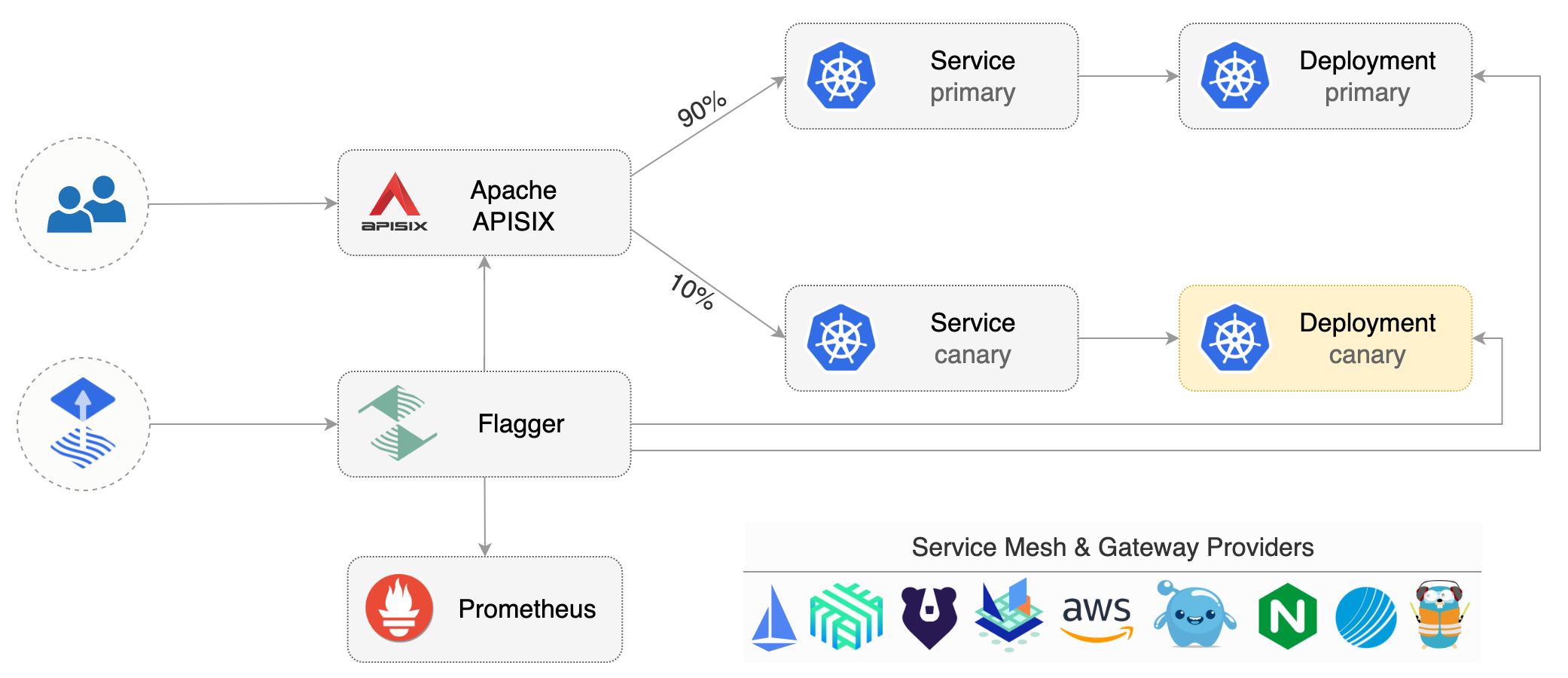
|
||||
|
||||
## Prerequisites
|
||||
|
||||
Flagger requires a Kubernetes cluster **v1.19** or newer and Apache APISIX **v2.15** or newer and Apache APISIX Ingress Controller **v1.5.0** or newer.
|
||||
|
||||
Install Apache APISIX and Apache APISIX Ingress Controller with Helm v3:
|
||||
|
||||
```bash
|
||||
helm repo add apisix https://charts.apiseven.com
|
||||
kubectl create ns apisix
|
||||
|
||||
helm upgrade -i apisix apisix/apisix --version=0.11.3 \
|
||||
--namespace apisix \
|
||||
--set apisix.podAnnotations."prometheus\.io/scrape"=true \
|
||||
--set apisix.podAnnotations."prometheus\.io/port"=9091 \
|
||||
--set apisix.podAnnotations."prometheus\.io/path"=/apisix/prometheus/metrics \
|
||||
--set pluginAttrs.prometheus.export_addr.ip=0.0.0.0 \
|
||||
--set pluginAttrs.prometheus.export_addr.port=9091 \
|
||||
--set pluginAttrs.prometheus.export_uri=/apisix/prometheus/metrics \
|
||||
--set pluginAttrs.prometheus.metric_prefix=apisix_ \
|
||||
--set ingress-controller.enabled=true \
|
||||
--set ingress-controller.config.apisix.serviceNamespace=apisix
|
||||
```
|
||||
|
||||
Install Flagger and the Prometheus add-on in the same namespace as Apache APISIX:
|
||||
|
||||
```bash
|
||||
helm repo add flagger https://flagger.app
|
||||
|
||||
helm upgrade -i flagger flagger/flagger \
|
||||
--namespace apisix \
|
||||
--set prometheus.install=true \
|
||||
--set meshProvider=apisix
|
||||
```
|
||||
|
||||
## Bootstrap
|
||||
|
||||
Flagger takes a Kubernetes deployment and optionally a horizontal pod autoscaler \(HPA\), then creates a series of objects \(Kubernetes deployments, ClusterIP services and an ApisixRoute\). These objects expose the application outside the cluster and drive the canary analysis and promotion.
|
||||
|
||||
Create a test namespace:
|
||||
|
||||
```bash
|
||||
kubectl create ns test
|
||||
```
|
||||
|
||||
Create a deployment and a horizontal pod autoscaler:
|
||||
|
||||
```bash
|
||||
kubectl apply -k https://github.com/fluxcd/flagger//kustomize/podinfo?ref=main
|
||||
```
|
||||
|
||||
Deploy the load testing service to generate traffic during the canary analysis:
|
||||
|
||||
```bash
|
||||
helm upgrade -i flagger-loadtester flagger/loadtester \
|
||||
--namespace=test
|
||||
```
|
||||
|
||||
Create an Apache APISIX `ApisixRoute`, Flagger will reference and generate the canary Apache APISIX `ApisixRoute` \(replace `app.example.com` with your own domain\):
|
||||
|
||||
```yaml
|
||||
apiVersion: apisix.apache.org/v2
|
||||
kind: ApisixRoute
|
||||
metadata:
|
||||
name: podinfo
|
||||
namespace: test
|
||||
spec:
|
||||
http:
|
||||
- backends:
|
||||
- serviceName: podinfo
|
||||
servicePort: 80
|
||||
match:
|
||||
hosts:
|
||||
- app.example.com
|
||||
methods:
|
||||
- GET
|
||||
paths:
|
||||
- /*
|
||||
name: method
|
||||
plugins:
|
||||
- name: prometheus
|
||||
enable: true
|
||||
config:
|
||||
disable: false
|
||||
prefer_name: true
|
||||
```
|
||||
|
||||
Save the above resource as podinfo-apisixroute.yaml and then apply it:
|
||||
|
||||
```bash
|
||||
kubectl apply -f ./podinfo-apisixroute.yaml
|
||||
```
|
||||
|
||||
Create a canary custom resource \(replace `app.example.com` with your own domain\):
|
||||
|
||||
```yaml
|
||||
apiVersion: flagger.app/v1beta1
|
||||
kind: Canary
|
||||
metadata:
|
||||
name: podinfo
|
||||
namespace: test
|
||||
spec:
|
||||
provider: apisix
|
||||
targetRef:
|
||||
apiVersion: apps/v1
|
||||
kind: Deployment
|
||||
name: podinfo
|
||||
# apisix route reference
|
||||
routeRef:
|
||||
apiVersion: apisix.apache.org/v2
|
||||
kind: ApisixRoute
|
||||
name: podinfo
|
||||
# the maximum time in seconds for the canary deployment
|
||||
# to make progress before it is rollback (default 600s)
|
||||
progressDeadlineSeconds: 60
|
||||
service:
|
||||
# ClusterIP port number
|
||||
port: 80
|
||||
# container port number or name
|
||||
targetPort: 9898
|
||||
analysis:
|
||||
# schedule interval (default 60s)
|
||||
interval: 10s
|
||||
# max number of failed metric checks before rollback
|
||||
threshold: 10
|
||||
# max traffic percentage routed to canary
|
||||
# percentage (0-100)
|
||||
maxWeight: 50
|
||||
# canary increment step
|
||||
# percentage (0-100)
|
||||
stepWeight: 10
|
||||
# APISIX Prometheus checks
|
||||
metrics:
|
||||
- name: request-success-rate
|
||||
# minimum req success rate (non 5xx responses)
|
||||
# percentage (0-100)
|
||||
thresholdRange:
|
||||
min: 99
|
||||
interval: 1m
|
||||
- name: request-duration
|
||||
# builtin Prometheus check
|
||||
# maximum req duration P99
|
||||
# milliseconds
|
||||
thresholdRange:
|
||||
max: 500
|
||||
interval: 30s
|
||||
webhooks:
|
||||
- name: load-test
|
||||
url: http://flagger-loadtester.test/
|
||||
timeout: 5s
|
||||
type: rollout
|
||||
metadata:
|
||||
cmd: |-
|
||||
hey -z 1m -q 10 -c 2 -h2 -host app.example.com http://apisix-gateway.apisix/api/info
|
||||
```
|
||||
|
||||
Save the above resource as podinfo-canary.yaml and then apply it:
|
||||
|
||||
```bash
|
||||
kubectl apply -f ./podinfo-canary.yaml
|
||||
```
|
||||
|
||||
After a couple of seconds Flagger will create the canary objects:
|
||||
|
||||
```bash
|
||||
# applied
|
||||
deployment.apps/podinfo
|
||||
horizontalpodautoscaler.autoscaling/podinfo
|
||||
apisixroute/podinfo
|
||||
canary.flagger.app/podinfo
|
||||
|
||||
# generated
|
||||
deployment.apps/podinfo-primary
|
||||
horizontalpodautoscaler.autoscaling/podinfo-primary
|
||||
service/podinfo
|
||||
service/podinfo-canary
|
||||
service/podinfo-primary
|
||||
apisixroute/podinfo-podinfo-canary
|
||||
```
|
||||
|
||||
## Automated canary promotion
|
||||
|
||||
Flagger implements a control loop that gradually shifts traffic to the canary while measuring key performance indicators like HTTP requests success rate, requests average duration and pod health. Based on analysis of the KPIs a canary is promoted or aborted, and the analysis result is published to Slack or MS Teams.
|
||||
|
||||

|
||||
|
||||
Trigger a canary deployment by updating the container image:
|
||||
|
||||
```bash
|
||||
kubectl -n test set image deployment/podinfo \
|
||||
podinfod=stefanprodan/podinfo:6.0.1
|
||||
```
|
||||
|
||||
Flagger detects that the deployment revision changed and starts a new rollout:
|
||||
|
||||
```text
|
||||
kubectl -n test describe canary/podinfo
|
||||
|
||||
Status:
|
||||
Canary Weight: 0
|
||||
Conditions:
|
||||
Message: Canary analysis completed successfully, promotion finished.
|
||||
Reason: Succeeded
|
||||
Status: True
|
||||
Type: Promoted
|
||||
Failed Checks: 1
|
||||
Iterations: 0
|
||||
Phase: Succeeded
|
||||
|
||||
Events:
|
||||
Type Reason Age From Message
|
||||
---- ------ ---- ---- -------
|
||||
Warning Synced 2m59s flagger podinfo-primary.test not ready: waiting for rollout to finish: observed deployment generation less than desired generation
|
||||
Warning Synced 2m50s flagger podinfo-primary.test not ready: waiting for rollout to finish: 0 of 1 (readyThreshold 100%) updated replicas are available
|
||||
Normal Synced 2m40s (x3 over 2m59s) flagger all the metrics providers are available!
|
||||
Normal Synced 2m39s flagger Initialization done! podinfo.test
|
||||
Normal Synced 2m20s flagger New revision detected! Scaling up podinfo.test
|
||||
Warning Synced 2m (x2 over 2m10s) flagger canary deployment podinfo.test not ready: waiting for rollout to finish: 0 of 1 (readyThreshold 100%) updated replicas are available
|
||||
Normal Synced 110s flagger Starting canary analysis for podinfo.test
|
||||
Normal Synced 109s flagger Advance podinfo.test canary weight 10
|
||||
Warning Synced 100s flagger Halt advancement no values found for apisix metric request-success-rate probably podinfo.test is not receiving traffic: running query failed: no values found
|
||||
Normal Synced 90s flagger Advance podinfo.test canary weight 20
|
||||
Normal Synced 80s flagger Advance podinfo.test canary weight 30
|
||||
Normal Synced 69s flagger Advance podinfo.test canary weight 40
|
||||
Normal Synced 59s flagger Advance podinfo.test canary weight 50
|
||||
Warning Synced 30s (x2 over 40s) flagger podinfo-primary.test not ready: waiting for rollout to finish: 1 old replicas are pending termination
|
||||
Normal Synced 9s (x3 over 50s) flagger (combined from similar events): Promotion completed! Scaling down podinfo.test
|
||||
```
|
||||
|
||||
**Note** that if you apply new changes to the deployment during the canary analysis, Flagger will restart the analysis.
|
||||
|
||||
You can monitor all canaries with:
|
||||
|
||||
```bash
|
||||
watch kubectl get canaries --all-namespaces
|
||||
|
||||
NAMESPACE NAME STATUS WEIGHT LASTTRANSITIONTIME
|
||||
test podinfo-2 Progressing 10 2022-11-23T05:00:54Z
|
||||
test podinfo Succeeded 0 2022-11-23T06:00:54Z
|
||||
```
|
||||
|
||||
## Automated rollback
|
||||
|
||||
During the canary analysis you can generate HTTP 500 errors to test if Flagger pauses and rolls back the faulted version.
|
||||
|
||||
Trigger another canary deployment:
|
||||
|
||||
```bash
|
||||
kubectl -n test set image deployment/podinfo \
|
||||
podinfod=stefanprodan/podinfo:6.0.2
|
||||
```
|
||||
|
||||
Exec into the load tester pod with:
|
||||
|
||||
```bash
|
||||
kubectl -n test exec -it deploy/flagger-loadtester bash
|
||||
```
|
||||
|
||||
Generate HTTP 500 errors:
|
||||
|
||||
```bash
|
||||
hey -z 1m -c 5 -q 5 -host app.example.com http://apisix-gateway.apisix/status/500
|
||||
```
|
||||
|
||||
Generate latency:
|
||||
|
||||
```bash
|
||||
watch -n 1 curl -H \"host: app.example.com\" http://apisix-gateway.apisix/delay/1
|
||||
```
|
||||
|
||||
When the number of failed checks reaches the canary analysis threshold, the traffic is routed back to the primary, the canary is scaled to zero and the rollout is marked as failed.
|
||||
|
||||
```text
|
||||
kubectl -n apisix logs deploy/flagger -f | jq .msg
|
||||
|
||||
"New revision detected! Scaling up podinfo.test"
|
||||
"canary deployment podinfo.test not ready: waiting for rollout to finish: 0 of 1 (readyThreshold 100%) updated replicas are available"
|
||||
"Starting canary analysis for podinfo.test"
|
||||
"Advance podinfo.test canary weight 10"
|
||||
"Halt podinfo.test advancement success rate 0.00% < 99%"
|
||||
"Halt podinfo.test advancement success rate 26.76% < 99%"
|
||||
"Halt podinfo.test advancement success rate 34.19% < 99%"
|
||||
"Halt podinfo.test advancement success rate 37.32% < 99%"
|
||||
"Halt podinfo.test advancement success rate 39.04% < 99%"
|
||||
"Halt podinfo.test advancement success rate 40.13% < 99%"
|
||||
"Halt podinfo.test advancement success rate 48.28% < 99%"
|
||||
"Halt podinfo.test advancement success rate 50.35% < 99%"
|
||||
"Halt podinfo.test advancement success rate 56.92% < 99%"
|
||||
"Halt podinfo.test advancement success rate 67.70% < 99%"
|
||||
"Rolling back podinfo.test failed checks threshold reached 10"
|
||||
"Canary failed! Scaling down podinfo.test"
|
||||
```
|
||||
|
||||
## Custom metrics
|
||||
|
||||
The canary analysis can be extended with Prometheus queries.
|
||||
|
||||
Create a metric template and apply it on the cluster:
|
||||
|
||||
```yaml
|
||||
apiVersion: flagger.app/v1beta1
|
||||
kind: MetricTemplate
|
||||
metadata:
|
||||
name: not-found-percentage
|
||||
namespace: test
|
||||
spec:
|
||||
provider:
|
||||
type: prometheus
|
||||
address: http://flagger-prometheus.apisix:9090
|
||||
query: |
|
||||
sum(
|
||||
rate(
|
||||
apisix_http_status{
|
||||
route=~"{{ namespace }}_{{ route }}-{{ target }}-canary_.+",
|
||||
code!~"4.."
|
||||
}[{{ interval }}]
|
||||
)
|
||||
)
|
||||
/
|
||||
sum(
|
||||
rate(
|
||||
apisix_http_status{
|
||||
route=~"{{ namespace }}_{{ route }}-{{ target }}-canary_.+"
|
||||
}[{{ interval }}]
|
||||
)
|
||||
) * 100
|
||||
```
|
||||
|
||||
Edit the canary analysis and add the not found error rate check:
|
||||
|
||||
```yaml
|
||||
analysis:
|
||||
metrics:
|
||||
- name: "404s percentage"
|
||||
templateRef:
|
||||
name: not-found-percentage
|
||||
thresholdRange:
|
||||
max: 5
|
||||
interval: 1m
|
||||
```
|
||||
|
||||
The above configuration validates the canary by checking if the HTTP 404 req/sec percentage is below 5 percent of the total traffic. If the 404s rate reaches the 5% threshold, then the canary fails.
|
||||
|
||||
|
||||
The above procedures can be extended with more [custom metrics](../usage/metrics.md) checks, [webhooks](../usage/webhooks.md), [manual promotion](../usage/webhooks.md#manual-gating) approval and [Slack or MS Teams](../usage/alerting.md) notifications.
|
||||
|
||||
@@ -62,6 +62,9 @@ Create a canary definition:
|
||||
apiVersion: flagger.app/v1beta1
|
||||
kind: Canary
|
||||
metadata:
|
||||
annotations:
|
||||
# Enable Envoy access logging to stdout.
|
||||
appmesh.flagger.app/accesslog: enabled
|
||||
name: podinfo
|
||||
namespace: test
|
||||
spec:
|
||||
@@ -77,7 +80,7 @@ spec:
|
||||
progressDeadlineSeconds: 60
|
||||
# HPA reference (optional)
|
||||
autoscalerRef:
|
||||
apiVersion: autoscaling/v2beta2
|
||||
apiVersion: autoscaling/v2
|
||||
kind: HorizontalPodAutoscaler
|
||||
name: podinfo
|
||||
service:
|
||||
@@ -168,7 +171,7 @@ virtualservice.appmesh.k8s.aws/podinfo
|
||||
virtualservice.appmesh.k8s.aws/podinfo-canary
|
||||
```
|
||||
|
||||
After the boostrap, the podinfo deployment will be scaled to zero and the traffic to `podinfo.test`
|
||||
After the bootstrap, the podinfo deployment will be scaled to zero and the traffic to `podinfo.test`
|
||||
will be routed to the primary pods.
|
||||
During the canary analysis, the `podinfo-canary.test` address can be used to target directly the canary pods.
|
||||
|
||||
@@ -242,7 +245,7 @@ Trigger a canary deployment by updating the container image:
|
||||
|
||||
```bash
|
||||
kubectl -n test set image deployment/podinfo \
|
||||
podinfod=stefanprodan/podinfo:3.1.1
|
||||
podinfod=ghcr.io/stefanprodan/podinfo:6.0.1
|
||||
```
|
||||
|
||||
Flagger detects that the deployment revision changed and starts a new rollout:
|
||||
@@ -307,7 +310,7 @@ Trigger a canary deployment:
|
||||
|
||||
```bash
|
||||
kubectl -n test set image deployment/podinfo \
|
||||
podinfod=stefanprodan/podinfo:3.1.2
|
||||
podinfod=ghcr.io/stefanprodan/podinfo:6.0.2
|
||||
```
|
||||
|
||||
Exec into the load tester pod with:
|
||||
@@ -399,7 +402,7 @@ Trigger a canary deployment by updating the container image:
|
||||
|
||||
```bash
|
||||
kubectl -n test set image deployment/podinfo \
|
||||
podinfod=stefanprodan/podinfo:3.1.3
|
||||
podinfod=ghcr.io/stefanprodan/podinfo:6.0.3
|
||||
```
|
||||
|
||||
Flagger detects that the deployment revision changed and starts the A/B test:
|
||||
|
||||
@@ -50,7 +50,7 @@ helm upgrade -i frontend flagger/podinfo \
|
||||
--set backend=http://backend.test:9898/echo \
|
||||
--set canary.enabled=true \
|
||||
--set canary.istioIngress.enabled=true \
|
||||
--set canary.istioIngress.gateway=public-gateway.istio-system.svc.cluster.local \
|
||||
--set canary.istioIngress.gateway=istio-system/public-gateway \
|
||||
--set canary.istioIngress.host=frontend.istio.example.com
|
||||
```
|
||||
|
||||
@@ -278,7 +278,7 @@ spec:
|
||||
enabled: true
|
||||
istioIngress:
|
||||
enabled: true
|
||||
gateway: public-gateway.istio-system.svc.cluster.local
|
||||
gateway: istio-system/public-gateway
|
||||
host: frontend.istio.example.com
|
||||
loadtest:
|
||||
enabled: true
|
||||
@@ -320,7 +320,7 @@ After a couple of seconds Flux will apply the Kubernetes resources from Git and
|
||||
A CI/CD pipeline for the `frontend` release could look like this:
|
||||
|
||||
* cut a release from the master branch of the podinfo code repo with the git tag `3.1.1`
|
||||
* CI builds the image and pushes the `podinfo:3.1.1` image to the container registry
|
||||
* CI builds the image and pushes the `podinfo:6.0.1` image to the container registry
|
||||
* Flux scans the registry and updates the Helm release `image.tag` to `3.1.1`
|
||||
* Flux commits and push the change to the cluster repo
|
||||
* Flux applies the updated Helm release on the cluster
|
||||
@@ -337,7 +337,7 @@ A canary deployment can fail due to any of the following reasons:
|
||||
|
||||
* the container image can't be downloaded
|
||||
* the deployment replica set is stuck for more then ten minutes \(eg. due to a container crash loop\)
|
||||
* the webooks \(acceptance tests, helm tests, load tests, etc\) are returning a non 2xx response
|
||||
* the webhooks \(acceptance tests, helm tests, load tests, etc\) are returning a non 2xx response
|
||||
* the HTTP success rate \(non 5xx responses\) metric drops under the threshold
|
||||
* the HTTP average duration metric goes over the threshold
|
||||
* the Istio telemetry service is unable to collect traffic metrics
|
||||
|
||||
@@ -76,7 +76,7 @@ spec:
|
||||
name: podinfo
|
||||
# HPA reference
|
||||
autoscalerRef:
|
||||
apiVersion: autoscaling/v2beta2
|
||||
apiVersion: autoscaling/v2
|
||||
kind: HorizontalPodAutoscaler
|
||||
name: podinfo
|
||||
service:
|
||||
@@ -90,6 +90,8 @@ spec:
|
||||
retries:
|
||||
attempts: 3
|
||||
perTryTimeout: 5s
|
||||
# supported values for retryOn - https://projectcontour.io/docs/main/config/api/#projectcontour.io/v1.RetryOn
|
||||
retryOn: "5xx"
|
||||
# define the canary analysis timing and KPIs
|
||||
analysis:
|
||||
# schedule interval (default 60s)
|
||||
@@ -157,7 +159,7 @@ service/podinfo-primary
|
||||
httpproxy.projectcontour.io/podinfo
|
||||
```
|
||||
|
||||
After the boostrap, the podinfo deployment will be scaled to zero and the traffic to `podinfo.test` will be routed to the primary pods. During the canary analysis, the `podinfo-canary.test` address can be used to target directly the canary pods.
|
||||
After the bootstrap, the podinfo deployment will be scaled to zero and the traffic to `podinfo.test` will be routed to the primary pods. During the canary analysis, the `podinfo-canary.test` address can be used to target directly the canary pods.
|
||||
|
||||
## Expose the app outside the cluster
|
||||
|
||||
@@ -224,7 +226,7 @@ Trigger a canary deployment by updating the container image:
|
||||
|
||||
```bash
|
||||
kubectl -n test set image deployment/podinfo \
|
||||
podinfod=stefanprodan/podinfo:3.1.1
|
||||
podinfod=ghcr.io/stefanprodan/podinfo:6.0.1
|
||||
```
|
||||
|
||||
Flagger detects that the deployment revision changed and starts a new rollout:
|
||||
@@ -281,7 +283,7 @@ Trigger a canary deployment:
|
||||
|
||||
```bash
|
||||
kubectl -n test set image deployment/podinfo \
|
||||
podinfod=stefanprodan/podinfo:3.1.2
|
||||
podinfod=ghcr.io/stefanprodan/podinfo:6.0.2
|
||||
```
|
||||
|
||||
Exec into the load tester pod with:
|
||||
@@ -369,7 +371,7 @@ Trigger a canary deployment by updating the container image:
|
||||
|
||||
```bash
|
||||
kubectl -n test set image deployment/podinfo \
|
||||
podinfod=stefanprodan/podinfo:3.1.3
|
||||
podinfod=ghcr.io/stefanprodan/podinfo:6.0.3
|
||||
```
|
||||
|
||||
Flagger detects that the deployment revision changed and starts the A/B test:
|
||||
|
||||
727
docs/gitbook/tutorials/gatewayapi-progressive-delivery.md
Normal file
@@ -0,0 +1,727 @@
|
||||
# Gateway API Canary Deployments
|
||||
|
||||
This guide shows you how to use [Gateway API](https://gateway-api.sigs.k8s.io/) and Flagger to automate canary deployments and A/B testing.
|
||||
|
||||
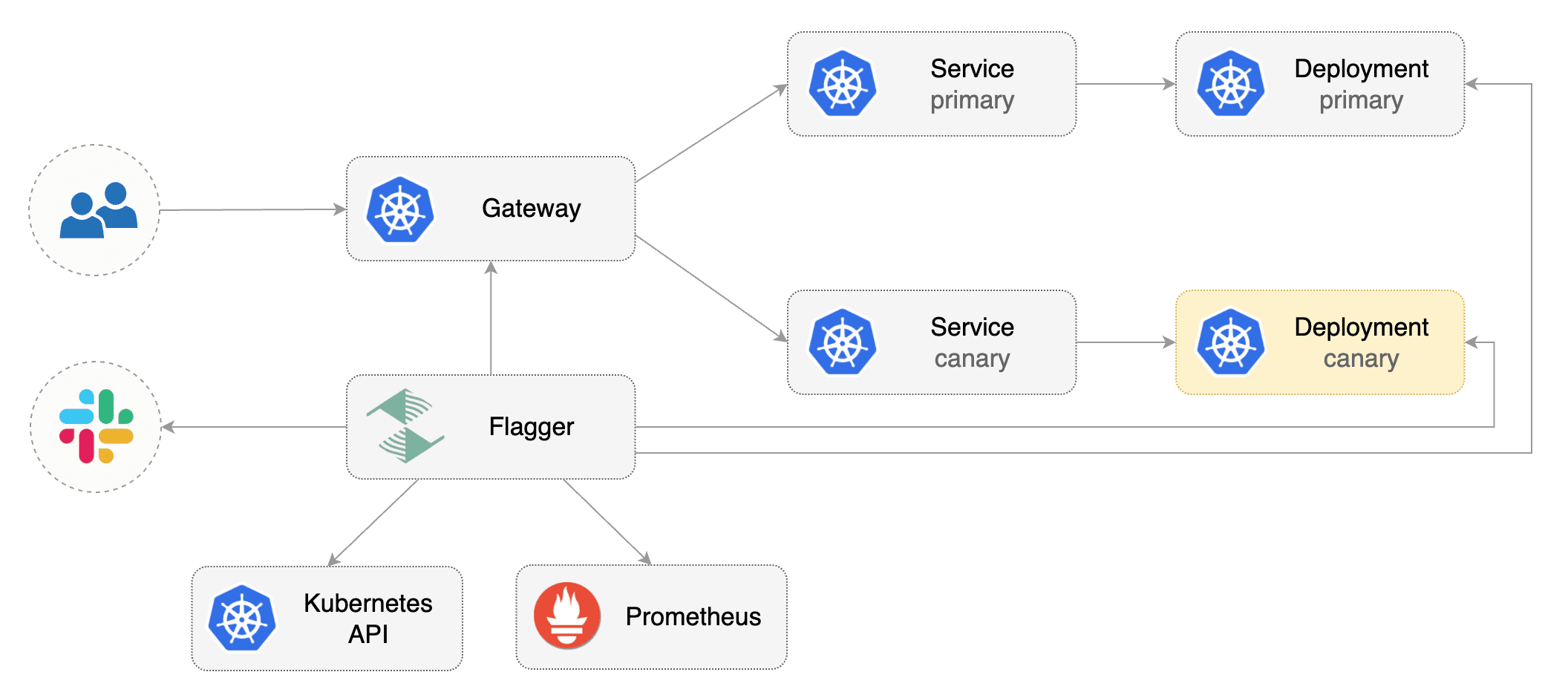
|
||||
|
||||
## Prerequisites
|
||||
|
||||
Flagger requires a Kubernetes cluster **v1.19** or newer and any mesh/ingress that implements the `v1beta1` or the `v1` version of Gateway API.
|
||||
We'll be using Istio for the sake of this tutorial, but you can use any other implementation.
|
||||
|
||||
Install the Gateway API CRDs
|
||||
|
||||
```bash
|
||||
kubectl apply -k "github.com/kubernetes-sigs/gateway-api/config/crd?ref=v1.0.0"
|
||||
```
|
||||
|
||||
Install Istio:
|
||||
|
||||
```bash
|
||||
istioctl install --set profile=minimal -y
|
||||
|
||||
# Suggestion: Please change release-1.20 in below command, to your real istio version.
|
||||
kubectl apply -f https://raw.githubusercontent.com/istio/istio/release-1.20/samples/addons/prometheus.yaml
|
||||
```
|
||||
|
||||
Install Flagger in the `flagger-system` namespace:
|
||||
|
||||
```bash
|
||||
kubectl create ns flagger-system
|
||||
|
||||
helm repo add flagger https://flagger.app
|
||||
helm upgrade -i flagger flagger/flagger \
|
||||
--namespace flagger-system \
|
||||
--set prometheus.install=false \
|
||||
--set meshProvider=gatewayapi:v1 \
|
||||
--set metricsServer=http://prometheus.istio-system:9090
|
||||
```
|
||||
|
||||
> Note: The above installation sets the mesh provider to be `gatewayapi:v1`. If your Gateway API implementation uses the `v1beta1` CRDs, then
|
||||
set the `--meshProvider` value to `gatewayapi:v1beta1`.
|
||||
|
||||
Create a namespace for the `Gateway`:
|
||||
|
||||
```bash
|
||||
kubectl create ns istio-ingress
|
||||
```
|
||||
|
||||
Create a `Gateway` that configures load balancing, traffic ACL, etc:
|
||||
|
||||
```yaml
|
||||
apiVersion: gateway.networking.k8s.io/v1beta1
|
||||
kind: Gateway
|
||||
metadata:
|
||||
name: gateway
|
||||
namespace: istio-ingress
|
||||
spec:
|
||||
gatewayClassName: istio
|
||||
listeners:
|
||||
- name: default
|
||||
hostname: "*.example.com"
|
||||
port: 80
|
||||
protocol: HTTP
|
||||
allowedRoutes:
|
||||
namespaces:
|
||||
from: All
|
||||
```
|
||||
|
||||
## Bootstrap
|
||||
|
||||
Flagger takes a Kubernetes deployment and optionally a horizontal pod autoscaler \(HPA\), then creates a series of objects \(Kubernetes deployments, ClusterIP services, HTTPRoutes for the Gateway\). These objects expose the application inside the mesh and drive the canary analysis and promotion.
|
||||
|
||||
Create a test namespace:
|
||||
|
||||
```bash
|
||||
kubectl create ns test
|
||||
```
|
||||
|
||||
Create a deployment and a horizontal pod autoscaler:
|
||||
|
||||
```bash
|
||||
kubectl apply -k https://github.com/fluxcd/flagger//kustomize/podinfo?ref=main
|
||||
```
|
||||
|
||||
Deploy the load testing service to generate traffic during the canary analysis:
|
||||
|
||||
```bash
|
||||
kubectl apply -k https://github.com/fluxcd/flagger//kustomize/tester?ref=main
|
||||
```
|
||||
|
||||
Create metric templates targeting the Prometheus server in the `flagger-system` namespace. The PromQL queries below are meant for `Envoy`, but you can [change it to your ingress/mesh provider](https://docs.flagger.app/faq#metrics) accordingly.
|
||||
|
||||
```yaml
|
||||
apiVersion: flagger.app/v1beta1
|
||||
kind: MetricTemplate
|
||||
metadata:
|
||||
name: latency
|
||||
namespace: flagger-system
|
||||
spec:
|
||||
provider:
|
||||
type: prometheus
|
||||
address: http://prometheus.istio-system:9090
|
||||
query: |
|
||||
histogram_quantile(0.99,
|
||||
sum(
|
||||
rate(
|
||||
istio_request_duration_milliseconds_bucket{
|
||||
reporter="source",
|
||||
destination_workload_namespace=~"{{ namespace }}",
|
||||
destination_workload=~"{{ target }}",
|
||||
}[{{ interval }}]
|
||||
)
|
||||
) by (le)
|
||||
)/1000
|
||||
---
|
||||
apiVersion: flagger.app/v1beta1
|
||||
kind: MetricTemplate
|
||||
metadata:
|
||||
name: error-rate
|
||||
namespace: flagger-system
|
||||
spec:
|
||||
provider:
|
||||
type: prometheus
|
||||
address: http://prometheus.istio-system:9090
|
||||
query: |
|
||||
100 - sum(
|
||||
rate(
|
||||
istio_requests_total{
|
||||
reporter="source",
|
||||
destination_workload_namespace=~"{{ namespace }}",
|
||||
destination_workload=~"{{ target }}",
|
||||
response_code!~"5.*"
|
||||
}[{{ interval }}]
|
||||
)
|
||||
)
|
||||
/
|
||||
sum(
|
||||
rate(
|
||||
istio_requests_total{
|
||||
reporter="source",
|
||||
destination_workload_namespace=~"{{ namespace }}",
|
||||
destination_workload=~"{{ target }}",
|
||||
}[{{ interval }}]
|
||||
)
|
||||
)
|
||||
* 100
|
||||
```
|
||||
|
||||
Save the above resource as metric-templates.yaml and then apply it:
|
||||
|
||||
```bash
|
||||
kubectl apply -f metric-templates.yaml
|
||||
```
|
||||
|
||||
Create a canary custom resource \(replace "www.example.com" with your own domain\):
|
||||
|
||||
```yaml
|
||||
apiVersion: flagger.app/v1beta1
|
||||
kind: Canary
|
||||
metadata:
|
||||
name: podinfo
|
||||
namespace: test
|
||||
spec:
|
||||
# deployment reference
|
||||
targetRef:
|
||||
apiVersion: apps/v1
|
||||
kind: Deployment
|
||||
name: podinfo
|
||||
# the maximum time in seconds for the canary deployment
|
||||
# to make progress before it is rollback (default 600s)
|
||||
progressDeadlineSeconds: 60
|
||||
# HPA reference (optional)
|
||||
autoscalerRef:
|
||||
apiVersion: autoscaling/v2
|
||||
kind: HorizontalPodAutoscaler
|
||||
name: podinfo
|
||||
service:
|
||||
# service port number
|
||||
port: 9898
|
||||
# container port number or name (optional)
|
||||
targetPort: 9898
|
||||
# Gateway API HTTPRoute host names
|
||||
hosts:
|
||||
- www.example.com
|
||||
# Reference to the Gateway that the generated HTTPRoute would attach to.
|
||||
gatewayRefs:
|
||||
- name: gateway
|
||||
namespace: istio-ingress
|
||||
analysis:
|
||||
# schedule interval (default 60s)
|
||||
interval: 1m
|
||||
# max number of failed metric checks before rollback
|
||||
threshold: 5
|
||||
# max traffic percentage routed to canary
|
||||
# percentage (0-100)
|
||||
maxWeight: 50
|
||||
# canary increment step
|
||||
# percentage (0-100)
|
||||
stepWeight: 10
|
||||
metrics:
|
||||
- name: error-rate
|
||||
# max error rate (5xx responses)
|
||||
# percentage (0-100)
|
||||
templateRef:
|
||||
name: error-rate
|
||||
namespace: flagger-system
|
||||
thresholdRange:
|
||||
max: 1
|
||||
interval: 1m
|
||||
- name: latency
|
||||
templateRef:
|
||||
name: latency
|
||||
namespace: flagger-system
|
||||
# seconds
|
||||
thresholdRange:
|
||||
max: 0.5
|
||||
interval: 30s
|
||||
# testing (optional)
|
||||
webhooks:
|
||||
- name: smoke-test
|
||||
type: pre-rollout
|
||||
url: http://flagger-loadtester.test/
|
||||
timeout: 15s
|
||||
metadata:
|
||||
type: bash
|
||||
cmd: "curl -sd 'anon' http://podinfo-canary.test:9898/token | grep token"
|
||||
- name: load-test
|
||||
url: http://flagger-loadtester.test/
|
||||
timeout: 5s
|
||||
metadata:
|
||||
cmd: "hey -z 2m -q 10 -c 2 -host www.example.com http://gateway-istio.istio-ingress/"
|
||||
```
|
||||
|
||||
Save the above resource as podinfo-canary.yaml and then apply it:
|
||||
|
||||
```bash
|
||||
kubectl apply -f ./podinfo-canary.yaml
|
||||
```
|
||||
|
||||
When the canary analysis starts, Flagger will call the pre-rollout webhooks before routing traffic to the canary. The canary analysis will run for five minutes while validating the HTTP metrics and rollout hooks every minute.
|
||||
|
||||
After a couple of seconds Flagger will create the canary objects:
|
||||
|
||||
```bash
|
||||
# applied
|
||||
deployment.apps/podinfo
|
||||
horizontalpodautoscaler.autoscaling/podinfo
|
||||
canary.flagger.app/podinfo
|
||||
|
||||
# generated
|
||||
deployment.apps/podinfo-primary
|
||||
horizontalpodautoscaler.autoscaling/podinfo-primary
|
||||
service/podinfo
|
||||
service/podinfo-canary
|
||||
service/podinfo-primary
|
||||
httproutes.gateway.networking.k8s.io/podinfo
|
||||
```
|
||||
|
||||
## Expose the app outside the cluster
|
||||
|
||||
Find the external address of Istio's load balancer:
|
||||
|
||||
```bash
|
||||
export ADDRESS="$(kubectl -n istio-ingress get svc/gateway-istio -ojson \
|
||||
| jq -r ".status.loadBalancer.ingress[].hostname")"
|
||||
echo $ADDRESS
|
||||
```
|
||||
|
||||
Configure your DNS server with a CNAME record \(AWS\) or A record \(GKE/AKS/DOKS\) and point a domain e.g. `www.example.com` to the LB address.
|
||||
|
||||
Now you can access the podinfo UI using your domain address.
|
||||
|
||||
Note that you should be using HTTPS when exposing production workloads on internet. You can obtain free TLS certs from Let's Encrypt, read this
|
||||
[guide](https://github.com/stefanprodan/istio-gke) on how to configure cert-manager to secure Istio with TLS certificates.
|
||||
|
||||
If you're using a local cluster via kind/k3s you can port forward the Envoy LoadBalancer service:
|
||||
```bash
|
||||
kubectl port-forward -n istio-ingress svc/gateway-istio 8080:80
|
||||
```
|
||||
|
||||
Now you can access podinfo via `curl -H "Host: www.example.com" localhost:8080`
|
||||
|
||||
## Automated canary promotion
|
||||
|
||||
Trigger a canary deployment by updating the container image:
|
||||
|
||||
```bash
|
||||
kubectl -n test set image deployment/podinfo \
|
||||
podinfod=stefanprodan/podinfo:6.0.1
|
||||
```
|
||||
|
||||
Flagger detects that the deployment revision changed and starts a new rollout:
|
||||
|
||||
```text
|
||||
kubectl -n test describe canary/podinfo
|
||||
|
||||
Status:
|
||||
Canary Weight: 0
|
||||
Failed Checks: 0
|
||||
Phase: Succeeded
|
||||
Events:
|
||||
Type Reason Age From Message
|
||||
---- ------ ---- ---- -------
|
||||
Normal Synced 3m flagger New revision detected podinfo.test
|
||||
Normal Synced 3m flagger Scaling up podinfo.test
|
||||
Warning Synced 3m flagger Waiting for podinfo.test rollout to finish: 0 of 1 updated replicas are available
|
||||
Normal Synced 3m flagger Advance podinfo.test canary weight 5
|
||||
Normal Synced 3m flagger Advance podinfo.test canary weight 10
|
||||
Normal Synced 3m flagger Advance podinfo.test canary weight 15
|
||||
Normal Synced 2m flagger Advance podinfo.test canary weight 20
|
||||
Normal Synced 2m flagger Advance podinfo.test canary weight 25
|
||||
Normal Synced 1m flagger Advance podinfo.test canary weight 30
|
||||
Normal Synced 1m flagger Advance podinfo.test canary weight 35
|
||||
Normal Synced 55s flagger Advance podinfo.test canary weight 40
|
||||
Normal Synced 45s flagger Advance podinfo.test canary weight 45
|
||||
Normal Synced 35s flagger Advance podinfo.test canary weight 50
|
||||
Normal Synced 25s flagger Copying podinfo.test template spec to podinfo-primary.test
|
||||
Warning Synced 15s flagger Waiting for podinfo-primary.test rollout to finish: 1 of 2 updated replicas are available
|
||||
Normal Synced 5s flagger Promotion completed! Scaling down podinfo.test
|
||||
```
|
||||
|
||||
**Note** that if you apply new changes to the deployment during the canary analysis, Flagger will restart the analysis.
|
||||
|
||||
A canary deployment is triggered by changes in any of the following objects:
|
||||
|
||||
* Deployment PodSpec \(container image, command, ports, env, resources, etc\)
|
||||
* ConfigMaps mounted as volumes or mapped to environment variables
|
||||
* Secrets mounted as volumes or mapped to environment variables
|
||||
|
||||
You can monitor how Flagger progressively changes the weights of the HTTPRoute object that is attahed to the Gateway with:
|
||||
|
||||
```bash
|
||||
watch kubectl get httproute -n test podinfo -o=jsonpath='{.spec.rules}'
|
||||
```
|
||||
|
||||
You can monitor all canaries with:
|
||||
|
||||
```bash
|
||||
watch kubectl get canaries --all-namespaces
|
||||
|
||||
NAMESPACE NAME STATUS WEIGHT LASTTRANSITIONTIME
|
||||
test podinfo Progressing 15 2022-01-16T14:05:07Z
|
||||
prod frontend Succeeded 0 2022-01-15T16:15:07Z
|
||||
prod backend Failed 0 2022-01-14T17:05:07Z
|
||||
```
|
||||
|
||||
## Automated rollback
|
||||
|
||||
During the canary analysis you can generate HTTP 500 errors and high latency to test if Flagger pauses the rollout.
|
||||
|
||||
Trigger another canary deployment:
|
||||
|
||||
```bash
|
||||
kubectl -n test set image deployment/podinfo \
|
||||
podinfod=stefanprodan/podinfo:6.0.2
|
||||
```
|
||||
|
||||
Exec into the load tester pod with:
|
||||
|
||||
```bash
|
||||
kubectl -n test exec -it flagger-loadtester-xx-xx sh
|
||||
```
|
||||
|
||||
Generate HTTP 500 errors:
|
||||
|
||||
```bash
|
||||
watch curl http://podinfo-canary:9898/status/500
|
||||
```
|
||||
|
||||
Generate latency:
|
||||
|
||||
```bash
|
||||
watch curl http://podinfo-canary:9898/delay/1
|
||||
```
|
||||
|
||||
When the number of failed checks reaches the canary analysis threshold, the traffic is routed back to the primary, the canary is scaled to zero and the rollout is marked as failed.
|
||||
|
||||
```text
|
||||
kubectl -n test describe canary/podinfo
|
||||
|
||||
Status:
|
||||
Canary Weight: 0
|
||||
Failed Checks: 10
|
||||
Phase: Failed
|
||||
Events:
|
||||
Type Reason Age From Message
|
||||
---- ------ ---- ---- -------
|
||||
Normal Synced 3m flagger Starting canary deployment for podinfo.test
|
||||
Normal Synced 3m flagger Advance podinfo.test canary weight 5
|
||||
Normal Synced 3m flagger Advance podinfo.test canary weight 10
|
||||
Normal Synced 3m flagger Advance podinfo.test canary weight 15
|
||||
Normal Synced 3m flagger Halt podinfo.test advancement error rate 69.17% > 1%
|
||||
Normal Synced 2m flagger Halt podinfo.test advancement error rate 61.39% > 1%
|
||||
Normal Synced 2m flagger Halt podinfo.test advancement error rate 55.06% > 1%
|
||||
Normal Synced 2m flagger Halt podinfo.test advancement error rate 47.00% > 1%
|
||||
Normal Synced 2m flagger (combined from similar events): Halt podinfo.test advancement error rate 38.08% > 1%
|
||||
Warning Synced 1m flagger Rolling back podinfo.test failed checks threshold reached 10
|
||||
Warning Synced 1m flagger Canary failed! Scaling down podinfo.test
|
||||
```
|
||||
|
||||
## Session Affinity
|
||||
|
||||
While Flagger can perform weighted routing and A/B testing individually, with Gateway API it can combine the two leading to a Canary
|
||||
release with session affinity.
|
||||
For more information you can read the [deployment strategies docs](../usage/deployment-strategies.md#canary-release-with-session-affinity).
|
||||
|
||||
> **Note:** The implementation must have support for the [`ResponseHeaderModifier`](https://github.com/kubernetes-sigs/gateway-api/blob/3d22aa5a08413222cb79e6b2e245870360434614/apis/v1beta1/httproute_types.go#L651) API.
|
||||
|
||||
Create a canary custom resource \(replace www.example.com with your own domain\):
|
||||
|
||||
```yaml
|
||||
apiVersion: flagger.app/v1beta1
|
||||
kind: Canary
|
||||
metadata:
|
||||
name: podinfo
|
||||
namespace: test
|
||||
spec:
|
||||
# deployment reference
|
||||
targetRef:
|
||||
apiVersion: apps/v1
|
||||
kind: Deployment
|
||||
name: podinfo
|
||||
# the maximum time in seconds for the canary deployment
|
||||
# to make progress before it is rollback (default 600s)
|
||||
progressDeadlineSeconds: 60
|
||||
# HPA reference (optional)
|
||||
autoscalerRef:
|
||||
apiVersion: autoscaling/v2
|
||||
kind: HorizontalPodAutoscaler
|
||||
name: podinfo
|
||||
service:
|
||||
# service port number
|
||||
port: 9898
|
||||
# container port number or name (optional)
|
||||
targetPort: 9898
|
||||
# Gateway API HTTPRoute host names
|
||||
hosts:
|
||||
- www.example.com
|
||||
# Reference to the Gateway that the generated HTTPRoute would attach to.
|
||||
gatewayRefs:
|
||||
- name: gateway
|
||||
namespace: istio-ingress
|
||||
analysis:
|
||||
# schedule interval (default 60s)
|
||||
interval: 1m
|
||||
# max number of failed metric checks before rollback
|
||||
threshold: 5
|
||||
# max traffic percentage routed to canary
|
||||
# percentage (0-100)
|
||||
maxWeight: 50
|
||||
# canary increment step
|
||||
# percentage (0-100)
|
||||
stepWeight: 10
|
||||
# session affinity config
|
||||
sessionAffinity:
|
||||
# name of the cookie used
|
||||
cookieName: flagger-cookie
|
||||
# max age of the cookie (in seconds)
|
||||
# optional; defaults to 86400
|
||||
maxAge: 21600
|
||||
metrics:
|
||||
- name: error-rate
|
||||
# max error rate (5xx responses)
|
||||
# percentage (0-100)
|
||||
templateRef:
|
||||
name: error-rate
|
||||
namespace: flagger-system
|
||||
thresholdRange:
|
||||
max: 1
|
||||
interval: 1m
|
||||
- name: latency
|
||||
templateRef:
|
||||
name: latency
|
||||
namespace: flagger-system
|
||||
# seconds
|
||||
thresholdRange:
|
||||
max: 0.5
|
||||
interval: 30s
|
||||
# testing (optional)
|
||||
webhooks:
|
||||
- name: smoke-test
|
||||
type: pre-rollout
|
||||
url: http://flagger-loadtester.test/
|
||||
timeout: 15s
|
||||
metadata:
|
||||
type: bash
|
||||
cmd: "curl -sd 'anon' http://podinfo-canary.test:9898/token | grep token"
|
||||
- name: load-test
|
||||
url: http://flagger-loadtester.test/
|
||||
timeout: 5s
|
||||
metadata:
|
||||
cmd: "hey -z 2m -q 10 -c 2 -host www.example.com http://gateway-istio.istio-ingress/"
|
||||
```
|
||||
|
||||
Save the above resource as podinfo-canary-session-affinity.yaml and then apply it:
|
||||
|
||||
```bash
|
||||
kubectl apply -f ./podinfo-canary-session-affinity.yaml
|
||||
```
|
||||
|
||||
Trigger a canary deployment by updating the container image:
|
||||
|
||||
```bash
|
||||
kubectl -n test set image deployment/podinfo \
|
||||
podinfod=ghcr.io/stefanprodan/podinfo:6.0.1
|
||||
```
|
||||
|
||||
You can load `www.example.com` in your browser and refresh it until you see the requests being served by `podinfo:6.0.1`.
|
||||
All subsequent requests after that will be served by `podinfo:6.0.1` and not `podinfo:6.0.0` because of the session affinity
|
||||
configured by Flagger in the HTTPRoute object.
|
||||
|
||||
# A/B Testing
|
||||
|
||||
Besides weighted routing, Flagger can be configured to route traffic to the canary based on HTTP match conditions. In an A/B testing scenario, you'll be using HTTP headers or cookies to target a certain segment of your users. This is particularly useful for frontend applications that require session affinity.
|
||||
|
||||
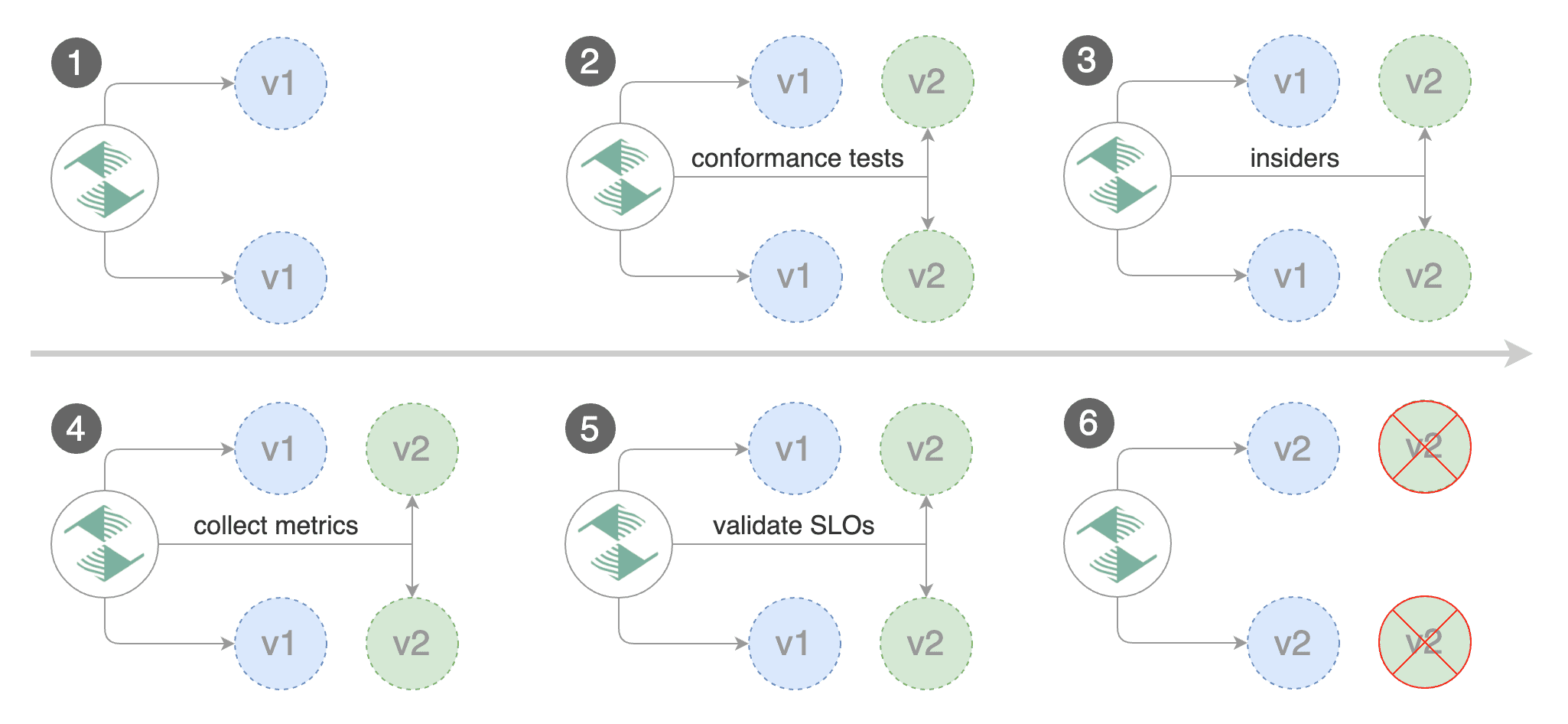
|
||||
|
||||
Create a canary custom resource \(replace "www.example.com" with your own domain\):
|
||||
|
||||
```yaml
|
||||
apiVersion: flagger.app/v1beta1
|
||||
kind: Canary
|
||||
metadata:
|
||||
name: podinfo
|
||||
namespace: test
|
||||
spec:
|
||||
# deployment reference
|
||||
targetRef:
|
||||
apiVersion: apps/v1
|
||||
kind: Deployment
|
||||
name: podinfo
|
||||
# the maximum time in seconds for the canary deployment
|
||||
# to make progress before it is rollback (default 600s)
|
||||
progressDeadlineSeconds: 60
|
||||
# HPA reference (optional)
|
||||
autoscalerRef:
|
||||
apiVersion: autoscaling/v2
|
||||
kind: HorizontalPodAutoscaler
|
||||
name: podinfo
|
||||
service:
|
||||
# service port number
|
||||
port: 9898
|
||||
# container port number or name (optional)
|
||||
targetPort: 9898
|
||||
# Gateway API HTTPRoute host names
|
||||
hosts:
|
||||
- www.example.com
|
||||
# Reference to the Gateway that the generated HTTPRoute would attach to.
|
||||
gatewayRefs:
|
||||
- name: gateway
|
||||
namespace: istio-ingress
|
||||
analysis:
|
||||
# schedule interval (default 60s)
|
||||
interval: 1m
|
||||
# max number of failed metric checks before rollback
|
||||
threshold: 5
|
||||
# max traffic percentage routed to canary
|
||||
# percentage (0-100)
|
||||
maxWeight: 50
|
||||
# canary increment step
|
||||
# percentage (0-100)
|
||||
stepWeight: 10
|
||||
metrics:
|
||||
- name: error-rate
|
||||
# max error rate (5xx responses)
|
||||
# percentage (0-100)
|
||||
templateRef:
|
||||
name: error-rate
|
||||
namespace: flagger-system
|
||||
thresholdRange:
|
||||
max: 1
|
||||
interval: 1m
|
||||
- name: latency
|
||||
templateRef:
|
||||
name: latency
|
||||
namespace: flagger-system
|
||||
# seconds
|
||||
thresholdRange:
|
||||
max: 0.5
|
||||
interval: 30s
|
||||
# testing (optional)
|
||||
webhooks:
|
||||
- name: smoke-test
|
||||
type: pre-rollout
|
||||
url: http://flagger-loadtester.test/
|
||||
timeout: 15s
|
||||
metadata:
|
||||
type: bash
|
||||
cmd: "curl -sd 'anon' http://podinfo-canary.test:9898/token | grep token"
|
||||
- name: load-test
|
||||
url: http://flagger-loadtester.test/
|
||||
timeout: 5s
|
||||
metadata:
|
||||
cmd: "hey -z 2m -q 10 -c 2 -host www.example.com -H 'X-Canary: insider' http://gateway-istio.istio-ingress/"
|
||||
```
|
||||
|
||||
The above configuration will run an analysis for ten minutes targeting those users that have an insider cookie.
|
||||
|
||||
Save the above resource as podinfo-ab-canary.yaml and then apply it:
|
||||
|
||||
```bash
|
||||
kubectl apply -f ./podinfo-ab-canary.yaml
|
||||
```
|
||||
|
||||
Trigger a canary deployment by updating the container image:
|
||||
|
||||
```bash
|
||||
kubectl -n test set image deployment/podinfo \
|
||||
podinfod=stefanprodan/podinfo:6.0.3
|
||||
```
|
||||
|
||||
Flagger detects that the deployment revision changed and starts a new rollout:
|
||||
|
||||
```text
|
||||
kubectl -n test describe canary/podinfo
|
||||
|
||||
Status:
|
||||
Failed Checks: 0
|
||||
Phase: Succeeded
|
||||
Events:
|
||||
Type Reason Age From Message
|
||||
---- ------ ---- ---- -------
|
||||
Normal Synced 3m flagger New revision detected podinfo.test
|
||||
Normal Synced 3m flagger Scaling up podinfo.test
|
||||
Warning Synced 3m flagger Waiting for podinfo.test rollout to finish: 0 of 1 updated replicas are available
|
||||
Normal Synced 3m flagger Advance podinfo.test canary iteration 1/10
|
||||
Normal Synced 3m flagger Advance podinfo.test canary iteration 2/10
|
||||
Normal Synced 3m flagger Advance podinfo.test canary iteration 3/10
|
||||
Normal Synced 2m flagger Advance podinfo.test canary iteration 4/10
|
||||
Normal Synced 2m flagger Advance podinfo.test canary iteration 5/10
|
||||
Normal Synced 1m flagger Advance podinfo.test canary iteration 6/10
|
||||
Normal Synced 1m flagger Advance podinfo.test canary iteration 7/10
|
||||
Normal Synced 55s flagger Advance podinfo.test canary iteration 8/10
|
||||
Normal Synced 45s flagger Advance podinfo.test canary iteration 9/10
|
||||
Normal Synced 35s flagger Advance podinfo.test canary iteration 10/10
|
||||
Normal Synced 25s flagger Copying podinfo.test template spec to podinfo-primary.test
|
||||
Warning Synced 15s flagger Waiting for podinfo-primary.test rollout to finish: 1 of 2 updated replicas are available
|
||||
Normal Synced 5s flagger Promotion completed! Scaling down podinfo.test
|
||||
```
|
||||
|
||||
## Traffic mirroring
|
||||
|
||||
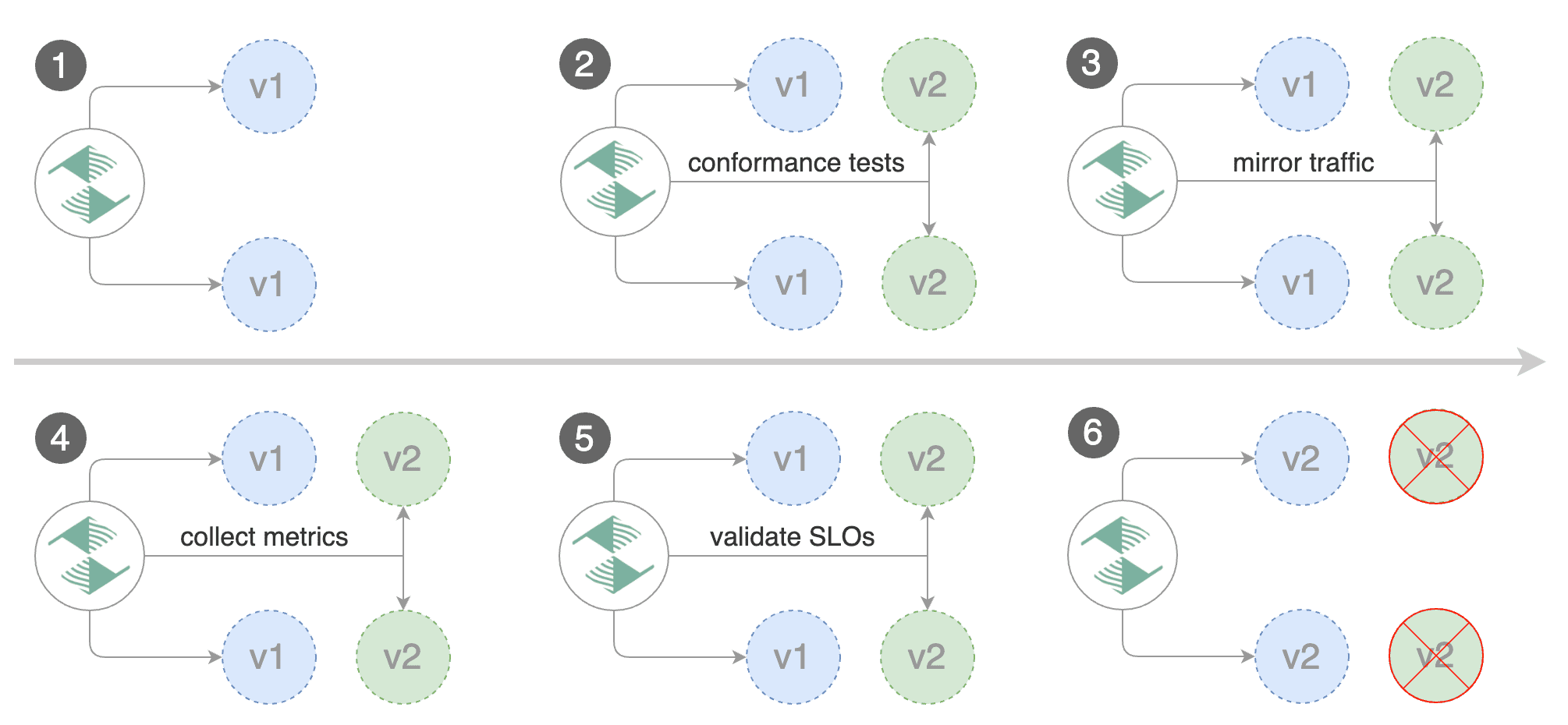
|
||||
|
||||
For applications that perform read operations, Flagger can be configured to do B/G tests with traffic mirroring.
|
||||
Gateway API traffic mirroring will copy each incoming request, sending one request to the primary and one to the canary service.
|
||||
The response from the primary is sent back to the user and the response from the canary is discarded.
|
||||
Metrics are collected on both requests so that the deployment will only proceed if the canary metrics are within the threshold values.
|
||||
|
||||
Note that mirroring should be used for requests that are **idempotent** or capable of being processed twice \(once by the primary and once by the canary\).
|
||||
|
||||
You can enable mirroring by replacing `stepWeight` with `iterations` and by setting `analysis.mirror` to `true`:
|
||||
|
||||
```yaml
|
||||
apiVersion: flagger.app/v1beta1
|
||||
kind: Canary
|
||||
metadata:
|
||||
name: podinfo
|
||||
namespace: test
|
||||
spec:
|
||||
# deployment reference
|
||||
targetRef:
|
||||
apiVersion: apps/v1
|
||||
kind: Deployment
|
||||
name: podinfo
|
||||
service:
|
||||
# service port number
|
||||
port: 9898
|
||||
# container port number or name (optional)
|
||||
targetPort: 9898
|
||||
# Gateway API HTTPRoute host names
|
||||
hosts:
|
||||
- www.example.com
|
||||
# Reference to the Gateway that the generated HTTPRoute would attach to.
|
||||
gatewayRefs:
|
||||
- name: gateway
|
||||
namespace: istio-ingress
|
||||
analysis:
|
||||
# schedule interval
|
||||
interval: 1m
|
||||
# max number of failed metric checks before rollback
|
||||
threshold: 5
|
||||
# total number of iterations
|
||||
iterations: 10
|
||||
# enable traffic shadowing
|
||||
mirror: true
|
||||
# Gateway API HTTPRoute host names
|
||||
metrics:
|
||||
- name: request-success-rate
|
||||
thresholdRange:
|
||||
min: 99
|
||||
interval: 1m
|
||||
- name: request-duration
|
||||
thresholdRange:
|
||||
max: 500
|
||||
interval: 1m
|
||||
webhooks:
|
||||
- name: load-test
|
||||
url: http://flagger-loadtester.test/
|
||||
timeout: 5s
|
||||
metadata:
|
||||
cmd: "hey -z 2m -q 10 -c 2 -host www.example.com http://gateway-istio.istio-ingress/"
|
||||
```
|
||||
|
||||
With the above configuration, Flagger will run a canary release with the following steps:
|
||||
|
||||
* detect new revision \(deployment spec, secrets or configmaps changes\)
|
||||
* scale from zero the canary deployment
|
||||
* wait for the HPA to set the canary minimum replicas
|
||||
* check canary pods health
|
||||
* run the acceptance tests
|
||||
* abort the canary release if tests fail
|
||||
* start the load tests
|
||||
* mirror 100% of the traffic from primary to canary
|
||||
* check request success rate and request duration every minute
|
||||
* abort the canary release if the metrics check failure threshold is reached
|
||||
* stop traffic mirroring after the number of iterations is reached
|
||||
* route live traffic to the canary pods
|
||||
* promote the canary \(update the primary secrets, configmaps and deployment spec\)
|
||||
* wait for the primary deployment rollout to finish
|
||||
* wait for the HPA to set the primary minimum replicas
|
||||
* check primary pods health
|
||||
* switch live traffic back to primary
|
||||
* scale to zero the canary
|
||||
* send notification with the canary analysis result
|
||||
|
||||
The above procedures can be extended with [custom metrics](../usage/metrics.md) checks, [webhooks](../usage/webhooks.md), [manual promotion](../usage/webhooks.md#manual-gating) approval and [Slack or MS Teams](../usage/alerting.md) notifications.
|
||||