mirror of
https://github.com/Joxit/docker-registry-ui.git
synced 2026-07-12 08:39:19 +00:00

160 lines
4.2 KiB
Markdown
160 lines
4.2 KiB
Markdown
# Docker Registry UI
|
|
|
|
## Overview
|
|
|
|
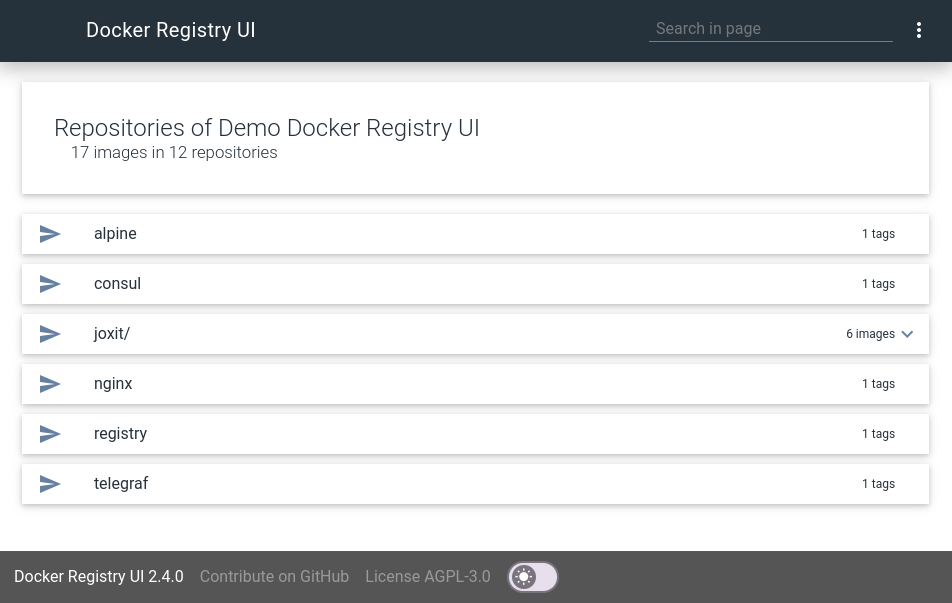
This project aims to provide a user interface for your private docker registry v2.
|
|
There is no default registry on this UI, you should add your own with the UI.
|
|
You can manage more than one registry server.
|
|
All registry will be stored in the [local storage](https://en.wikipedia.org/wiki/Web_storage#Local_and_session_storage) of your browser.
|
|
|
|
This web user interface use [Riot](https://github.com/Riot/riot) the react-like user interface micro-library and [Material Design Lite](https://github.com/google/material-design-lite) components.
|
|
|
|
## [GitHub Page](https://joxit.github.io/docker-registry-ui) and [Live Demo](https://joxit.github.io/docker-registry-ui/demo/)
|
|
|
|
|
|
|
|
## Features
|
|
|
|
- List all your repositories/images.
|
|
- List all tags for a repository/image
|
|
- Sort the tag list
|
|
- One interface for many registry
|
|
- Use a secured docker registry
|
|
|
|
## Getting Started
|
|
|
|
### Basic
|
|
|
|
First you need node and npm in order to download dependencies.
|
|
|
|
```sh
|
|
git clone https://github.com/Joxit/docker-registry-ui.git
|
|
cd docker-registry-ui
|
|
npm install
|
|
```
|
|
|
|
Now you can open index.html with your browser or use a http-server
|
|
|
|
```sh
|
|
npm install -g http-server
|
|
http-server
|
|
```
|
|
|
|
### Docker
|
|
|
|
The docker contains the source code and a node webserver in order to serve the docker-registry-ui.
|
|
|
|
#### Get the docker image
|
|
|
|
You can get the image in three ways
|
|
|
|
From sources with this command :
|
|
|
|
```sh
|
|
git clone https://github.com/Joxit/docker-registry-ui.git
|
|
docker build -t joxit/docker-registry-ui docker-registry-ui
|
|
docker build -t joxit/docker-registry-ui -f docker-registry-ui/Dockerfile.static docker-registry-ui
|
|
```
|
|
|
|
Or build with the url :
|
|
|
|
```sh
|
|
docker build -t joxit/docker-registry-ui github.com/Joxit/docker-registry-ui
|
|
docker build -t joxit/docker-registry-ui -f Dockerfile.static github.com/Joxit/docker-registry-ui
|
|
```
|
|
|
|
Or pull the image from [docker hub](https://hub.docker.com/r/joxit/docker-registry-ui/) :
|
|
|
|
```sh
|
|
docker pull joxit/docker-registry-ui
|
|
docker pull joxit/docker-registry-ui:static
|
|
```
|
|
|
|
#### Run the docker
|
|
|
|
To run the docker and see the website on your 80 port, try this :
|
|
|
|
```sh
|
|
docker run -d -p 80:80 joxit/docker-registry-ui
|
|
```
|
|
|
|
#### Run the static docker
|
|
|
|
Some env options are available for use this interface for only one server.
|
|
|
|
- `URL`: set the static URL to use. (`Required`)
|
|
- `DELETE_IMAGES`: if this variable is empty or `false`, delete feature is desactivated. It is activated otherwise.
|
|
|
|
```sh
|
|
docker run -d -p 80:80 -e URL=http://127.0.0.1:5000 -e DELETE_IMAGES=true joxit/docker-registry-ui:static
|
|
```
|
|
|
|
## Using CORS
|
|
|
|
Your server should be configured to accept CORS.
|
|
|
|
If your docker registry does not need credentials, you will need to send this HEADER :
|
|
|
|
Access-Control-Allow-Origin: '*'
|
|
|
|
If your docker registry need credentials, you will need to send these HEADERS :
|
|
|
|
```yml
|
|
http:
|
|
headers:
|
|
Access-Control-Allow-Origin: '<your docker-registry-ui url>'
|
|
Access-Control-Allow-Credentials: true
|
|
Access-Control-Allow-Methods: ['HEAD', 'GET', 'OPTIONS'] # Optional
|
|
```
|
|
|
|
## Using delete
|
|
|
|
For deleting images, you need to activate the delete feature in your registry :
|
|
|
|
```yml
|
|
storage:
|
|
delete:
|
|
enabled: true
|
|
```
|
|
|
|
And you need to add these HEADERS :
|
|
|
|
```yml
|
|
http:
|
|
headers:
|
|
Access-Control-Allow-Methods: ['HEAD', 'GET', 'OPTIONS', 'DELETE']
|
|
Access-Control-Expose-Headers: ['Docker-Content-Digest']
|
|
```
|
|
|
|
## Registry example
|
|
|
|
Example of docker registry configuration file:
|
|
|
|
```yml
|
|
version: 0.1
|
|
log:
|
|
fields:
|
|
service: registry
|
|
storage:
|
|
delete:
|
|
enabled: true
|
|
cache:
|
|
blobdescriptor: inmemory
|
|
filesystem:
|
|
rootdirectory: /var/lib/registry
|
|
http:
|
|
addr: :5000
|
|
headers:
|
|
X-Content-Type-Options: [nosniff]
|
|
Access-Control-Allow-Origin: ['http://127.0.0.1:8001']
|
|
Access-Control-Allow-Methods: ['HEAD', 'GET', 'OPTIONS', 'DELETE']
|
|
Access-Control-Allow-Headers: ['Authorization']
|
|
Access-Control-Max-Age: [1728000]
|
|
Access-Control-Allow-Credentials: [true]
|
|
Access-Control-Expose-Headers: ['Docker-Content-Digest']
|
|
auth:
|
|
htpasswd:
|
|
realm: basic-realm
|
|
path: /etc/docker/registry/htpasswd
|
|
```
|