mirror of
https://github.com/Joxit/docker-registry-ui.git
synced 2026-05-15 04:06:32 +00:00

80 lines
2.3 KiB
Markdown
80 lines
2.3 KiB
Markdown
# Docker Registry UI
|
|
|
|
## Overview
|
|
This project aims to provide a user interface for your private docker registry v2.
|
|
There is no default registry on this UI, you should add your own with the UI.
|
|
You can manage more than one registry server.
|
|
All registry will be stored in the [local storage](https://en.wikipedia.org/wiki/Web_storage#Local_and_session_storage) of your browser.
|
|
|
|
This web user interface use [Riot](https://github.com/Riot/riot) the react-like user interface micro-library and [Material Design Lite](https://github.com/google/material-design-lite) components.
|
|
|
|
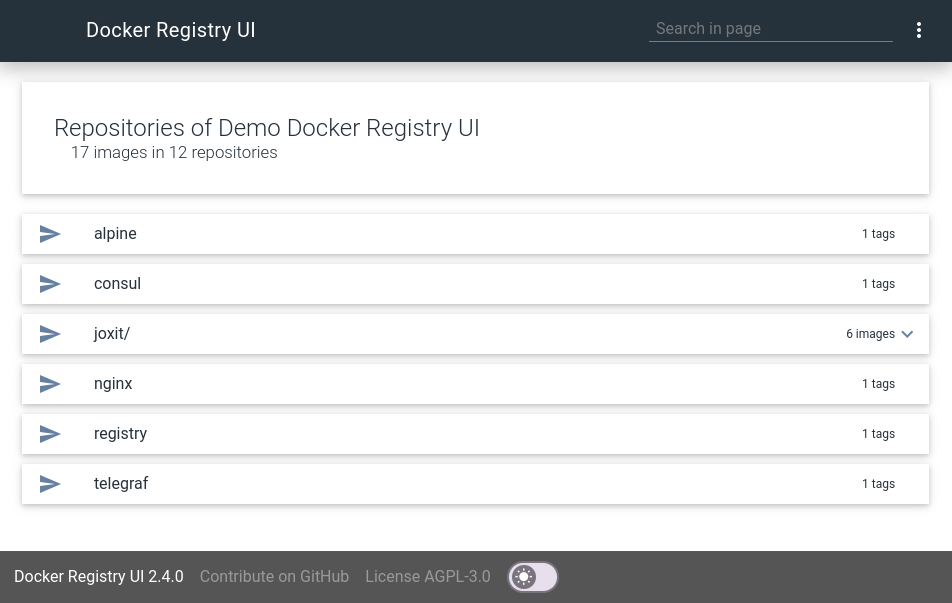
|
|
|
|
## Features
|
|
|
|
* List all your repositories/images.
|
|
* List all tags for a repository/image
|
|
* Sort the tag list
|
|
* One interface for many registry
|
|
* Use a secured docker registry
|
|
|
|
## Getting Started
|
|
### Basic
|
|
|
|
First you need node and npm in order to download dependencies.
|
|
|
|
```sh
|
|
git clone https://github.com/Joxit/docker-registry-ui.git
|
|
cd docker-registry-ui
|
|
npm install
|
|
```
|
|
|
|
Now you can open index.html with your browser or use a http-server
|
|
```sh
|
|
npm install -g http-server
|
|
http-server
|
|
```
|
|
### Docker
|
|
The docker contains the source code and a node webserver in order to serve the docker-registry-ui.
|
|
|
|
#### Get the docker image
|
|
You can get the image in three ways
|
|
|
|
From sources with this command :
|
|
```sh
|
|
git clone https://github.com/Joxit/docker-registry-ui.git
|
|
docker build -t joxit/docker-registry-ui docker-registry-ui
|
|
```
|
|
|
|
Or build with the url :
|
|
```sh
|
|
docker build -t joxit/docker-registry-ui github.com/Joxit/docker-registry-ui
|
|
```
|
|
|
|
Or pull the image from [docker hub](https://hub.docker.com/r/joxit/docker-registry-ui/) :
|
|
```sh
|
|
docker pull joxit/docker-registry-ui
|
|
```
|
|
|
|
#### Run the docker
|
|
To run the docker and see the website on your 8080 port, try this :
|
|
```sh
|
|
docker run -d -p 8080:8080 joxit/docker-registry-ui
|
|
```
|
|
|
|
## Using CORS
|
|
|
|
Your server should be configured to accept CORS.
|
|
|
|
If your docker registry does not need credentials, you will need to send this HEADER :
|
|
```
|
|
Access-Control-Allow-Origin: '*'
|
|
```
|
|
|
|
If your docker registry need credentials, you will need to send these HEADERS :
|
|
```
|
|
Access-Control-Allow-Origin: '<your docker-registry-ui url>'
|
|
Access-Control-Allow-Credentials: true
|
|
Access-Control-Allow-Methods: ['HEAD', 'GET', 'OPTIONS'] # Optional
|
|
```
|