mirror of
https://github.com/Joxit/docker-registry-ui.git
synced 2026-02-19 21:29:51 +00:00
Compare commits
1 Commits
| Author | SHA1 | Date | |
|---|---|---|---|

|
115105a2a0 |
@@ -1,8 +1,4 @@
|
||||
*
|
||||
!dist
|
||||
!bin
|
||||
!nginx
|
||||
!src
|
||||
!package.json
|
||||
!gulpfile.js
|
||||
!favicon.ico
|
||||
!nginx
|
||||
61
.github/ISSUE_TEMPLATE/bug_report.md
vendored
61
.github/ISSUE_TEMPLATE/bug_report.md
vendored
@@ -1,61 +0,0 @@
|
||||
---
|
||||
name: Bug report
|
||||
about: Create a report to help us improve
|
||||
title: ''
|
||||
labels: ''
|
||||
assignees: ''
|
||||
|
||||
---
|
||||
|
||||
Hi, I use this docker registry UI and I have an issue...
|
||||
|
||||
## Bug description
|
||||
|
||||
A clear and concise description of what the bug is.
|
||||
## How to Reproduce
|
||||
|
||||
For UI bug, steps to reproduce the behavior:
|
||||
1. Go to '...'
|
||||
2. Click on '....'
|
||||
3. Scroll down to '....'
|
||||
4. See error
|
||||
|
||||
For service bug, steps to reproduce the behavior:
|
||||
<!-- Remove your credentials or anonymize them -->
|
||||
My docker-compose file
|
||||
```yml
|
||||
|
||||
```
|
||||
|
||||
My private docker registry configuration
|
||||
```yml
|
||||
|
||||
```
|
||||
|
||||
## Expected behavior
|
||||
|
||||
A clear and concise description of what you expected to happen.
|
||||
|
||||
## Screenshots
|
||||
|
||||
If applicable, add screenshots to help explain your problem.
|
||||
|
||||
## System information
|
||||
|
||||
- OS: [e.g. Debian 10, Windows, Android 9...]
|
||||
<!-- Browser is only for UI bugs -->
|
||||
- Browser:
|
||||
- Name: [e.g. Chrome, Firefox...]
|
||||
- Version: [e.g. 22]
|
||||
- Docker registry UI:
|
||||
- Version: [e.g. 1.4.0]
|
||||
- Server: [docker or dist]
|
||||
<!-- Only for Docker and for where the UI is hosted -->
|
||||
- Docker version: [e.g. 19.03]
|
||||
- Docker registry ui tag: [latest, static, master, 1.4-static...]
|
||||
- OS/Arch: [e.g. linux/amd64]
|
||||
- Tools: [e.g. docker-compose, kubernets..]
|
||||
|
||||
## Additional context
|
||||
|
||||
Add any other context about the problem here.
|
||||
10
.github/ISSUE_TEMPLATE/custom.md
vendored
10
.github/ISSUE_TEMPLATE/custom.md
vendored
@@ -1,10 +0,0 @@
|
||||
---
|
||||
name: Custom issue template
|
||||
about: Describe this issue template's purpose here.
|
||||
title: ''
|
||||
labels: ''
|
||||
assignees: ''
|
||||
|
||||
---
|
||||
|
||||
|
||||
20
.github/ISSUE_TEMPLATE/feature_request.md
vendored
20
.github/ISSUE_TEMPLATE/feature_request.md
vendored
@@ -1,20 +0,0 @@
|
||||
---
|
||||
name: Feature request
|
||||
about: Suggest an idea for this project
|
||||
title: ''
|
||||
labels: ''
|
||||
assignees: ''
|
||||
|
||||
---
|
||||
|
||||
**Is your feature request related to a problem? Please describe.**
|
||||
A clear and concise description of what the problem is. Ex. I'm always frustrated when [...]
|
||||
|
||||
**Describe the solution you'd like**
|
||||
A clear and concise description of what you want to happen.
|
||||
|
||||
**Describe alternatives you've considered**
|
||||
A clear and concise description of any alternative solutions or features you've considered.
|
||||
|
||||
**Additional context**
|
||||
Add any other context or screenshots about the feature request here.
|
||||
44
.github/workflows/main.yml
vendored
44
.github/workflows/main.yml
vendored
@@ -1,44 +0,0 @@
|
||||
name: Build and push master/main docker images
|
||||
|
||||
on:
|
||||
push:
|
||||
branches: [ master, main ]
|
||||
|
||||
jobs:
|
||||
build:
|
||||
runs-on: ubuntu-latest
|
||||
steps:
|
||||
- uses: actions/checkout@v2
|
||||
- name: Install dependencies
|
||||
run: npm install
|
||||
- name: Build the interface
|
||||
run: npm run build
|
||||
- name: Set up QEMU
|
||||
uses: docker/setup-qemu-action@v1
|
||||
- name: Set up Docker Buildx
|
||||
uses: docker/setup-buildx-action@v1
|
||||
- name: Login to DockerHub
|
||||
uses: docker/login-action@v1
|
||||
with:
|
||||
username: ${{ secrets.DOCKERHUB_USERNAME }}
|
||||
password: ${{ secrets.DOCKERHUB_TOKEN }}
|
||||
- name: Build and push Beta Alpine Version
|
||||
uses: docker/build-push-action@v2
|
||||
with:
|
||||
context: .
|
||||
file: ./Dockerfile
|
||||
platforms: linux/386,linux/amd64,linux/arm/v6,linux/arm/v7,linux/arm64,linux/ppc64le,linux/s390x
|
||||
push: true
|
||||
tags: |
|
||||
joxit/docker-registry-ui:master
|
||||
joxit/docker-registry-ui:main
|
||||
- name: Build and push Beta Debian Version
|
||||
uses: docker/build-push-action@v2
|
||||
with:
|
||||
context: .
|
||||
file: ./debian.dockerfile
|
||||
platforms: linux/386,linux/amd64,linux/arm/v6,linux/arm/v7,linux/arm64,linux/ppc64le,linux/s390x
|
||||
push: true
|
||||
tags: |
|
||||
joxit/docker-registry-ui:master-debian
|
||||
joxit/docker-registry-ui:main-debian
|
||||
74
.github/workflows/release.yml
vendored
74
.github/workflows/release.yml
vendored
@@ -1,74 +0,0 @@
|
||||
name: Release
|
||||
|
||||
on:
|
||||
push:
|
||||
tags: '*'
|
||||
|
||||
jobs:
|
||||
build:
|
||||
runs-on: ubuntu-latest
|
||||
steps:
|
||||
- uses: actions/checkout@v2
|
||||
with:
|
||||
fetch-depth: 0
|
||||
- name: Install dependencies
|
||||
run: npm install
|
||||
- name: Build the interface
|
||||
run: npm run build
|
||||
- name: Major tag
|
||||
id: major-tag
|
||||
run: echo "::set-output name=tag::$(git describe --tags | grep -o '^[0-9]*')"
|
||||
- name: Minor tag
|
||||
id: minor-tag
|
||||
run: echo "::set-output name=tag::$(git describe --tags | grep -o '^[0-9]*\.[0-9]*')"
|
||||
- name: Patch tag
|
||||
id: patch-tag
|
||||
run: echo "::set-output name=tag::$(git describe --tags | grep -o '^[0-9]*\.[0-9]*\.[0-9]*')"
|
||||
- name: Download kokai
|
||||
run: curl -sSL https://github.com/Joxit/kokai/releases/download/$(curl -sSL https://api.github.com/repos/Joxit/kokai/releases/latest | jq -r ".tag_name")/kokai-linux-x86_64 > kokai
|
||||
- name: Create Release Note
|
||||
run: chmod +x kokai && ./kokai release --ref ${{ github.ref }} --tag-from-ref . > RELEASE_NOTE.md
|
||||
- name: Create Release
|
||||
id: create_release
|
||||
uses: actions/create-release@v1
|
||||
env:
|
||||
GITHUB_TOKEN: ${{ secrets.GITHUB_TOKEN }}
|
||||
with:
|
||||
tag_name: ${{ github.ref }}
|
||||
release_name: Release ${{ github.ref }}
|
||||
body_path: RELEASE_NOTE.md
|
||||
draft: false
|
||||
prerelease: false
|
||||
- name: Set up QEMU
|
||||
uses: docker/setup-qemu-action@v1
|
||||
- name: Set up Docker Buildx
|
||||
uses: docker/setup-buildx-action@v1
|
||||
- name: Login to DockerHub
|
||||
uses: docker/login-action@v1
|
||||
with:
|
||||
username: ${{ secrets.DOCKERHUB_USERNAME }}
|
||||
password: ${{ secrets.DOCKERHUB_TOKEN }}
|
||||
- name: Build and push Latest Version
|
||||
uses: docker/build-push-action@v2
|
||||
with:
|
||||
context: .
|
||||
file: ./Dockerfile
|
||||
platforms: linux/386,linux/amd64,linux/arm/v6,linux/arm/v7,linux/arm64,linux/ppc64le,linux/s390x
|
||||
push: true
|
||||
tags: |
|
||||
joxit/docker-registry-ui:latest
|
||||
joxit/docker-registry-ui:${{steps.major-tag.outputs.tag}}
|
||||
joxit/docker-registry-ui:${{steps.minor-tag.outputs.tag}}
|
||||
joxit/docker-registry-ui:${{steps.patch-tag.outputs.tag}}
|
||||
- name: Build and push Latest Debian Version
|
||||
uses: docker/build-push-action@v2
|
||||
with:
|
||||
context: .
|
||||
file: ./debian.dockerfile
|
||||
platforms: linux/386,linux/amd64,linux/arm/v6,linux/arm/v7,linux/arm64,linux/ppc64le,linux/s390x
|
||||
push: true
|
||||
tags: |
|
||||
joxit/docker-registry-ui:debian
|
||||
joxit/docker-registry-ui:${{steps.major-tag.outputs.tag}}-debian
|
||||
joxit/docker-registry-ui:${{steps.minor-tag.outputs.tag}}-debian
|
||||
joxit/docker-registry-ui:${{steps.patch-tag.outputs.tag}}-debian
|
||||
42
.gitignore
vendored
42
.gitignore
vendored
@@ -1,9 +1,37 @@
|
||||
.project
|
||||
node_modules
|
||||
# dependencies
|
||||
/node_modules
|
||||
package-lock.json
|
||||
|
||||
# IDEs and editors
|
||||
/.idea
|
||||
*.iml
|
||||
.project
|
||||
.classpath
|
||||
.c9/
|
||||
*.launch
|
||||
.settings/
|
||||
*.sublime-workspace
|
||||
|
||||
# IDE - VSCode
|
||||
.vscode/*
|
||||
!.vscode/settings.json
|
||||
!.vscode/tasks.json
|
||||
!.vscode/launch.json
|
||||
!.vscode/extensions.json
|
||||
|
||||
# misc
|
||||
/.sass-cache
|
||||
/connect.lock
|
||||
/coverage
|
||||
/libpeerconnection.log
|
||||
npm-debug.log
|
||||
yarn-error.log
|
||||
testem.log
|
||||
/typings
|
||||
|
||||
# System Files
|
||||
.DS_Store
|
||||
Thumbs.db
|
||||
.vscode/
|
||||
|
||||
registry-data
|
||||
.idea
|
||||
_site
|
||||
*.orig
|
||||
.serve/
|
||||
demo/v2
|
||||
|
||||
@@ -1,7 +0,0 @@
|
||||
{
|
||||
"singleQuote": true,
|
||||
"tabWidth": 2,
|
||||
"quoteProps": "preserve",
|
||||
"printWidth": 120,
|
||||
"proseWrap": "preserve"
|
||||
}
|
||||
@@ -1,76 +0,0 @@
|
||||
# Contributor Covenant Code of Conduct
|
||||
|
||||
## Our Pledge
|
||||
|
||||
In the interest of fostering an open and welcoming environment, we as
|
||||
contributors and maintainers pledge to making participation in our project and
|
||||
our community a harassment-free experience for everyone, regardless of age, body
|
||||
size, disability, ethnicity, sex characteristics, gender identity and expression,
|
||||
level of experience, education, socio-economic status, nationality, personal
|
||||
appearance, race, religion, or sexual identity and orientation.
|
||||
|
||||
## Our Standards
|
||||
|
||||
Examples of behavior that contributes to creating a positive environment
|
||||
include:
|
||||
|
||||
* Using welcoming and inclusive language
|
||||
* Being respectful of differing viewpoints and experiences
|
||||
* Gracefully accepting constructive criticism
|
||||
* Focusing on what is best for the community
|
||||
* Showing empathy towards other community members
|
||||
|
||||
Examples of unacceptable behavior by participants include:
|
||||
|
||||
* The use of sexualized language or imagery and unwelcome sexual attention or
|
||||
advances
|
||||
* Trolling, insulting/derogatory comments, and personal or political attacks
|
||||
* Public or private harassment
|
||||
* Publishing others' private information, such as a physical or electronic
|
||||
address, without explicit permission
|
||||
* Other conduct which could reasonably be considered inappropriate in a
|
||||
professional setting
|
||||
|
||||
## Our Responsibilities
|
||||
|
||||
Project maintainers are responsible for clarifying the standards of acceptable
|
||||
behavior and are expected to take appropriate and fair corrective action in
|
||||
response to any instances of unacceptable behavior.
|
||||
|
||||
Project maintainers have the right and responsibility to remove, edit, or
|
||||
reject comments, commits, code, wiki edits, issues, and other contributions
|
||||
that are not aligned to this Code of Conduct, or to ban temporarily or
|
||||
permanently any contributor for other behaviors that they deem inappropriate,
|
||||
threatening, offensive, or harmful.
|
||||
|
||||
## Scope
|
||||
|
||||
This Code of Conduct applies both within project spaces and in public spaces
|
||||
when an individual is representing the project or its community. Examples of
|
||||
representing a project or community include using an official project e-mail
|
||||
address, posting via an official social media account, or acting as an appointed
|
||||
representative at an online or offline event. Representation of a project may be
|
||||
further defined and clarified by project maintainers.
|
||||
|
||||
## Enforcement
|
||||
|
||||
Instances of abusive, harassing, or otherwise unacceptable behavior may be
|
||||
reported by contacting the project team at contact@joxit.dev. All
|
||||
complaints will be reviewed and investigated and will result in a response that
|
||||
is deemed necessary and appropriate to the circumstances. The project team is
|
||||
obligated to maintain confidentiality with regard to the reporter of an incident.
|
||||
Further details of specific enforcement policies may be posted separately.
|
||||
|
||||
Project maintainers who do not follow or enforce the Code of Conduct in good
|
||||
faith may face temporary or permanent repercussions as determined by other
|
||||
members of the project's leadership.
|
||||
|
||||
## Attribution
|
||||
|
||||
This Code of Conduct is adapted from the [Contributor Covenant][homepage], version 1.4,
|
||||
available at https://www.contributor-covenant.org/version/1/4/code-of-conduct.html
|
||||
|
||||
[homepage]: https://www.contributor-covenant.org
|
||||
|
||||
For answers to common questions about this code of conduct, see
|
||||
https://www.contributor-covenant.org/faq
|
||||
@@ -1,51 +0,0 @@
|
||||
# How to contribute to Docke Registry UI
|
||||
|
||||
I ([Jones Magloire](https://joxit.dev/)) created the Docker Registry UI from scratch, but I can't succeed without contributions from community members like you! Contributions come in many different shapes and sizes. In this file we provide guidance around two of the most common types of contributions: opening issues and opening pull requests.
|
||||
|
||||
Please read also the [Code Of Conduct](https://github.com/Joxit/docker-registry-ui/blob/main/CODE_OF_CONDUCT.md).
|
||||
|
||||
## Submitting Issues
|
||||
|
||||
### Did you find a bug?
|
||||
|
||||
* **Ensure the bug was not already reported** by searching on GitHub under [Issues](https://github.com/joxit/docker-registry-ui/issues).
|
||||
|
||||
* If you're unable to find an open issue addressing the problem, [open a new one](https://github.com/joxit/docker-registry-ui/issues/new). Be sure to
|
||||
* Use the [**Bug Report Template**](https://github.com/Joxit/docker-registry-ui/issues/new?assignees=&labels=&template=bug_report.md&title=)
|
||||
* Include a **title and clear description**
|
||||
* Write as much relevant information as possible
|
||||
* Add your **full configuration** (Docker Registry UI **AND** Docker Server) or a **screenshots** demonstrating the expected behavior that is not occurring
|
||||
|
||||
## Submitting Pull Request
|
||||
|
||||
### Do you intend to add a new feature or change an existing one?
|
||||
|
||||
* Suggest your change in a new issue using the [**Feature Request Template**](https://github.com/Joxit/docker-registry-ui/issues/new?assignees=&labels=&template=feature_request.md&title=) and start writing code.
|
||||
|
||||
* Run the interface on your computer first with `npm start`.
|
||||
|
||||
### Did you write a patch that fixes a bug?
|
||||
|
||||
* Open a new [GitHub pull request](https://github.com/Joxit/docker-registry-ui/compare) with the patch.
|
||||
|
||||
* Ensure the PR description clearly describes the problem and solution. Include the relevant issue number if applicable.
|
||||
|
||||
* Before submitting, please read the [Coding conventions](#coding-conventions) first.
|
||||
|
||||
### Did you fix whitespace, format code, or make a purely cosmetic patch?
|
||||
|
||||
Changes that are cosmetic in nature and do not add anything substantial to the stability, functionality, or testability of Docker Registry UI will generally not be accepted.
|
||||
|
||||
## Coding conventions
|
||||
|
||||
* I use prettier with custom preset, use `npm format` before any PR
|
||||
|
||||
* I use [semver](https://semver.org/) for package versioning
|
||||
|
||||
* I use Github Actions for publishing docker images and releases
|
||||
|
||||
* I indent with two spaces
|
||||
|
||||
Thank you for your help! :heart:
|
||||
|
||||
[Joxit](https://joxit.dev/)
|
||||
@@ -1,45 +0,0 @@
|
||||
# Contributors
|
||||
|
||||
## Committers
|
||||
|
||||
- Jones Magloire [@Joxit](https://github.com/Joxit)
|
||||
- Lennart Blom [@lennartblom](https://github.com/lennartblom)
|
||||
- Jakob Ackermann [@das7pad](https://github.com/das7pad)
|
||||
- Olivier Nizet [@onizet](https://github.com/onizet)
|
||||
- Anton Antonov [@syndbg](https://github.com/syndbg)
|
||||
- Bertrand Pechenot [@berpec](https://github.com/berpec)
|
||||
- Sébastien Huss [@sebt3](https://github.com/sebt3)
|
||||
- Vladimir Kozyrev [@fieryvova](https://github.com/fieryvova)
|
||||
- Haibo Jia [@bluethon](https://github.com/bluethon)
|
||||
- Manuel Leitold [@agrippa1994](https://github.com/agrippa1994)
|
||||
- Murad [@muradheydarov](https://github.com/muradheydarov)
|
||||
- Giacomo Mazzamuto [@gmazzamuto](https://github.com/gmazzamuto)
|
||||
- Joe Bureau [@jabstone](https://github.com/jabstone)
|
||||
|
||||
## Because committers are not the only contributors
|
||||
|
||||
- Ewout Prangsma [@ewoutp](https://github.com/ewoutp)
|
||||
- [@soosap](https://github.com/soosap)
|
||||
- Madhukar Mishra [@madhukar93](https://github.com/madhukar93)
|
||||
- Yoan Blanc [@greut](https://github.com/greut)
|
||||
- [@samuelmaier](https://github.com/samuelmaier)
|
||||
- [@sbaloo](https://github.com/sbaloo)
|
||||
- [@rucciva](https://github.com/rucciva)
|
||||
- [@wuyue92tree](https://github.com/wuyue92tree)
|
||||
- Giovanni Toraldo [@gionn](https://github.com/gionn)
|
||||
- [@marcusblake](https://github.com/marcusblake)
|
||||
- Dario Piombo [@pidario](https://github.com/pidario)
|
||||
- Jernej K. [@Cvetk0](https://github.com/Cvetk0)
|
||||
- Cristian Posoiu [@cr1st1p](https://github.com/cr1st1p)
|
||||
- Sepp Zuther [@Herr-Sepp](https://github.com/Herr-Sepp)
|
||||
- Tomas Hulata [@tombokombo](https://github.com/tombokombo)
|
||||
- Ben Jackson [@bjj](https://github.com/bjj)
|
||||
- 三十文 [@xfduan](https://github.com/xfduan)
|
||||
- Aram Akhavan [@kaysond](https://github.com/kaysond)
|
||||
- Jason Tackaberry [@jtackaberry](https://github.com/jtackaberry)
|
||||
- Maxime Loliée [@loliee](https://github.com/loliee)
|
||||
- Enrico [@Enrico204](https://github.com/Enrico204)
|
||||
- [@clyvari](https://github.com/clyvari)
|
||||
- Laszlo Boros [@Semmu](https://github.com/Semmu)
|
||||
- [@JKDingwall](https://github.com/JKDingwall)
|
||||
- Martin Herren [@MartinHerren](https://github.com/MartinHerren)
|
||||
@@ -18,13 +18,4 @@ LABEL maintainer="Jones MAGLOIRE @Joxit"
|
||||
|
||||
WORKDIR /usr/share/nginx/html/
|
||||
|
||||
ENV NGINX_PROXY_HEADER_Host '$http_host'
|
||||
ENV NGINX_LISTEN_PORT '80'
|
||||
ENV SHOW_CATALOG_NB_TAGS 'false'
|
||||
|
||||
COPY nginx/default.conf /etc/nginx/conf.d/default.conf
|
||||
COPY bin/90-docker-registry-ui.sh /docker-entrypoint.d/90-docker-registry-ui.sh
|
||||
COPY dist/ /usr/share/nginx/html/
|
||||
COPY favicon.ico /usr/share/nginx/html/
|
||||
|
||||
RUN chown -R nginx:nginx /etc/nginx/ /usr/share/nginx/html/ /var/cache/nginx
|
||||
1
Dockerfile.static
Symbolic link
1
Dockerfile.static
Symbolic link
@@ -0,0 +1 @@
|
||||
static.dockerfile
|
||||
240
README.md
240
README.md
@@ -1,121 +1,128 @@
|
||||
---
|
||||
title: Docker Registry User Interface
|
||||
---
|
||||
|
||||
# Docker Registry UI
|
||||
|
||||

|
||||

|
||||
[](https://github.com/sponsors/Joxit)
|
||||
[](https://artifacthub.io/packages/search?repo=joxit)
|
||||
|
||||
## Overview
|
||||
|
||||
This project aims to provide a simple and complete user interface for your private docker registry. You can customize the interface with various options. The major option is `SINGLE_REGISTRY` which allows you to disable the dynamic selection of docker registeries (same behavior as the old **static** tag).
|
||||
|
||||
You may need the [migration guide from 1.x to 2.x](https://github.com/Joxit/docker-registry-ui/wiki/Migrating-from-1.x-to-2.x) or [the 1.x readme](https://github.com/Joxit/docker-registry-ui/blob/8fe3adf12540d1316cb57628ebe86a392a703d90/README.md)
|
||||
This project aims to provide a user interface for your private docker registry v2.
|
||||
There is no default registry on this UI, you should add your own with the UI.
|
||||
You can manage more than one registry server.
|
||||
All registries will be stored in the [local storage](https://en.wikipedia.org/wiki/Web_storage#Local_and_session_storage) of your browser.
|
||||
|
||||
This web user interface uses [Riot](https://github.com/Riot/riot) the react-like user interface micro-library and [riot-mui](https://github.com/kysonic/riot-mui) components.
|
||||
|
||||
## [Project Page](https://joxit.dev/docker-registry-ui), [Live Demo](https://joxit.dev/docker-registry-ui/demo/), [Examples](https://github.com/Joxit/docker-registry-ui/tree/main/examples), [Helm Chart](https://helm.joxit.dev/)
|
||||
## [GitHub Page](https://joxit.github.io/docker-registry-ui) and [Live Demo](https://joxit.github.io/docker-registry-ui/demo/)
|
||||
|
||||
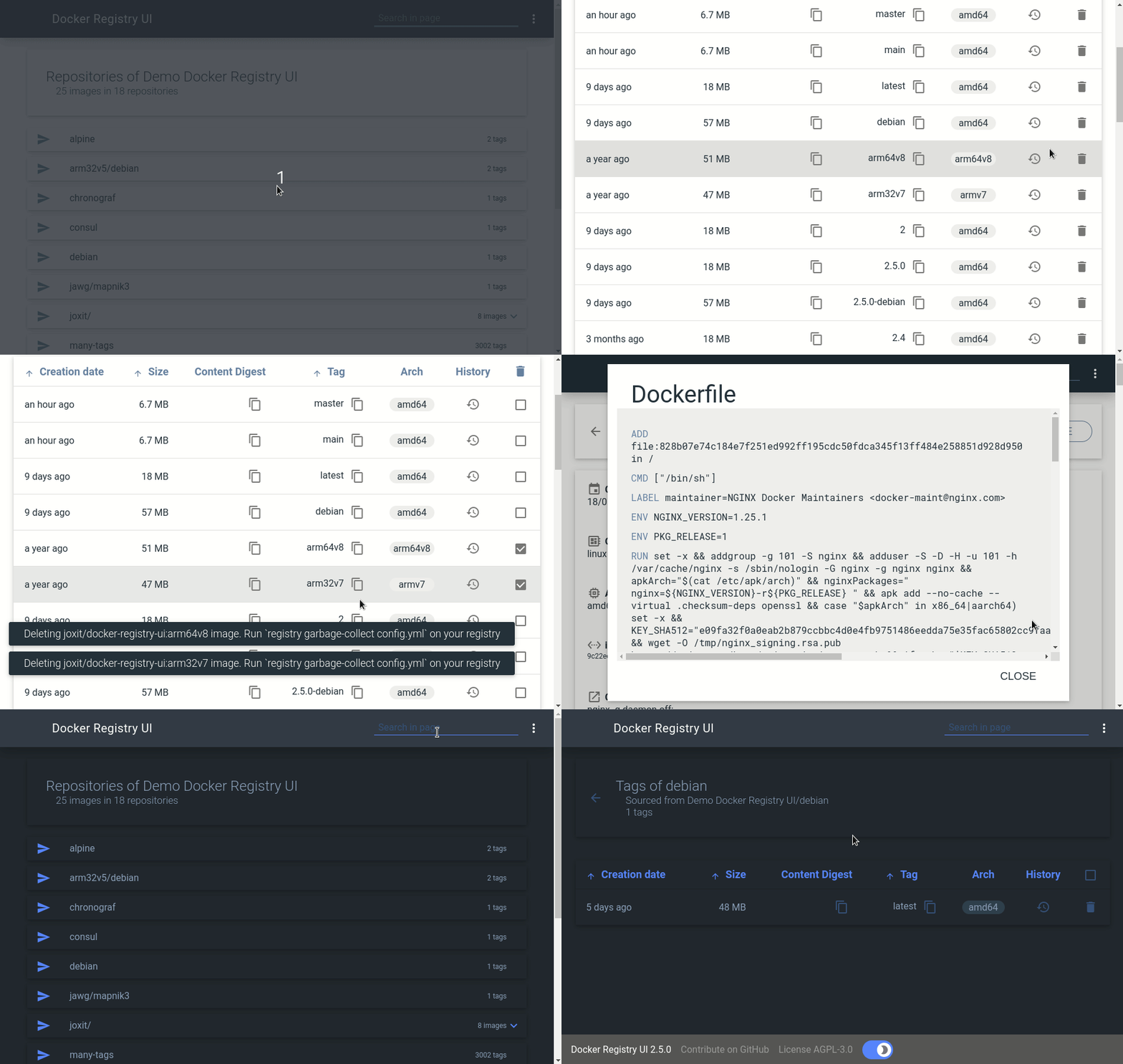
|
||||
|
||||
If you like my work and want to support it, don't hesitate to [sponsor me](https://github.com/sponsors/Joxit).
|
||||
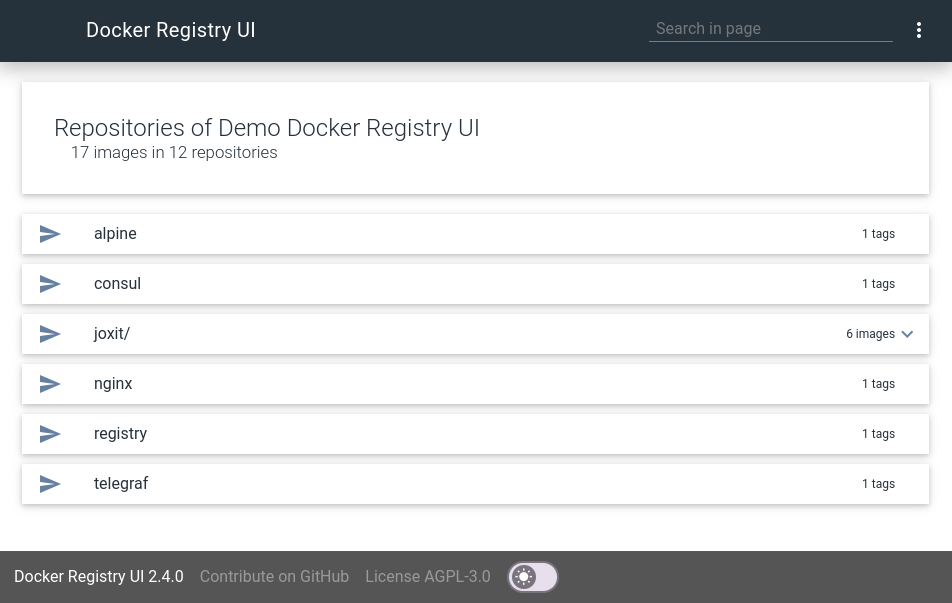
|
||||
|
||||
## Features
|
||||
|
||||
- List all your repositories/images.
|
||||
- List all tags for a image.
|
||||
- Sort the tag list with number compatibility (see [#46](https://github.com/Joxit/docker-registry-ui/pull/46)).
|
||||
- Use a secured docker registry.
|
||||
- Display image size (see [#30](https://github.com/Joxit/docker-registry-ui/issues/30)).
|
||||
- Multi arch supports, Alpine and Debian based images with supports for arm32v7 and arm64v8.
|
||||
- Copy `docker pull` command to clipboard (see [#42](https://github.com/Joxit/docker-registry-ui/issues/42)).
|
||||
- Show sha256 for specific tag (hover image tag).
|
||||
- Display image creation date (see [#49](https://github.com/Joxit/docker-registry-ui/issues/49))
|
||||
- Display image history (see [#58](https://github.com/Joxit/docker-registry-ui/pull/58) & [#61](https://github.com/Joxit/docker-registry-ui/pull/61)).
|
||||
- Image aggregation (see [#56](https://github.com/Joxit/docker-registry-ui/issues/56)).
|
||||
- Display image/tag count (see [#56 issue comment](https://github.com/Joxit/docker-registry-ui/issues/56#issuecomment-449246524)).
|
||||
- Select multiple tags to delete (see [#29](https://github.com/Joxit/docker-registry-ui/issues/29)).
|
||||
- Select all tags with ALT + Click to delete (see [#80](https://github.com/Joxit/docker-registry-ui/issues/80)).
|
||||
- One interface for many registries (when `SINGLE_REGISTRY=false`).
|
||||
- Share your docker registry with query parameter `url` (e.g. `https://joxit.dev/docker-registry-ui/demo?url=https://registry.example.com`) (when `SINGLE_REGISTRY=false`).
|
||||
- Use the UI as reverse proxy (with `NGINX_PROXY_PASS_URL` environment variable) to your docker registry (This will avoid CORS).
|
||||
- Add Title when using `REGISTRY_TITLE` (see [#28](https://github.com/Joxit/docker-registry-ui/issues/28)).
|
||||
- Customise docker pull command on static registry UI (see [#71](https://github.com/Joxit/docker-registry-ui/issues/71)).
|
||||
- Add custom header via environment variable and file via `NGINX_PROXY_HEADER_*` (see [#89](https://github.com/Joxit/docker-registry-ui/pull/89))
|
||||
- Show/Hide content digest in taglist via `SHOW_CONTENT_DIGEST` (values are: [`true`, `false`], default: `false`) (see [#126](https://github.com/Joxit/docker-registry-ui/issues/126)).
|
||||
- Limit the number of elements in the image list via `CATALOG_ELEMENTS_LIMIT` (see [#127](https://github.com/Joxit/docker-registry-ui/pull/127)).
|
||||
- Multi arch support in history page (see [#130](https://github.com/Joxit/docker-registry-ui/issues/130) and [#134](https://github.com/Joxit/docker-registry-ui/pull/134))
|
||||
- Set a list of default registries with `DEFAULT_REGISTRIES` (see [#219](https://github.com/Joxit/docker-registry-ui/pull/219)).
|
||||
- Desactivate add and remove regisitries with `READ_ONLY_REGISTRIES` (see [#219](https://github.com/Joxit/docker-registry-ui/pull/219)).
|
||||
- Filter images and tags with a search bar. You can select the search bar with the shortcut `CRTL` + `F` or `F3`. When the search bar is already focused, the shortcut will fallback to the default behavior (see [#213](https://github.com/Joxit/docker-registry-ui/issues/213)).
|
||||
- **Forward** custom header to your backend registry via environment variable and file via `NGINX_PROXY_PASS_HEADER_*` (see [#206](https://github.com/Joxit/docker-registry-ui/pull/206)).
|
||||
- Run the container with user nginx instead of root via `--user nginx` and listend on custom port via `NGINX_LISTEN_PORT` (see [#224](https://github.com/Joxit/docker-registry-ui/issues/224)).
|
||||
- Show number of tags per images on catalog page. This will produce + nb images requests, not recommended on large registries via `SHOW_CATALOG_NB_TAGS` (default: `false`) (see [#161](https://github.com/Joxit/docker-registry-ui/issues/161) and [#239](https://github.com/Joxit/docker-registry-ui/pull/239)).
|
||||
- Expose custom labels in history page, custom labels will be processed like maintainer label via `HISTORY_CUSTOM_LABELS` (see [#160](https://github.com/Joxit/docker-registry-ui/issues/160) and [#240](https://github.com/Joxit/docker-registry-ui/pull/240)).
|
||||
- Access to the official Helm Chart: https://helm.joxit.dev/
|
||||
- List all tags for a repository/image
|
||||
- Sort the tag list
|
||||
- One interface for many registries
|
||||
- Use a secured docker registry
|
||||
- Share your docker registry with query parameter `url` (e.g. `https://joxit.github.io/docker-registry-ui/demo?url=https://registry.example.com`)
|
||||
- Use `joxit/docker-registry-ui:static` as reverse proxy to your docker registry (This will avoid CORS).
|
||||
- Display image size (see #30)
|
||||
- Add Title when using REGISTRY_URL (see #28)
|
||||
- Alpine and Debian based images with supports for arm32v7 and arm64v8
|
||||
- Copy `docker pull` command to clipbloard
|
||||
- Show sha256 for specific tag (hover image tag)
|
||||
|
||||
## FAQ
|
||||
## Getting Started
|
||||
|
||||
- What is the difference between **`SINGLE_REGISTRY=false`** and **`SINGLE_REGISTRY=true`** options ?
|
||||
- When `SINGLE_REGISTRY` is set to false, a menu appears on the interface allowing you to dynamically change docker registry URLs.
|
||||
- Why, when I delete all tags of an image, the image is still in the UI ?
|
||||
- This is a limitation of docker registry, the garbage collector don't remove empty images. If you want to delete dangling images, you will need to delete the folder in your registry data. (see [#77](https://github.com/Joxit/docker-registry-ui/issues/77))
|
||||
- Why the image size in the UI is not the same as displayed during `docker images` ?
|
||||
- The UI displays the compressed size of the image and not the extracted size version.
|
||||
- Can I use HTTPS on the UI ?
|
||||
- Yes, put your favourite reverse proxy on the front of the UI. Your reverse proxy will take care of HTTPS connection.
|
||||
- Does the UI support authentication ?
|
||||
- Yes, but it supports only basic auth. It's a simple standalone frontend, it will use your browser window for authentication.
|
||||
- Can I use the UI and docker client with an insecure registry (registry url without https) ?
|
||||
- Yes you can, you must first configure your docker client. (see [#76](https://github.com/Joxit/docker-registry-ui/issues/76))
|
||||
- What does Mixed Content error mean ?
|
||||
- This means you are using a UI with HTTPS and your registry is using HTTP (unsecured). When you are on a HTTPS site, you can't get HTTP content. Upgrade you registry with a HTTPS connection.
|
||||
- Why the default nginx `Host` is set to `$http_host` ?
|
||||
- This fixes the issue [#88](https://github.com/Joxit/docker-registry-ui/issues/88). More about this in [#113](https://github.com/Joxit/docker-registry-ui/issues/113).
|
||||
- Why OPTIONS (aka preflight requests) and DELETE fails with 401 status code (using Basic Auth) ?
|
||||
- This is caused by a bug in docker registry, it returns 401 status requests on preflight requests, this breaks [W3C preflight-request specification](https://www.w3.org/TR/cors/#preflight-request). I suggest to have your UI on the same domain than your registry e.g. registry.example.com/ui/ **or** use `NGINX_PROXY_PASS_URL` **or** configure a nginx/apache/haproxy in front of your registry that returns 200 on each OPTIONS requests. (see [#104](https://github.com/Joxit/docker-registry-ui/issues/104), [#204](https://github.com/Joxit/docker-registry-ui/issues/204), [#207](https://github.com/Joxit/docker-registry-ui/issues/207), [#214](https://github.com/Joxit/docker-registry-ui/issues/214), [#266](https://github.com/Joxit/docker-registry-ui/issues/266)).
|
||||
- Can I use the docker registry ui as a standalone application (with Electron) ?
|
||||
- Yes, check out the example [here](https://github.com/Joxit/docker-registry-ui/tree/main/examples/electron). (see [#129](https://github.com/Joxit/docker-registry-ui/pull/129))
|
||||
- I deleted images through the UI, but they are still present on the server. How can I delete them?
|
||||
- When you delete an image with the UI, only the reference is deleted and not the content. To remove dangling images, you need to run the garbage collector of the registry with the command `registry garbage-collect config.yml` or `docker exec registry registry garbage-collect config.yml`. (see [#77](https://github.com/Joxit/docker-registry-ui/issues/77) [#147](https://github.com/Joxit/docker-registry-ui/issues/147))
|
||||
- Why when I delete one tag, all tags with the same SHA are deleted ?
|
||||
- This a docker registry API limitation, there is only one way to [delete images with tag](https://docs.docker.com/registry/spec/api/#deleting-an-image), it's by its `name` and its `manifest` (it's a sha of the content). So when you delete a tag, this will delete all tags of this image with the same SHA/manifest.
|
||||
- Can I run the container with an unprivileged user ?
|
||||
- Yes you can run the container with the `nginx` user, (see [#224](https://github.com/Joxit/docker-registry-ui/issues/224)).
|
||||
- Can I use the UI with a docker hub mirror and show `library/*` images ?
|
||||
- Yes but it is at your own risk using two regstry servers, check the comment [#155](https://github.com/Joxit/docker-registry-ui/issues/155#issuecomment-1286052124).
|
||||
- How to fix CORS issue on s3 bucket ?
|
||||
- You should add a CORS Policy on your bucket, check the issue [#193](https://github.com/Joxit/docker-registry-ui/issues/193).
|
||||
### Basic
|
||||
|
||||
Need more informations ? Try my [examples](https://github.com/Joxit/docker-registry-ui/tree/main/examples) or open an issue.
|
||||
First you need node and npm in order to download dependencies.
|
||||
|
||||
## Available options
|
||||
```sh
|
||||
git clone https://github.com/Joxit/docker-registry-ui.git
|
||||
cd docker-registry-ui
|
||||
npm install
|
||||
```
|
||||
|
||||
You can run the container with the unprivileged user `nginx`, see the discussion [#224](https://github.com/Joxit/docker-registry-ui/issues/224).
|
||||
Now you can open index.html with your browser or use a http-server
|
||||
|
||||
Some env options are available for use this interface for **only one server**.
|
||||
```sh
|
||||
npm install -g http-server
|
||||
http-server
|
||||
```
|
||||
|
||||
- `REGISTRY_URL`: The default url of your docker registry. You may need CORS configuration on your registry. This is usually the domain name or IP of your registry reachable by your computer (e.g `http://registry.example.com`). (default: derived from the hostname of your UI).
|
||||
- `REGISTRY_TITLE`: Set a custom title for your user interface. (default: value derived from `REGISTRY_URL`).
|
||||
- `PULL_URL`: Set a custom url when you copy the `docker pull` command. (default: value derived from `REGISTRY_URL`).
|
||||
- `DELETE_IMAGES`: Set if we can delete images from the UI. (default: `false`)
|
||||
- `SHOW_CONTENT_DIGEST`: Show content digest in docker tag list. (default: `false`)
|
||||
- `CATALOG_ELEMENTS_LIMIT`: Limit the number of elements in the catalog page. (default: `100000`).
|
||||
- `SINGLE_REGISTRY`: Remove the menu that show the dialogs to add, remove and change the endpoint of your docker registry. (default: `false`).
|
||||
- `NGINX_PROXY_PASS_URL`: Update the default Nginx configuration and set the **proxy_pass** to your backend docker registry (this avoid CORS configuration). This is usually the name of your registry container in the form `http://registry:5000`.
|
||||
- `NGINX_PROXY_HEADER_*`: Update the default Nginx configuration and **set custom headers** for your backend docker registry. Only when `NGINX_PROXY_PASS_URL` is used.
|
||||
- `NGINX_PROXY_PASS_HEADER_*`: Update the default Nginx configuration and **forward custom headers** to your backend docker registry. Only when `NGINX_PROXY_PASS_URL` is used.
|
||||
- `NGINX_LISTEN_PORT`: Listen on a port other than 80. (default: `80` when the user is root, `8080` otherwise).
|
||||
- `DEFAULT_REGISTRIES`: List of comma separated registry URLs (e.g `http://registry.example.com,http://registry:5000`), available only when `SINGLE_REGISTRY=false`. (default: ` `).
|
||||
- `READ_ONLY_REGISTRIES`: Desactivate dialog for remove and add new registries, available only when `SINGLE_REGISTRY=false`. (default: `false`).
|
||||
- `SHOW_CATALOG_NB_TAGS`: Show number of tags per images on catalog page. This will produce + nb images requests, not recommended on large registries. (default: `false`).
|
||||
- `HISTORY_CUSTOM_LABELS`: Expose custom labels in history page, custom labels will be processed like maintainer label.
|
||||
- `USE_CONTROL_CACHE_HEADER`: Use `Control-Cache` header and set to `no-store, no-cache`. This will avoid some issues on multi-arch images (see [#260](https://github.com/Joxit/docker-registry-ui/issues/260)). This option requires registry configuration: `Access-Control-Allow-Headers` with `Cache-Control`. (default: `false`).
|
||||
### Docker
|
||||
|
||||
There are some examples with [docker-compose](https://docs.docker.com/compose/) and docker-registry-ui as proxy [here](https://github.com/Joxit/docker-registry-ui/tree/main/examples/ui-as-proxy/) or docker-registry-ui as standalone [here](https://github.com/Joxit/docker-registry-ui/tree/main/examples/ui-as-standalone/).
|
||||
The docker contains the source code and a node webserver in order to serve the docker-registry-ui.
|
||||
|
||||
#### Get the docker image
|
||||
|
||||
You can get the image in three ways
|
||||
|
||||
From sources with this command:
|
||||
|
||||
```sh
|
||||
git clone https://github.com/Joxit/docker-registry-ui.git
|
||||
# Alpine
|
||||
docker build -t joxit/docker-registry-ui:latest docker-registry-ui
|
||||
docker build -t joxit/docker-registry-ui:static -f docker-registry-ui/static.dockerfile docker-registry-ui
|
||||
# Debian
|
||||
docker build -t joxit/docker-registry-ui:debian -f docker-registry-ui/debian.dockerfile docker-registry-ui
|
||||
docker build -t joxit/docker-registry-ui:static -f docker-registry-ui/debian-static.dockerfile docker-registry-ui
|
||||
```
|
||||
|
||||
Or build with the url:
|
||||
|
||||
```sh
|
||||
# Alpine
|
||||
docker build -t joxit/docker-registry-ui:latest github.com/Joxit/docker-registry-ui
|
||||
docker build -t joxit/docker-registry-ui:static -f static.dockerfile github.com/Joxit/docker-registry-ui
|
||||
# Debian
|
||||
docker build -t joxit/docker-registry-ui:debian -f debian.dockerfile github.com/Joxit/docker-registry-ui
|
||||
docker build -t joxit/docker-registry-ui:debian-static -f debian-static.dockerfile github.com/Joxit/docker-registry-ui
|
||||
```
|
||||
|
||||
Or pull the image from [docker hub](https://hub.docker.com/r/joxit/docker-registry-ui/):
|
||||
|
||||
```sh
|
||||
# Alpine
|
||||
docker pull joxit/docker-registry-ui:latest
|
||||
docker pull joxit/docker-registry-ui:static
|
||||
# Debian
|
||||
docker pull joxit/docker-registry-ui:debian
|
||||
docker pull joxit/docker-registry-ui:debian-static
|
||||
```
|
||||
|
||||
#### Run the docker
|
||||
|
||||
To run the docker and see the website on your 80 port, try this:
|
||||
|
||||
```sh
|
||||
docker run -d -p 80:80 joxit/docker-registry-ui
|
||||
```
|
||||
|
||||
#### Run the static docker
|
||||
|
||||
Some env options are available for use this interface for only one server.
|
||||
|
||||
- `URL`: set the static URL to use (You will need CORS configuration). Example: `http://127.0.0.1:5000`. (`Required`)
|
||||
- `REGISTRY_URL`: your docker registry URL to contact (CORS configuration is not needed). Example: `http://my-docker-container:5000`. (Can't be used with `URL`, since 0.3.2).
|
||||
- `DELETE_IMAGES`: if this variable is empty or `false`, delete feature is deactivated. It is activated otherwise.
|
||||
- `REGISTRY_TITLE`: Set a custom title for your user interface when using `REGISTRY_URL` (since 0.3.4)
|
||||
|
||||
Example with `URL` option.
|
||||
|
||||
```sh
|
||||
docker run -d -p 80:80 -e URL=http://127.0.0.1:5000 -e DELETE_IMAGES=true joxit/docker-registry-ui:static
|
||||
```
|
||||
|
||||
Example with `REGISTRY_URL`, this will add a proxy to your registry.
|
||||
Your registry will be accessible here : `http://127.0.0.1/v2`, this will avoid CORS errors (see #25).
|
||||
Be careful, `joxit/docker-registry-ui` and `registry:2` will communicate, both containers should be in the same network or use your private IP.
|
||||
|
||||
```sh
|
||||
docker network create registry-ui-net
|
||||
docker run -d --net registry-ui-net --name registry-srv registry:2
|
||||
docker run -d --net registry-ui-net -p 80:80 -e REGISTRY_URL=http://registry-srv:5000 -e DELETE_IMAGES=true -e REGISTRY_TITLE="My registry" joxit/docker-registry-ui:static
|
||||
```
|
||||
|
||||
There are some examples with [docker-compose](https://docs.docker.com/compose/) and docker-registry-ui as proxy [here](https://github.com/Joxit/docker-registry-ui/tree/master/examples/ui-as-proxy/) or docker-registry-ui as standalone [here](https://github.com/Joxit/docker-registry-ui/tree/master/examples/ui-as-standalone/).
|
||||
|
||||
## Using CORS
|
||||
|
||||
@@ -123,21 +130,18 @@ Your server should be configured to accept CORS.
|
||||
|
||||
If your docker registry does not need credentials, you will need to send this HEADER:
|
||||
|
||||
Access-Control-Allow-Origin: ['*']
|
||||
Access-Control-Allow-Origin: '*'
|
||||
|
||||
If your docker registry need credentials, you will need to send these HEADERS (you must add the protocol `http`/`https` and the port when not default `80`/`443`):
|
||||
If your docker registry need credentials, you will need to send these HEADERS:
|
||||
|
||||
```yml
|
||||
http:
|
||||
headers:
|
||||
Access-Control-Allow-Origin: ['http://registry.example.com']
|
||||
Access-Control-Allow-Credentials: [true]
|
||||
Access-Control-Allow-Headers: ['Authorization', 'Accept', 'Cache-Control']
|
||||
Access-Control-Allow-Origin: '<your docker-registry-ui url>'
|
||||
Access-Control-Allow-Credentials: true
|
||||
Access-Control-Allow-Methods: ['HEAD', 'GET', 'OPTIONS'] # Optional
|
||||
```
|
||||
|
||||
An alternative for CORS issues is a plugin on your browser, more info [here](https://github.com/Joxit/docker-registry-ui/issues/25#issuecomment-621104846) (thank you [xmontero](https://github.com/xmontero)).
|
||||
|
||||
## Using delete
|
||||
|
||||
For deleting images, you need to activate the delete feature in your registry:
|
||||
@@ -154,12 +158,9 @@ And you need to add these HEADERS:
|
||||
http:
|
||||
headers:
|
||||
Access-Control-Allow-Methods: ['HEAD', 'GET', 'OPTIONS', 'DELETE']
|
||||
Access-Control-Allow-Headers: ['Authorization', 'Accept', 'Cache-Control']
|
||||
Access-Control-Expose-Headers: ['Docker-Content-Digest']
|
||||
```
|
||||
|
||||
If you are running the **static interface** don't forget the environment variable `DELETE_IMAGES`.
|
||||
|
||||
## Registry example
|
||||
|
||||
Example of docker registry configuration file:
|
||||
@@ -180,9 +181,9 @@ http:
|
||||
addr: :5000
|
||||
headers:
|
||||
X-Content-Type-Options: [nosniff]
|
||||
Access-Control-Allow-Origin: ['http://127.0.0.1:8000']
|
||||
Access-Control-Allow-Origin: ['http://127.0.0.1:8001']
|
||||
Access-Control-Allow-Methods: ['HEAD', 'GET', 'OPTIONS', 'DELETE']
|
||||
Access-Control-Allow-Headers: ['Authorization', 'Accept', 'Cache-Control']
|
||||
Access-Control-Allow-Headers: ['Authorization']
|
||||
Access-Control-Max-Age: [1728000]
|
||||
Access-Control-Allow-Credentials: [true]
|
||||
Access-Control-Expose-Headers: ['Docker-Content-Digest']
|
||||
@@ -191,22 +192,3 @@ auth:
|
||||
realm: basic-realm
|
||||
path: /etc/docker/registry/htpasswd
|
||||
```
|
||||
|
||||
## Standalone Application
|
||||
If you do not want to install the docker-registry-ui on your server, you may
|
||||
check out the [Electron](examples/electron/README.md) standalone application.
|
||||
|
||||
## All examples
|
||||
|
||||
- [Use docker-registry-ui as a proxy (use REGISTRY_URL)](https://github.com/Joxit/docker-registry-ui/tree/main/examples/ui-as-proxy)
|
||||
- [Use docker-registry-ui as standalone (use URL)](https://github.com/Joxit/docker-registry-ui/tree/main/examples/ui-as-standalone)
|
||||
- [Use docker-registry-ui with traefik](https://github.com/Joxit/docker-registry-ui/tree/main/examples/traefik)
|
||||
- [Use docker-registry-ui with docker registry and Amazon s3](https://github.com/Joxit/docker-registry-ui/tree/main/examples/issue-75) ([#75](https://github.com/Joxit/docker-registry-ui/issues/75))
|
||||
- [FIX revproxy to registry does not work when published under non-root url](https://github.com/Joxit/docker-registry-ui/tree/main/examples/issue-73) ([#73](https://github.com/Joxit/docker-registry-ui/issues/73))
|
||||
- [Use docker-registry-ui with HTTPS](https://github.com/Joxit/docker-registry-ui/tree/main/examples/issue-20) ([#20](https://github.com/Joxit/docker-registry-ui/issues/20))
|
||||
- [Unable to push image when docker-registry-ui is used as a proxy on non 80 port](https://github.com/Joxit/docker-registry-ui/tree/main/examples/issue-88) ([#88](https://github.com/Joxit/docker-registry-ui/issues/88))
|
||||
- [Add custom headers bases on environment variable and/or file when the ui is used as proxy](https://github.com/Joxit/docker-registry-ui/tree/main/examples/proxy-headers) ([#89](https://github.com/Joxit/docker-registry-ui/pull/89))
|
||||
- [UI showing same sha256 content digest for all tags + Delete is not working](https://github.com/Joxit/docker-registry-ui/tree/main/examples/issue-116) ([#116](https://github.com/Joxit/docker-registry-ui/issues/116))
|
||||
- [Electron-based Standalone Application](https://github.com/Joxit/docker-registry-ui/tree/main/examples/electron) ([#129](https://github.com/Joxit/docker-registry-ui/pull/129))
|
||||
- [Use docker-registry-ui as proxy with read-only right](https://github.com/Joxit/docker-registry-ui/tree/main/examples/read-only-auth) ([#47](https://github.com/Joxit/docker-registry-ui/issues/47))
|
||||
- [Use DEFAULT_REGISTRIES and READ_ONLY_REGISTRIES](https://github.com/Joxit/docker-registry-ui/tree/main/examples/pr-219) ([#219](https://github.com/Joxit/docker-registry-ui/issues/219))
|
||||
|
||||
20
_config.yml
20
_config.yml
@@ -1,17 +1,3 @@
|
||||
title: Docker Registry User Interface
|
||||
description: The simplest and most complete UI for your private registry!
|
||||
url: https://joxit.dev/docker-registry-ui
|
||||
google_analytics: G-T158HYBVZ2
|
||||
remote_theme: joxit/joxit.github.io
|
||||
author: Jones Magloire
|
||||
twitter:
|
||||
username: Joxit
|
||||
instagram:
|
||||
username: jox.it
|
||||
defaults:
|
||||
- scope:
|
||||
path: ""
|
||||
values:
|
||||
image: /screenshot.png
|
||||
plugins:
|
||||
- jekyll-seo-tag
|
||||
title: Docker Registry v2 User Interface
|
||||
google_analytics: UA-99119327-1
|
||||
theme: jekyll-theme-cayman
|
||||
26
arm32v7-static.dockerfile
Normal file
26
arm32v7-static.dockerfile
Normal file
@@ -0,0 +1,26 @@
|
||||
# Copyright (C) 2016-2018 Jones Magloire @Joxit
|
||||
#
|
||||
# This program is free software: you can redistribute it and/or modify
|
||||
# it under the terms of the GNU Affero General Public License as published by
|
||||
# the Free Software Foundation, either version 3 of the License, or
|
||||
# (at your option) any later version.
|
||||
#
|
||||
# This program is distributed in the hope that it will be useful,
|
||||
# but WITHOUT ANY WARRANTY; without even the implied warranty of
|
||||
# MERCHANTABILITY or FITNESS FOR A PARTICULAR PURPOSE. See the
|
||||
# GNU Affero General Public License for more details.
|
||||
#
|
||||
# You should have received a copy of the GNU Affero General Public License
|
||||
# along with this program. If not, see <http://www.gnu.org/licenses/>.
|
||||
FROM arm32v7/nginx
|
||||
|
||||
LABEL maintainer="Jones MAGLOIRE @Joxit"
|
||||
|
||||
WORKDIR /usr/share/nginx/html/
|
||||
|
||||
COPY nginx/default.conf /etc/nginx/conf.d/default.conf
|
||||
COPY dist/ /usr/share/nginx/html/
|
||||
COPY dist/scripts/docker-registry-ui-static.js /usr/share/nginx/html/scripts/docker-registry-ui.js
|
||||
COPY bin/entrypoint /bin
|
||||
|
||||
ENTRYPOINT entrypoint
|
||||
@@ -18,13 +18,4 @@ LABEL maintainer="Jones MAGLOIRE @Joxit"
|
||||
|
||||
WORKDIR /usr/share/nginx/html/
|
||||
|
||||
ENV NGINX_PROXY_HEADER_Host '$http_host'
|
||||
ENV NGINX_LISTEN_PORT '80'
|
||||
ENV SHOW_CATALOG_NB_TAGS 'false'
|
||||
|
||||
COPY nginx/default.conf /etc/nginx/conf.d/default.conf
|
||||
COPY bin/90-docker-registry-ui.sh /docker-entrypoint.d/90-docker-registry-ui.sh
|
||||
COPY dist/ /usr/share/nginx/html/
|
||||
COPY favicon.ico /usr/share/nginx/html/
|
||||
|
||||
RUN chown -R nginx:nginx /etc/nginx/ /usr/share/nginx/html/ /var/cache/nginx
|
||||
|
||||
26
arm64v8-static.dockerfile
Normal file
26
arm64v8-static.dockerfile
Normal file
@@ -0,0 +1,26 @@
|
||||
# Copyright (C) 2016-2018 Jones Magloire @Joxit
|
||||
#
|
||||
# This program is free software: you can redistribute it and/or modify
|
||||
# it under the terms of the GNU Affero General Public License as published by
|
||||
# the Free Software Foundation, either version 3 of the License, or
|
||||
# (at your option) any later version.
|
||||
#
|
||||
# This program is distributed in the hope that it will be useful,
|
||||
# but WITHOUT ANY WARRANTY; without even the implied warranty of
|
||||
# MERCHANTABILITY or FITNESS FOR A PARTICULAR PURPOSE. See the
|
||||
# GNU Affero General Public License for more details.
|
||||
#
|
||||
# You should have received a copy of the GNU Affero General Public License
|
||||
# along with this program. If not, see <http://www.gnu.org/licenses/>.
|
||||
FROM arm64v8/nginx
|
||||
|
||||
LABEL maintainer="Jones MAGLOIRE @Joxit"
|
||||
|
||||
WORKDIR /usr/share/nginx/html/
|
||||
|
||||
COPY nginx/default.conf /etc/nginx/conf.d/default.conf
|
||||
COPY dist/ /usr/share/nginx/html/
|
||||
COPY dist/scripts/docker-registry-ui-static.js /usr/share/nginx/html/scripts/docker-registry-ui.js
|
||||
COPY bin/entrypoint /bin
|
||||
|
||||
ENTRYPOINT entrypoint
|
||||
@@ -18,13 +18,4 @@ LABEL maintainer="Jones MAGLOIRE @Joxit"
|
||||
|
||||
WORKDIR /usr/share/nginx/html/
|
||||
|
||||
ENV NGINX_PROXY_HEADER_Host '$http_host'
|
||||
ENV NGINX_LISTEN_PORT '80'
|
||||
ENV SHOW_CATALOG_NB_TAGS 'false'
|
||||
|
||||
COPY nginx/default.conf /etc/nginx/conf.d/default.conf
|
||||
COPY bin/90-docker-registry-ui.sh /docker-entrypoint.d/90-docker-registry-ui.sh
|
||||
COPY dist/ /usr/share/nginx/html/
|
||||
COPY favicon.ico /usr/share/nginx/html/
|
||||
|
||||
RUN chown -R nginx:nginx /etc/nginx/ /usr/share/nginx/html/ /var/cache/nginx
|
||||
|
||||
@@ -1,71 +0,0 @@
|
||||
#!/bin/sh
|
||||
|
||||
sed -i "s~\${REGISTRY_URL}~${REGISTRY_URL}~" index.html
|
||||
sed -i "s~\${REGISTRY_TITLE}~${REGISTRY_TITLE}~" index.html
|
||||
sed -i "s~\${PULL_URL}~${PULL_URL}~" index.html
|
||||
sed -i "s~\${SINGLE_REGISTRY}~${SINGLE_REGISTRY}~" index.html
|
||||
sed -i "s~\${CATALOG_ELEMENTS_LIMIT}~${CATALOG_ELEMENTS_LIMIT}~" index.html
|
||||
sed -i "s~\${SHOW_CONTENT_DIGEST}~${SHOW_CONTENT_DIGEST}~" index.html
|
||||
sed -i "s~\${DEFAULT_REGISTRIES}~${DEFAULT_REGISTRIES}~" index.html
|
||||
sed -i "s~\${READ_ONLY_REGISTRIES}~${READ_ONLY_REGISTRIES}~" index.html
|
||||
sed -i "s~\${SHOW_CATALOG_NB_TAGS}~${SHOW_CATALOG_NB_TAGS}~" index.html
|
||||
sed -i "s~\${HISTORY_CUSTOM_LABELS}~${HISTORY_CUSTOM_LABELS}~" index.html
|
||||
sed -i "s~\${USE_CONTROL_CACHE_HEADER}~${USE_CONTROL_CACHE_HEADER}~" index.html
|
||||
|
||||
if [ -z "${DELETE_IMAGES}" ] || [ "${DELETE_IMAGES}" = false ] ; then
|
||||
sed -i "s/\${DELETE_IMAGES}/false/" index.html
|
||||
else
|
||||
sed -i "s/\${DELETE_IMAGES}/true/" index.html
|
||||
fi
|
||||
|
||||
get_nginx_proxy_headers() {
|
||||
(
|
||||
env &&
|
||||
if [ -f "/etc/nginx/.env" ]; then
|
||||
cat /etc/nginx/.env
|
||||
# Force new line
|
||||
echo ""
|
||||
fi
|
||||
) | while read e; do
|
||||
if [ -n "$(echo $e | grep -o '^NGINX_PROXY_HEADER_')" ]; then
|
||||
key=$(echo ${e%%=*} | sed 's/^NGINX_PROXY_HEADER_//' | sed 's/_/-/g')
|
||||
value=${e#*=}
|
||||
echo -n "proxy_set_header ${key} \"${value}\"; "
|
||||
fi
|
||||
done
|
||||
}
|
||||
|
||||
get_nginx_proxy_pass_headers() {
|
||||
(
|
||||
env &&
|
||||
if [ -f "/etc/nginx/.env" ]; then
|
||||
cat /etc/nginx/.env
|
||||
# Force new line
|
||||
echo ""
|
||||
fi
|
||||
) | while read e; do
|
||||
if [ -n "$(echo $e | grep -o '^NGINX_PROXY_PASS_HEADER_')" ]; then
|
||||
key=$(echo ${e%%=*} | sed 's/^NGINX_PROXY_PASS_HEADER_//' | sed 's/_/-/g')
|
||||
echo -n "proxy_pass_header \"${key}\"; "
|
||||
fi
|
||||
done
|
||||
}
|
||||
|
||||
if [ -n "${NGINX_PROXY_PASS_URL}" ] ; then
|
||||
sed -i "s,\${NGINX_PROXY_PASS_URL},${NGINX_PROXY_PASS_URL}," /etc/nginx/conf.d/default.conf
|
||||
sed -i "s^\${NGINX_PROXY_HEADERS}^$(get_nginx_proxy_headers)^" /etc/nginx/conf.d/default.conf
|
||||
sed -i "s^\${NGINX_PROXY_PASS_HEADERS}^$(get_nginx_proxy_pass_headers)^" /etc/nginx/conf.d/default.conf
|
||||
sed -i "s,#!,," /etc/nginx/conf.d/default.conf
|
||||
fi
|
||||
|
||||
if [ "$(whoami)" != "root" ]; then
|
||||
if [ "$NGINX_LISTEN_PORT" = "80" ]; then
|
||||
NGINX_LISTEN_PORT="8080"
|
||||
fi
|
||||
sed -i "/user nginx;/d" /etc/nginx/nginx.conf
|
||||
sed -i "s,/var/run/nginx.pid,/tmp/nginx.pid," /etc/nginx/nginx.conf
|
||||
fi
|
||||
|
||||
if [ "$NGINX_LISTEN_PORT" != "80" ]; then
|
||||
sed -i "s,listen 80;,listen $NGINX_LISTEN_PORT;," /etc/nginx/conf.d/default.conf
|
||||
fi
|
||||
19
bin/entrypoint
Executable file
19
bin/entrypoint
Executable file
@@ -0,0 +1,19 @@
|
||||
#!/bin/sh
|
||||
$@
|
||||
sed -i "s,\${URL},${URL}," scripts/docker-registry-ui.js
|
||||
sed -i "s,\${REGISTRY_TITLE},${REGISTRY_TITLE}," scripts/docker-registry-ui.js
|
||||
|
||||
if [ -z "${DELETE_IMAGES}" ] || [ "${DELETE_IMAGES}" = false ] ; then
|
||||
sed -i "s/registryUI.isImageRemoveActivated *= *[^,;]*/registryUI.isImageRemoveActivated=false/" scripts/docker-registry-ui.js
|
||||
fi
|
||||
|
||||
if [ -n "${REGISTRY_URL}" ] ; then
|
||||
sed -i "s,\${REGISTRY_URL},${REGISTRY_URL}," /etc/nginx/conf.d/default.conf
|
||||
sed -i "s,#!,," /etc/nginx/conf.d/default.conf
|
||||
fi
|
||||
|
||||
if [ -z "$@" ]; then
|
||||
nginx -g "daemon off;"
|
||||
else
|
||||
$@
|
||||
fi
|
||||
@@ -1,21 +0,0 @@
|
||||
#!/bin/sh
|
||||
|
||||
for i in alpine chronograf:alpine consul debian jawg/mapnik3 nginx:alpine postgres:alpine redis:alpine telegraf:alpine joxit/docker-registry-ui joxit/kosmtik joxit/node joxit/rust-openssl joxit/tile-server-ui; do
|
||||
docker pull $i
|
||||
docker tag $i 127.0.0.1:5000/$i
|
||||
docker push 127.0.0.1:5000/$i
|
||||
done
|
||||
|
||||
for i in arm64v8 arm32v7 master latest debian main; do
|
||||
docker pull joxit/docker-registry-ui:$i
|
||||
docker tag joxit/docker-registry-ui:$i 127.0.0.1:5000/joxit/docker-registry-ui:$i
|
||||
docker push 127.0.0.1:5000/joxit/docker-registry-ui:$i
|
||||
done
|
||||
|
||||
for v in 1.1 1.2 1.3 1.4 1.5 2.0 ; do
|
||||
for type in "-debian" ""; do
|
||||
docker pull joxit/docker-registry-ui:$v$type
|
||||
docker tag joxit/docker-registry-ui:$v$type 127.0.0.1:5000/joxit/docker-registry-ui:$v$type
|
||||
docker push 127.0.0.1:5000/joxit/docker-registry-ui:$v$type
|
||||
done
|
||||
done
|
||||
26
debian-static.dockerfile
Normal file
26
debian-static.dockerfile
Normal file
@@ -0,0 +1,26 @@
|
||||
# Copyright (C) 2016-2018 Jones Magloire @Joxit
|
||||
#
|
||||
# This program is free software: you can redistribute it and/or modify
|
||||
# it under the terms of the GNU Affero General Public License as published by
|
||||
# the Free Software Foundation, either version 3 of the License, or
|
||||
# (at your option) any later version.
|
||||
#
|
||||
# This program is distributed in the hope that it will be useful,
|
||||
# but WITHOUT ANY WARRANTY; without even the implied warranty of
|
||||
# MERCHANTABILITY or FITNESS FOR A PARTICULAR PURPOSE. See the
|
||||
# GNU Affero General Public License for more details.
|
||||
#
|
||||
# You should have received a copy of the GNU Affero General Public License
|
||||
# along with this program. If not, see <http://www.gnu.org/licenses/>.
|
||||
FROM nginx:latest
|
||||
|
||||
LABEL maintainer="Jones MAGLOIRE @Joxit"
|
||||
|
||||
WORKDIR /usr/share/nginx/html/
|
||||
|
||||
COPY nginx/default.conf /etc/nginx/conf.d/default.conf
|
||||
COPY dist/ /usr/share/nginx/html/
|
||||
COPY dist/scripts/docker-registry-ui-static.js /usr/share/nginx/html/scripts/docker-registry-ui.js
|
||||
COPY bin/entrypoint /bin
|
||||
|
||||
ENTRYPOINT entrypoint
|
||||
@@ -18,13 +18,4 @@ LABEL maintainer="Jones MAGLOIRE @Joxit"
|
||||
|
||||
WORKDIR /usr/share/nginx/html/
|
||||
|
||||
ENV NGINX_PROXY_HEADER_Host '$http_host'
|
||||
ENV NGINX_LISTEN_PORT '80'
|
||||
ENV SHOW_CATALOG_NB_TAGS 'false'
|
||||
|
||||
COPY nginx/default.conf /etc/nginx/conf.d/default.conf
|
||||
COPY bin/90-docker-registry-ui.sh /docker-entrypoint.d/90-docker-registry-ui.sh
|
||||
COPY dist/ /usr/share/nginx/html/
|
||||
COPY favicon.ico /usr/share/nginx/html/
|
||||
|
||||
RUN chown -R nginx:nginx /etc/nginx/ /usr/share/nginx/html/ /var/cache/nginx
|
||||
|
||||
@@ -1,5 +1,5 @@
|
||||
<!--
|
||||
Copyright (C) 2016-2018 Jones Magloire @Joxit
|
||||
Copyright (C) 2016 Jones Magloire @Joxit
|
||||
|
||||
This program is free software: you can redistribute it and/or modify
|
||||
it under the terms of the GNU Affero General Public License as published by
|
||||
@@ -19,40 +19,20 @@
|
||||
|
||||
<head>
|
||||
<meta charset="UTF-8">
|
||||
<link rel="stylesheet" href="../dist/docker-registry-ui.css">
|
||||
<meta name="viewport" content="width=device-width, initial-scale=1">
|
||||
<meta property="og:locale" content="en_US" />
|
||||
<meta name="description"
|
||||
content="This is the live demo for Docker Registry User Interface. Try it now! Sources : https://github.com/Joxit/docker-registry-ui" />
|
||||
<meta property="og:description"
|
||||
content="This is the live demo for Docker Registry User Interface. Try it now! Sources : https://github.com/Joxit/docker-registry-ui" />
|
||||
<link rel="canonical" href="https://joxit.dev/docker-registry-ui/demo/" />
|
||||
<meta property="og:url" content="https://joxit.dev/docker-registry-ui/demo/" />
|
||||
<meta property="og:site_name" content="Live Demo | Docker Registry User Interface" />
|
||||
<meta name="twitter:card" content="summary" />
|
||||
<meta name="twitter:site" content="@Joxit" />
|
||||
<meta name="twitter:creator" content="@Jones Magloire" />
|
||||
<title>Live Demo | Docker Registry User Interface</title>
|
||||
<link rel="stylesheet" href="../dist/vendor.css">
|
||||
<link rel="stylesheet" href="../dist/style.css">
|
||||
<link href="https://fonts.googleapis.com/css?family=Roboto:regular,bold,italic,thin,light,bolditalic,black,medium&lang=en" rel="stylesheet" type="text/css">
|
||||
<title>Docker Registry UI</title>
|
||||
</head>
|
||||
|
||||
<body>
|
||||
<docker-registry-ui registry-url="" name="Demo Docker Registry UI" pull-url="" show-content-digest="true"
|
||||
is-image-remove-activated="true" catalog-elements-limit="1000" single-registry="false" default-registries="https://joxit.dev/docker-registry-demo">
|
||||
<script>
|
||||
if (localStorage.getItem('registryServer')) {
|
||||
localStorage.setItem('registryServer',
|
||||
localStorage.getItem('registryServer').replace(
|
||||
'https://raw.githubusercontent.com/Joxit/docker-registry-ui/master/demo',
|
||||
'https://joxit.dev/docker-registry-demo'
|
||||
)
|
||||
)
|
||||
}
|
||||
</script>
|
||||
<script src="../dist/docker-registry-ui.js"></script>
|
||||
<app></app>
|
||||
<script src="../dist/scripts/vendor.js"></script>
|
||||
<script src="../dist/scripts/docker-registry-ui.js"></script>
|
||||
<script>
|
||||
(function (i, s, o, g, r, a, m) {
|
||||
(function(i, s, o, g, r, a, m) {
|
||||
i['GoogleAnalyticsObject'] = r;
|
||||
i[r] = i[r] || function () {
|
||||
i[r] = i[r] || function() {
|
||||
(i[r].q = i[r].q || []).push(arguments)
|
||||
}, i[r].l = 1 * new Date();
|
||||
a = s.createElement(o),
|
||||
@@ -62,7 +42,7 @@
|
||||
m.parentNode.insertBefore(a, m)
|
||||
})(window, document, 'script', 'https://www.google-analytics.com/analytics.js', 'ga');
|
||||
|
||||
ga('create', 'G-T158HYBVZ2', 'auto');
|
||||
ga('create', 'UA-99119327-1', 'auto');
|
||||
ga('send', 'pageview');
|
||||
</script>
|
||||
</body>
|
||||
|
||||
1
dist/docker-registry-ui.css
vendored
1
dist/docker-registry-ui.css
vendored
File diff suppressed because one or more lines are too long
20
dist/docker-registry-ui.js
vendored
20
dist/docker-registry-ui.js
vendored
File diff suppressed because one or more lines are too long
BIN
dist/fonts/MaterialIcons-Regular.eot
vendored
BIN
dist/fonts/MaterialIcons-Regular.eot
vendored
Binary file not shown.
BIN
dist/fonts/MaterialIcons-Regular.ttf
vendored
BIN
dist/fonts/MaterialIcons-Regular.ttf
vendored
Binary file not shown.
BIN
dist/fonts/MaterialIcons-Regular.woff
vendored
BIN
dist/fonts/MaterialIcons-Regular.woff
vendored
Binary file not shown.
BIN
dist/fonts/MaterialIcons-Regular.woff2
vendored
BIN
dist/fonts/MaterialIcons-Regular.woff2
vendored
Binary file not shown.
BIN
dist/fonts/Roboto-Bold.ttf
vendored
BIN
dist/fonts/Roboto-Bold.ttf
vendored
Binary file not shown.
BIN
dist/fonts/Roboto-Bold.woff
vendored
BIN
dist/fonts/Roboto-Bold.woff
vendored
Binary file not shown.
BIN
dist/fonts/Roboto-Bold.woff2
vendored
BIN
dist/fonts/Roboto-Bold.woff2
vendored
Binary file not shown.
BIN
dist/fonts/Roboto-Light.ttf
vendored
BIN
dist/fonts/Roboto-Light.ttf
vendored
Binary file not shown.
BIN
dist/fonts/Roboto-Light.woff
vendored
BIN
dist/fonts/Roboto-Light.woff
vendored
Binary file not shown.
BIN
dist/fonts/Roboto-Light.woff2
vendored
BIN
dist/fonts/Roboto-Light.woff2
vendored
Binary file not shown.
BIN
dist/fonts/Roboto-Regular.eot
vendored
BIN
dist/fonts/Roboto-Regular.eot
vendored
Binary file not shown.
BIN
dist/fonts/Roboto-Regular.ttf
vendored
BIN
dist/fonts/Roboto-Regular.ttf
vendored
Binary file not shown.
BIN
dist/fonts/Roboto-Regular.woff
vendored
BIN
dist/fonts/Roboto-Regular.woff
vendored
Binary file not shown.
BIN
dist/fonts/Roboto-Regular.woff2
vendored
BIN
dist/fonts/Roboto-Regular.woff2
vendored
Binary file not shown.
BIN
dist/fonts/RobotoMono-Regular.eot
vendored
BIN
dist/fonts/RobotoMono-Regular.eot
vendored
Binary file not shown.
BIN
dist/fonts/RobotoMono-Regular.ttf
vendored
BIN
dist/fonts/RobotoMono-Regular.ttf
vendored
Binary file not shown.
BIN
dist/fonts/RobotoMono-Regular.woff
vendored
BIN
dist/fonts/RobotoMono-Regular.woff
vendored
Binary file not shown.
BIN
dist/fonts/RobotoMono-Regular.woff2
vendored
BIN
dist/fonts/RobotoMono-Regular.woff2
vendored
Binary file not shown.
1
dist/images/docker-logo.svg
vendored
1
dist/images/docker-logo.svg
vendored

@@ -1 +0,0 @@
|
||||
<?xml version="1.0" encoding="UTF-8" standalone="no"?> <svg xmlns:dc="http://purl.org/dc/elements/1.1/" xmlns:cc="http://creativecommons.org/ns#" xmlns:rdf="http://www.w3.org/1999/02/22-rdf-syntax-ns#" xmlns:svg="http://www.w3.org/2000/svg" xmlns="http://www.w3.org/2000/svg" version="1.1" id="svg2" x="0px" y="0px" viewBox="-5.724 -43.601 730 600" fill="#777"> <path d="m595.942,422.343 c -7.543,0.119 -13.562,6.331 -13.443,13.875 0.119,7.544 6.332,13.562 13.875,13.443 7.495,-0.118 13.494,-6.254 13.445,-13.75 -0.085,-7.578 -6.297,-13.652 -13.875,-13.568 0,0 -10e-4,0 0,0 m 0,24.398 c -5.975,0.272 -11.039,-4.352 -11.311,-10.326 -0.271,-5.976 4.352,-11.04 10.327,-11.312 5.975,-0.271 11.039,4.352 11.311,10.327 0.01,0.19 0.013,0.382 0.011,0.573 0.204,5.723 -4.27,10.527 -9.992,10.731 -0.115,0.005 -0.23,0.007 -0.346,0.007"/> <path d="m599.081,436.342 v -0.185 c 1.512,-0.292 2.65,-1.544 2.8,-3.076 0.057,-1.175 -0.432,-2.311 -1.323,-3.077 -1.445,-0.765 -3.076,-1.106 -4.707,-0.984 -1.743,-0.024 -3.484,0.12 -5.2,0.431 v 13.538 h 3.077 v -5.446 h 1.477 c 1.754,0 2.554,0.646 2.83,2.154 0.184,1.143 0.536,2.252 1.047,3.292 h 3.415 c -0.53,-1.062 -0.873,-2.207 -1.016,-3.385 -0.138,-1.473 -1.088,-2.744 -2.462,-3.292 m -3.723,-0.985 h -1.508 v -3.908 c 0.583,-0.069 1.172,-0.069 1.754,0 1.97,0 2.893,0.831 2.893,2.062 0,1.231 -1.415,2 -3.076,2"/> <path d="M707.494,193.557c-1.938-1.539-20.029-15.199-58.181-15.199c-10.074,0.044-20.127,0.908-30.061,2.584 c-7.384-50.612-49.228-75.288-51.104-76.395l-10.245-5.908l-6.738,9.723c-8.438,13.061-14.598,27.459-18.214,42.582 c-6.831,28.891-2.677,56.027,11.999,79.226c-17.722,9.876-46.151,12.307-51.904,12.522H22.367 c-12.294,0.017-22.27,9.952-22.337,22.245c-0.549,41.234,6.437,82.222,20.614,120.946c16.214,42.521,40.336,73.842,71.719,93.01 c35.167,21.537,92.302,33.844,157.067,33.844c29.258,0.092,58.461-2.556,87.226-7.907c39.986-7.342,78.463-21.318,113.839-41.352 c29.149-16.88,55.383-38.354,77.688-63.596c37.29-42.213,59.505-89.226,76.026-131.007c2.215,0,4.431,0,6.584,0 c40.828,0,65.935-16.338,79.78-30.029c9.201-8.732,16.384-19.369,21.045-31.167l2.923-8.553L707.494,193.557z"/> <path d="M65.995,228.909h63.073c3.042,0,5.507-2.466,5.507-5.507l0,0V167.22c0.017-3.042-2.435-5.521-5.476-5.538 c-0.01,0-0.021,0-0.031,0H65.995c-3.042,0-5.507,2.466-5.507,5.507c0,0.01,0,0.021,0,0.031v56.181 C60.488,226.443,62.953,228.909,65.995,228.909L65.995,228.909"/> <path d="M152.913,228.909h63.073c3.042,0,5.507-2.466,5.507-5.507l0,0V167.22c0.017-3.042-2.435-5.521-5.477-5.538 c-0.01,0-0.021,0-0.031,0h-63.073c-3.059,0-5.538,2.479-5.538,5.538v56.181C147.392,226.448,149.866,228.909,152.913,228.909"/> <path d="M241.153,228.909h63.073c3.042,0,5.507-2.466,5.507-5.507l0,0V167.22c0.017-3.042-2.435-5.521-5.477-5.538 c-0.01,0-0.021,0-0.031,0h-63.073c-3.042,0-5.507,2.466-5.507,5.507c0,0.01,0,0.021,0,0.031v56.181 C235.646,226.443,238.112,228.909,241.153,228.909L241.153,228.909"/> <path d="M328.348,228.909h63.073c3.047,0,5.521-2.46,5.538-5.507V167.22c0-3.059-2.479-5.538-5.538-5.538l0,0h-63.073 c-3.042,0-5.507,2.466-5.507,5.507c0,0.01,0,0.021,0,0.031v56.181C322.841,226.443,325.307,228.909,328.348,228.909L328.348,228.909"/> <path d="M152.913,148.083h63.073c3.046-0.017,5.507-2.492,5.507-5.538V86.364c0-3.042-2.466-5.507-5.507-5.507l0,0h-63.073 c-3.046,0-5.521,2.46-5.538,5.507v56.181C147.392,145.597,149.861,148.066,152.913,148.083"/> <path d="M241.153,148.083h63.073c3.046-0.017,5.507-2.492,5.507-5.538V86.364c0-3.042-2.466-5.507-5.507-5.507l0,0h-63.073 c-3.042,0-5.507,2.466-5.507,5.507l0,0v56.181C235.646,145.591,238.107,148.066,241.153,148.083"/> <path d="M328.348,148.083h63.073c3.052-0.017,5.521-2.486,5.538-5.538V86.364c-0.017-3.047-2.491-5.507-5.538-5.507h-63.073 c-3.042,0-5.507,2.466-5.507,5.507l0,0v56.181C322.841,145.591,325.302,148.066,328.348,148.083"/> <path d="M328.348,67.227h63.073c3.047,0,5.521-2.461,5.538-5.507V5.507C396.942,2.46,394.468,0,391.421,0h-63.073 c-3.042,0-5.507,2.465-5.507,5.507l0,0v56.212C322.841,64.761,325.307,67.227,328.348,67.227"/> <path d="M416.312,228.909h63.073c3.047,0,5.521-2.46,5.538-5.507V167.22c0-3.059-2.479-5.538-5.538-5.538l0,0h-63.073 c-3.041,0-5.507,2.466-5.507,5.507c0,0.01,0,0.021,0,0.031v56.181C410.805,226.443,413.271,228.909,416.312,228.909"/> </svg>
|
||||
|
Before Width: | Height: | Size: 4.1 KiB |
17
dist/index.html
vendored
17
dist/index.html
vendored
@@ -1,5 +1,5 @@
|
||||
<!--
|
||||
Copyright (C) 2016-2021 Jones Magloire @Joxit
|
||||
Copyright (C) 2016 Jones Magloire @Joxit
|
||||
|
||||
This program is free software: you can redistribute it and/or modify
|
||||
it under the terms of the GNU Affero General Public License as published by
|
||||
@@ -13,17 +13,4 @@
|
||||
|
||||
You should have received a copy of the GNU Affero General Public License
|
||||
along with this program. If not, see <http://www.gnu.org/licenses/>.
|
||||
--><!DOCTYPE html><html><head><meta charset="UTF-8" /><link href="docker-registry-ui.css" rel="stylesheet" type="text/css"><meta name="viewport" content="width=device-width, initial-scale=1" /><meta property="og:site_name" content="Docker Registry UI" /><meta name="twitter:card" content="summary" /><meta name="twitter:site" content="@Joxit" /><meta name="twitter:creator" content="@Jones Magloire" /><title>Docker Registry UI</title></head><body><docker-registry-ui
|
||||
registry-url="${REGISTRY_URL}"
|
||||
name="${REGISTRY_TITLE}"
|
||||
pull-url="${PULL_URL}"
|
||||
show-content-digest="${SHOW_CONTENT_DIGEST}"
|
||||
is-image-remove-activated="${DELETE_IMAGES}"
|
||||
catalog-elements-limit="${CATALOG_ELEMENTS_LIMIT}"
|
||||
single-registry="${SINGLE_REGISTRY}"
|
||||
default-registries="${DEFAULT_REGISTRIES}"
|
||||
read-only-registries="${READ_ONLY_REGISTRIES}"
|
||||
show-catalog-nb-tags="${SHOW_CATALOG_NB_TAGS}"
|
||||
history-custom-labels="${HISTORY_CUSTOM_LABELS}"
|
||||
use-control-cache-header="${USE_CONTROL_CACHE_HEADER}"
|
||||
></docker-registry-ui><script src="docker-registry-ui.js"></script></body></html>
|
||||
--><!DOCTYPE html><html><head><meta charset="UTF-8"><link rel="stylesheet" href="vendor.css"><link rel="stylesheet" href="style.css"><link href="https://fonts.googleapis.com/css?family=Roboto:regular,bold,italic,thin,light,bolditalic,black,medium&lang=en" rel="stylesheet" type="text/css"><title>Docker Registry UI</title></head><body><app></app><script src="scripts/init.js"></script><script src="scripts/vendor.js"></script><script src="scripts/docker-registry-ui.js"></script></body></html>
|
||||
18
dist/scripts/docker-registry-ui-static.js
vendored
Normal file
18
dist/scripts/docker-registry-ui-static.js
vendored
Normal file
File diff suppressed because one or more lines are too long
18
dist/scripts/docker-registry-ui.js
vendored
Normal file
18
dist/scripts/docker-registry-ui.js
vendored
Normal file
File diff suppressed because one or more lines are too long
27
dist/scripts/init.js
vendored
Normal file
27
dist/scripts/init.js
vendored
Normal file
@@ -0,0 +1,27 @@
|
||||
const REGISTRY_SERVER_KEY = 'registryServer';
|
||||
let registryServersStr = localStorage.getItem(REGISTRY_SERVER_KEY);
|
||||
let registryServers = [];
|
||||
if (registryServersStr !== null){
|
||||
let rs = JSON.parse(registryServersStr);
|
||||
if (rs instanceof Array) {
|
||||
registryServers = rs;
|
||||
}
|
||||
}
|
||||
|
||||
const apiHost = location.protocol+'//'+location.host;
|
||||
if (!registryServers.includes(apiHost)) {
|
||||
let xhr = new XMLHttpRequest();
|
||||
xhr.open('GET', apiHost+"/v2/", true);
|
||||
xhr.onload = function (e) {
|
||||
if (xhr.readyState === 4) {
|
||||
if (xhr.status === 200) {
|
||||
const version = xhr.getResponseHeader('Docker-Distribution-Api-Version');
|
||||
if (version.startsWith('registry/2.')) {
|
||||
registryServers.unshift(apiHost);
|
||||
localStorage.setItem(REGISTRY_SERVER_KEY, JSON.stringify(registryServers));
|
||||
}
|
||||
}
|
||||
}
|
||||
};
|
||||
xhr.send();
|
||||
}
|
||||
5
dist/scripts/vendor.js
vendored
Normal file
5
dist/scripts/vendor.js
vendored
Normal file
File diff suppressed because one or more lines are too long
18
dist/style.css
vendored
Normal file
18
dist/style.css
vendored
Normal file
@@ -0,0 +1,18 @@
|
||||
/*!
|
||||
* docker-registry-ui
|
||||
* Copyright (C) 2016-2018 Jones Magloire @Joxit
|
||||
*
|
||||
* This program is free software: you can redistribute it and/or modify
|
||||
* it under the terms of the GNU Affero General Public License as
|
||||
* published by the Free Software Foundation, either version 3 of the
|
||||
* License, or (at your option) any later version.
|
||||
*
|
||||
* This program is distributed in the hope that it will be useful,
|
||||
* but WITHOUT ANY WARRANTY; without even the implied warranty of
|
||||
* MERCHANTABILITY or FITNESS FOR A PARTICULAR PURPOSE. See the
|
||||
* GNU Affero General Public License for more details.
|
||||
*
|
||||
* You should have received a copy of the GNU Affero General Public License
|
||||
* along with this program. If not, see <http://www.gnu.org/licenses/>.
|
||||
*/
|
||||
@font-face{font-family:'Material Icons';font-style:normal;font-weight:400;src:url(MaterialIcons-Regular.eot);src:local('fonts/Material Icons'),local('fonts/MaterialIcons-Regular'),url(fonts/MaterialIcons-Regular.woff2) format('woff2'),url(fonts/MaterialIcons-Regular.woff) format('woff'),url(fonts/MaterialIcons-Regular.ttf) format('truetype')}.material-icons{font-family:'Material Icons';font-weight:400;font-style:normal;font-size:24px;display:inline-block;width:1em;height:1em;line-height:1;text-transform:none;letter-spacing:normal;word-wrap:normal;white-space:nowrap;direction:ltr;-webkit-font-smoothing:antialiased;text-rendering:optimizeLegibility;-moz-osx-font-smoothing:grayscale;font-feature-settings:'liga'}html>body{font-family:Roboto,Helvetica,Arial,sans-serif!important}body,html{margin:0;height:100%}main{margin-bottom:100px}.section-centerd{margin:auto}.full-table{width:100%;border:none}.url{font-size:14px;word-break:break-all}.material-card-title-action a{color:inherit;text-decoration:none;font-weight:inherit}material-card{min-height:200px;max-width:75%;margin:auto;margin-top:20px;margin-bottom:20px}material-spinner{align-self:center}.spinner-wrapper{margin-top:50px;display:flex;flex-direction:column}material-navbar{height:64px}.logo{padding:0 16px 0 72px;text-decoration:none;font-size:20px;line-height:1;letter-spacing:.02em;font-weight:400}h2{padding:16px;margin:auto;font-size:24px;font-weight:300;line-height:normal;overflow:hidden}.list{display:block;padding:8px 0;list-style:none}.list.highlight>li:hover{background-color:#eee;cursor:pointer}.list>li{box-sizing:border-box;line-height:1;height:48px;padding:0 16px;overflow:hidden}.list>li i.material-icons{margin-right:32px;height:24px;width:24px;font-size:24px;box-sizing:border-box;color:#757575}.list>li>span{height:100%;text-decoration:none;box-sizing:border-box;display:-webkit-flex;display:-ms-flexbox;display:flex;-webkit-align-items:center;-ms-flex-align:center;align-items:center}.material-card-title-action{-webkit-align-items:center;-ms-flex-align:center;align-items:center;display:block;display:-webkit-flex;display:-ms-flexbox;display:flex;padding:16px}.material-card-title-action h2{margin:0}material-card table{width:100%;border:none;position:relative;border:1px solid rgba(0,0,0,.12);border-collapse:collapse;white-space:nowrap;font-size:13px;background-color:#fff;border:none}material-card table th{font-size:18px;vertical-align:bottom;line-height:24px;height:48px;color:rgba(0,0,0,.54);box-sizing:border-box;padding:0 18px 12px 18px;text-align:right}.material-card-th-left{text-align:left}material-card table tbody tr:hover{background-color:#eee}material-card table tbody tr{position:relative;height:48px;transition-duration:.28s;transition-timing-function:cubic-bezier(.4,0,.2,1);transition-property:background-color}material-card table td{font-size:16px;position:relative;height:48px;border-top:1px solid rgba(0,0,0,.12);border-bottom:1px solid rgba(0,0,0,.12);padding:12px 18px;box-sizing:border-box;vertical-align:middle;text-align:right}material-card table th.material-card-th-sorted-ascending:hover,material-card table th.material-card-th-sorted-descending:hover{cursor:pointer}material-card table th.material-card-th-sorted-ascending:hover:before,material-card table th.material-card-th-sorted-descending:hover:before{color:rgba(0,0,0,.26)}material-card table th.material-card-th-sorted-ascending:before,material-card table th.material-card-th-sorted-descending:before{font-family:'Material Icons';font-weight:400;font-style:normal;line-height:1;font-size:16px;content:"\e5d8";margin-right:5px;vertical-align:sub}material-card table th.material-card-th-sorted-descending:before{content:"\e5db"}.material-icons{color:#777}material-snackbar .toast{height:auto}menu{position:absolute;top:0;right:16px;color:#000}menu .overlay{position:fixed;height:100%;width:100%;top:0;right:0;z-index:1}#menu-control-button{background:rgba(255,255,255,0);float:right}#menu-control-button i{color:#fff;font-size:24px}#menu-control-dropdown{display:inline-block;position:relative}.dropdown{min-width:124px;padding:8px 0;margin:0}#menu-control-dropdown p,dropdown-item{padding:0 16px;margin:auto;line-height:48px;height:48px;cursor:pointer}#menu-control-dropdown p:hover{background-color:#eee}#menu-control-dropdown p:active,.material-button-active:active{background-color:#e0e0e0}material-popup material-button{background-color:#fff;color:#000}material-popup material-button:hover material-waves{background-color:hsla(0,0%,75%,.2)}material-popup .popup{max-width:450px}footer{width:100%;position:fixed;bottom:0}.select-padding{padding:20px 0}select{position:relative;outline:0;box-shadow:none;padding:0;width:100%;background:0 0;border:none;font-weight:400;line-height:24px;height:24px;border-bottom:1px solid #2f6975;appearance:none;-moz-appearance:none;-webkit-appearance:none}.copy-to-clipboard{padding:12px 5px}.copy-to-clipboard a:hover{cursor:pointer}
|
||||
1
dist/vendor.css
vendored
Normal file
1
dist/vendor.css
vendored
Normal file
File diff suppressed because one or more lines are too long

Binary file not shown.
|
Before Width: | Height: | Size: 1.2 MiB |
@@ -1,14 +0,0 @@
|
||||
## Examples
|
||||
|
||||
- [Use docker-registry-ui as a proxy (use REGISTRY_URL)](https://github.com/Joxit/docker-registry-ui/tree/main/examples/ui-as-proxy)
|
||||
- [Use docker-registry-ui as standalone (use URL)](https://github.com/Joxit/docker-registry-ui/tree/main/examples/ui-as-standalone)
|
||||
- [Use docker-registry-ui with traefik](https://github.com/Joxit/docker-registry-ui/tree/main/examples/traefik)
|
||||
- [Use docker-registry-ui with docker registry and Amazon s3](https://github.com/Joxit/docker-registry-ui/tree/main/examples/issue-75) ([#75](https://github.com/Joxit/docker-registry-ui/issues/75))
|
||||
- [FIX revproxy to registry does not work when published under non-root url](https://github.com/Joxit/docker-registry-ui/tree/main/examples/issue-73) ([#73](https://github.com/Joxit/docker-registry-ui/issues/73))
|
||||
- [Use docker-registry-ui with HTTPS](https://github.com/Joxit/docker-registry-ui/tree/main/examples/issue-20) ([#20](https://github.com/Joxit/docker-registry-ui/issues/20))
|
||||
- [Unable to push image when docker-registry-ui is used as a proxy on non 80 port](https://github.com/Joxit/docker-registry-ui/tree/main/examples/issue-88) ([#88](https://github.com/Joxit/docker-registry-ui/issues/88))
|
||||
- [Add custom headers bases on environment variable and/or file when the ui is used as proxy](https://github.com/Joxit/docker-registry-ui/tree/main/examples/proxy-headers) ([#89](https://github.com/Joxit/docker-registry-ui/pull/89))
|
||||
- [UI showing same sha256 content digest for all tags + Delete is not working](https://github.com/Joxit/docker-registry-ui/tree/main/examples/issue-116) ([#116](https://github.com/Joxit/docker-registry-ui/issues/116))
|
||||
- [Electron-based Standalone Application](https://github.com/Joxit/docker-registry-ui/tree/main/examples/electron) ([#129](https://github.com/Joxit/docker-registry-ui/pull/129))
|
||||
- [Use docker-registry-ui as proxy with read-only right](https://github.com/Joxit/docker-registry-ui/tree/main/examples/read-only-auth) ([#47](https://github.com/Joxit/docker-registry-ui/issues/47))
|
||||
- [Use DEFAULT_REGISTRIES and READ_ONLY_REGISTRIES](https://github.com/Joxit/docker-registry-ui/tree/main/examples/pr-219) ([#219](https://github.com/Joxit/docker-registry-ui/issues/219))
|
||||
8
examples/electron/.gitignore
vendored
8
examples/electron/.gitignore
vendored
@@ -1,8 +0,0 @@
|
||||
# NPM renames .gitignore to .npmignore
|
||||
# In order to prevent that, we remove the initial "."
|
||||
# And the CLI then renames it
|
||||
|
||||
dist/
|
||||
node_modules/
|
||||
Registry*
|
||||
.cache
|
||||
@@ -1,61 +0,0 @@
|
||||
# Standalone Application
|
||||
|
||||
## Overview
|
||||
|
||||
This standalone application is based on Electron which encapsulates the whole
|
||||
docker-registry-ui in a single executable, that can be run on your local
|
||||
computer.
|
||||
|
||||
## Building
|
||||
* Check out or download the repository, open a terminal at the checkout
|
||||
directory, download the dependencies and build the web app:
|
||||
```bash
|
||||
npm install
|
||||
npm run build
|
||||
```
|
||||
* After building the web application, navigate to the ```electron``` directory
|
||||
and execute following commands to build the executable:
|
||||
```bash
|
||||
cd examples/electron
|
||||
npm install
|
||||
npm run dist
|
||||
```
|
||||
* Run the application:
|
||||
```bash
|
||||
npm start
|
||||
```
|
||||
If you encounter any issues, please check the troubleshooting below.
|
||||
|
||||
|
||||
## Password Protected Registries
|
||||
If you want to interact with password protected Docker Registries, this
|
||||
application will use the keystore of your system to gather the credentials for
|
||||
accessing the Registry.
|
||||
|
||||
This is accomplished with the [keytar](https://www.npmjs.com/package/keytar)
|
||||
package. In concjunction with keytar, the integrated credential
|
||||
helper supports you with managing the credentials to the Registries.
|
||||
|
||||

|
||||
|
||||
|
||||
## Troubleshooting
|
||||
* Problem: The application does not start with ```npm start``` and exits with following message:
|
||||
```
|
||||
[7742:0509/001117.199224:FATAL:setuid_sandbox_host.cc(157)] The SUID sandbox helper binary was found, but is not configured correctly. Rather than run without sandboxing I'm aborting now. You need to make sure that ./node_modules/electron dist/chrome-sandbox is owned by root and has mode 4755.
|
||||
```
|
||||
|
||||
Solution: Add proper rights to the chrome-sanbox
|
||||
```bash
|
||||
sudo chown root ./node_modules/electron/dist/chrome-sandbox
|
||||
sudo chmod 4755 ./node_modules/electron/dist/chrome-sandbox
|
||||
```
|
||||
|
||||
* Problem: I am on Linux and to not have any password wallet for keytar.
|
||||
|
||||
Solution: Install following dependencies according to the official [setup instructions](https://atom.github.io/node-keytar/) for keytar on Linux:
|
||||
* Debian/Ubuntu: ```sudo apt-get install libsecret-1-dev```
|
||||
* Red Hat-based: ```sudo yum install libsecret-devel```
|
||||
* Arch Linux: ```sudo pacman -S libsecret```
|
||||
|
||||
|
||||
@@ -1,8 +0,0 @@
|
||||
<html>
|
||||
|
||||
<body>
|
||||
<div id="root"></div>
|
||||
<script src="index.tsx"></script>
|
||||
</body>
|
||||
|
||||
</html>
|
||||
@@ -1,211 +0,0 @@
|
||||
import * as React from "react";
|
||||
import {useEffect, useState} from "react";
|
||||
import {render} from "react-dom";
|
||||
import * as keytar from 'keytar';
|
||||
import {ipcRenderer} from 'electron';
|
||||
import {
|
||||
Button,
|
||||
createMuiTheme,
|
||||
CssBaseline,
|
||||
IconButton,
|
||||
LinearProgress,
|
||||
makeStyles,
|
||||
Paper,
|
||||
Table,
|
||||
TableBody,
|
||||
TableCell,
|
||||
TableContainer,
|
||||
TableHead,
|
||||
TableRow,
|
||||
TextField,
|
||||
ThemeProvider,
|
||||
useMediaQuery
|
||||
} from "@material-ui/core";
|
||||
import {Alert, AlertTitle} from '@material-ui/lab';
|
||||
import {blue} from "@material-ui/core/colors";
|
||||
import {Add as AddIcon, Delete as DeleteIcon, Save as SaveIcon} from "@material-ui/icons";
|
||||
|
||||
const mainStyle = makeStyles((theme) => ({
|
||||
root: {
|
||||
padding: theme.spacing(2),
|
||||
display: "flex",
|
||||
flexDirection: 'column',
|
||||
width: '100%',
|
||||
height: '100%',
|
||||
},
|
||||
main: {
|
||||
flexGrow: 1,
|
||||
paddingTop: theme.spacing(2),
|
||||
paddingBottom: theme.spacing(2),
|
||||
},
|
||||
input: {
|
||||
width: '100%',
|
||||
},
|
||||
}));
|
||||
|
||||
function CredentialRow({credential, index, onDelete, onUpdate}) {
|
||||
const [account, setAccount] = useState(credential?.account || '');
|
||||
const [password, setPassword] = useState(credential?.password || '');
|
||||
|
||||
const style = mainStyle();
|
||||
return (<TableRow>
|
||||
<TableCell>
|
||||
<TextField
|
||||
className={style.input}
|
||||
type="text"
|
||||
placeholder='https://user@someregistry:5000/'
|
||||
value={account} variant="outlined"
|
||||
onChange={(e) => {
|
||||
setAccount(e.target.value)
|
||||
}}/>
|
||||
</TableCell>
|
||||
<TableCell>
|
||||
<TextField type="password"
|
||||
className={style.input}
|
||||
variant="outlined"
|
||||
placeholder='Password'
|
||||
value={password}
|
||||
onChange={(e) => {
|
||||
setPassword(e.target.value)
|
||||
}}/>
|
||||
</TableCell>
|
||||
<TableCell align="right">
|
||||
<IconButton onClick={async () => await onUpdate(credential, index, {account, password})}>
|
||||
<SaveIcon/>
|
||||
</IconButton>
|
||||
<IconButton onClick={async () => await onDelete(credential, index,)}>
|
||||
<DeleteIcon/>
|
||||
</IconButton>
|
||||
</TableCell>
|
||||
</TableRow>);
|
||||
}
|
||||
|
||||
|
||||
function CredentialsTable({onError}) {
|
||||
const [credentials, setCredentials] = useState(null);
|
||||
|
||||
async function loadItems() {
|
||||
try {
|
||||
const credentials = await keytar.findCredentials('docker-registry-ui');
|
||||
for (const credential of credentials) {
|
||||
// fix for windows
|
||||
credential.password = credential.password.replace(/\000+/g, '');
|
||||
}
|
||||
setCredentials(credentials);
|
||||
} catch (e) {
|
||||
onError(e.toString());
|
||||
}
|
||||
}
|
||||
|
||||
async function handleDelete(item, index) {
|
||||
// delete an item that has not been stored yet
|
||||
if (!item) {
|
||||
const newCredentials = [...credentials];
|
||||
newCredentials.splice(index, 1);
|
||||
setCredentials(newCredentials);
|
||||
return;
|
||||
}
|
||||
|
||||
try {
|
||||
await keytar.deletePassword('docker-registry-ui', item.account);
|
||||
await loadItems();
|
||||
} catch (e) {
|
||||
onError(e.toString());
|
||||
}
|
||||
}
|
||||
|
||||
async function handleUpdate(oldCredentials, index, newCredentials) {
|
||||
try {
|
||||
await handleDelete(oldCredentials, index);
|
||||
await keytar.setPassword('docker-registry-ui', newCredentials.account, newCredentials.password);
|
||||
await loadItems();
|
||||
} catch (e) {
|
||||
console.error("Error while updating key: ", e);
|
||||
onError(e.toString());
|
||||
}
|
||||
}
|
||||
|
||||
useEffect(() => {
|
||||
const load = async () => {
|
||||
await loadItems();
|
||||
};
|
||||
|
||||
load();
|
||||
return;
|
||||
}, []);
|
||||
|
||||
if (credentials === null) {
|
||||
return <LinearProgress/>
|
||||
}
|
||||
|
||||
return (
|
||||
<TableContainer component={Paper}>
|
||||
<Table>
|
||||
<TableHead>
|
||||
<TableRow>
|
||||
<TableCell>Host of the registry including username</TableCell>
|
||||
<TableCell>Password</TableCell>
|
||||
<TableCell align='right'>
|
||||
<IconButton onClick={() => {
|
||||
setCredentials([...credentials, null])
|
||||
}} disabled={credentials.includes(null)}>
|
||||
<AddIcon/>
|
||||
</IconButton>
|
||||
</TableCell>
|
||||
</TableRow>
|
||||
</TableHead>
|
||||
<TableBody>
|
||||
{credentials.map((credential, index) => <CredentialRow
|
||||
onDelete={handleDelete}
|
||||
onUpdate={handleUpdate}
|
||||
index={index}
|
||||
key={credential?.account || ''}
|
||||
credential={credential}/>)}
|
||||
</TableBody>
|
||||
</Table>
|
||||
</TableContainer>
|
||||
);
|
||||
}
|
||||
|
||||
function App() {
|
||||
const prefersDarkMode = useMediaQuery('(prefers-color-scheme: dark)');
|
||||
const [error, setError] = useState();
|
||||
const classes = mainStyle();
|
||||
|
||||
const theme = React.useMemo(
|
||||
() =>
|
||||
createMuiTheme({
|
||||
palette: {
|
||||
type: prefersDarkMode ? 'dark' : 'light',
|
||||
primary: blue,
|
||||
},
|
||||
}),
|
||||
[prefersDarkMode],
|
||||
);
|
||||
|
||||
return (
|
||||
<ThemeProvider theme={theme}>
|
||||
<CssBaseline/>
|
||||
<div className={classes.root}>
|
||||
{error && <Alert severity='error' onClose={() => {
|
||||
setError(null)
|
||||
}}>
|
||||
<AlertTitle>Error</AlertTitle>
|
||||
{error}
|
||||
</Alert>}
|
||||
<main className={classes.main}>
|
||||
<CredentialsTable onError={setError}/>
|
||||
</main>
|
||||
</div>
|
||||
</ThemeProvider>
|
||||
);
|
||||
}
|
||||
|
||||
render(<App/>, document.getElementById("root"));
|
||||
|
||||
// @ts-ignore
|
||||
if (module.hot) {
|
||||
// @ts-ignore
|
||||
module.hot.accept();
|
||||
}
|
||||
|
||||

Binary file not shown.
|
Before Width: | Height: | Size: 450 KiB |
@@ -1,229 +0,0 @@
|
||||
const {app, BrowserWindow, globalShortcut, Menu} = require('electron');
|
||||
const isDevMode = require('electron-is-dev');
|
||||
const keytar = require('keytar');
|
||||
const url = require('url');
|
||||
|
||||
const isMac = process.platform === 'darwin'
|
||||
|
||||
// Place holders for our windows so they don't get garbage collected.
|
||||
let mainWindow = null;
|
||||
|
||||
// Credentials that are fetched from the Keychain
|
||||
let credentials = [];
|
||||
|
||||
// Credentials helper window
|
||||
let credentialsWindow;
|
||||
|
||||
const template = [
|
||||
// { role: 'appMenu' }
|
||||
...(isMac ? [{
|
||||
label: app.name,
|
||||
submenu: [
|
||||
{role: 'about'},
|
||||
{type: 'separator'},
|
||||
{
|
||||
label: 'Preferences', accelerator: 'CmdorCtrl+,', click: () => {
|
||||
credentialsWindow.show();
|
||||
}
|
||||
},
|
||||
{type: 'separator'},
|
||||
{role: 'hide'},
|
||||
{role: 'hideothers'},
|
||||
{role: 'unhide'},
|
||||
{type: 'separator'},
|
||||
{role: 'quit'}
|
||||
]
|
||||
}] : []),
|
||||
// { role: 'fileMenu' }
|
||||
{
|
||||
label: 'File',
|
||||
submenu: [
|
||||
...(isMac ? [] : [{role: 'quit'}]),
|
||||
{
|
||||
label: 'Preferences', accelerator: 'CmdorCtrl+,', click: () => {
|
||||
credentialsWindow.show();
|
||||
}
|
||||
},
|
||||
]
|
||||
},
|
||||
// { role: 'editMenu' }
|
||||
{
|
||||
label: 'Edit',
|
||||
submenu: [
|
||||
{role: 'undo'},
|
||||
{role: 'redo'},
|
||||
{type: 'separator'},
|
||||
{role: 'cut'},
|
||||
{role: 'copy'},
|
||||
{role: 'paste'},
|
||||
...(isMac ? [
|
||||
{role: 'pasteAndMatchStyle'},
|
||||
{role: 'delete'},
|
||||
{role: 'selectAll'},
|
||||
{type: 'separator'},
|
||||
{
|
||||
label: 'Speech',
|
||||
submenu: [
|
||||
{role: 'startspeaking'},
|
||||
{role: 'stopspeaking'}
|
||||
]
|
||||
}
|
||||
] : [
|
||||
{role: 'delete'},
|
||||
{type: 'separator'},
|
||||
{role: 'selectAll'}
|
||||
])
|
||||
]
|
||||
},
|
||||
// { role: 'viewMenu' }
|
||||
{
|
||||
label: 'View',
|
||||
submenu: [
|
||||
{role: 'reload'},
|
||||
{role: 'forcereload'},
|
||||
{role: 'toggledevtools'},
|
||||
{type: 'separator'},
|
||||
{role: 'resetzoom'},
|
||||
{role: 'zoomin'},
|
||||
{role: 'zoomout'},
|
||||
{type: 'separator'},
|
||||
{role: 'togglefullscreen'},
|
||||
{type: 'separator'},
|
||||
{
|
||||
label: 'Credentials Helper', accelerator: 'CmdorCtrl+k', click: () => {
|
||||
credentialsWindow.show();
|
||||
}
|
||||
},
|
||||
]
|
||||
},
|
||||
// { role: 'windowMenu' }
|
||||
{
|
||||
label: 'Window',
|
||||
submenu: [
|
||||
{role: 'minimize'},
|
||||
{role: 'zoom'},
|
||||
...(isMac ? [
|
||||
{type: 'separator'},
|
||||
{role: 'front'},
|
||||
{type: 'separator'},
|
||||
{role: 'window'}
|
||||
] : [
|
||||
{role: 'close'}
|
||||
])
|
||||
]
|
||||
},
|
||||
{
|
||||
role: 'help',
|
||||
submenu: [
|
||||
{
|
||||
label: 'Learn More',
|
||||
click: async () => {
|
||||
const {shell} = require('electron')
|
||||
await shell.openExternal('https://joxit.dev/docker-registry-ui/')
|
||||
}
|
||||
}
|
||||
]
|
||||
}
|
||||
];
|
||||
|
||||
const menu = Menu.buildFromTemplate(template);
|
||||
if (isMac) {
|
||||
Menu.setApplicationMenu(menu);
|
||||
}
|
||||
|
||||
async function loadCredentials() {
|
||||
try {
|
||||
credentials = await keytar.findCredentials('docker-registry-ui');
|
||||
for (const credential of credentials) {
|
||||
// fix for windows
|
||||
credential.password = credential.password.replace(/\000+/g, '');
|
||||
}
|
||||
} catch (e) {
|
||||
console.log(e);
|
||||
credentials = [];
|
||||
}
|
||||
}
|
||||
|
||||
async function createWindow() {
|
||||
return new Promise((resolve, reject) => {
|
||||
mainWindow = new BrowserWindow({
|
||||
height: 920,
|
||||
width: 1600,
|
||||
show: false,
|
||||
webPreferences: {
|
||||
nodeIntegration: false,
|
||||
}
|
||||
});
|
||||
|
||||
if (isDevMode) {
|
||||
mainWindow.webContents.openDevTools();
|
||||
}
|
||||
|
||||
if (!isMac) {
|
||||
mainWindow.setMenu(menu);
|
||||
}
|
||||
|
||||
mainWindow.loadURL(`file://${__dirname}/dist/index.html`);
|
||||
mainWindow.webContents.on('dom-ready', () => {
|
||||
console.log("Main Window DOM ready");
|
||||
resolve();
|
||||
});
|
||||
});
|
||||
}
|
||||
|
||||
async function createCredentialsWindow() {
|
||||
return new Promise((resolve) => {
|
||||
credentialsWindow = new BrowserWindow({
|
||||
width: 1000,
|
||||
height: 400,
|
||||
show: false,
|
||||
title: 'Credential Manager',
|
||||
parent: mainWindow,
|
||||
webPreferences: {
|
||||
nodeIntegration: true,
|
||||
}
|
||||
});
|
||||
|
||||
if (isDevMode) {
|
||||
credentialsWindow.openDevTools();
|
||||
}
|
||||
|
||||
if (!isMac) {
|
||||
credentialsWindow.setMenu(null);
|
||||
}
|
||||
|
||||
credentialsWindow.loadURL(`file://${__dirname}/dist/authentication/index.html`);
|
||||
credentialsWindow.webContents.on('dom-ready', () => {
|
||||
console.log('Credentials Window DOM is ready');
|
||||
resolve();
|
||||
});
|
||||
|
||||
credentialsWindow.on('close', async (e) => {
|
||||
console.log("Closed credential window");
|
||||
credentialsWindow.hide();
|
||||
e.preventDefault();
|
||||
await loadCredentials();
|
||||
mainWindow.reload();
|
||||
});
|
||||
});
|
||||
}
|
||||
|
||||
app.on('ready', async () => {
|
||||
await Promise.all([
|
||||
loadCredentials(),
|
||||
createWindow(),
|
||||
createCredentialsWindow(),
|
||||
]);
|
||||
mainWindow.show();
|
||||
});
|
||||
|
||||
|
||||
app.on("login", (event, contents, authencation, info, callback) => {
|
||||
for (const credential of credentials) {
|
||||
const parsedUrl = url.parse(credential.account);
|
||||
if (parsedUrl.hostname === info.host) {
|
||||
return callback(parsedUrl.auth, credential.password);
|
||||
}
|
||||
}
|
||||
callback();
|
||||
});
|
||||
@@ -1,39 +0,0 @@
|
||||
{
|
||||
"name": "docker-registry-ui",
|
||||
"version": "1.4.8",
|
||||
"productName": "Registry UI",
|
||||
"description": "Electron Application for Docker Registry UI",
|
||||
"main": "index.js",
|
||||
"scripts": {
|
||||
"start": "electron ./",
|
||||
"start:dev": "parcel serve -d dist/authentication -t electron --public-url ./ authentication/index.html",
|
||||
"build": "parcel build -d dist/authentication -t electron --public-url ./ authentication/index.html",
|
||||
"rebuild": "electron-rebuild -f -w keytar",
|
||||
"package": "electron-packager --overwrite .",
|
||||
"sync": "copyfiles ../../dist/* ../../dist/**/* ./examples/out",
|
||||
"dist": "npm run rebuild && npm run sync && npm run build && npm run package"
|
||||
},
|
||||
"dependencies": {
|
||||
"@material-ui/core": "^4.9.13",
|
||||
"@material-ui/icons": "^4.9.1",
|
||||
"@material-ui/lab": "^4.0.0-alpha.52",
|
||||
"electron-is-dev": "^1.1.0",
|
||||
"keytar": "^7.3.0",
|
||||
"react": "^16.13.1",
|
||||
"react-dom": "^16.13.1"
|
||||
},
|
||||
"devDependencies": {
|
||||
"copyfiles": "^2.2.0",
|
||||
"electron": "^11.2.3",
|
||||
"electron-builder": "^22.6.0",
|
||||
"electron-packager": "^15.2.0",
|
||||
"electron-rebuild": "^2.3.5",
|
||||
"parcel-bundler": "^1.12.4",
|
||||
"typescript": "^3.8.3"
|
||||
},
|
||||
"keywords": [
|
||||
"electron"
|
||||
],
|
||||
"author": "",
|
||||
"license": "AGPL-3.0"
|
||||
}
|
||||
@@ -1,23 +0,0 @@
|
||||
# docker-registry-ui
|
||||
|
||||
:warning: The official helm chart is now located at https://helm.joxit.dev and on GitHub [github.com/Joxit/helm-charts](https://github.com/Joxit/helm-charts).
|
||||
|
||||
## Usage
|
||||
|
||||
1. Add my Helm repository (named `joxit`)
|
||||
|
||||
```
|
||||
helm repo add joxit https://helm.joxit.dev
|
||||
```
|
||||
|
||||
2. Ensure you have access to the Helm chart and you see the latest chart version listed. If you have previously added the Helm repository, run `helm repo update`.
|
||||
|
||||
```
|
||||
helm search repo joxit/docker-registry-ui
|
||||
```
|
||||
|
||||
3. Now you're ready to install the Docker Registry UI! To install Docker Registry UI with the default configuration using Helm 3.2 run the following command below. This will deploy the Docker Registry UI on the default namespace.
|
||||
|
||||
```
|
||||
helm upgrade --install docker-registry-ui joxit/docker-registry-ui
|
||||
```
|
||||
@@ -1,43 +0,0 @@
|
||||
version: '2'
|
||||
|
||||
services:
|
||||
registry-srv:
|
||||
image: registry:2.7
|
||||
restart: always
|
||||
volumes:
|
||||
- storage:/var/lib/registry
|
||||
- ./htpasswd:/etc/docker/registry/htpasswd
|
||||
ports:
|
||||
- 5000:5000
|
||||
environment:
|
||||
- REGISTRY_HTTP_HEADERS_X-Content-Type-Options=[nosniff]
|
||||
- REGISTRY_HTTP_HEADERS_Access-Control-Allow-Origin=['http://localhost']
|
||||
- REGISTRY_HTTP_HEADERS_Access-Control-Allow-Methods=['HEAD', 'GET', 'OPTIONS', 'DELETE']
|
||||
- REGISTRY_HTTP_HEADERS_Access-Control-Allow-Headers=['Authorization']
|
||||
- REGISTRY_HTTP_HEADERS_Access-Control-Expose-Headers=['Docker-Content-Digest']
|
||||
- REGISTRY_HTTP_HEADERS_Access-Control-Allow-Credentials=['true']
|
||||
- REGISTRY_AUTH_HTPASSWD_REALM=basic-realm
|
||||
- REGISTRY_AUTH_HTPASSWD_PATH=/etc/docker/registry/htpasswd
|
||||
- REGISTRY_STORAGE_DELETE_ENABLED=true
|
||||
networks:
|
||||
- registry-ui-net
|
||||
container_name: registry-srv
|
||||
|
||||
registry-ui:
|
||||
image: joxit/docker-registry-ui:latest
|
||||
restart: always
|
||||
ports:
|
||||
- 80:80
|
||||
environment:
|
||||
- REGISTRY_TITLE=Private Docker Registry
|
||||
- REGISTRY_URL=http://localhost:5000
|
||||
- DELETE_IMAGES=true
|
||||
- SINGLE_REGISTRY=true
|
||||
container_name: registry-ui
|
||||
|
||||
networks:
|
||||
registry-ui-net:
|
||||
|
||||
volumes:
|
||||
storage:
|
||||
driver: local
|
||||
@@ -1,3 +0,0 @@
|
||||
# login: registry
|
||||
# password: ui
|
||||
registry:$2y$11$1bmuJLK8HrQl5ACS/WeqRuJLUArUZfUcP2R23asmozEpfN76.pCHy
|
||||
@@ -1,11 +0,0 @@
|
||||
# Example for issue #20 (HTTPS supports)
|
||||
|
||||
This example will override the original nginx conf with one supporting HTTPS. You will need to rewrite all the project configuration (replaces `proxy_pass` with your own value, in this example `http://registry:5000` is fine).
|
||||
|
||||
Generating a self signed certificate:
|
||||
|
||||
```
|
||||
openssl req -newkey rsa:2048 -nodes -keyout nginx/privkey.pem -x509 -days 3650 -out nginx/fullchain.pem
|
||||
```
|
||||
|
||||
The UI will be available here : https://localhost
|
||||
@@ -1,28 +0,0 @@
|
||||
version: '2.0'
|
||||
services:
|
||||
registry:
|
||||
image: registry:2.7
|
||||
volumes:
|
||||
- ./registry-data:/var/lib/registry
|
||||
networks:
|
||||
- registry-ui-net
|
||||
|
||||
ui:
|
||||
image: joxit/docker-registry-ui:latest
|
||||
environment:
|
||||
- SINGLE_REGISTRY=true
|
||||
- REGISTRY_TITLE=My Private Docker Registry
|
||||
volumes:
|
||||
- ./nginx/nginx.conf:/etc/nginx/conf.d/default.conf
|
||||
- ./nginx/fullchain.pem:/etc/nginx/certs/fullchain.pem
|
||||
- ./nginx/privkey.pem:/etc/nginx/certs/privkey.pem
|
||||
ports:
|
||||
- 80:80
|
||||
- 443:443
|
||||
depends_on:
|
||||
- registry
|
||||
networks:
|
||||
- registry-ui-net
|
||||
|
||||
networks:
|
||||
registry-ui-net:
|
||||
@@ -1,21 +0,0 @@
|
||||
-----BEGIN CERTIFICATE-----
|
||||
MIIDYDCCAkigAwIBAgIJAKNtVPbuycx+MA0GCSqGSIb3DQEBCwUAMEUxCzAJBgNV
|
||||
BAYTAkFVMRMwEQYDVQQIDApTb21lLVN0YXRlMSEwHwYDVQQKDBhJbnRlcm5ldCBX
|
||||
aWRnaXRzIFB0eSBMdGQwHhcNMTkwNDE2MDk1NzEzWhcNMjkwNDEzMDk1NzEzWjBF
|
||||
MQswCQYDVQQGEwJBVTETMBEGA1UECAwKU29tZS1TdGF0ZTEhMB8GA1UECgwYSW50
|
||||
ZXJuZXQgV2lkZ2l0cyBQdHkgTHRkMIIBIjANBgkqhkiG9w0BAQEFAAOCAQ8AMIIB
|
||||
CgKCAQEAuykmuGBPiNDWzxmqK7BQgJqDLWbAsf4769sI2gSMR0C6qd6WV6JJ+Rf+
|
||||
y1auT2fA38cvJUjdPBEQCTxpE3Ce3e9nXYTITzze6OUCwewbdR/Cm+dHyR+M2YNP
|
||||
SQrZI6p4NE1TwCHc0LVWfblAaWiylFPeWlFCVSg5hqKAkRh9PEcWBdN5vim3/8sC
|
||||
16YmXWCERGPdFKYBN52ERJ+9h51ktMdns0LJVn+DLVSNWsiH76IMulHU64d9nZoL
|
||||
kVhxohiOeP2ZuV7E+9RYDlaKObohclPz3RoOXUbr3zjjna+dqxI6mxCw5qms26RL
|
||||
eBcQQA/EoqaAv+y+jCKqbCCcEgy27QIDAQABo1MwUTAdBgNVHQ4EFgQUDKyOzsPn
|
||||
Tc6ZTTdnt8U59/j+3l8wHwYDVR0jBBgwFoAUDKyOzsPnTc6ZTTdnt8U59/j+3l8w
|
||||
DwYDVR0TAQH/BAUwAwEB/zANBgkqhkiG9w0BAQsFAAOCAQEAmqHfSjO58FoJWJUM
|
||||
2i0rcql0Y24XjZ92RdBQGLkvAhi+QxWBXNKibvpen2miv3fAeYmiFtIHQCuOCqCj
|
||||
SSdQwb91D5WR9s21PILEWsOd1H0v4ZVHX2Z5Qv5f6Hk1DiTG/sZmzUqog74TtCpG
|
||||
4m56/JYd4Mkk9raiWT9RKVTVnSHjM8h2zIMio14Nil4zO67G68jp1K0C1AM9npsf
|
||||
cvQ2+2XAOEcQ7e3nCF4ppA3HdnCm8qbr8DM12KTs+nkncps/7u+3C5vv5TxI+BEz
|
||||
b5Cs+HbLwPAphYp0CSK+sXiCUMA//mUAcMeYKq2/V4wufJlZEpBxogdttW7J4KJm
|
||||
Num0pw==
|
||||
-----END CERTIFICATE-----
|
||||
@@ -1,28 +0,0 @@
|
||||
server {
|
||||
listen 443 ssl;
|
||||
ssl_protocols TLSv1 TLSv1.1 TLSv1.2;
|
||||
ssl_ciphers HIGH:!aNULL:!MD5;
|
||||
ssl_certificate /etc/nginx/certs/fullchain.pem;
|
||||
ssl_certificate_key /etc/nginx/certs/privkey.pem;
|
||||
root /usr/share/nginx/html;
|
||||
|
||||
# disable any limits to avoid HTTP 413 for large image uploads
|
||||
client_max_body_size 0;
|
||||
|
||||
location /v2 {
|
||||
# Do not allow connections from docker 1.5 and earlier
|
||||
# docker pre-1.6.0 did not properly set the user agent on ping, catch "Go *" user agents
|
||||
if ($http_user_agent ~ "^(docker\/1\.(3|4|5(.[0-9]-dev))|Go ).*$" ) {
|
||||
return 404;
|
||||
}
|
||||
proxy_pass http://registry:5000;
|
||||
}
|
||||
}
|
||||
|
||||
server {
|
||||
listen 80;
|
||||
location / {
|
||||
# Force HTTPS
|
||||
return 301 https://$host$request_uri;
|
||||
}
|
||||
}
|
||||
@@ -1,28 +0,0 @@
|
||||
-----BEGIN PRIVATE KEY-----
|
||||
MIIEvwIBADANBgkqhkiG9w0BAQEFAASCBKkwggSlAgEAAoIBAQC7KSa4YE+I0NbP
|
||||
GaorsFCAmoMtZsCx/jvr2wjaBIxHQLqp3pZXokn5F/7LVq5PZ8Dfxy8lSN08ERAJ
|
||||
PGkTcJ7d72ddhMhPPN7o5QLB7Bt1H8Kb50fJH4zZg09JCtkjqng0TVPAIdzQtVZ9
|
||||
uUBpaLKUU95aUUJVKDmGooCRGH08RxYF03m+Kbf/ywLXpiZdYIREY90UpgE3nYRE
|
||||
n72HnWS0x2ezQslWf4MtVI1ayIfvogy6UdTrh32dmguRWHGiGI54/Zm5XsT71FgO
|
||||
Voo5uiFyU/PdGg5dRuvfOOOdr52rEjqbELDmqazbpEt4FxBAD8SipoC/7L6MIqps
|
||||
IJwSDLbtAgMBAAECggEBAK7E+KFHXj22NkDiCGQPmrzcjA4DW4FalH3j5Vog0RVg
|
||||
Pm6NqfpfU5BFdepPISqJCjRs/XtllSGYFU9ql/xNOCyqd+1+JsbHYqg74d1QKzut
|
||||
0r5etEv9KDudQJZGiQmjD+hXJRPPCzHhg8iXCqzj1Y5o2sOgCb8XdtBgQoo7Qgbc
|
||||
CG+3tytGPo33dotiFBUknrQRexTwgSWYXI89lI6fRSJlc8NyK7zp+mGbSopqGWHm
|
||||
X6V8AI+XNuliIhTvOxGhw0maNEnds39SYHCYfLATjp9x6XVVp5mG7BJLkifC8Cob
|
||||
IYQGfBwmEYbOTiNJ6oEgRZOZFPsLbqsPfPgTpHvIwUECgYEA7WfYek3DWkC7Ex3r
|
||||
7hcZjBa8JMxPhgSMho/5F8zHGAf8MdEmXPYKi9tvhLeMJQwzzlN4RtX9zg0FJ5eL
|
||||
tSgGHT/aRc2/9ZAvuG7gypNZlaAd+/SloYfKsGJQxFqLTfm288qyrRoOtBjhRMCI
|
||||
lRmw5uYVV775cK741+lyD5xj/DkCgYEAydHb8mIt/IvCloVGzP8z4veIarEecYk3
|
||||
UPw/wneZFZwGegGTsCwxox1uWVcO5CoNLhRo7622kZ6Mhsd83ySj8eQWpR1qoeMJ
|
||||
8ti9c2FniZdtUwdFgu7GPgJq3DWTVQ0c0MTnyk/UbsfD/AKG0YK9T2sReteaPOUg
|
||||
nohVutYZuFUCgYEAorXau7BSZKgaz3ZhfjQc0VO/rWTOWCcD/THt4i76gXDvm2Ei
|
||||
bvI+ti42V3rJNZcQZqf0tm/x3Og1kTYfjZCZ6DAcNF1Y5D/nRPvRW2X0L0WnZ0j8
|
||||
wCHmfE9V1c3MziuJBbv2DAfg7fRjaJCgy7fo88fb9uCv61gwuyKHh0WDjZkCgYB3
|
||||
R89lLF3dm4TAjbjQxCyYgpBf7pr9o4nMFaphd2pE+Vhil7gAMb6Ml4J2zxuAAtKT
|
||||
X4C917/FxR1tM048XF2BQ7uWjxJM5/EjVLJ0FSeqjJMStYOB5TnJwIgD6q5PYFad
|
||||
lSMh0ZjOeMb+lUe1YD4fSDqmjfMc9pcW26E/sfa1mQKBgQDMRKH/R+yw6Nemu837
|
||||
mwNVTiKtQoWS8jl8Gwox6o3cgrV/6szQaQz8oF9x829jFehYEMGYMX/8zPToyBCU
|
||||
gRod6bcMmdLB8EQd7VI5L9/CeoZQmpVVZ1STNjUqscE/Gb98nCPNXTkVeAgtE1WS
|
||||
AVhAAc+34wOxlAcjcXweBK69kg==
|
||||
-----END PRIVATE KEY-----
|
||||
@@ -1,32 +0,0 @@
|
||||
version: '2.0'
|
||||
services:
|
||||
registry:
|
||||
image: registry:2.7
|
||||
volumes:
|
||||
- ./registry-data:/var/lib/registry
|
||||
networks:
|
||||
- registry-ui-net
|
||||
|
||||
ui:
|
||||
image: joxit/docker-registry-ui:latest
|
||||
environment:
|
||||
- REGISTRY_TITLE=My Private Docker Registry
|
||||
- NGINX_PROXY_PASS_URL=http://registry:5000
|
||||
- SINGLE_REGISTRY=true
|
||||
depends_on:
|
||||
- registry
|
||||
networks:
|
||||
- registry-ui-net
|
||||
|
||||
proxy:
|
||||
image: nginx:alpine
|
||||
volumes:
|
||||
- ./nginx.conf:/etc/nginx/conf.d/default.conf
|
||||
ports:
|
||||
- 80:80
|
||||
depends_on:
|
||||
- ui
|
||||
networks:
|
||||
- registry-ui-net
|
||||
networks:
|
||||
registry-ui-net:
|
||||
@@ -1,35 +0,0 @@
|
||||
server {
|
||||
listen 80;
|
||||
server_name localhost;
|
||||
resolver 127.0.0.11; # This is for docker container name resolver
|
||||
#charset koi8-r;
|
||||
#access_log /var/log/nginx/host.access.log main;
|
||||
|
||||
# disable any limits to avoid HTTP 413 for large image uploads
|
||||
client_max_body_size 0;
|
||||
|
||||
# required to avoid HTTP 411: see Issue #1486 (https://github.com/moby/moby/issues/1486)
|
||||
chunked_transfer_encoding on;
|
||||
# required for strict SNI checking: see Issue #70 (https://github.com/Joxit/docker-registry-ui/issues/70)
|
||||
proxy_ssl_server_name on;
|
||||
|
||||
location /ui/ {
|
||||
proxy_pass http://ui/;
|
||||
}
|
||||
|
||||
#error_page 404 /404.html;
|
||||
|
||||
# redirect server error pages to the static page /50x.html
|
||||
#
|
||||
error_page 500 502 503 504 /50x.html;
|
||||
location = /50x.html {
|
||||
root /usr/share/nginx/html;
|
||||
}
|
||||
|
||||
# deny access to .htaccess files, if Apache's document root
|
||||
# concurs with nginx's one
|
||||
#
|
||||
#location ~ /\.ht {
|
||||
# deny all;
|
||||
#}
|
||||
}
|
||||
@@ -1,7 +0,0 @@
|
||||
# Example for issue #75
|
||||
|
||||
Run this command `docker-compose up -d`, then you can push your images (e.g localhost:5000/alpine).
|
||||
|
||||
Be careful, the docker registry is using status codes 307 for each requests, that means you must configure your s3 to accept same requests as your private registry (that means `DELETE`, `Access-Control-Allow-Origin` and others). To avoid this, we need the option `storage.redirect.disable: true`, with this you will use your registry credentials (if you are using it).
|
||||
|
||||
This s3 server allow all requests.
|
||||
@@ -1,33 +0,0 @@
|
||||
version: '2.0'
|
||||
services:
|
||||
registry:
|
||||
image: registry:2.7
|
||||
volumes:
|
||||
- ./registry-data:/var/lib/registry
|
||||
- ./registry-config/config.yml:/etc/docker/registry/config.yml
|
||||
depends_on:
|
||||
- s3-server
|
||||
network_mode: host
|
||||
|
||||
ui:
|
||||
image: joxit/docker-registry-ui:latest
|
||||
ports:
|
||||
- 80:80
|
||||
environment:
|
||||
- REGISTRY_URL=http://127.0.0.1:5000
|
||||
- DELETE_IMAGES=true
|
||||
- SINGLE_REGISTRY=true
|
||||
depends_on:
|
||||
- registry
|
||||
network_mode: host
|
||||
|
||||
s3-server:
|
||||
image: minio/minio:RELEASE.2019-04-09T01-22-30Z
|
||||
volumes:
|
||||
- ./s3-server-cmd:/bin/s3-server-cmd:ro
|
||||
environment:
|
||||
- MINIO_ACCESS_KEY=accessKey1
|
||||
- MINIO_SECRET_KEY=verySecretKey1
|
||||
- MINIO_REGION=us-east-1
|
||||
network_mode: host
|
||||
entrypoint: /bin/s3-server-cmd
|
||||
@@ -1,39 +0,0 @@
|
||||
version: 0.1
|
||||
|
||||
log:
|
||||
level: debug
|
||||
fields:
|
||||
service: registry
|
||||
storage:
|
||||
delete:
|
||||
enabled: true
|
||||
cache:
|
||||
blobdescriptor: inmemory
|
||||
s3:
|
||||
accesskey: accessKey1
|
||||
secretkey: verySecretKey1
|
||||
region: us-east-1
|
||||
regionendpoint: http://127.0.0.1:9000
|
||||
bucket: registry
|
||||
encrypt: false
|
||||
secure: false
|
||||
v4auth: true
|
||||
chunksize: 5242880
|
||||
rootdirectory: /
|
||||
redirect:
|
||||
disable: true
|
||||
http:
|
||||
addr: 0.0.0.0:5000
|
||||
headers:
|
||||
X-Content-Type-Options: [nosniff]
|
||||
Access-Control-Allow-Origin: ['http://127.0.0.1']
|
||||
Access-Control-Allow-Methods: ['HEAD', 'GET', 'OPTIONS', 'DELETE']
|
||||
Access-Control-Allow-Headers: ['Authorization', 'Accept']
|
||||
Access-Control-Max-Age: [1728000]
|
||||
Access-Control-Allow-Credentials: [true]
|
||||
Access-Control-Expose-Headers: ['Docker-Content-Digest']
|
||||
health:
|
||||
storagedriver:
|
||||
enabled: true
|
||||
interval: 10s
|
||||
threshold: 3
|
||||
@@ -1,6 +0,0 @@
|
||||
#!/bin/sh
|
||||
|
||||
set -e
|
||||
|
||||
mkdir -p /data/registry
|
||||
minio server /data
|
||||
@@ -1,4 +0,0 @@
|
||||
# Example for issue #88
|
||||
|
||||
When the docker registry ui is used as a proxy and its port is not 80, we can't push images.
|
||||
To fix that, I added the correct Host header in the proxy_set_header.
|
||||
@@ -1,24 +0,0 @@
|
||||
version: 0.1
|
||||
log:
|
||||
fields:
|
||||
service: registry
|
||||
storage:
|
||||
cache:
|
||||
blobdescriptor: inmemory
|
||||
filesystem:
|
||||
rootdirectory: /var/lib/registry
|
||||
delete:
|
||||
enabled: true
|
||||
http:
|
||||
addr: :5000
|
||||
headers:
|
||||
X-Content-Type-Options: [nosniff]
|
||||
Access-Control-Allow-Origin: ['*']
|
||||
Access-Control-Allow-Methods: ['HEAD', 'GET', 'OPTIONS', 'DELETE']
|
||||
Access-Control-Allow-Headers: ['Accept']
|
||||
Access-Control-Expose-Headers: ['Docker-Content-Digest']
|
||||
health:
|
||||
storagedriver:
|
||||
enabled: true
|
||||
interval: 10s
|
||||
threshold: 3
|
||||
@@ -1,33 +0,0 @@
|
||||
version: '2'
|
||||
|
||||
services:
|
||||
registry-srv:
|
||||
image: registry:2.7
|
||||
restart: always
|
||||
volumes:
|
||||
- storage:/var/lib/registry
|
||||
- ./config.yml:/etc/docker/registry/config.yml:ro
|
||||
networks:
|
||||
- registry-ui-net
|
||||
container_name: registry-srv
|
||||
|
||||
registry-ui:
|
||||
image: joxit/docker-registry-ui:latest
|
||||
restart: always
|
||||
ports:
|
||||
- 8080:80
|
||||
environment:
|
||||
- REGISTRY_TITLE=Private Docker Registry
|
||||
- NGINX_PROXY_PASS_URL=http://registry-srv:5000
|
||||
- DELETE_IMAGES=true
|
||||
- SINGLE_REGISTRY=true
|
||||
networks:
|
||||
- registry-ui-net
|
||||
container_name: registry-ui
|
||||
|
||||
networks:
|
||||
registry-ui-net:
|
||||
|
||||
volumes:
|
||||
storage:
|
||||
driver: local
|
||||
@@ -1,19 +0,0 @@
|
||||
# Kubernetes installation of Docker Registry UI
|
||||
|
||||
## Full installation
|
||||
Install a registry and docker-registry-ui as frontend of this registry to kubernetes.
|
||||
|
||||
```sh
|
||||
kubectl apply -f *.yaml
|
||||
```
|
||||
|
||||
Please note that you'll need a PV provisionner to be able to store the uploaded images.
|
||||
|
||||
## Dynamic installation
|
||||
Edit the image tag in the ui-deployment.yaml file and set it to `latest`, then :
|
||||
|
||||
```sh
|
||||
kubectl apply -f ui*.yaml
|
||||
```
|
||||
|
||||
You'll get a docker-registry-ui pod installed inside kubernetes and you'll be able to configure it to act as a frontend to your existing registry(ies).
|
||||
@@ -1,31 +0,0 @@
|
||||
apiVersion: v1
|
||||
kind: ConfigMap
|
||||
metadata:
|
||||
name: docker-registry
|
||||
labels:
|
||||
app: registry
|
||||
release: docker-registry-ui
|
||||
app/version: "1.2.1"
|
||||
data:
|
||||
config.yml: |-
|
||||
version: 0.1
|
||||
log:
|
||||
fields:
|
||||
service: registry
|
||||
storage:
|
||||
delete:
|
||||
enabled: true
|
||||
cache:
|
||||
blobdescriptor: inmemory
|
||||
filesystem:
|
||||
rootdirectory: /var/lib/registry
|
||||
http:
|
||||
addr: :5000
|
||||
headers:
|
||||
X-Content-Type-Options: [nosniff]
|
||||
Access-Control-Allow-Origin: ['*']
|
||||
Access-Control-Allow-Methods: ['HEAD', 'GET', 'OPTIONS', 'DELETE']
|
||||
Access-Control-Allow-Headers: ['Authorization', 'Accept']
|
||||
Access-Control-Max-Age: [1728000]
|
||||
Access-Control-Allow-Credentials: [true]
|
||||
Access-Control-Expose-Headers: ['Docker-Content-Digest']
|
||||
@@ -1,51 +0,0 @@
|
||||
apiVersion: apps/v1
|
||||
kind: Deployment
|
||||
metadata:
|
||||
name: docker-registry
|
||||
labels:
|
||||
app: registry
|
||||
release: docker-registry-ui
|
||||
app/version: "2.0.0"
|
||||
spec:
|
||||
replicas: 1
|
||||
selector:
|
||||
matchLabels:
|
||||
app: registry
|
||||
release: docker-registry-ui
|
||||
template:
|
||||
metadata:
|
||||
labels:
|
||||
app: registry
|
||||
release: docker-registry-ui
|
||||
spec:
|
||||
volumes:
|
||||
- name: config
|
||||
configMap:
|
||||
defaultMode: 420
|
||||
name: docker-registry
|
||||
- name: data
|
||||
persistentVolumeClaim:
|
||||
claimName: docker-registry
|
||||
containers:
|
||||
- name: registry
|
||||
image: "docker.io/registry:2.7"
|
||||
imagePullPolicy: Always
|
||||
ports:
|
||||
- name: registry
|
||||
containerPort: 5000
|
||||
protocol: TCP
|
||||
volumeMounts:
|
||||
- mountPath: "/var/lib/registry"
|
||||
name: "data"
|
||||
- mountPath: "/etc/docker/registry"
|
||||
name: "config"
|
||||
livenessProbe:
|
||||
httpGet:
|
||||
path: /v2/
|
||||
port: registry
|
||||
readinessProbe:
|
||||
httpGet:
|
||||
path: /v2/
|
||||
port: registry
|
||||
resources:
|
||||
{}
|
||||
@@ -1,14 +0,0 @@
|
||||
apiVersion: v1
|
||||
kind: PersistentVolumeClaim
|
||||
metadata:
|
||||
labels:
|
||||
app: registry
|
||||
release: docker-registry-ui
|
||||
app/version: "2.0.0"
|
||||
name: docker-registry
|
||||
spec:
|
||||
accessModes:
|
||||
- "ReadWriteOnce"
|
||||
resources:
|
||||
requests:
|
||||
storage: 1Gi
|
||||
@@ -1,18 +0,0 @@
|
||||
apiVersion: v1
|
||||
kind: Service
|
||||
metadata:
|
||||
name: docker-registry
|
||||
labels:
|
||||
app: registry
|
||||
release: docker-registry-ui
|
||||
app/version: "2.0.0"
|
||||
spec:
|
||||
type: ClusterIP
|
||||
ports:
|
||||
- port: 5000
|
||||
targetPort: registry
|
||||
protocol: TCP
|
||||
name: registry
|
||||
selector:
|
||||
app: registry
|
||||
release: docker-registry-ui
|
||||
@@ -1,50 +0,0 @@
|
||||
apiVersion: apps/v1
|
||||
kind: Deployment
|
||||
metadata:
|
||||
name: docker-registry-ui
|
||||
labels:
|
||||
app: registry-ui
|
||||
release: docker-registry-ui
|
||||
app/version: "2.0.0"
|
||||
spec:
|
||||
replicas: 1
|
||||
selector:
|
||||
matchLabels:
|
||||
app: registry-ui
|
||||
release: docker-registry-ui
|
||||
template:
|
||||
metadata:
|
||||
labels:
|
||||
app: registry-ui
|
||||
release: docker-registry-ui
|
||||
spec:
|
||||
containers:
|
||||
- name: registry-ui
|
||||
image: "docker.io/joxit/docker-registry-ui:static"
|
||||
imagePullPolicy: Always
|
||||
env:
|
||||
- name: REGISTRY_TITLE
|
||||
value: "Docker registry UI"
|
||||
- name: DELETE_IMAGES
|
||||
value: "false"
|
||||
- name: NGINX_PROXY_PASS_URL
|
||||
value: "http://docker-registry.default:5000"
|
||||
- name: PULL_URL
|
||||
value: "docker-registry-ui.default:80"
|
||||
- name: SINGLE_REGISTRY
|
||||
value: "true"
|
||||
ports:
|
||||
- name: http
|
||||
containerPort: 80
|
||||
protocol: TCP
|
||||
livenessProbe:
|
||||
httpGet:
|
||||
path: /
|
||||
port: http
|
||||
readinessProbe:
|
||||
httpGet:
|
||||
path: /
|
||||
port: http
|
||||
resources:
|
||||
{}
|
||||
|
||||
@@ -1,19 +0,0 @@
|
||||
apiVersion: v1
|
||||
kind: Service
|
||||
metadata:
|
||||
name: docker-registry-ui
|
||||
labels:
|
||||
app: registry-ui
|
||||
release: docker-registry-ui
|
||||
app/version: "2.0.0"
|
||||
spec:
|
||||
type: LoadBalancer
|
||||
ports:
|
||||
- port: 80
|
||||
targetPort: http
|
||||
protocol: TCP
|
||||
name: http
|
||||
selector:
|
||||
app: registry-ui
|
||||
release: docker-registry-ui
|
||||
|
||||
@@ -1,9 +0,0 @@
|
||||
#!/bin/sh
|
||||
|
||||
REGISTRY="${1:-localhost:5000}"
|
||||
|
||||
for image in alpine:latest alpine:edge alpine:3.11 alpine:3.10 alpine:3.9; do
|
||||
docker pull $image
|
||||
docker tag $image $REGISTRY/$image
|
||||
docker push $REGISTRY/$image
|
||||
done
|
||||
@@ -1,14 +0,0 @@
|
||||
# Example for pull request #219
|
||||
|
||||
Basic usage for `DEFAULT_REGISTRIES` and `READ_ONLY_REGISTRIES`.
|
||||
|
||||
Behaviors:
|
||||
- `DEFAULT_REGISTRIES`:
|
||||
- will set the list of registries in the localstorage when the localstorage is empty.
|
||||
- will overwrite the list of registries every time when `READ_ONLY_REGISTRIES=true`
|
||||
- `READ_ONLY_REGISTRIES`:
|
||||
- will remove dialog for Add and Remove registries
|
||||
|
||||
These options works only when `SINGLE_REGISTRY=false`
|
||||
|
||||
See [#219](https://github.com/Joxit/docker-registry-ui/pull/219)
|
||||
@@ -1,39 +0,0 @@
|
||||
version: '2'
|
||||
|
||||
services:
|
||||
registry_1:
|
||||
image: registry:latest
|
||||
restart: always
|
||||
ports:
|
||||
- 5000:5000
|
||||
container_name: registry_1
|
||||
environment:
|
||||
REGISTRY_HTTP_HEADERS_Access-Control-Allow-Origin: "['*']"
|
||||
REGISTRY_STORAGE_DELETE_ENABLED: 'true'
|
||||
volumes:
|
||||
- ./data:/var/lib/registry
|
||||
|
||||
registry_2:
|
||||
image: registry:latest
|
||||
restart: always
|
||||
ports:
|
||||
- 5001:5000
|
||||
container_name: registry_2
|
||||
environment:
|
||||
REGISTRY_HTTP_HEADERS_Access-Control-Allow-Origin: "['*']"
|
||||
REGISTRY_STORAGE_DELETE_ENABLED: 'true'
|
||||
volumes:
|
||||
- ./data:/var/lib/registry
|
||||
|
||||
ui:
|
||||
image: joxit/docker-registry-ui:latest
|
||||
restart: always
|
||||
container_name: registry-ui
|
||||
environment:
|
||||
- REGISTRY_TITLE=Private Docker Registry
|
||||
- DEFAULT_REGISTRIES=http://localhost:5000,http://localhost:5001
|
||||
- DELETE_IMAGES=true
|
||||
- READ_ONLY_REGISTRIES=true
|
||||
- SINGLE_REGISTRY=false
|
||||
ports:
|
||||
- 80:80
|
||||
@@ -1,19 +0,0 @@
|
||||
# Set custom headers to the registry example
|
||||
|
||||
The interface and the docker registry will be accessible with <http://localhost>.
|
||||
|
||||
This example highlight the usage of custom headers when the UI is used as a proxy. When you wants to use a header name with hyphens, replace them by underscores in the variable. You can put headers in environment variable or in config file `/etc/nginx/.env`. They have the same writing style.
|
||||
|
||||
Headers can be useful in some cases such as avoid sending credentials when you are on the UI. Or give to the registry server other properties such as X-Forward-For header.
|
||||
|
||||
I will set these two headers in this example. X-Forward-For by environment variable and Authorization by file.
|
||||
|
||||
In order to set your credentials in the header, you need to know how [Authorization](https://developer.mozilla.org/en-US/docs/Web/HTTP/Headers/Authorization) header works. Here we use the `Basic` authentication scheme, the credentials are constructed like this:
|
||||
- The username and the password are combined with a colon (`registry:ui`).
|
||||
- The resulting string is base64 encoded (`cmVnaXN0cnk6dWk=`). You can simply run `echo -n "registry:ui" | base64`.
|
||||
- In your header, put this value `Basic cmVnaXN0cnk6dWk=`
|
||||
- In your `/etc/nginx/.env`, the file will contains `NGINX_PROXY_HEADER_Authorization=Basic cmVnaXN0cnk6dWk=`
|
||||
|
||||
For X-Forward-For, replace all hyphens by underscores, and the value will be a nginx variable which is `$proxy_add_x_forwarded_for`. In your docker compose you will need to duplicate the `$` character. In your docker-compose, your environment will look like `NGINX_PROXY_HEADER_X_Forwarded_For=$$proxy_add_x_forwarded_for`
|
||||
|
||||
As usual, run the project with `docker-compose up -d` (for background mode)
|
||||
@@ -1,29 +0,0 @@
|
||||
version: '2.0'
|
||||
services:
|
||||
registry:
|
||||
image: registry:2.7
|
||||
volumes:
|
||||
- ./registry-data:/var/lib/registry
|
||||
- ./registry-config/credentials.yml:/etc/docker/registry/config.yml
|
||||
- ./registry-config/htpasswd:/etc/docker/registry/htpasswd
|
||||
networks:
|
||||
- registry-ui-net
|
||||
|
||||
ui:
|
||||
image: joxit/docker-registry-ui:latest
|
||||
ports:
|
||||
- 80:80
|
||||
environment:
|
||||
- REGISTRY_TITLE=My Private Docker Registry
|
||||
- NGINX_PROXY_PASS_URL=http://registry:5000
|
||||
- NGINX_PROXY_HEADER_X_Forwarded_For=$$proxy_add_x_forwarded_for
|
||||
- SINGLE_REGISTRY=true
|
||||
volumes:
|
||||
- ./nginx.env:/etc/nginx/.env
|
||||
depends_on:
|
||||
- registry
|
||||
networks:
|
||||
- registry-ui-net
|
||||
|
||||
networks:
|
||||
registry-ui-net:
|
||||
@@ -1 +0,0 @@
|
||||
NGINX_PROXY_HEADER_Authorization=Basic cmVnaXN0cnk6dWk=
|
||||
@@ -1,25 +0,0 @@
|
||||
version: 0.1
|
||||
log:
|
||||
fields:
|
||||
service: registry
|
||||
storage:
|
||||
delete:
|
||||
enabled: true
|
||||
cache:
|
||||
blobdescriptor: inmemory
|
||||
filesystem:
|
||||
rootdirectory: /var/lib/registry
|
||||
http:
|
||||
addr: :5000
|
||||
headers:
|
||||
X-Content-Type-Options: [nosniff]
|
||||
Access-Control-Allow-Origin: ['http://localhost']
|
||||
Access-Control-Allow-Methods: ['HEAD', 'GET', 'OPTIONS', 'DELETE']
|
||||
Access-Control-Allow-Headers: ['Authorization', 'Accept']
|
||||
Access-Control-Max-Age: [1728000]
|
||||
Access-Control-Allow-Credentials: [true]
|
||||
Access-Control-Expose-Headers: ['Docker-Content-Digest']
|
||||
auth:
|
||||
htpasswd:
|
||||
realm: basic-realm
|
||||
path: /etc/docker/registry/htpasswd
|
||||
@@ -1 +0,0 @@
|
||||
registry:$2y$11$1bmuJLK8HrQl5ACS/WeqRuJLUArUZfUcP2R23asmozEpfN76.pCHy
|
||||
@@ -1,10 +0,0 @@
|
||||
# Docker registry with read only access
|
||||
|
||||
This example will override the original nginx conf with read only access to the registry. You will need to rewrite all the project configuration (replaces `proxy_pass` with your own value, in this example `http://registry:5000` is fine).
|
||||
|
||||
There are two htpasswd files. `read-write.htpasswd` a read and write access to the registry and `read-only.htpasswd` for a read only access.
|
||||
|
||||
All users in `read-only.htpasswd` should be in `read-write.htpasswd`.
|
||||
|
||||
Read only user: login: `read` password: `regisrty`.
|
||||
Read and write user: login: `write` password: `regisrty`.
|
||||
@@ -1,27 +0,0 @@
|
||||
version: '2.0'
|
||||
services:
|
||||
registry:
|
||||
image: registry:2.7
|
||||
volumes:
|
||||
- ./registry-data:/var/lib/registry
|
||||
- ./registry.yml:/etc/docker/registry/config.yml
|
||||
networks:
|
||||
- registry-ui-net
|
||||
|
||||
ui:
|
||||
image: joxit/docker-registry-ui:latest
|
||||
ports:
|
||||
- 80:80
|
||||
environment:
|
||||
- REGISTRY_TITLE=My Private Docker Registry
|
||||
- SINGLE_REGISTRY=true
|
||||
volumes:
|
||||
- ./nginx.conf:/etc/nginx/conf.d/default.conf
|
||||
- ./read-write.htpasswd:/etc/nginx/auth/read-write.htpasswd:ro
|
||||
- ./read-only.htpasswd:/etc/nginx/auth/read-only.htpasswd
|
||||
depends_on:
|
||||
- registry
|
||||
networks:
|
||||
- registry-ui-net
|
||||
networks:
|
||||
registry-ui-net:
|
||||
@@ -1,55 +0,0 @@
|
||||
server {
|
||||
listen 80;
|
||||
server_name localhost;
|
||||
#! resolver 127.0.0.11; # This is for docker container name resolver
|
||||
#charset koi8-r;
|
||||
#access_log /var/log/nginx/host.access.log main;
|
||||
|
||||
# disable any limits to avoid HTTP 413 for large image uploads
|
||||
client_max_body_size 0;
|
||||
|
||||
# required to avoid HTTP 411: see Issue #1486 (https://github.com/moby/moby/issues/1486)
|
||||
chunked_transfer_encoding on;
|
||||
# required for strict SNI checking: see Issue #70 (https://github.com/Joxit/docker-registry-ui/issues/70)
|
||||
proxy_ssl_server_name on;
|
||||
proxy_buffering off;
|
||||
proxy_ignore_headers "X-Accel-Buffering";
|
||||
|
||||
location / {
|
||||
root /usr/share/nginx/html;
|
||||
index index.html index.htm;
|
||||
}
|
||||
|
||||
location /v2 {
|
||||
# Do not allow connections from docker 1.5 and earlier
|
||||
# docker pre-1.6.0 did not properly set the user agent on ping, catch "Go *" user agents
|
||||
if ($http_user_agent ~ "^(docker\/1\.(3|4|5(?!\.[0-9]-dev))|Go ).*$" ) {
|
||||
return 404;
|
||||
}
|
||||
# To add basic authentication to v2 use auth_basic setting.
|
||||
auth_basic "Registry realm";
|
||||
auth_basic_user_file /etc/nginx/auth/read-write.htpasswd;
|
||||
# For requests that *aren't* a PUT, POST, or DELETE
|
||||
limit_except PUT POST DELETE {
|
||||
auth_basic_user_file /etc/nginx/auth/read-only.htpasswd;
|
||||
}
|
||||
|
||||
proxy_pass http://registry:5000;
|
||||
}
|
||||
|
||||
#error_page 404 /404.html;
|
||||
|
||||
# redirect server error pages to the static page /50x.html
|
||||
#
|
||||
error_page 500 502 503 504 /50x.html;
|
||||
location = /50x.html {
|
||||
root /usr/share/nginx/html;
|
||||
}
|
||||
|
||||
# deny access to .htaccess files, if Apache's document root
|
||||
# concurs with nginx's one
|
||||
#
|
||||
#location ~ /\.ht {
|
||||
# deny all;
|
||||
#}
|
||||
}
|
||||
@@ -1,2 +0,0 @@
|
||||
read:$2y$05$NHpWy4HuCM8Ol2wZJsf6/.cJtGgv61jWzHTCYt/WntzRLDse1IuVO
|
||||
write:$2y$05$aqLmS1hXojRnubpSN4aVDeZ8wLhJtmQr4v0NiZl4KHUHXhDVnyoQm
|
||||
@@ -1 +0,0 @@
|
||||
write:$2y$05$aqLmS1hXojRnubpSN4aVDeZ8wLhJtmQr4v0NiZl4KHUHXhDVnyoQm
|
||||
@@ -1,21 +0,0 @@
|
||||
version: 0.1
|
||||
log:
|
||||
fields:
|
||||
service: registry
|
||||
storage:
|
||||
delete:
|
||||
enabled: true
|
||||
cache:
|
||||
blobdescriptor: inmemory
|
||||
filesystem:
|
||||
rootdirectory: /var/lib/registry
|
||||
http:
|
||||
addr: :5000
|
||||
headers:
|
||||
X-Content-Type-Options: [nosniff]
|
||||
Access-Control-Allow-Origin: ['http://localhost']
|
||||
Access-Control-Allow-Methods: ['HEAD', 'GET', 'OPTIONS', 'DELETE']
|
||||
Access-Control-Allow-Headers: ['Authorization', 'Accept']
|
||||
Access-Control-Max-Age: [1728000]
|
||||
Access-Control-Allow-Credentials: [true]
|
||||
Access-Control-Expose-Headers: ['Docker-Content-Digest']
|
||||
Some files were not shown because too many files have changed in this diff Show More
Reference in New Issue
Block a user