KubeDiagrams








Generate Kubernetes architecture diagrams from Kubernetes manifest files, kustomization files, Helm charts, helmfile descriptors, and actual cluster state.
There are several tools to generate Kubernetes architecture diagrams (see here). The main originality of KubeDiagrams is its configurability allowing for instance to deal with custom Kubernetes resources.
Examples
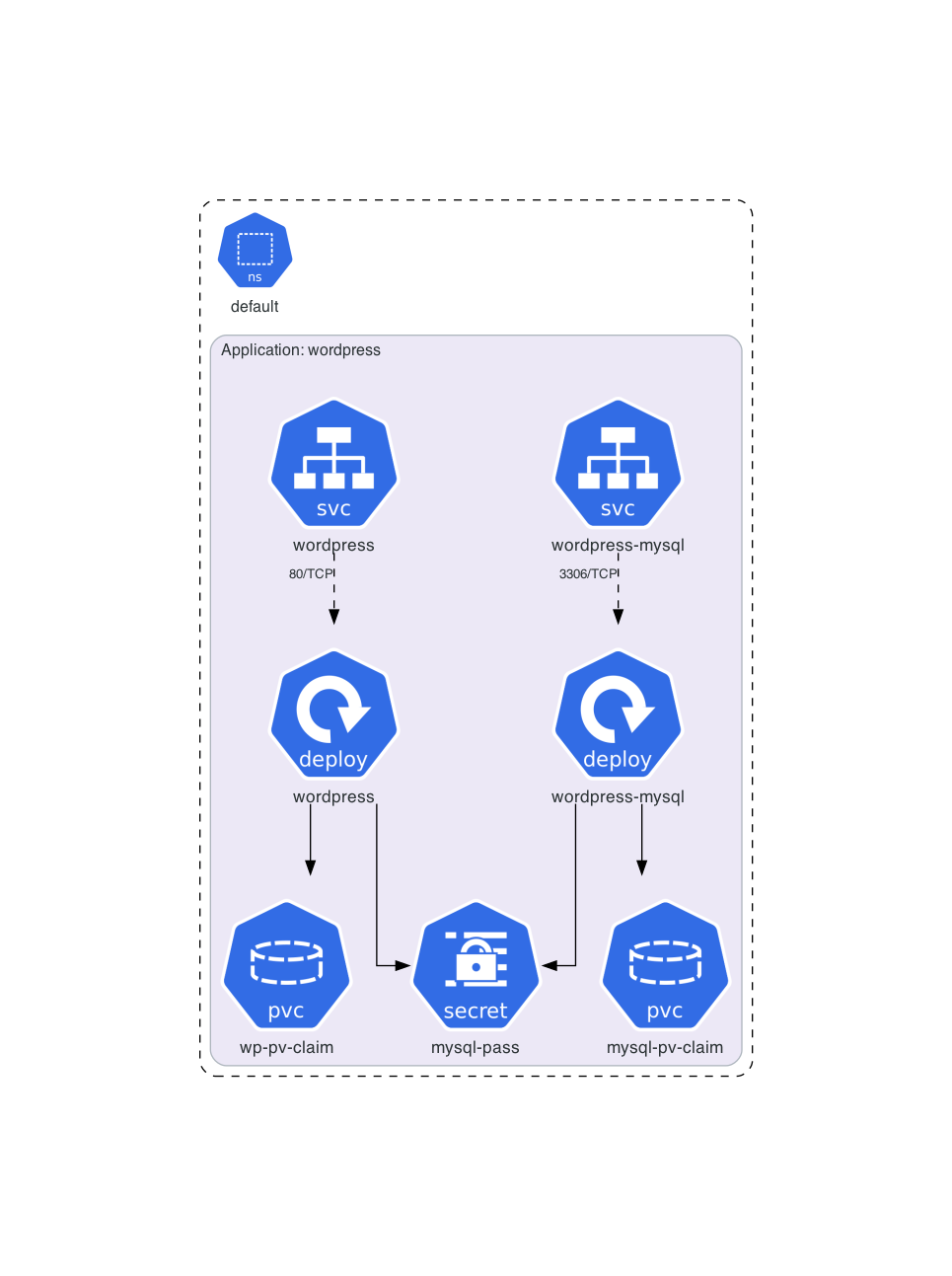
Architecture diagram for official Kubernetes WordPress tutorial manifests:
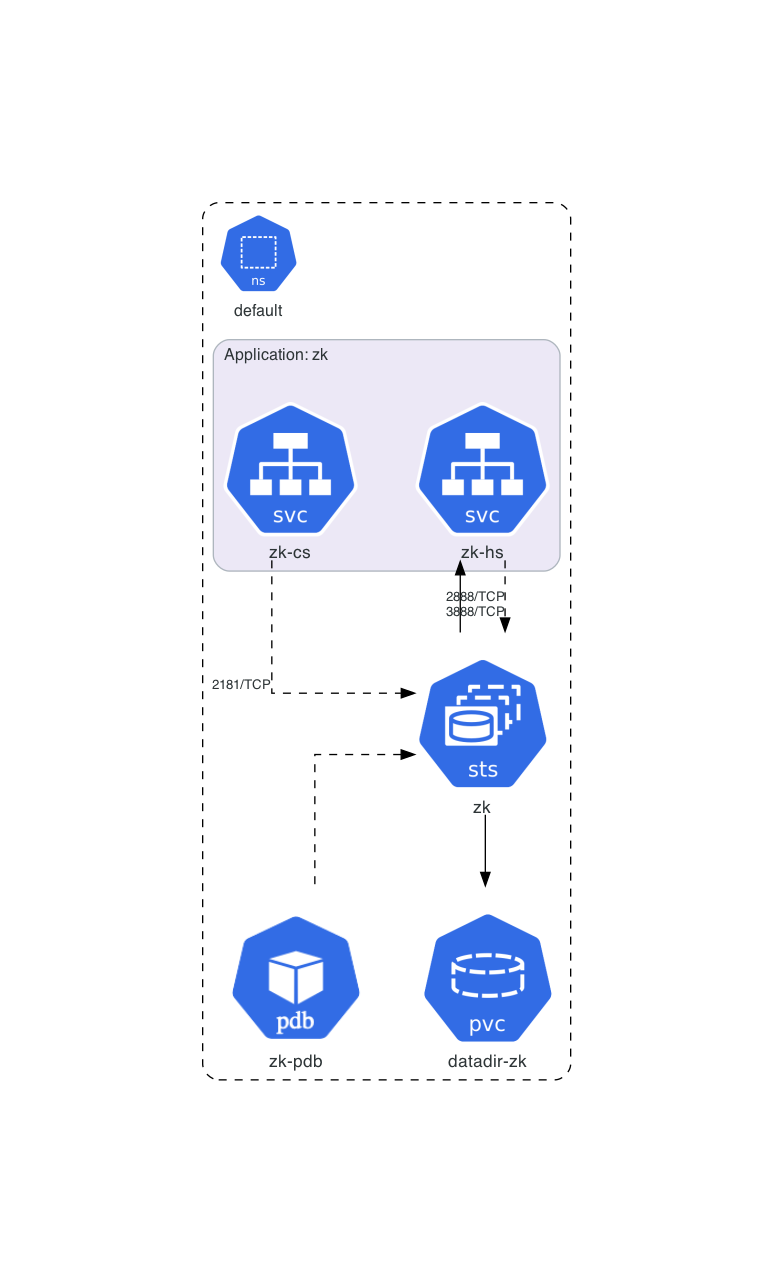
Architecture diagram for official Kubernetes ZooKeeper tutorial manifests:
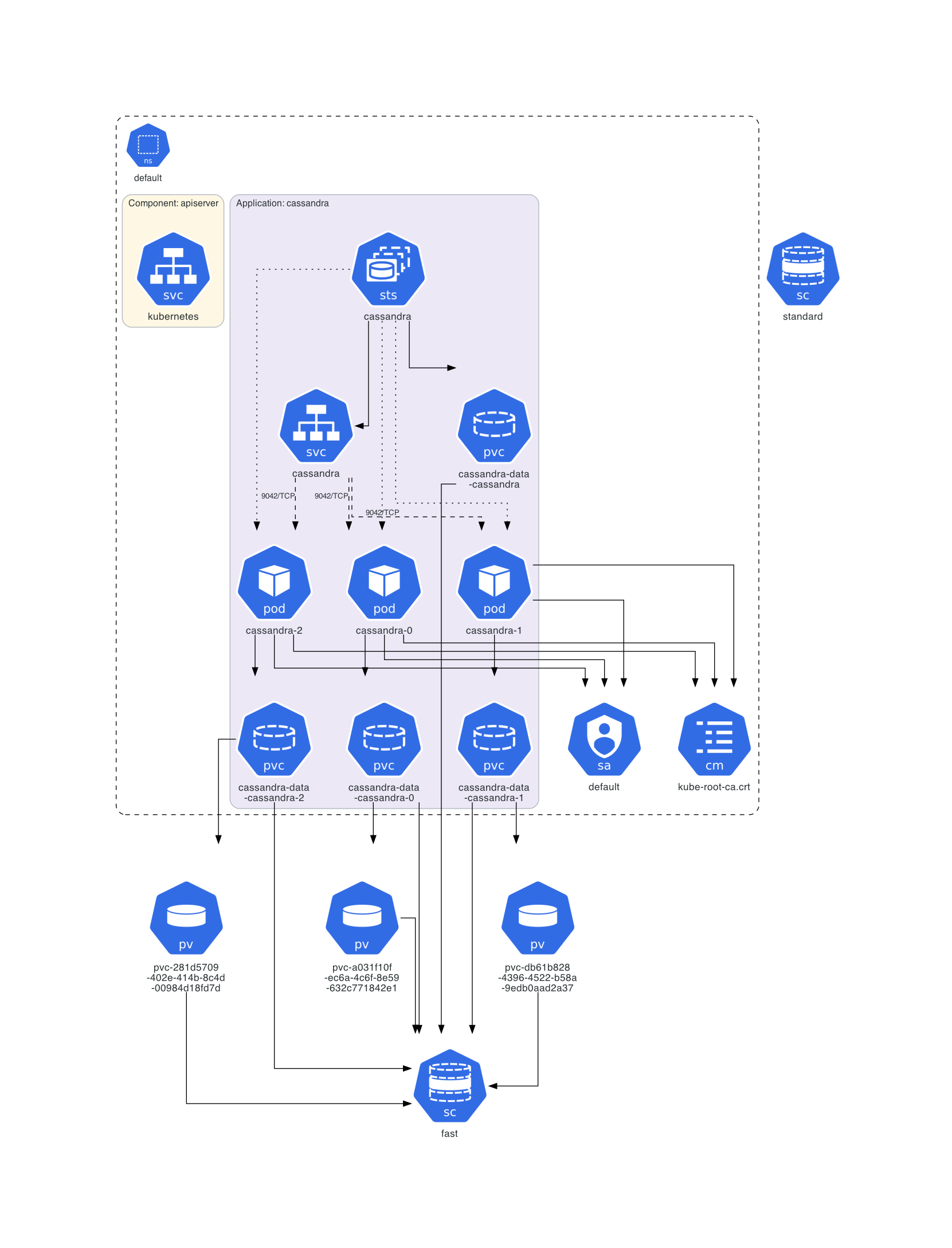
Architecture diagram of a deployed Cassandra instance:
Architecture diagram for Train Ticket:A Benchmark Microservice System:

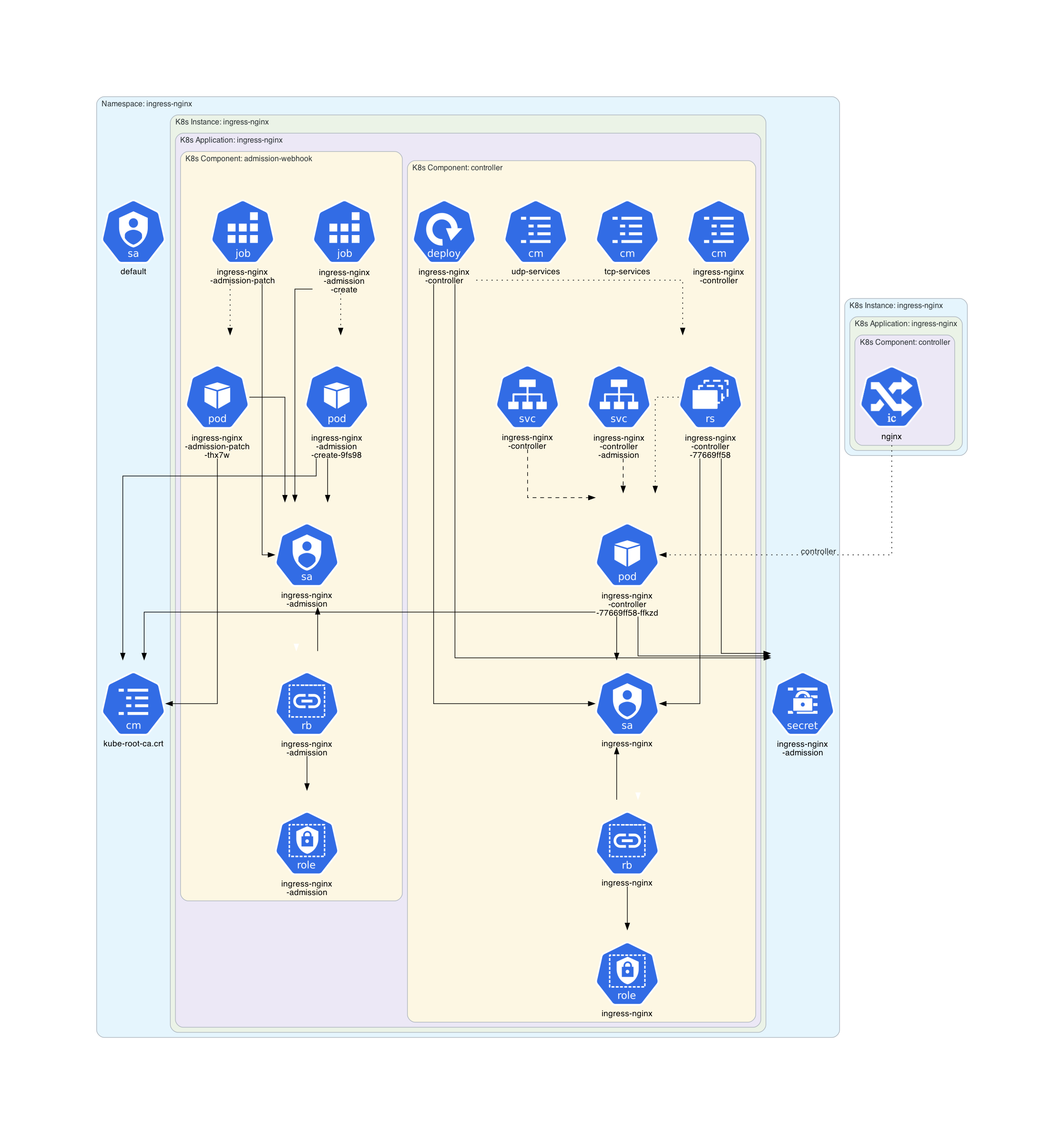
Architecture diagram of the Minikube Ingress Addon:
Architecture diagram for the Kube Prometheus Stack chart:

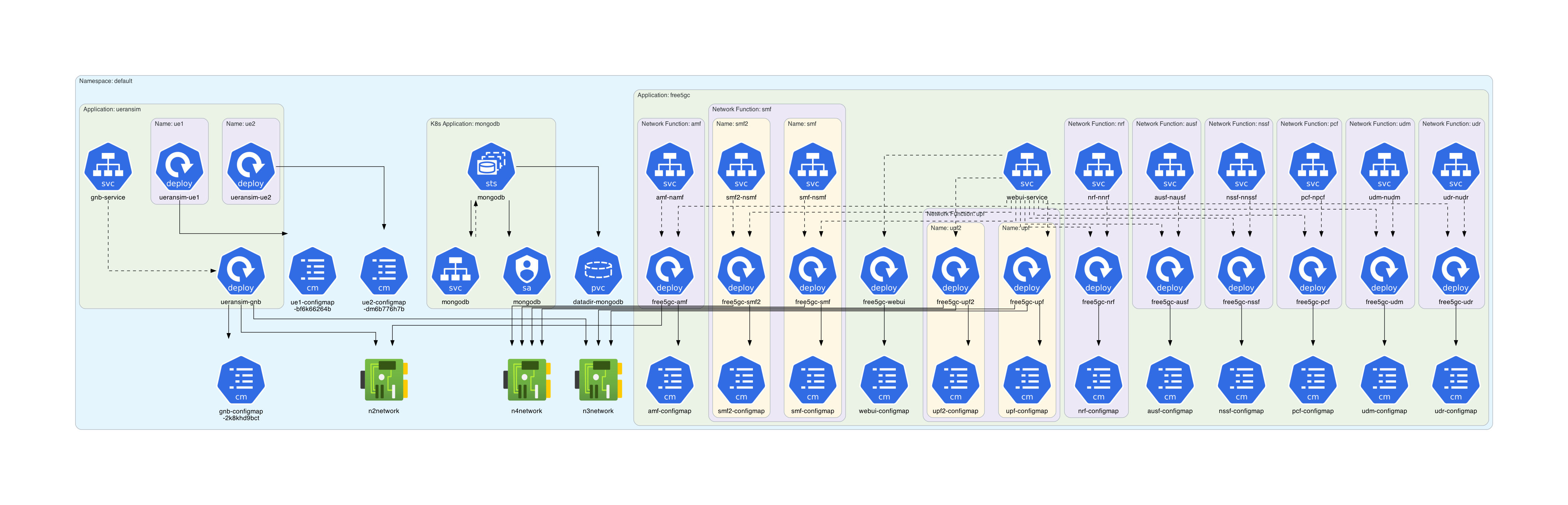
Architecture diagram for free5gc-k8s manifests:
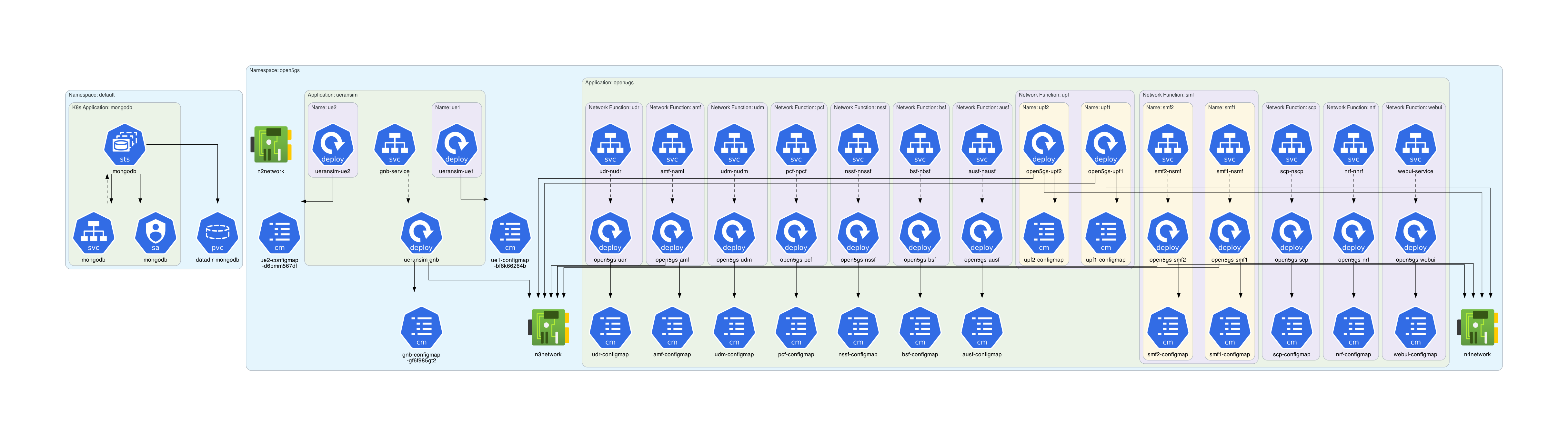
Architecture diagram for open5gs-k8s manifests:
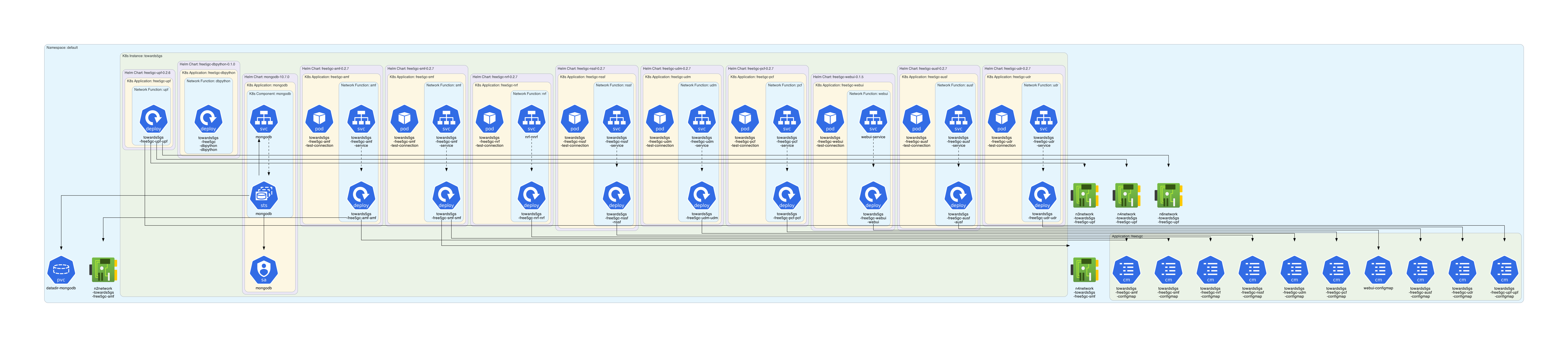
Architecture diagram for the Towards5GS-helm chart:
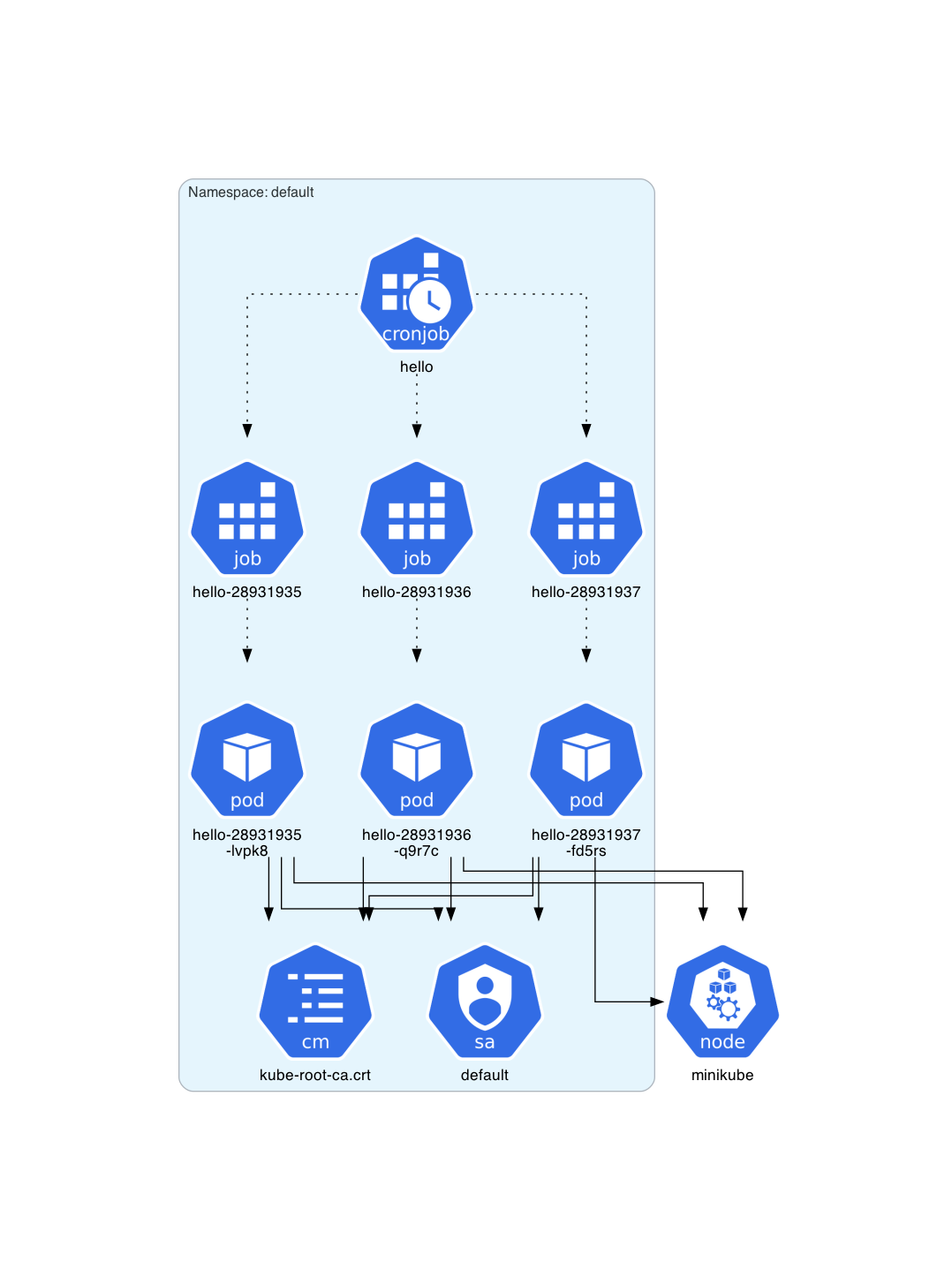
Architecture diagram for a deployed CronJob instance:
Architecture diagram for NetworkPolicy resources: 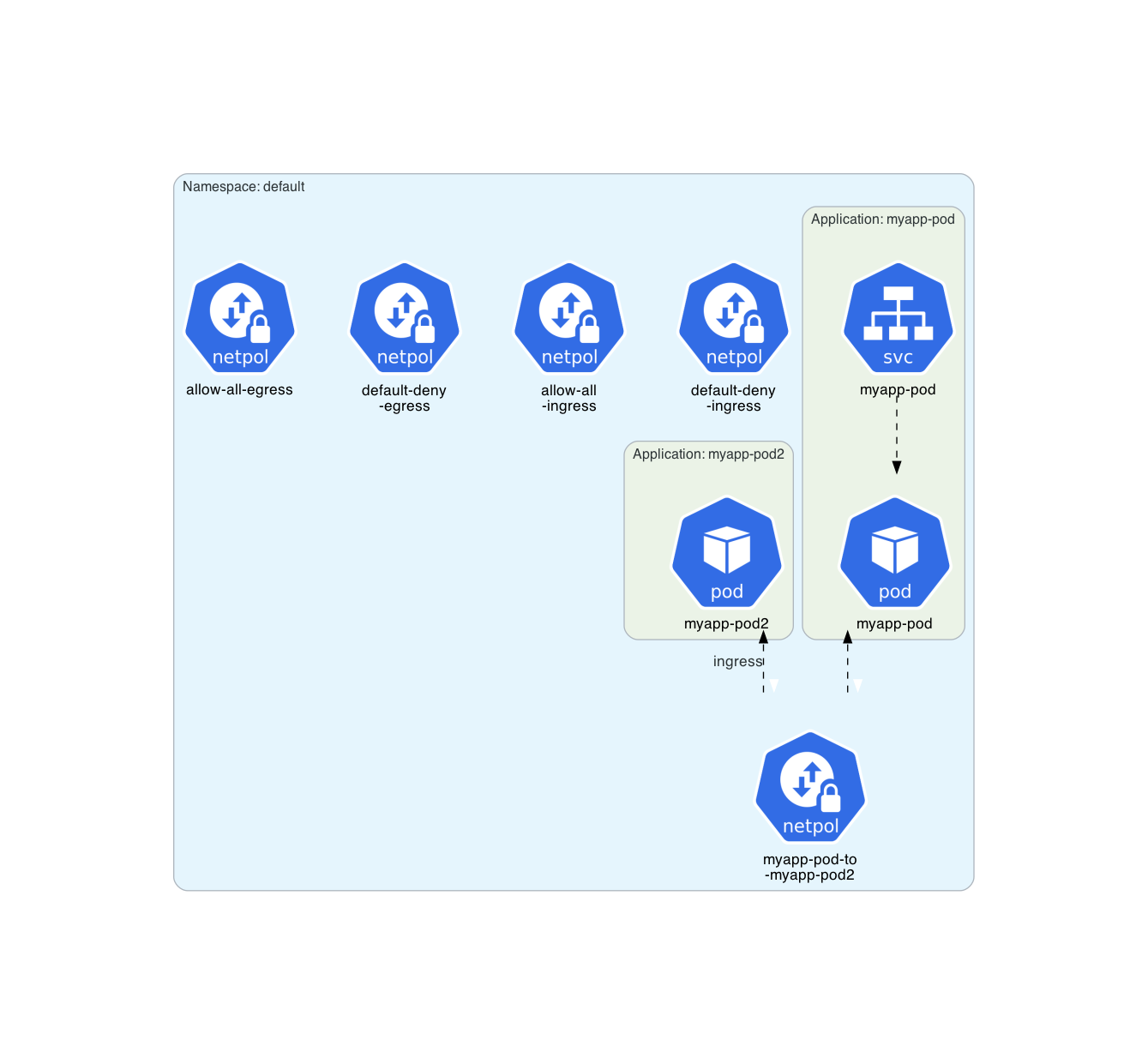
Architecture diagram for an Argo CD example:
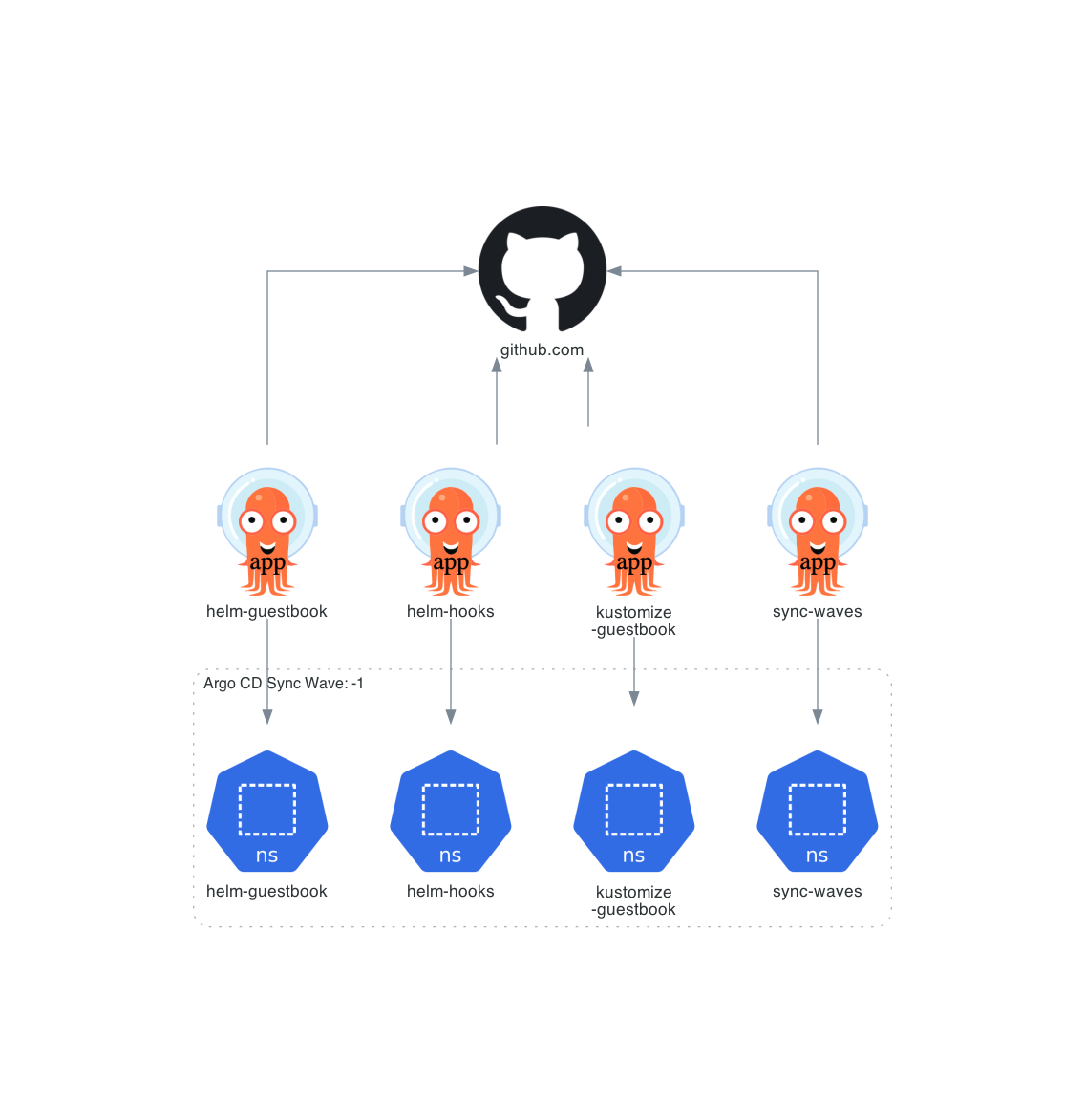
Architecture diagram for an Argo Events example:

Many other architecture diagrams are available into examples/.
All the examples are
- official Kubernetes WordPress tutorial
- official Kubernetes ZooKeeper tutorial
- official Kubernetes Cassandra tutorial
- Train Ticket
- minikube architecture diagrams
- k0s architecture diagrams
- Kube Prometheus Stack
- free5gc-k8s
- open5gs-k8s
- Towards5GS-helm
- OpenAirInterface 5G Core Network
- docker-open5gs
- Gradiant 5G Charts
- Miscellaneous examples
- Some Helm charts
- LeaderWorkerSet API
- helmfile
- Istio
- Argo
- Online Boutique
Prerequisites
Following software must be installed:
Getting Started
Following command installs KubeDiagrams and all its Python dependencies, i.e., PyYAML and Diagrams.
# using pip (pip3)
pip install KubeDiagrams
Alternatively, you can install via Nix:
nix shell github:philippemerle/KubeDiagrams
Usage
KubeDiagrams provides two commands: kube-diagrams and helm-diagrams.
kube-diagrams
kube-diagrams generates a Kubernetes architecture diagram from one or several Kubernetes manifest files.
kube-diagrams -h
usage: kube-diagrams [-h] [-o OUTPUT] [-f FORMAT] [-c CONFIG] [-v] [--without-namespace] filename [filename ...]

Generate Kubernetes architecture diagrams from Kubernetes manifest files

positional arguments:
  filename              the Kubernetes manifest filename to process

options:
  -h, --help            show this help message and exit
  -o, --output OUTPUT   output diagram filename
  -f, --format FORMAT   output format, allowed formats are dot, dot_json, gif, jp2, jpe, jpeg, jpg, pdf, png, svg, tif, tiff, set to png by default
  -c, --config CONFIG   custom kube-diagrams configuration file
  -v, --verbose         verbosity, set to false by default
  --without-namespace   disable namespace cluster generation
Examples:
# generate a diagram from a manifest
kube-diagrams -o cassandra.png examples/cassandra/cassandra.yml

# generate a diagram from a kustomize folder
kubectl kustomize path_to_a_kustomize_folder | kube-diagrams - -o diagram.png

# generate a diagram from a helmfile descriptor
helmfile template -f helmfile.yaml | kube-diagrams - -o diagram.png

# generate a diagram from the actual default namespace state
kubectl get all -o yaml | kube-diagrams -o default-namespace.png -

# generate a diagram of all workload and service resources from all namespaces
kubectl get all --all-namespaces -o yaml | kube-diagrams -o all-namespaces.png -
🧩 kubectl Plugin Support
You can use KubeDiagrams as a kubectl plugin as well for a more integrated Kubernetes workflow. This allows you to run commands like:
kubectl diagrams all -o diagram.png
To enable this, simply symlink or copy the kubectl-diagrams script onto your $PATH:
ln -s $(which kube-diagrams) /usr/local/bin/kubectl-diagrams
Note
You will also already need
kube-diagramson your$PATHas well for this to work.
You can alternatively install it via Nix:
nix shell github:philippemerle/KubeDiagrams#kubectl-diagrams
helm-diagrams
helm-diagrams generates a Kubernetes architecture diagram from an Helm chart.
helm-diagrams -h
Usage: helm-diagrams <helm-chart-url> [OPTIONS]

A script to generate a diagram of an Helm chart using kube-diagrams.

Options:
  -o, --output <file>          Specify the output file for the diagram
  -f, --format <format>        Specify the output format (e.g., png, svg)
  -c, --config <file>          Specify the custom kube-diagrams configuration file
  -h, --help                   Display this help message

Examples:
  helm-diagrams https://charts.jetstack.io/cert-manager -o diagram.png
  helm-diagrams oci://ghcr.io/argoproj/argo-helm/argo-cd -f svg
  helm-diagrams --help
Note
helm-diagramsrequires that thehelmcommand was installed.
Examples:
# generate a diagram for the Helm chart 'cert-manager' available in HTTP repository 'charts.jetstack.io'
helm-diagrams https://charts.jetstack.io/cert-manager

# generate a diagram for the Helm chart 'argo-cd' available in OCI repository 'ghcr.io'
helm-diagrams oci://ghcr.io/argoproj/argo-helm/argo-cd

# generate a diagram for the Helm chart 'some-chart' available locally
helm-diagrams some-path/some-chart
With Docker/Podman
KubeDiagrams images are available in Docker Hub.
# For usage with Podman, replace 'docker' by 'podman' in the following lines.

# generate a diagram from a manifest
docker run -v "$(pwd)":/work philippemerle/kubediagrams kube-diagrams -o cassandra.png examples/cassandra/cassandra.yml

# generate a diagram from a kustomize folder
kubectl kustomize path_to_a_kustomize_folder | docker run -v "$(pwd)":/work -i philippemerle/kubediagrams kube-diagrams - -o diagram.png

# generate a diagram from a helmfile descriptor
helmfile template -f helmfile.yaml | docker run -v "$(pwd)":/work -i philippemerle/kubediagrams kube-diagrams - -o diagram.png

# generate a diagram from the actual default namespace state
kubectl get all -o yaml | docker run -v "$(pwd)":/work -i philippemerle/kubediagrams kube-diagrams -o default-namespace.png -

# generate a diagram of all workload and service resources from all namespaces
kubectl get all --all-namespaces -o yaml | docker run -v "$(pwd)":/work -i philippemerle/kubediagrams kube-diagrams -o all-namespaces.png -

# generate a diagram for the Helm chart 'cert-manager' available in HTTP repository 'charts.jetstack.io'
docker run -v "$(pwd)":/work philippemerle/kubediagrams helm-diagrams https://charts.jetstack.io/cert-manager

# generate a diagram for the Helm chart 'argo-cd' available in OCI repository 'ghcr.io'
docker run -v "$(pwd)":/work philippemerle/kubediagrams helm-diagrams oci://ghcr.io/argoproj/argo-helm/argo-cd
Features
Kubernetes resources
KubeDiagrams supported the following 47 Kubernetes resource types:
| Kind | ApiGroup | Versions | Icon |
|---|---|---|---|
APIService |
apiregistration.k8s.io |
v1beta1 v1 |
 |
ClusterRole |
rbac.authorization.k8s.io |
v1beta1 v1 |
 |
ClusterRoleBinding |
rbac.authorization.k8s.io |
v1beta1 v1 |
 |
ConfigMap |
v1 |
 |
|
CronJob |
batch |
v1beta1 v1 |
 |
CSIDriver |
storage.k8s.io |
v1beta1 v1 |
 |
CSINode |
storage.k8s.io |
v1 |
 |
CSIStorageCapacity |
storage.k8s.io |
v1 |
 |
CustomResourceDefinition |
apiextensions.k8s.io |
v1beta1 v1 |
 |
DaemonSet |
apps |
v1beta2 v1 |
 |
Deployment |
apps |
v1beta1 v1beta2 v1 |
 |
Endpoints |
v1 |
 |
|
EndpointSlice |
discovery.k8s.io |
v1 |
 |
Group |
rbac.authorization.k8s.io |
v1 |
 |
HorizontalPodAutoscaler |
autoscaling |
v1 v2beta1 v2beta2 v2 |
 |
Ingress |
networking.k8s.io |
v1beta1 v1 |
 |
IngressClass |
networking.k8s.io |
v1beta1 v1 |
 |
Job |
batch |
v1beta1 v1 |
 |
Lease |
coordination.k8s.io |
v1 |
 |
LimitRange |
v1 |
 |
|
MutatingWebhookConfiguration |
admissionregistration.k8s.io |
v1beta1 v1 |
 |
Namespace |
v1 |
 |
|
NetworkAttachmentDefinition |
k8s.cni.cncf.io |
v1 |
 |
NetworkPolicy |
networking.k8s.io |
v1 |
 |
Node |
v1 |
 |
|
PersistentVolume |
v1 |
 |
|
PersistentVolumeClaim |
v1 |
 |
|
Pod |
v1 |
 |
|
PodDisruptionBudget |
policy |
v1beta1 v1 |
 |
PodSecurityPolicy |
policy |
v1beta1 v1 |
 |
PodTemplate |
v1 |
 |
|
PriorityClass |
scheduling.k8s.io |
v1beta1 v1 |
 |
ReplicaSet |
apps |
v1 |
 |
ReplicationController |
v1 |
 |
|
ResourceQuota |
v1 |
 |
|
Role |
rbac.authorization.k8s.io |
v1beta1 v1 |
 |
RoleBinding |
rbac.authorization.k8s.io |
v1beta1 v1 |
 |
RuntimeClass |
node.k8s.io |
v1 |
 |
Secret |
v1 |
 |
|
Service |
v1 |
 |
|
ServiceAccount |
v1 |
 |
|
StatefulSet |
apps |
v1beta1 v1beta2 v1 |
 |
StorageClass |
storage.k8s.io |
v1beta1 v1 |
 |
User |
rbac.authorization.k8s.io |
v1 |
 |
ValidatingWebhookConfiguration |
admissionregistration.k8s.io |
v1beta1 v1 |
 |
VerticalPodAutoscaler |
autoscaling.k8s.io |
v1 |
 |
VolumeAttachment |
storage.k8s.io |
v1 |
 |
Note: The mapping between these supported Kubernetes resources and architecture diagrams is defined into bin/kube-diagrams.yml.
Note: The mapping for any Kubernetes custom resources can be also defined into KubeDiagrams configuration files as illustrated in examples/k0s/KubeDiagrams.yml, examples/kube-prometheus-stack/KubeDiagrams.yml, examples/lws/KubeDiagrams.yml, and examples/argo/KubeDiagrams.yaml.
Currently, there are 16 unsupported Kubernetes resource types:
| Kind | ApiGroup |
|---|---|
Binding |
|
ComponentStatus |
|
Event |
|
ControllerRevision |
apps |
TokenReview |
authentication.k8s.io |
LocalSubjectAccessReview |
authorization.k8s.io |
SelfSubjectAccessReview |
authorization.k8s.io |
SelfSubjectReview |
authorization.k8s.io |
SelfSubjectRulesReview |
authorization.k8s.io |
SubjectAccessReview |
authorization.k8s.io |
CertificateSigningRequest |
certificates.k8s.io |
Event |
events.k8s.io |
FlowSchema |
flowcontrol.apiserver.k8s.io |
PriorityLevelConfiguration |
flowcontrol.apiserver.k8s.io |
NodeMetrics |
metrics.k8s.io |
PodMetrics |
metrics.k8s.io |
Kubernetes resources clustering
With KubeDiagrams, Kubernetes resources can be clustered within the architecture diagrams automatically. KubeDiagrams uses the metadata.namespace resource field as first clustering criteria. Then, the metadata.labels keys can be used to define subclusters. Following table lists the predefined mappings between label keys and cluster titles as defined in the bin/kube-diagrams.yml file (see the clusters list).
| Label Key | Cluster Title |
|---|---|
app.kubernetes.io/instance |
K8s Instance: label value |
release |
Release: label value |
helm.sh/chart |
Helm Chart: label value |
chart |
Chart: label value |
app.kubernetes.io/name |
K8s Application: label value |
app |
Application: label value |
app.kubernetes.io/component |
K8s Component: label value |
service |
Microservice: label value |
tier |
Tier: label value |
Resource clustering could be also annotation-based, i.e. based on metadata.annotations keys. Following table lists the predefined mappings between annotation keys and cluster titles as defined in the bin/kube-diagrams.yml file.
| Annotation Key | Cluster Title |
|---|---|
helm.sh/hook |
annotation value |
New label/annotation-based mappings can be easily defined in custom configuration files (see examples/minikube/KubeDiagrams.yml, examples/k0s/KubeDiagrams.yml, examples/free5gc-k8s/KubeDiagrams.yml, examples/open5gs-k8s/KubeDiagrams.yml, examples/towards5gs-helm/KubeDiagrams.yml, examples/lws/KubeDiagrams.yml, and examples/argo/KubeDiagrams.yaml)
and provided to KubeDiagrams via the --config command-line option.
Kubernetes resource relationships
With KubeDiagrams, each relationship between Kubernetes resources is represented by a visual edge between visual nodes.
Following table lists the predefined edges as defined in the bin/kube-diagrams.yml file (see the edges map).
| Edge Kind | Edge Style | Edge Color | Meaning |
|---|---|---|---|
REFERENCE |
solid |
black |
Used when a resource refers to another resource directly |
SELECTOR |
dashed |
black |
Used when a resource refers to other resources via a selector |
OWNER |
dotted |
black |
Used when a resource owns another resource |
COMMUNICATION |
solid |
brown |
Used to represent ingress and egress networking policies between pods |
New edges can be easily defined or redefined in custom configuration files, and provided to KubeDiagrams via the --config command-line option.
Following diagram illustrates all the visual nodes, edges, and clusters supported by default by KubeDiagrams.
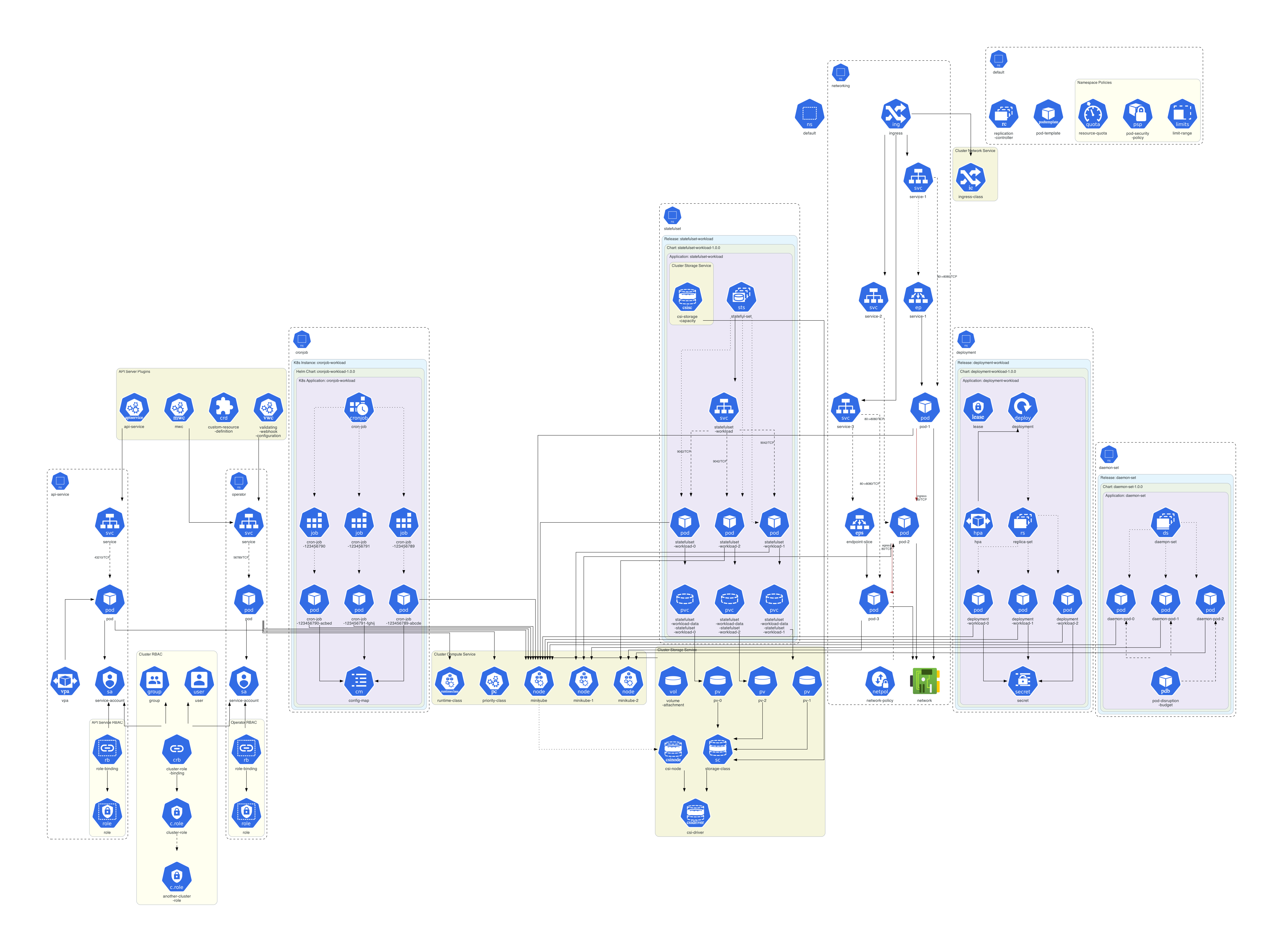 .
.
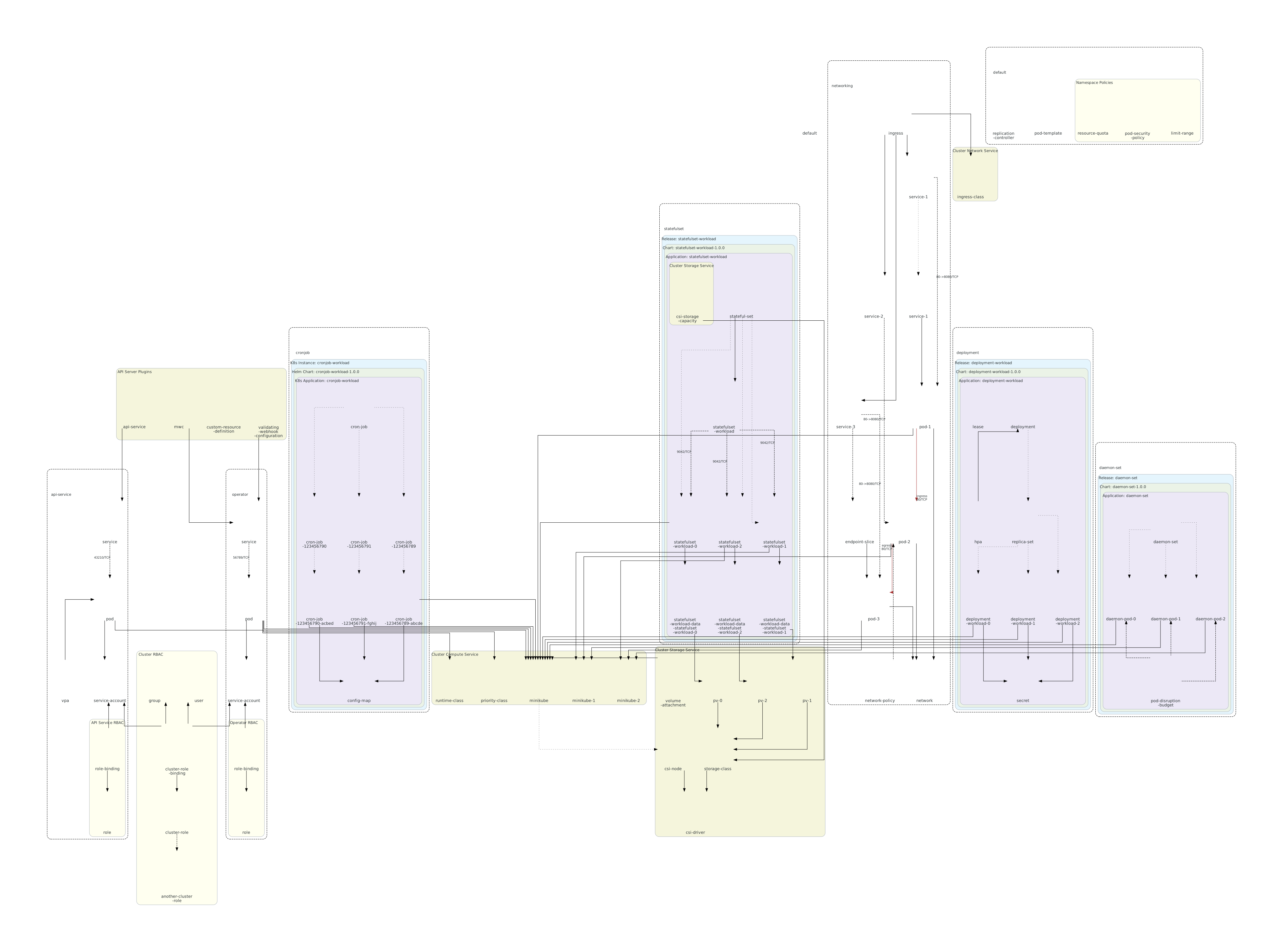
Generated SVG diagrams contain tooltips for each cluster/node/edge as illustrated in images/semiotics.svg
Custom diagrams
By default, KubeDiagrams generates diagrams from data contained into Kubernetes manifest files, actual cluster state, kustomization files, or Helm charts automatically. But sometimes, users would like to customize generated diagrams by adding their own clusters, nodes and edges as illustrated in the following diagram:
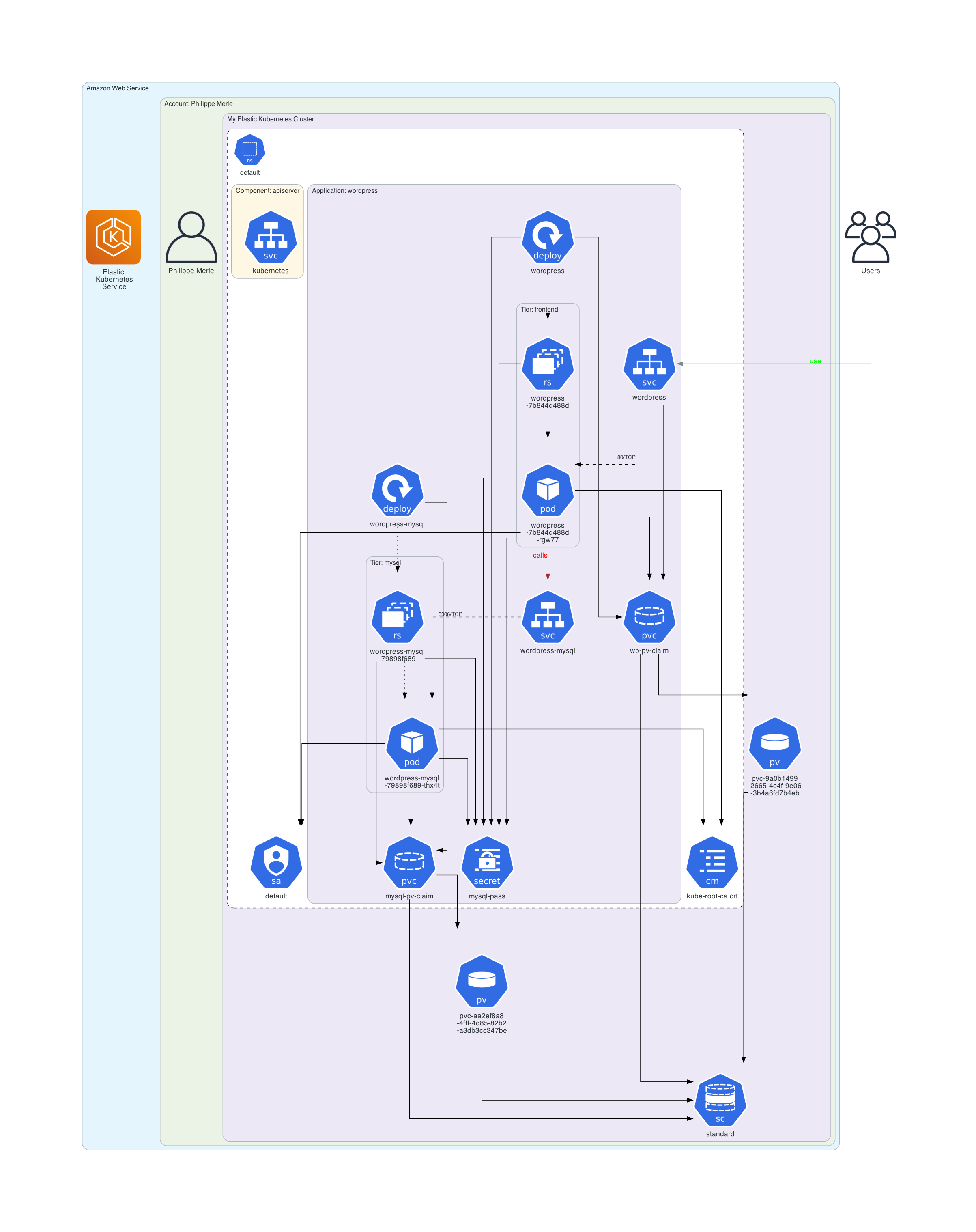
This previous diagram contains three custom clusters labelled with Amazon Web Service, Account: Philippe Merle and My Elastic Kubernetes Cluster, three custom nodes labelled with Users, Elastic Kubernetes Services, and Philippe Merle, and two custom edges labelled with use and calls. The rest of this custom diagram is generated from actual cluster state for a deployed WordPress application automatically.
Have a look to examples/wordpress/custom_diagram.kd and examples/online-boutique/custom_diagram.kd to see how to define custom diagrams, clusters, nodes and edges declaratively.
GitHub Action
You can use Kube Diagrams (and Helm Diagrams) in your GitHub Action workflows.
name: "Your GitHub Action Name"
on:
  workflow_dispatch: # add your specific triggers (https://docs.github.com/en/actions/writing-workflows/choosing-when-your-workflow-runs/events-that-trigger-workflows)
jobs:
  test:
    runs-on: ubuntu-latest
    steps:
      - name: "Generate diagram from Helm chart"
        uses: philippemerle/KubeDiagrams@main
        with:
          type: "helm"
          args: "https://charts.jetstack.io/cert-manager"
KubeDiagrams Interactive Viewer
KubeDiagrams could output diagrams in the dot_json format. For instance, type:
kube-diagrams examples/wordpress/*.yaml -o wordpress.dot_json
Diagrams in the dot_json format can be viewed and manipulated interactively thanks to KubeDiagrams Interactive Viewer. For instance, type:
open interactive_viewer/index.html
Then open the wordpress.dot_json file:
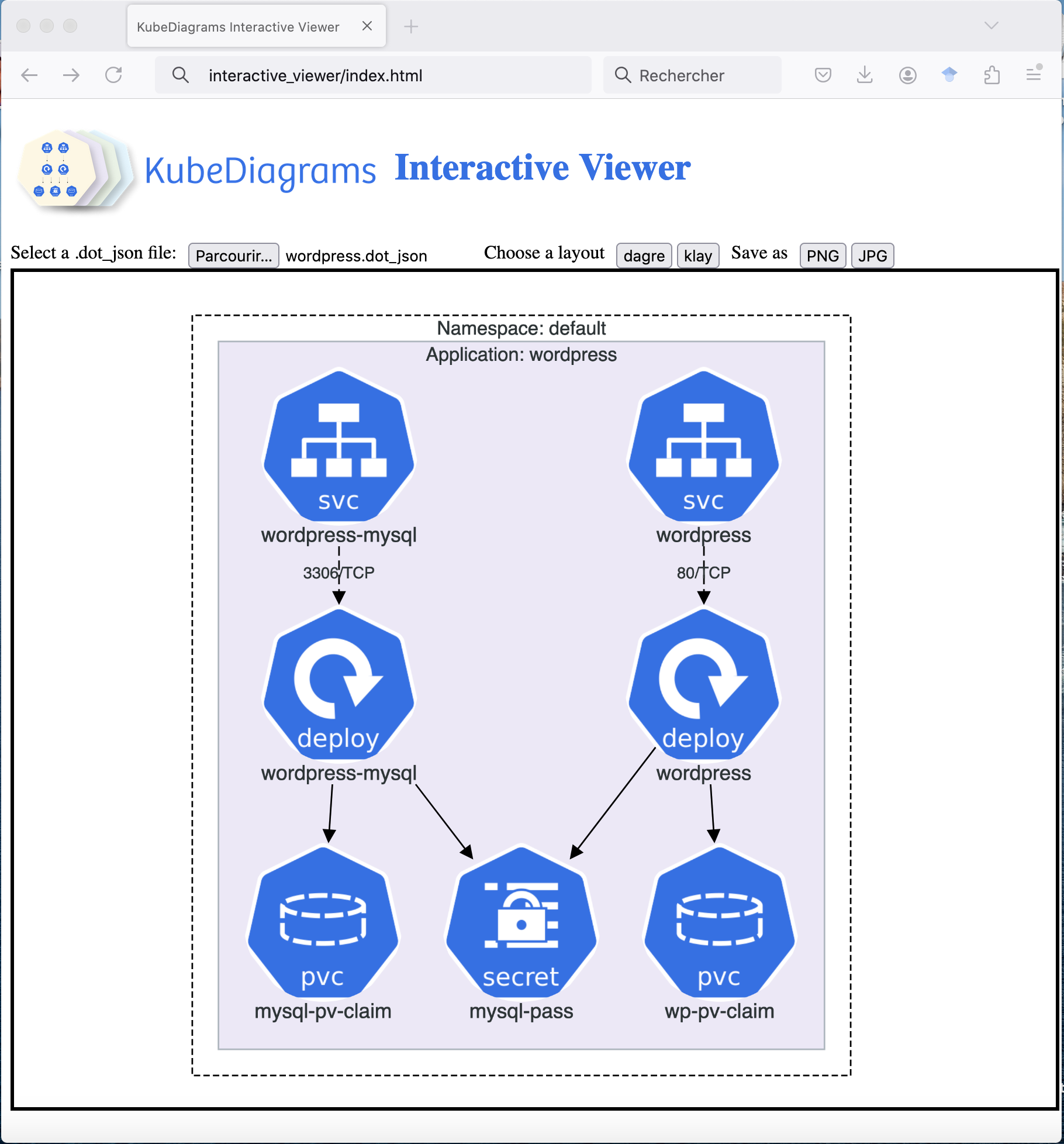
KubeDiagrams Interactive Viewer allows users to zoom in/out diagrams, to see cluster/node/edge tooltips, open/close clusters, move clusters/nodes interactively, and save as PNG/JPG images.
Architecture
Following figure shows the software architecture of KubeDiagrams.

Real-World Use Cases
Following provides links to real-world use cases.
Documentation
KubeDiagrams could be used to generate architectural diagrams documenting your Kubernetes applications (manifests, Helm charts, helmfiles, or cluster state). See following links:
Architectural defects identification
Diagrams generated by KubeDiagrams could help you to identify architectural defects in your own or used Kubernetes applications. See following links:
Your own real-world use cases
Don't hesitate to submit your own real-world use cases as pull requests.
What do they say about it?
Papers
- Visualizing Cloud-native Applications with KubeDiagrams. Philippe Merle and Fabio Petrillo. arXiv. May 28, 2025.
Talks
- Visualizing cloud-native applications with KubeDiagrams, Philippe Merle, PEPR Cloud Taranis Project, February 17, 2025.
Blogs
-
KubeDiagrams: Automating your Kubernetes Architecture, Daniel Makhoba Emmanuel, Medium, June 19, 2025.
-
[Literature Review] Visualizing Cloud-native Applications with KubeDiagrams, Moonlight, May 27, 2025.
-
KubeDiagrams, CSDN, April 10, 2025.
-
Generate Kubernetes Architecture Maps Directly from Your Cluster, Abhimanyu Saharan, March 29, 2025.
-
KubeDiagrams 0.2.0 Makes It Way Easier to Visualize Your Kubernetes Setup, Mr.PlanB, Medium, March 27, 2025.
-
Visualising SQL Server in Kubernetes, Andrew Pruski, February 6, 2025.
Social Networks
-
Out Now: Kubernetes Content Performance Analysis Report, May 2025 , LinkedIn, June 17, 2025. Full Report.
-
KubeDiagrams Interactive Viewer on Reddit, June 14, 2025.
-
Mahyar Mirrashed's post on LinkedIn, June 13, 2025.
-
Christophe Gourdin's post on LinkedIn, June 10, 2025.
-
Preview: Kubernetes Content Performance Analysis Report for May 2025, LinkedIn, June 9, 2025. Full Report Preview.
-
Mathieu Acher's post on X, June 9, 2025.
-
Philippe Merle's post on LinkedIn, June 9, 2025.
-
KubeDiagrams moved from GPL-3.0 to Apache 2.0 License on Reddit, June 6, 2025.
-
Jimmy Song's post on X, June 4, 2025.
-
Sebastian Sejzer’s post on Facebook, May 30, 2025.
-
Donald Lutz’s post on LinkedIn, May 30, 2025.
-
Dor Ben Dov’s post on LinkedIn, May 30, 2025.
-
박상길’s post on LinkedIn, May 30, 2025.
-
Visualizing Cloud-native Applications with KubeDiagrams on Reddit, May 30, 2025.
-
Kubernetes Architect's post on LinkedIn, May 29, 2025.
-
Kubernetes Architect's post on X, May 29, 2025.
-
KubeDiagrams on Daily.dev, May 8, 2025.
-
KubeDiagrams 0.3.0 is out! on Reddit, April 29, 2025.
-
JReuben1's post on X, April 19, 2025.
-
Custom declarative diagrams with KubeDiagrams on Reddit, April 17, 2025.
-
DevOps Radar on LinkedIn, April 1, 2025.
-
Gregory Lindner’s post on LinkedIn, March, 2025.
-
Vishnu Hari Dadhich’s post on LinkedIn, March, 2025.
-
Rino Rondan’s post on LinkedIn, March, 2025.
-
Michael Cade's post on X, March 29, 2025.
-
Paco Xu's post on X, March 26, 2025.
-
KubeDiagrams 0.2.0 is out! on Reddit, March 25, 2025.
-
KubeDiagrams: Revolutionizing Cloud Cluster Management! on LinkedIn, March 18, 2025.
-
Anyone know of any repos/open source tools that can create k8 diagrams? on Reddit, March 13, 2025.
-
Automation of diagram creation for Kubernetes, DevSecOps, February/March 2025.
-
Facebook Kubernetes Users Group, February 6, 2025.
-
KubeDiagrams on Reddit, February 4, 2025.
Referencing sites
-
Tool of the day, TechOps Examples, February 11, 2025.
Your own contributions
Don't hesitate to submit your own papers, talks, blogs, social network posts, and referencing sites as pull requests.
Star History
Issue Stats
License
This project is licensed under the Apache 2.0 License - see the LICENSE file for details.