
1.5 KiB
title, homepage, tagline
| title | homepage | tagline |
|---|---|---|
| LSDeluxe | https://github.com/Peltoche/lsd | LSDeluxe: next gen ls command |
Updating lsd
webi lsd@stable
Use the @beta tag for pre-releases.
Cheat Sheet
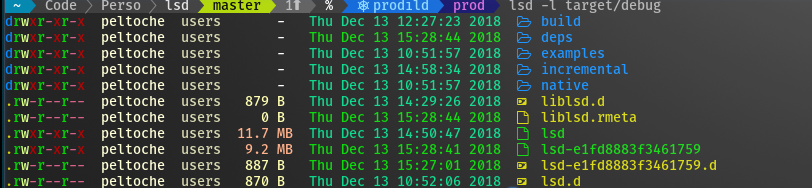
lsdis a modern, cross-platform, drop-in replacement forls. It does everything that you expect it to, plus modern extras that you can check out withlsd --help.
Note: You must install the nerdfont and
update the font in your Terminal for lsd to show icons.
Run lsd exactly as you would ls:
lsd
But wait, there's more, you can tree as well:
lsd --tree
How to turn off icons and colors
If you just want the benefits of a cross-platform ls without having to install
nerdfont or needing a modern terminal, you've got options:
lsd --icon=never --color=never
Since that can be a little awkward to type over and over, you can use an alias:
alias lsd=lsd --icon=never --color=never
lsd
How to alias as ls, ll, la, etc
Update your .bashrc, .zshrc, or .profile
alias ls="lsd -F"
alias la="lsd -AF"
alias ll="lsd -lAF"
alias lg="lsd -F --group-dirs=first"
For situations in which you must use ls exactly, remember that you can escape
the alias:
\ls -lAF
How to alias as tree
Update your .bashrc, .zshrc, or .profile
alias tree="lsd -AF --tree"
And when you want to use GNU tree, just escape the alias:
\tree