 1803c208c3
Updated install.sh for bat, fd, gh, goreleaser, lsd, rg, sd, watchexec,
and zoxide to extract and install shell completions (bash, fish, zsh) and
man pages from their release archives. Completions go to standard XDG
locations under the versioned opt directory. All moves use 2>/dev/null
fallbacks for older versions that don't include completions.
title, homepage, tagline
| title | homepage | tagline |
|---|---|---|
| LSDeluxe | https://github.com/lsd-rs/lsd | LSDeluxe: next gen ls command |
To update or switch versions, run webi lsd@stable (or @v0.20, @beta, etc).
Files
~/.config/envman/PATH.env
~/.config/lsd/config.yaml
~/.local/bin/lsd
Cheat Sheet
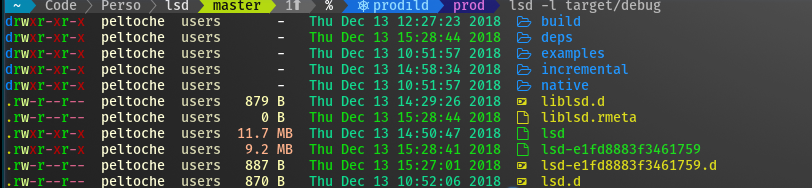
lsdis a modern, cross-platform, drop-in replacement forls. It does everything that you expect it to, plus modern extras that you can check out withlsd --help.
Note: You must install the nerdfont and
update the font in your Terminal for lsd to show icons.
Run lsd exactly as you would ls:
lsd
But wait, there's more, you can tree as well:
lsd --tree
How to turn off icons and colors
If you just want the benefits of a cross-platform ls without having to install
nerdfont or needing a modern terminal, you've got options:
lsd --icon=never --color=never
Since that can be a little awkward to type over and over, you can use an alias:
alias lsd=lsd --icon=never --color=never
lsd
(you may also enjoy aliasman)
Or update the config file:
~/.config/lsd/config.yaml
classic: true
How to alias as ls, ll, la, etc
This will affect the interactive shell, but not scripts.
Using aliasman:
aliasman ls "lsd -F"
aliasman la "lsd -AF"
aliasman ll "lsd -lAF"
aliasman lg "lsd -F --group-dirs=first"
(and follow the on-screen instructions or restart your shell)
Or manually update your .bashrc, .zshrc, or .profile
alias ls="lsd -F"
alias la="lsd -AF"
alias ll="lsd -lAF"
alias lg="lsd -F --group-dirs=first"
For situations in which you must use ls exactly, remember that you can escape
the alias:
\ls -lAF
How to alias as tree
Using aliasman:
aliasman tree "lsd -AF --tree"
alias tree="lsd -AF --tree"
Or manually update your .bashrc, .zshrc, or .profile
alias tree="lsd -AF --tree"
And when you want to use GNU tree you can escape the alias in some shells:
\tree
Or use the full path:
/bin/tree