
3.2 KiB
title, homepage, tagline, description
| title | homepage | tagline | description |
|---|---|---|---|
| btop | https://github.com/aristocratos/btop | btop: a beautiful, interactive resource monitor | btop++ is a fast, feature-rich terminal resource monitor written in C++. It shows real-time usage and stats for CPU, memory, disks, network, and processes — with full mouse support, customizable themes, and an easy-to-use menu system. The spiritual successor to bashtop and bpytop. |
To update or switch versions, run webi btop@stable (or @v1.4, @beta, etc).
Files
These are the files / directories that are created and/or modified with this install:
~/.config/envman/PATH.env
~/.local/bin/btop
~/.local/opt/btop/
~/.local/opt/btop-<VERSION>/
Cheat Sheet
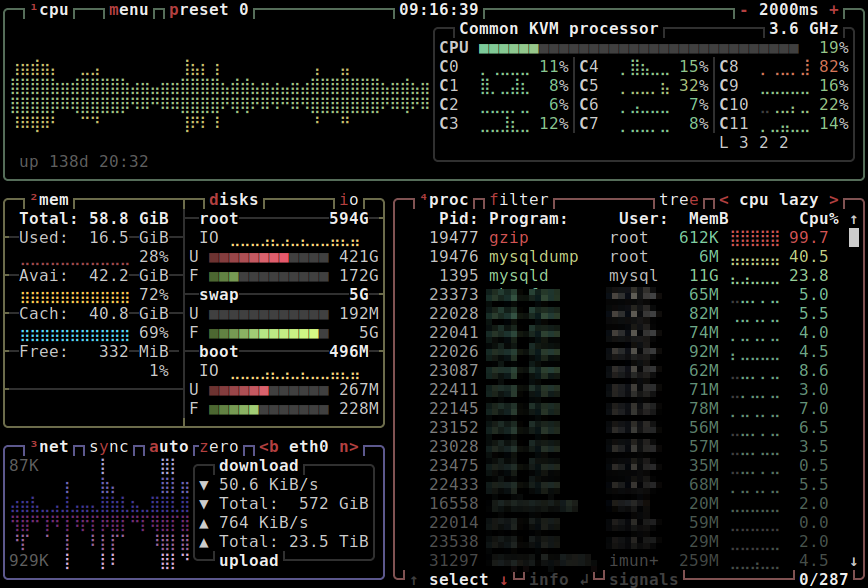
btop gives you a gorgeous, interactive view of what your system is doing — CPU cores, RAM, swap, disk I/O, network throughput, and a filterable process list — all in one terminal window.
Launch btop
btop
Navigation
| Key | Action |
|---|---|
Arrow keys |
Move selection in process list |
Enter |
Show detailed stats for process |
F |
Filter / search processes |
K |
Send signal (kill, SIGTERM, etc.) |
R |
Renice (change process priority) |
T |
Toggle tree / flat process view |
M |
Change sort field |
ESC |
Open settings menu |
Q |
Quit |
Mouse support is fully enabled by default — scroll and click anywhere in the UI.
Change the color theme
Press ESC to open the menu, navigate to Options → Color theme, and pick
from the built-in themes (Default, TTY, Dracula, Gruvbox, and more).
Custom themes can be placed in:
~/.config/btop/themes/
Adjust update interval
In the Options menu, set Update interval (in milliseconds). The default is
2000 (2 seconds). Lower values give a more live feel; higher values reduce CPU
overhead from btop itself.
Config file location
btop's settings are saved automatically at:
~/.config/btop/btop.conf
You can edit this file directly to set options like update_ms, color_theme,
proc_sorting, or net_iface.
Run btop with a specific network interface shown
btop --utf-foce      # force UTF-8 box drawing
btop --debug         # verbose debug output to btop.log
Network interface selection is done interactively inside btop via the network
panel — press B / N to cycle interfaces.
GPU monitoring (Linux x86_64)
On Linux, btop supports Nvidia, AMD, and Intel GPUs out of the box provided the correct drivers are installed. If wattage or GPU stats are missing, you may need to grant extended capabilities:
# Run once after install (requires sudo)
sudo setcap cap_perfmon,cap_sys_ptrace+ep ~/.local/bin/btop