 AJ ONeal
9f28505af7
AJ ONeal
9f28505af7
Stacked on the modifications PR. Now that no live code path references
the per-package fetchers, the shared HTTP/parsing helpers, the
in-process normalizer, or the example template, delete them. Pure
deletion — no behavior change.

- ~93 per-package <pkg>/releases.js fetcher modules.
- _common/{brew,fetcher,git-tag,gitea,github,github-source,
  githubish,githubish-source}.js shared HTTP/parsing helpers.
- _webi/normalize.js in-process normalization layer (cache files
  arrive normalized from webicached).
- _example/releases.js fetcher template for new packages.

The Go cache daemon (webicached) is now the sole producer of release
metadata; the Node process never makes an upstream request.
title, homepage, tagline
| title | homepage | tagline |
|---|---|---|
| LSDeluxe | https://github.com/lsd-rs/lsd | LSDeluxe: next gen ls command |
To update or switch versions, run webi lsd@stable (or @v0.20, @beta, etc).
Files
~/.config/envman/PATH.env
~/.config/lsd/config.yaml
~/.local/bin/lsd
Cheat Sheet
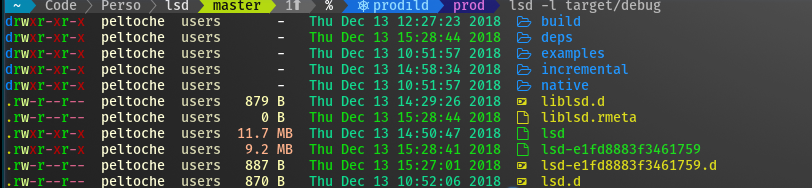
lsdis a modern, cross-platform, drop-in replacement forls. It does everything that you expect it to, plus modern extras that you can check out withlsd --help.
Note: You must install the nerdfont and
update the font in your Terminal for lsd to show icons.
Run lsd exactly as you would ls:
lsd
But wait, there's more, you can tree as well:
lsd --tree
How to turn off icons and colors
If you just want the benefits of a cross-platform ls without having to install
nerdfont or needing a modern terminal, you've got options:
lsd --icon=never --color=never
Since that can be a little awkward to type over and over, you can use an alias:
alias lsd=lsd --icon=never --color=never
lsd
(you may also enjoy aliasman)
Or update the config file:
~/.config/lsd/config.yaml
classic: true
How to alias as ls, ll, la, etc
This will affect the interactive shell, but not scripts.
Using aliasman:
aliasman ls "lsd -F"
aliasman la "lsd -AF"
aliasman ll "lsd -lAF"
aliasman lg "lsd -F --group-dirs=first"
(and follow the on-screen instructions or restart your shell)
Or manually update your .bashrc, .zshrc, or .profile
alias ls="lsd -F"
alias la="lsd -AF"
alias ll="lsd -lAF"
alias lg="lsd -F --group-dirs=first"
For situations in which you must use ls exactly, remember that you can escape
the alias:
\ls -lAF
How to alias as tree
Using aliasman:
aliasman tree "lsd -AF --tree"
alias tree="lsd -AF --tree"
Or manually update your .bashrc, .zshrc, or .profile
alias tree="lsd -AF --tree"
And when you want to use GNU tree you can escape the alias in some shells:
\tree
Or use the full path:
/bin/tree