
13 KiB
APIServer + Catalog Architecture Design
Summary
In KubeVela, APIServer provides the RESTful API for external systems (e.g. UI) to manage Vela abstractions like Applications, Definitions; Catalog stores templates to install common-off-the-shell (COTS) capabilities on Kubernetes.
This doc provides a top-down architecture design for Vela APIServer and Catalog. It clarifies the API interfaces for platform builders to build integration solutions and describes the architecture design in details for the incoming roadmap. Some of the interfaces might have not been implemented yet, but we will follow this design in the future project roadmap.
Motivation
This design is based on and tries to resolve the following use cases:
- UI component wants to discover APIs to integrate with Vela APIServer.
- Users want to manage multiple clusters, catalogues, configuration environments in a single place.
- The management data can be stored in a cloud database like MySQL instead of k8s control plane.
- Because there aren't control logic for those data. This is unlike other Vela resources stored as CR in K8s control plane.
- It is more expensive to host a k8s control plane than MySQL database on cloud.
- Users want to manage third-party capabilities via a well-defined, standard Catalog API interface and Package format.
- Here is the workflow of creating an application:
- The user chooses an environment
- The user chooses one or more clusters in the environment
- The user configures the service deployment configuration such as replica count, instance labels, container image, domain name, port number, etc.
Proposal
1. Top-down Architecture
The overall architecture diagram:
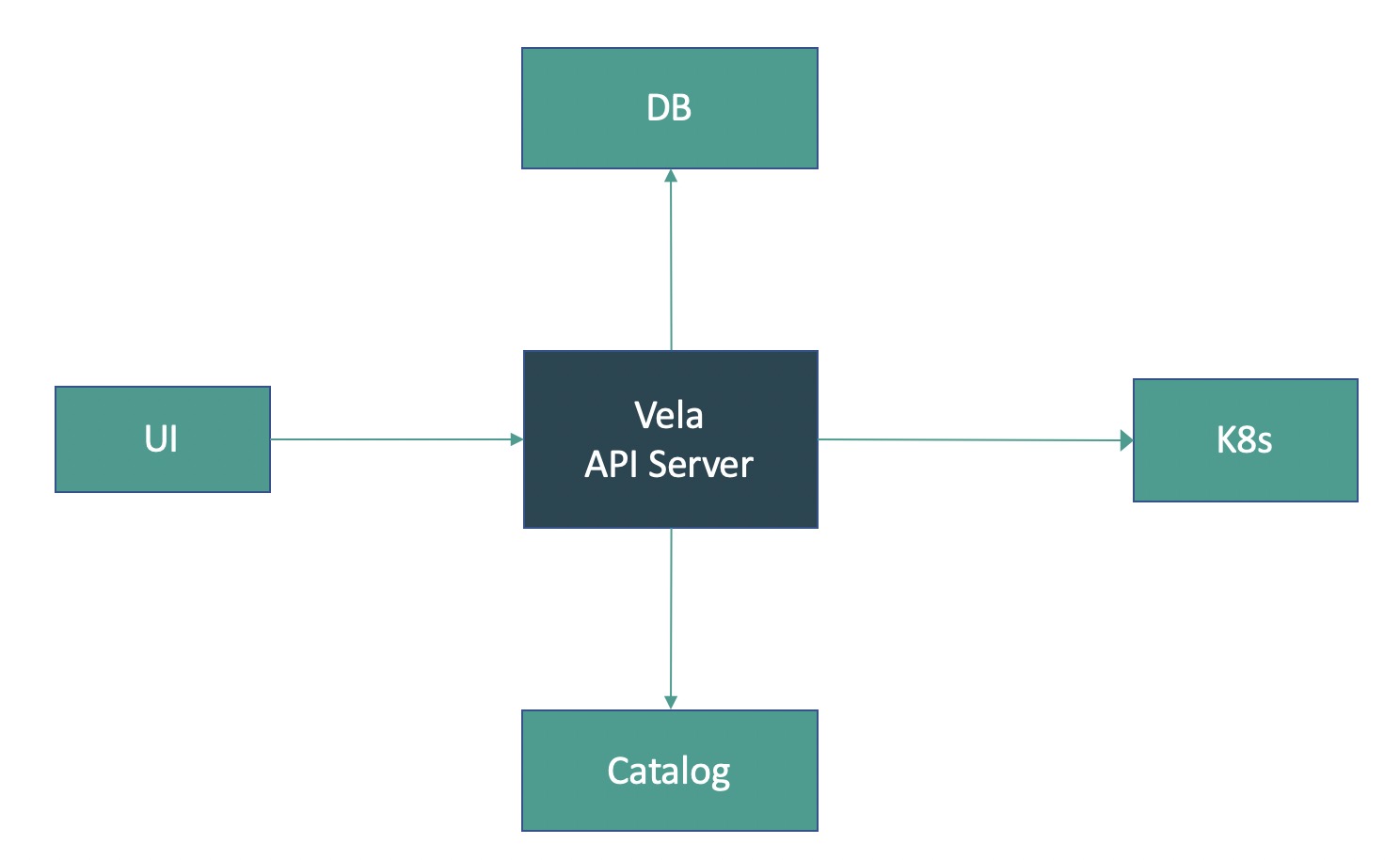
Here's some explanation of the diagram:
- UI requests APIServer for data to render the dashboard.
- Vela APIServer aggregates data from different kinds of sources.
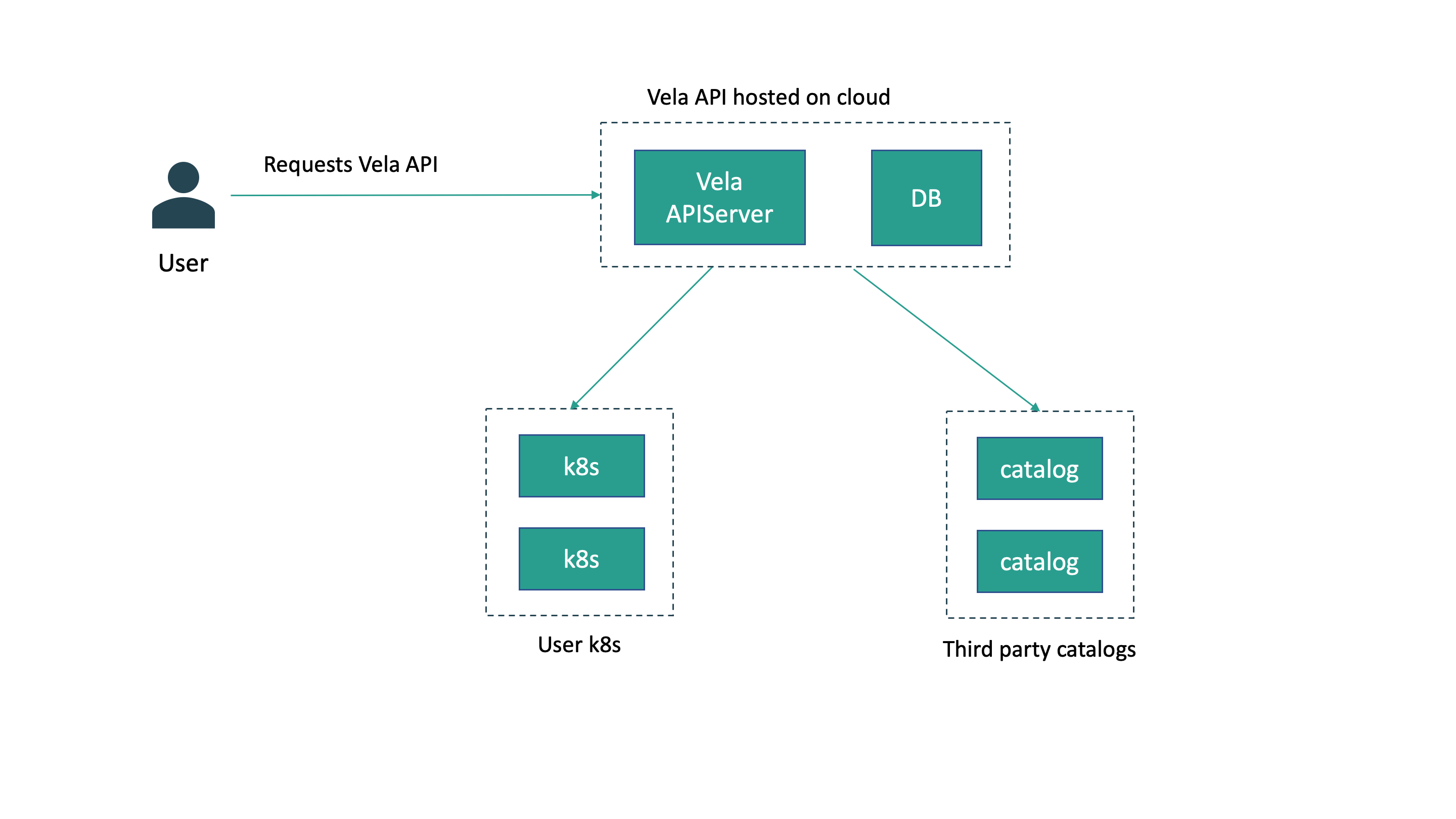
- Vela APIServer can sync with multiple k8s clusters.
- Vela APIServer can sync with multiple catalog servers.
- For those data not in k8s or catalog servers, Vela APIServer syncs them in MySQL database.
The above architecture implies that the Vela APIServer could be used to multiple k8s clusters and catalogs. Below is what a deployment of Vela platform would look like:
2. API Design
Below is the overall architecture of API grouping and storage:
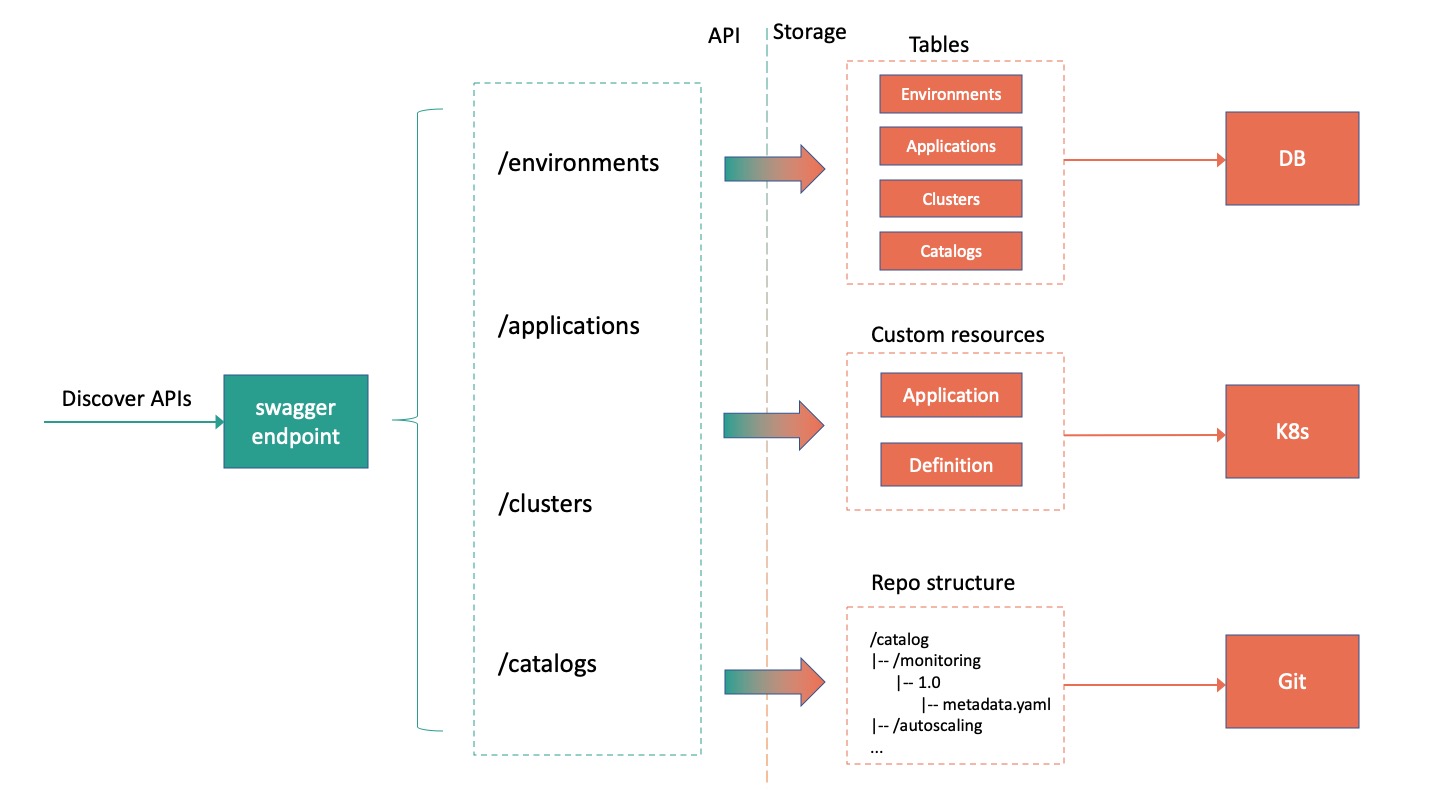
There are two distinguished layers:
- API layer: It defines the API discovery and serving endpoints that Vela APIServer implementation must follow. This is the integration point for external system components (e.g. UI) to contact.
- Storage layer: It describes the storage systems and objects that Vela APIServer syncs data with behind the scene. There are three types of storage:
- K8s cluster: Vela APIServer manages multiple k8s clusters with regard to the applications and definitions custom resources.
- Catalog server: Vela APIServer manages multiple catalogs which contain COTS application packages. Currently in our use case the catalogs resides in Git repos. In the future we can extend this to other catalog storage like file server, object storage.
- MySQL database: Vela APIServer stores global, cross-cluster, cross catalog information in a MySQL database. These data do not exist in k8s or catalog and thus need to be managed by APIServer in a separate database. The database is usually hosted on cloud.
Environment API
Environment is a collection of configurations of the application and dependent resources. For example, a developer would define production and staging environments where each have different config of routing, scaling, database connection credentials, etc.
/environments- Description: List all environments
[{"id": "env-1"}, {"id": "env-2"}]
- Description: List all environments
/environments/<env>- Description: CRUD operations of an environment.
{
  "id": "env-1",

   // The clusters bound to this environment
  "clusters": [
    {
      "id": "cluster-1"
    }
  ],

  "config": {
    "foo": "bar"
  }
}
- Description: CRUD operations of an environment.
Application API
Application is a global unit to manage cross-cluster, cross-namespace application deployment.
/applications- Description: List all applications
/applications/<app>- Description: CRUD operations of an application.
{
  "id": "app-1",

  "configuration": {
    "services": {
      "testsvc": {
        "type": "webservice",
        "image": "crccheck/hello-world"
      }
    }
  },

  // An application could be deployed to multiple environments
  "environments": [
    {
      "id": "env-1",
      // In each env it could deploy to multiple clusters
      "clusters": [
        {
          "id": "cluster-1",
          "deployments": [
            {
              "id": "deploy-1",
              "namespace": "ns-1"
            }
          ]
        }
      ]
    }
  ]
}
- Description: CRUD operations of an application.
Cluster API
-
/clusters- Description: List all k8s clusters.
-
/clusters/<cluster>- Description: CRUD operations of a k8s cluster
{
  "id": "cluster-1",

  // The definitions indicate the capabilities enabled in this cluster
  "definitions": [
    {
      "id": "def-1"
    }
  ],

  "deployments": [
    {
      "id": "deploy-1"
    }
  ]
}
- Description: CRUD operations of a k8s cluster
-
/clusters/<cluster-id>/deployments- Description: List all application deployments on a cluster.
-
/clusters/<cluster-id>/deployments/<deploy>- Description: CRUD operations of an application deployment on a cluster.
{
  "id": "deploy-1",
  "namespace": "ns-1",
  "resources": {},
  "status": {},
}
- Description: CRUD operations of an application deployment on a cluster.
-
/clusters/<cluster-id>/definitions- Description: List all definitions installed on a cluster.
-
/clusters/<cluster-id>/definitions/<def>- Description: CRUD operations of a definition on a cluster.
{
  "id": "def-1",
  "namespace": "ns-1",
  "kind": "TraitDefinition",
  "spec": {
    "template": "..."
  }
}
- Description: CRUD operations of a definition on a cluster.
Catalog API
/catalogs- Description: List all catalogs.
/catalogs/<catalog>- Description: CRUD operations of a catalog.
{
  "namespace": "ns-1",
  "name": "catalog-1",
  "address": "example.com:8080",
  "protocols": {
    "git": {
      "root_dir": "catalog/"
    }
  }
}
- Description: CRUD operations of a catalog.
/catalogs/<catalog>/sync- Description: Sync this catalog.
/catalogs/<catalog>/packages- Description: List latest-version packages on a catalog.
- Param @label: Select packages based on label indexing. Multiple labels could be specified via query parameters.
/catalogs/<catalog>/packages/<pkg>- Description: List all versions of a package.
/catalogs/<catalog>/packages/<pkg>/<version>- Description: Query the information of a package of specified version.
3. Catalog Design
This section will describe the design of the catalog structure, how it interacts with APIServer, and the workflow users install packages.
Catalog structure
All packages are put under /catalog/ dir (this is configurable). The directory structure follows a predefined format:
/catalog/ # a catalog consists of multiple packages
|-- <package>
    |-- v1.0 # a package consists of multiple versions
        |-- metadata.yaml
        |-- definitions/
            |-- xxx-workload.yaml
            |-- xxx-trait.yaml
        |-- conditions/
            |-- check-crd.yaml
        |-- hooks/
            |-- pre-install.yaml
        |-- modules.yaml
    |-- v2.0
|-- <package>
The structure of one package version contains:
-
metadata.yaml: the metadata of the package.name: "foo" version: 1.0 description: | More details about this package. maintainer: - "@xxx" license: "Apache License Version 2.0" url: "https://..." label: category: foo -
definitions: definition files that describe the capabilities from this package to enable on a cluster. Note that these definitions will compared against a cluster on APIServer side to see if a cluster can install or upgrade this package. -
conditions/: defining conditional checks before deploying this package. For example, check if a CRD with specific version exist, if not then the deployment should fail.# check-crd.yaml conditions: - target: apiVersion: apiextensions.k8s.io/v1 kind: CustomResourceDefinition name: test.example.com fieldPath: spec.versions[0].name op: eq value: "v1" -
hooks/:lifecycle hooks on deploying this package. These are the k8s jobs, and consists of pre-install, post-install, pre-uninstall, post-uninstall.# pre-install.yaml pre-install: - job: apiVersion: batch/v1 kind: Job spec: template: spec: containers: - name: pre-install-job image: "pre-install:v1" command: ["/bin/pre-install"] -
modules.yaml: defining the modules that contain the actual resources, e.g. Helm Charts or Terraform modules. Note that we choose to integrate with existing community solutions instead of inventing our own format. In this way we can adopt the reservoir of community efforts and make the design extensible to more in-house formats as we have observed.modules: - chart: path: ./charts/ingress-nginx/ # local path in this package remote: repo: https://kubernetes.github.io/ingress-nginx name: ingress-nginx - terraform: path: ./tf_modules/rds/ # local path in this package remote: source: terraform-aws-modules/rds/aws version: "~> 2.0"
Register a catalog in APIServer
Please refer to /catalogs/<catalog> API endpoint above.
Under the hood, APIServer will scan the catalog repo based on the predefined structure to parse each packages and versions.
Sync a catalog in APIServer
Please refer to /catalogs/<catalog>/sync API endpoint above.
Under the hood, APIServer will rescan the catalog.
Download a package from a catalog
Vela APIServer aggregates package information from multiple catalog servers. To download a package, the user first requests the APIServer to find the location of the catalog and the package. Then the user visits the catalog repo directly to download the package data. The workflow is shown as below:
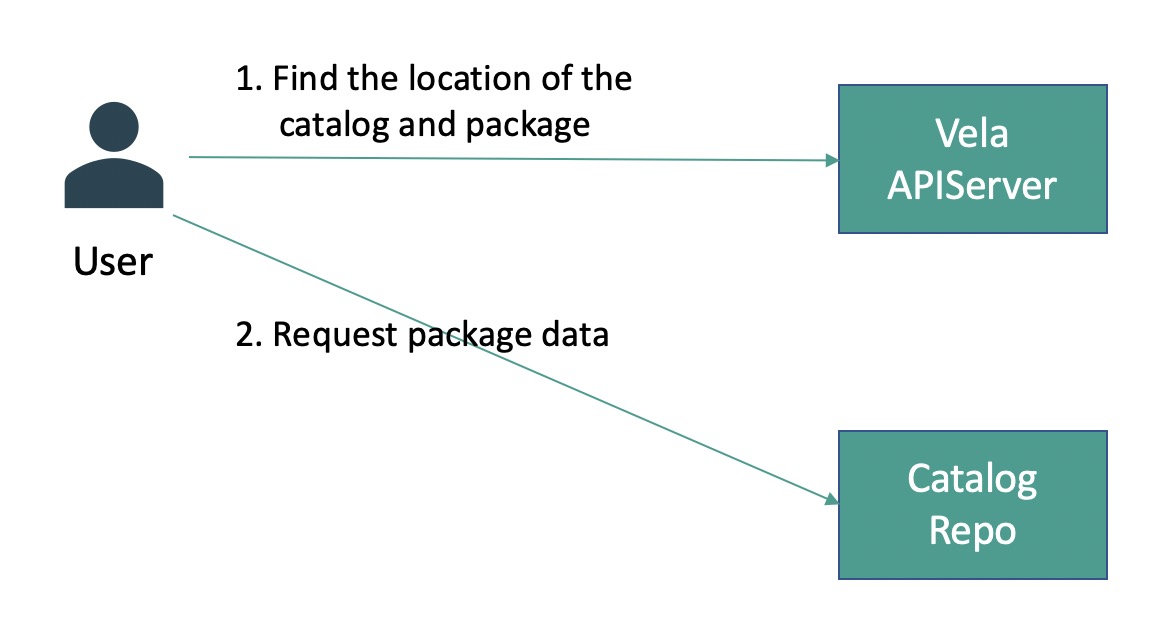
In our future roadmap, we will build a catalog controller for each k8s cluster. Then we will add API endpoint to install the package in APIServer which basically creates a CR to trigger the controller to reconcile package installation into the cluster. We choose this instead of APIServer installing the package because in this way we can bypass the APIServer in the package data transfer path and avoid APIServer becoming a single point of failure.
Examples
Considerations
Package parameters
We can parse the schema of parameters from Helm Chart or Terraform. For example, Helm supports value schema file for input validation and there is an automation tool to generate the schema.
Package dependency
Instead of having multiple definitions in one package, we could define that one package correlates to one definition only. But some users will need a bundle of definitions instead of one. For example, a full-observability trait might include a prometheus package, a grafana package, a loki package, and a jaeger package. This is what we call "package bundling".
To provide a bundle of definitions, we could define package dependency. So a parent package could depend on multiple atomic packages to provide a full-fledged capability.
Package dependency solution will simplify the structure and provide more atomic packages. But this is not a simple problem and beyond the current scope. We will add this on the future roadmap.
Multi-tenancy
For initial version we plan to implement APIServer without multi-tenancy. But as an application platform we expect multi-tenancy is a necessary part of Vela. We will keep API compatibility and might add some sort of auth token (e.g. JWT) as a query parameter in the future.