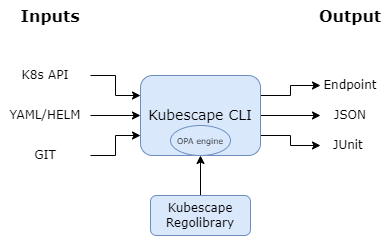
# Kubescape Architecture
This document describes the architecture of Kubescape, covering both the CLI tool and the in-cluster operator.
## Overview
Kubescape is designed as a modular security platform that can run in two primary modes:
1. **CLI Mode** - On-demand scanning from your local machine
2. **Operator Mode** - Continuous monitoring within your Kubernetes cluster
Both modes share core scanning logic but differ in how they collect data and report results.
---
## CLI Architecture
The Kubescape CLI is a standalone binary that performs security assessments on-demand.
### Core Components
#### 1. Command Layer (`cmd/`)
The entry point for all CLI operations. Key commands include:
| Command | Description |
|---------|-------------|
| `scan` | Orchestrates misconfiguration and vulnerability scanning |
| `scan image` | Container image vulnerability scanning |
| `fix` | Auto-remediation of misconfigurations |
| `patch` | Container image patching |
| `list` | Lists available frameworks and controls |
| `download` | Downloads artifacts for offline use |
| `vap` | Validating Admission Policy management |
| `mcpserver` | MCP server for AI integration |
| `operator` | Communicates with in-cluster operator |
#### 2. Core Engine (`core/`)
The main scanning engine that:
- Loads and parses Kubernetes resources
- Evaluates resources against security controls
- Aggregates and formats results
- Manages scan lifecycle and configuration
#### 3. Policy Evaluation (OPA/Rego)
Kubescape uses [Open Policy Agent (OPA)](https://www.openpolicyagent.org/) as its policy engine:
```
┌─────────────────────────────────────────────────────────────┐
│ Policy Evaluation Flow │
├─────────────────────────────────────────────────────────────┤
│ │
│ K8s Resources ──► OPA Engine ──► Rego Policies ──► Results │
│ │ │ │
│ │ ▼ │
│ │ Regolibrary │
│ │ (Control Library) │
│ │ │
│ ▼ │
│ - YAML files │
│ - Helm charts │
│ - Live cluster │
│ - Git repositories │
│ │
└─────────────────────────────────────────────────────────────┘
```
**[Regolibrary](https://github.com/kubescape/regolibrary)** contains:
- Security controls (200+)
- Framework definitions (NSA-CISA, MITRE ATT&CK®, CIS Benchmarks)
- Control metadata and remediation guidance
#### 4. Image Scanner (Grype Integration)
For vulnerability scanning, Kubescape integrates [Grype](https://github.com/anchore/grype):
```
┌─────────────────────────────────────────────────────────────┐
│ Image Scanning Pipeline │
├─────────────────────────────────────────────────────────────┤
│ │
│ Container Image ──► SBOM Generation ──► Vulnerability DB │
│ │ │ │
│ ▼ ▼ │
│ Syft Engine Grype Matching │
│ │ │ │
│ └────────┬───────────┘ │
│ ▼ │
│ CVE Results │
│ │
└─────────────────────────────────────────────────────────────┘
```
#### 5. Image Patcher (Copacetic Integration)
For patching vulnerable images, Kubescape uses [Copacetic](https://github.com/project-copacetic/copacetic):
```
┌─────────────────────────────────────────────────────────────┐
│ Image Patching Pipeline │
├─────────────────────────────────────────────────────────────┤
│ │
│ Vulnerable Image ──► Copa ──► BuildKit ──► Patched Image │
│ │ │ │
│ ▼ ▼ │
│ - Scan for CVEs - Apply OS patches │
│ - Identify fixes - Rebuild layers │
│ - Generate patch plan - Push to registry │
│ │
└─────────────────────────────────────────────────────────────┘
```
### Data Flow (CLI Scan)
```
┌──────────────────────────────────────────────────────────────────────┐
│ CLI Scan Data Flow │
├──────────────────────────────────────────────────────────────────────┤
│ │
│ Input Sources Processing Output │
│ ───────────── ────────── ────── │
│ │
│ ┌─────────────┐ ┌─────────────────┐ ┌─────────────────┐ │
│ │ Kubernetes │────────►│ │ │ Console │ │
│ │ Cluster │ │ │───►│ (pretty-print) │ │
│ └─────────────┘ │ │ └─────────────────┘ │
│ │ │ │
│ ┌─────────────┐ │ Kubescape │ ┌─────────────────┐ │
│ │ YAML Files │────────►│ Core Engine │───►│ JSON/SARIF │ │
│ └─────────────┘ │ │ └─────────────────┘ │
│ │ │ │
│ ┌─────────────┐ │ │ ┌─────────────────┐ │
│ │ Helm Charts │────────►│ │───►│ HTML/PDF │ │
│ └─────────────┘ │ │ └─────────────────┘ │
│ │ │ │
│ ┌─────────────┐ │ │ ┌─────────────────┐ │
│ │ Git Repos │────────►│ │───►│ JUnit XML │ │
│ └─────────────┘ └─────────────────┘ └─────────────────┘ │
│ │
└──────────────────────────────────────────────────────────────────────┘
```
---
## Operator Architecture (In-Cluster)
The Kubescape Operator provides continuous security monitoring within the cluster.
### Components
#### 1. Kubescape Operator
The main controller that:
- Watches for changes to Kubernetes resources
- Triggers scans on schedule or on-demand
- Manages scan lifecycle
- Stores results in Custom Resources
#### 2. Kubevuln
Handles container image vulnerability scanning:
- Scans images running in the cluster
- Generates SBOMs (Software Bill of Materials)
- Matches against vulnerability databases
- Creates `VulnerabilityManifest` CRs
#### 3. Host Scanner
Collects security-relevant information from cluster nodes:
- Kernel parameters
- Kubelet configuration
- Container runtime settings
- File permissions
#### 4. Storage
Kubescape uses Custom Resources to store scan results:
| CRD | Description |
|-----|-------------|
| `VulnerabilityManifest` | Image vulnerability scan results |
| `VulnerabilityManifestSummary` | Aggregated vulnerability summaries |
| `WorkloadConfigurationScan` | Misconfiguration scan results |
| `WorkloadConfigurationScanSummary` | Aggregated configuration summaries |
| `ApplicationProfile` | Runtime behavior profiles |
| `NetworkNeighborhood` | Observed network connections |
#### 5. Node Agent (Runtime Security)
For runtime security, the Node Agent uses eBPF via [Inspektor Gadget](https://github.com/inspektor-gadget/inspektor-gadget):
```
┌─────────────────────────────────────────────────────────────┐
│ Runtime Security Flow │
├─────────────────────────────────────────────────────────────┤
│ │
│ Kernel ──► eBPF Probes ──► Node Agent ──► Kubescape │
│ │ │ │
│ ▼ ▼ │
│ System calls - Process exec │
│ Network events - File access │
│ File operations - Network connections │
│ - Anomaly detection │
│ │
└─────────────────────────────────────────────────────────────┘
```
### Data Flow (Operator)
```
┌──────────────────────────────────────────────────────────────────────┐
│ Operator Data Flow │
├──────────────────────────────────────────────────────────────────────┤
│ │
│ ┌─────────────┐ ┌─────────────┐ ┌─────────────────────────┐ │
│ │ Kubernetes │ │ Kubescape │ │ Custom Resources │ │
│ │ API Server │────►│ Operator │────►│ (Scan Results) │ │
│ └─────────────┘ └─────────────┘ └─────────────────────────┘ │
│ │ │ │ │
│ │ │ ▼ │
│ │ │ ┌─────────────────────────┐ │
│ │ │ │ Prometheus Metrics │ │
│ │ │ └─────────────────────────┘ │
│ │ │ │ │
│ ▼ ▼ ▼ │
│ ┌─────────────┐ ┌─────────────┐ ┌─────────────────────────┐ │
│ │ Kubevuln │ │ Node Agent │ │ External Integrations │ │
│ │ (Images) │ │ (Runtime) │ │ (ARMO Platform, etc.) │ │
│ └─────────────┘ └─────────────┘ └─────────────────────────┘ │
│ │
└──────────────────────────────────────────────────────────────────────┘
```
---
## Frameworks and Controls
Kubescape evaluates resources against security frameworks:
### Supported Frameworks
| Framework | Description |
|-----------|-------------|
| **NSA-CISA** | Kubernetes Hardening Guidance |
| **MITRE ATT&CK®** | Threat-based security framework |
| **CIS Benchmarks** | Center for Internet Security best practices |
| **SOC2** | Service Organization Control 2 |
| **HIPAA** | Healthcare compliance requirements |
| **PCI-DSS** | Payment Card Industry standards |
### Control Structure
```yaml
Control:
id: C-0005
name: API server insecure port is enabled
description: Check if the API server insecure port is enabled
frameworks:
- NSA
- MITRE
severity: High
remediation: |
Disable the insecure port by setting --insecure-port=0
rules:
- rego: |
# OPA/Rego policy code
```
---
## Security Model
### CLI Mode
- Runs with the permissions of the executing user
- Uses kubeconfig for cluster access
- No persistent state in the cluster
- Results stored locally or sent to configured backend
### Operator Mode
- Runs as a Kubernetes workload
- Uses ServiceAccount with defined RBAC
- Stores results as Custom Resources
- Can send data to external backends (optional)
### Network Requirements
| Component | Outbound Connections |
|-----------|---------------------|
| CLI | Vulnerability DB updates, framework downloads |
| Operator | Vulnerability DB updates, optional backend |
| Offline | All artifacts can be pre-downloaded |
---
## Extensibility
### Custom Controls
You can create custom controls using Rego:
```rego
package armo_builtins
deny[msga] {
# Your custom policy logic
input.kind == "Deployment"
not input.spec.template.spec.securityContext.runAsNonRoot
msga := {
"alertMessage": "Deployment should run as non-root",
"alertScore": 7,
"failedPaths": ["spec.template.spec.securityContext.runAsNonRoot"],
"fixPaths": [{"path": "spec.template.spec.securityContext.runAsNonRoot", "value": "true"}]
}
}
```
### Integration Points
- **HTTP API** - For programmatic access ([see httphandler docs](../httphandler/README.md))
- **MCP Server** - For AI assistant integration ([see mcp-server docs](mcp-server.md))
- **Prometheus Metrics** - For monitoring and alerting
- **Webhook** - For external notifications
---
## Further Reading
- [Getting Started Guide](getting-started.md)
- [Installation Guide](installation.md)
- [Regolibrary (Controls)](https://github.com/kubescape/regolibrary)
- [Helm Charts](https://github.com/kubescape/helm-charts)
- [ARMO Platform Integration](providers.md)