

 9b37d18e16
Datadog provider is often meeting API rate limits on bigger
implementations. Datadog Cluster Agent can batch metric queries
and expose them through an endpoint compatible with Kubernetes External
Metrics API.

This implementations allows to use this endpoint and any other server
implementing Kubernetes External Metrics API. Including k8s API server
itself.

Co-authored-by: Johan Lore <johan.lore@decathlon.com>
Co-authored-by: Maxime Véroone <maxime.veroone@decathlon.com>
Signed-off-by: Johan Lore <johan.lore@decathlon.com>
Signed-off-by: Maxime Véroone <maxime.veroone@decathlon.com>
Signed-off-by: Johan Lore <johan.lore@decathlon.com>
description
| description |
|---|
| Flagger is a progressive delivery Kubernetes operator |
Introduction
Flagger is a progressive delivery tool that automates the release process for applications running on Kubernetes. It reduces the risk of introducing a new software version in production by gradually shifting traffic to the new version while measuring metrics and running conformance tests.
Flagger implements several deployment strategies (Canary releases, A/B testing, Blue/Green mirroring) using a service mesh or an ingress controller for traffic routing. For release analysis, Flagger can query Prometheus, InfluxDB, Datadog, New Relic, CloudWatch, Stackdriver or Graphite and for alerting it uses Slack, MS Teams, Discord and Rocket.
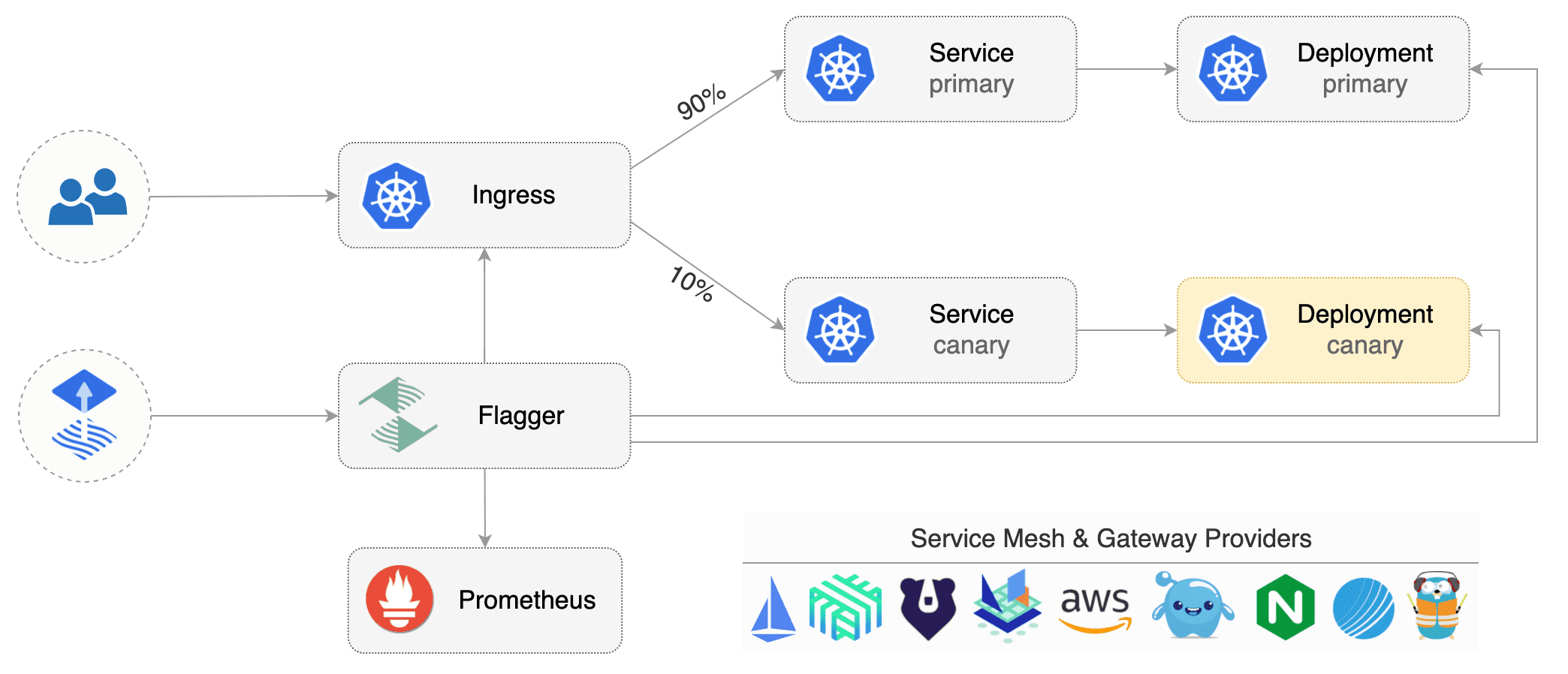
Flagger can be configured with Kubernetes custom resources and is compatible with any CI/CD solutions made for Kubernetes. Since Flagger is declarative and reacts to Kubernetes events, it can be used in GitOps pipelines together with tools like Flux CD.
Flagger is a Cloud Native Computing Foundation graduated project and part of Flux family of GitOps tools.
Getting started
To get started with Flagger, choose one of the supported routing providers and install Flagger with Flux CD.
After installing Flagger, you can follow one of these tutorials to get started:
Service mesh tutorials
Ingress controller tutorials
The Linux Foundation has registered trademarks and uses trademarks. For a list of trademarks of The Linux Foundation, please see our Trademark Usage page.