
9.5 KiB
App Mesh Canary Deployments
This guide shows you how to use App Mesh and Flagger to automate canary deployments. You'll need an EKS cluster configured with App Mesh, you can find the install guide here.
Bootstrap
Flagger takes a Kubernetes deployment and optionally a horizontal pod autoscaler (HPA), then creates a series of objects (Kubernetes deployments, ClusterIP services, App Mesh virtual nodes and services). These objects expose the application on the mesh and drive the canary analysis and promotion. The only App Mesh object you need to create by yourself is the mesh resource.
Create a mesh called global:
export REPO=https://raw.githubusercontent.com/weaveworks/flagger/master

kubectl apply -f ${REPO}/artifacts/appmesh/global-mesh.yaml
Create a test namespace with App Mesh sidecar injection enabled:
kubectl apply -f ${REPO}/artifacts/namespaces/test.yaml
Create a deployment and a horizontal pod autoscaler:
kubectl apply -f ${REPO}/artifacts/appmesh/deployment.yaml
kubectl apply -f ${REPO}/artifacts/appmesh/hpa.yaml
Deploy the load testing service to generate traffic during the canary analysis:
helm upgrade -i flagger-loadtester flagger/loadtester \
--namespace=test \
--set meshName=global.appmesh-system \
--set "backends[0]=podinfo.test"
Create a canary custom resource:
apiVersion: flagger.app/v1alpha3
kind: Canary
metadata:
  name: podinfo
  namespace: test
spec:
  # deployment reference
  targetRef:
    apiVersion: apps/v1
    kind: Deployment
    name: podinfo
  # the maximum time in seconds for the canary deployment
  # to make progress before it is rollback (default 600s)
  progressDeadlineSeconds: 60
  # HPA reference (optional)
  autoscalerRef:
    apiVersion: autoscaling/v2beta1
    kind: HorizontalPodAutoscaler
    name: podinfo
  service:
    # container port
    port: 9898
    # App Mesh reference
    meshName: global.appmesh-system
    # App Mesh egress (optional)
    backends:
      - backend.test
  # define the canary analysis timing and KPIs
  canaryAnalysis:
    # schedule interval (default 60s)
    interval: 10s
    # max number of failed metric checks before rollback
    threshold: 10
    # max traffic percentage routed to canary
    # percentage (0-100)
    maxWeight: 50
    # canary increment step
    # percentage (0-100)
    stepWeight: 5
    # App Mesh Prometheus checks
    metrics:
    - name: request-success-rate
      # minimum req success rate (non 5xx responses)
      # percentage (0-100)
      threshold: 99
      interval: 1m
    # external checks (optional)
    webhooks:
      - name: load-test
        url: http://flagger-loadtester.test/
        timeout: 5s
        metadata:
          cmd: "hey -z 1m -q 10 -c 2 http://podinfo.test:9898/"
Save the above resource as podinfo-canary.yaml and then apply it:
kubectl apply -f ./podinfo-canary.yaml
After a couple of seconds Flagger will create the canary objects:
# applied
deployment.apps/podinfo
horizontalpodautoscaler.autoscaling/podinfo
canary.flagger.app/podinfo

# generated Kubernetes objects
deployment.apps/podinfo-primary
horizontalpodautoscaler.autoscaling/podinfo-primary
service/podinfo
service/podinfo-canary
service/podinfo-primary

# generated App Mesh objects
virtualnode.appmesh.k8s.aws/podinfo
virtualnode.appmesh.k8s.aws/podinfo-canary
virtualnode.appmesh.k8s.aws/podinfo-primary
virtualservice.appmesh.k8s.aws/podinfo.test
The App Mesh specific settings are:
  service:
    port: 9898
    meshName: global.appmesh-system
    backends:
      - backend1.test
      - backend2.test
App Mesh blocks all egress traffic by default. If your application needs to call another service, you have to create an App Mesh virtual service for it and add the virtual service name to the backend list.
Setup App Mesh ingress (optional)
In order to expose the podinfo app outside the mesh you'll be using an Envoy ingress and an AWS classic load balancer. The ingress binds to an internet domain and forwards the calls into the mesh through the App Mesh sidecar. If podinfo becomes unavailable due to a HPA downscaling or a node restart, the ingress will retry the calls for a short period of time.
Deploy the ingress and the AWS ELB service:
kubectl apply -f ${REPO}/artifacts/appmesh/ingress.yaml
Find the ingress public address:
kubectl -n test describe svc/ingress | grep Ingress

LoadBalancer Ingress:     yyy-xx.us-west-2.elb.amazonaws.com
Wait for the ELB to become active:
watch curl -sS ${INGRESS_URL}
Open your browser and navigate to the ingress address to access podinfo UI.
Automated canary promotion
Trigger a canary deployment by updating the container image:
kubectl -n test set image deployment/podinfo \
podinfod=quay.io/stefanprodan/podinfo:1.4.1
Flagger detects that the deployment revision changed and starts a new rollout:
kubectl -n test describe canary/podinfo

Status:
  Canary Weight:         0
  Failed Checks:         0
  Phase:                 Succeeded
Events:
  Type     Reason  Age   From     Message
  ----     ------  ----  ----     -------
  Normal   Synced  3m    flagger  New revision detected podinfo.test
  Normal   Synced  3m    flagger  Scaling up podinfo.test
  Warning  Synced  3m    flagger  Waiting for podinfo.test rollout to finish: 0 of 1 updated replicas are available
  Normal   Synced  3m    flagger  Advance podinfo.test canary weight 5
  Normal   Synced  3m    flagger  Advance podinfo.test canary weight 10
  Normal   Synced  3m    flagger  Advance podinfo.test canary weight 15
  Normal   Synced  2m    flagger  Advance podinfo.test canary weight 20
  Normal   Synced  2m    flagger  Advance podinfo.test canary weight 25
  Normal   Synced  1m    flagger  Advance podinfo.test canary weight 30
  Normal   Synced  1m    flagger  Advance podinfo.test canary weight 35
  Normal   Synced  55s   flagger  Advance podinfo.test canary weight 40
  Normal   Synced  45s   flagger  Advance podinfo.test canary weight 45
  Normal   Synced  35s   flagger  Advance podinfo.test canary weight 50
  Normal   Synced  25s   flagger  Copying podinfo.test template spec to podinfo-primary.test
  Warning  Synced  15s   flagger  Waiting for podinfo-primary.test rollout to finish: 1 of 2 updated replicas are available
  Normal   Synced  5s    flagger  Promotion completed! Scaling down podinfo.test
Note that if you apply new changes to the deployment during the canary analysis, Flagger will restart the analysis.
During the analysis the canary’s progress can be monitored with Grafana. The App Mesh dashboard URL is http://localhost:3000/d/flagger-appmesh/appmesh-canary?refresh=10s&orgId=1&var-namespace=test&var-primary=podinfo-primary&var-canary=podinfo

You can monitor all canaries with:
watch kubectl get canaries --all-namespaces

NAMESPACE   NAME      STATUS        WEIGHT   LASTTRANSITIONTIME
test        podinfo   Progressing   15       2019-03-16T14:05:07Z
prod        frontend  Succeeded     0        2019-03-15T16:15:07Z
prod        backend   Failed        0        2019-03-14T17:05:07Z
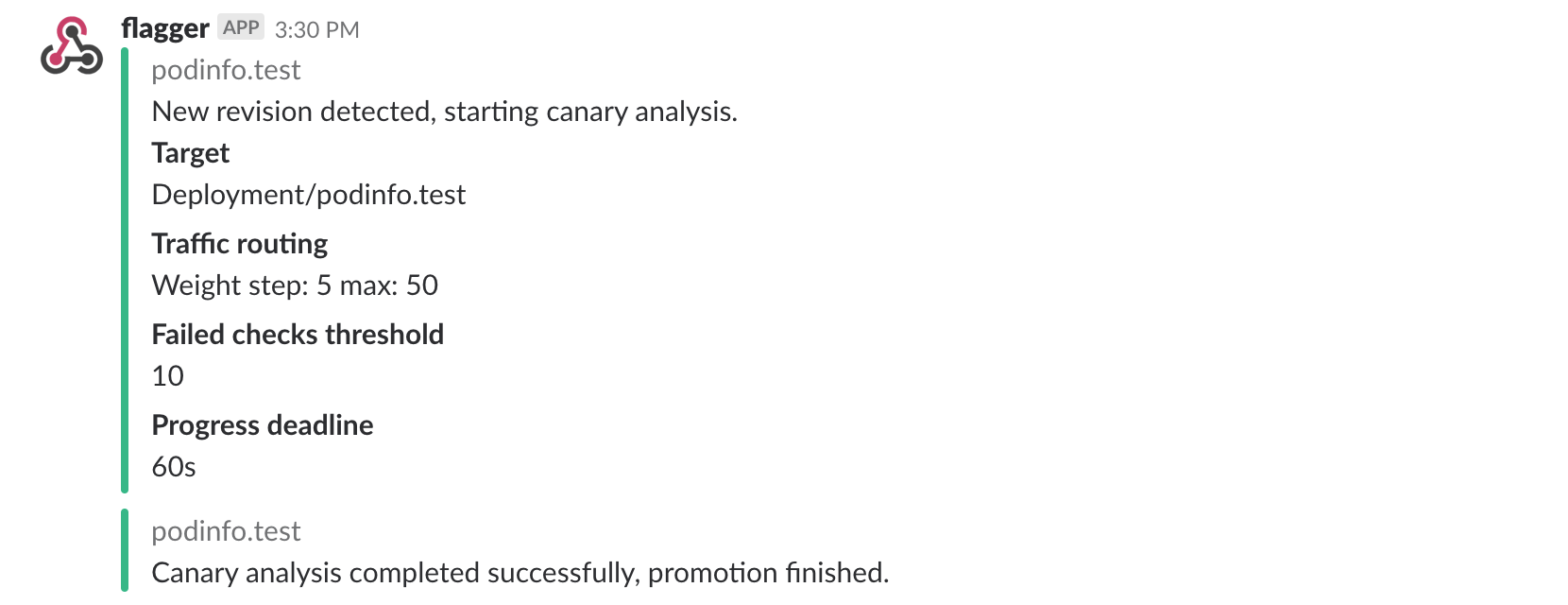
If you’ve enabled the Slack notifications, you should receive the following messages:
Automated rollback
During the canary analysis you can generate HTTP 500 errors to test if Flagger pauses the rollout.
Trigger a canary deployment:
kubectl -n test set image deployment/podinfo \
podinfod=quay.io/stefanprodan/podinfo:1.4.2
Exec into the load tester pod with:
kubectl -n test exec -it flagger-loadtester-xx-xx sh
Generate HTTP 500 errors:
hey -z 1m -c 5 -q 5 http://podinfo.test:9898/status/500
When the number of failed checks reaches the canary analysis threshold, the traffic is routed back to the primary, the canary is scaled to zero and the rollout is marked as failed.
kubectl -n test describe canary/podinfo

Status:
  Canary Weight:         0
  Failed Checks:         10
  Phase:                 Failed
Events:
  Type     Reason  Age   From     Message
  ----     ------  ----  ----     -------
  Normal   Synced  3m    flagger  Starting canary deployment for podinfo.test
  Normal   Synced  3m    flagger  Advance podinfo.test canary weight 5
  Normal   Synced  3m    flagger  Advance podinfo.test canary weight 10
  Normal   Synced  3m    flagger  Advance podinfo.test canary weight 15
  Normal   Synced  3m    flagger  Halt podinfo.test advancement success rate 69.17% < 99%
  Normal   Synced  2m    flagger  Halt podinfo.test advancement success rate 61.39% < 99%
  Normal   Synced  2m    flagger  Halt podinfo.test advancement success rate 55.06% < 99%
  Normal   Synced  2m    flagger  Halt podinfo.test advancement success rate 47.00% < 99%
  Normal   Synced  2m    flagger  (combined from similar events): Halt podinfo.test advancement success rate 38.08% < 99%
  Warning  Synced  1m    flagger  Rolling back podinfo.test failed checks threshold reached 10
  Warning  Synced  1m    flagger  Canary failed! Scaling down podinfo.test
If you’ve enabled the Slack notifications, you’ll receive a message if the progress deadline is exceeded, or if the analysis reached the maximum number of failed checks:
