 Chris Curwick
3bacc1f54b
Chris Curwick
3bacc1f54b
Add an `azuremonitor` metric template provider that queries the managed
Prometheus endpoint of an Azure Monitor Workspace, removing the need to
front the workspace with an aad-auth-proxy sidecar.

The provider embeds the Prometheus provider and only takes care of
authentication. It resolves a Microsoft Entra ID token before each query
and hands it to the Prometheus provider as a bearer token, so query
handling, headers and error reporting stay unchanged.

The identity is taken from the keys present in the referenced secret. A
clientId and tenantId pair selects a workload identity, adding a
clientSecret selects a service principal, and an absent secret falls back
to the workload identity of the Flagger pod. The Azure cloud and the
token audience are derived from the workspace host name, so no new
provider fields or controller flags are needed.

The address is required to be an HTTPS Azure Monitor Workspace query
endpoint and insecureSkipVerify is rejected, so that the token is only
ever sent to a verified workspace host.

Signed-off-by: Chris Curwick <chriscur@microsoft.com>
description
| description |
|---|
| Flagger is a progressive delivery Kubernetes operator |
Introduction
Flagger is a progressive delivery tool that automates the release process for applications running on Kubernetes. It reduces the risk of introducing a new software version in production by gradually shifting traffic to the new version while measuring metrics and running conformance tests.
Flagger implements several deployment strategies (Canary releases, A/B testing, Blue/Green mirroring) using a service mesh or an ingress controller for traffic routing. For release analysis, Flagger can query Prometheus, InfluxDB, Datadog, New Relic, CloudWatch, Stackdriver or Graphite and for alerting it uses Slack, MS Teams, Discord and Rocket.
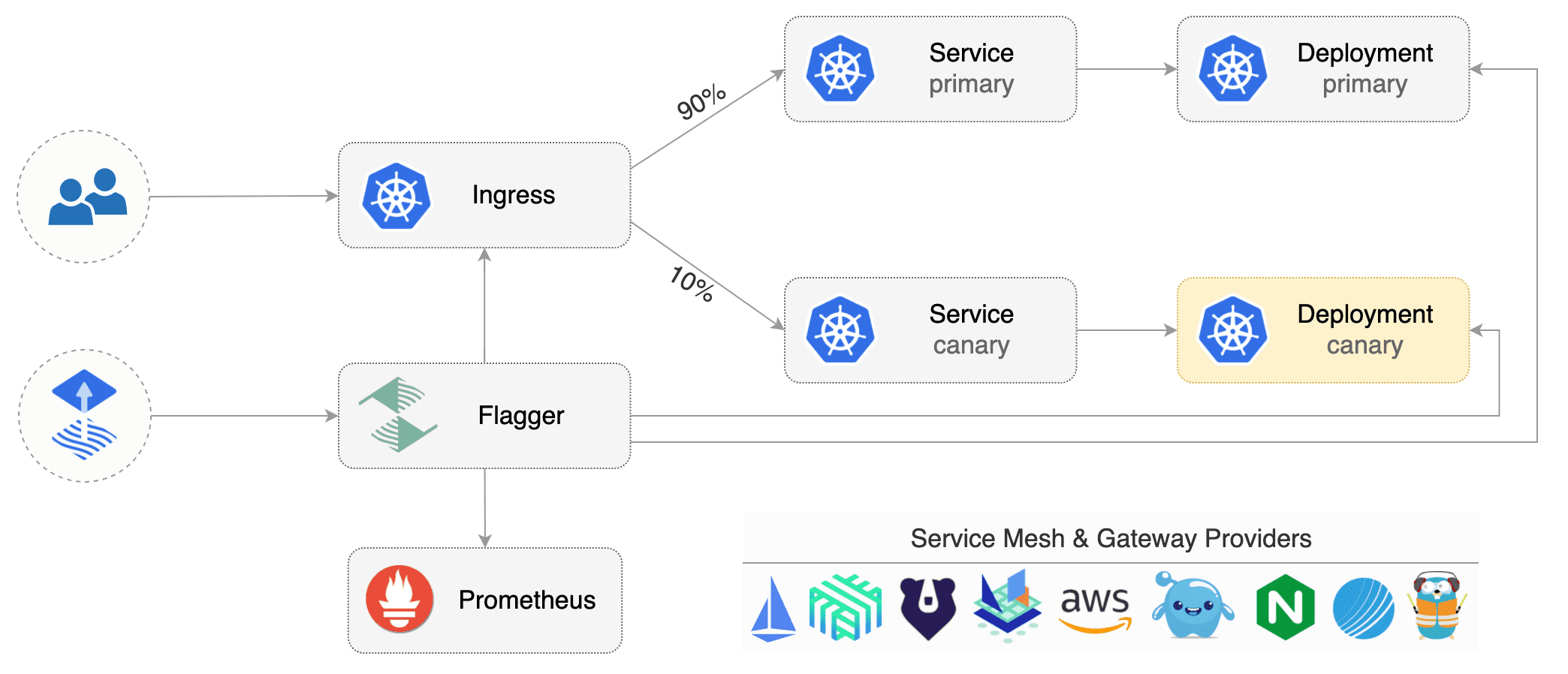
Flagger can be configured with Kubernetes custom resources and is compatible with any CI/CD solutions made for Kubernetes. Since Flagger is declarative and reacts to Kubernetes events, it can be used in GitOps pipelines together with tools like Flux CD.
Flagger is a Cloud Native Computing Foundation graduated project and part of Flux family of GitOps tools.
Getting started
To get started with Flagger, choose one of the supported routing providers and install Flagger with Flux CD.
After installing Flagger, you can follow one of these tutorials to get started:
Service mesh tutorials
Ingress controller tutorials
The Linux Foundation has registered trademarks and uses trademarks. For a list of trademarks of The Linux Foundation, please see our Trademark Usage page.