
12 KiB
The Gateway API
-
Over time, Kubernetes has introduced multiple ways to expose containers
-
In the first versions of Kubernetes, we would use a
Serviceof typeLoadBalancer -
HTTP services often need extra features, though:
-
content-based routing (route requests with URI, HTTP headers...)
-
TLS termination
-
middlewares (e.g. authentication)
-
etc.
-
-
This led to the introduction of the
Ingressresource
History of Ingress
-
Kubernetes 1.8 (September 2017) introduced
Ingress(v1beta1) -
Kubernetes 1.19 (August 2020) graduated
Ingressto GA (v1) -
Ingress supports:
-
content-based routing with URI or HTTP
Host:header -
TLS termination (with neat integration with e.g. cert-manager)
-
-
Ingress doesn't support:
-
content-based routing with other headers (e.g. cookies)
-
middlewares
-
traffic split for e.g. canary deployments
-
Everyone needed something better
-
Virtually every ingress controller added proprietary extensions:
-
nginx.ingress.kubernetes.io/configuration-snippetannotation -
Traefik has CRDs like
IngressRoute,TraefikService,Middleware... -
HAProxy has CRDs like
Backend,TCP... -
etc.
-
-
Ingress was too specific to L7 (HTTP) traffic
-
We needed a totally new set of APIs and resources!
Gateway API in a nutshell
-
Handle HTTP, GRPC, TCP, TLS, UDP routes
(note: as of October 2025, only HTTP and GRPC routes are in GA)
-
Finer-grained permission model
(e.g. define which namespaces can use a specific "gateway"; more on that later)
-
Standardize more "core" features than Ingress
(header-based routing, traffic weighing, rewrite requests and responses...)
-
Pave the way for further extension thanks to different feature sets
(
CorevsExtendedvsImplementation-specific) -
Can also be used for service meshes
Gateway API personas
-
Ingress informally had two personas:
-
cluster administrator (installs and manages the Ingress Controller)
-
application developer (creates Ingress resources)
-
-
Gateway formally defines three personas:
-
infrastructure provider
(~network admin; potentially works within managed providers) -
cluster operator
(~Kubernetes admin; potentially manages multiple clusters) -
application developer
-
class: pic
Gateway API resources
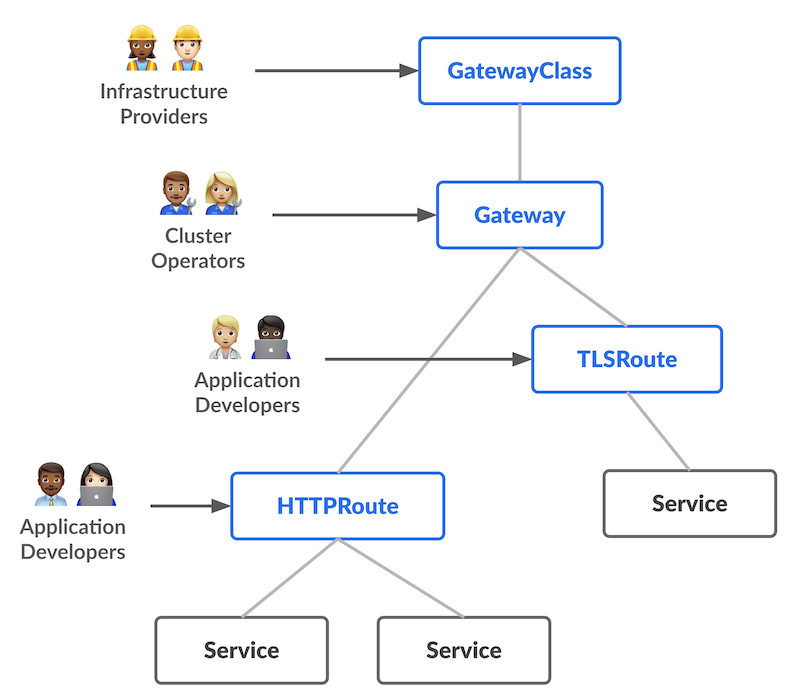
Gateway API resources
-
Service= our good old Kubernetes service -
HTTPRoute= describes which requests should go to whichService(similar to the
Ingressresource) -
Gateway= how traffic enters the system(could correspond to e.g. a
LoadBalancerService) -
GatewayClass= represents different types ofGateways(many gateway controllers will offer only one)
HTTPRoute anatomy
-
spec.parentRefs= where requests come from-
typically a single
Gateway -
could be multiple
Gatewayresources -
can also be a
Service(for cluster mesh uses)
-
-
spec.hostnames= which hosts (HTTPHost:header) this applies to -
spec.rules[].matches= which requests this applies to (match paths, headers...) -
spec.rules[].filters= optional transformations (change headers, rewrite URI...) -
spec.rules[].backendRefs= where requests go to
Minimal HTTPRoute
apiVersion: gateway.networking.k8s.io/v1
kind: HTTPRoute
metadata:
  name: xyz
spec:
  parentRefs:
  - group: gateway.networking.k8s.io
    kind: Gateway
    name: my-gateway
    namespace: my-gateway-namespace
  hostnames: [ xyz.example.com ]
  rules:
  - backendRefs:
    - name: xyz
      port: 80
Gateway API in action
-
Let's deploy Traefik in Gateway API mode!
-
We'll use the official Helm chart for Traefik
-
We'll need to set a few values
-
providers.kubernetesGateway.enabled=trueenable Gateway API provisioning
-
gateway.listeners.web.namespacePolicy.from=Allallow
HTTPRoutesin all namespaces to refer to the defaultGateway
LoadBalancer vs hostPort
-
If we're using a managed Kubernetes cluster, we'll use the default mode:
-
Traefik runs with a
Deployment -
Traefik
Servicehas typeLoadBalancer -
we connect to the
LoadBalancerpublic IP address
-
-
If we don't have a CCM (or
LoadBalancerService), we'll do things differently:-
Traefik runs with a
DaemonSet -
Traefik
Servicehas typeClusterIP(not strictly necessary but cleaner) -
we connect to any node's public IP address
-
Installing Traefik (with LoadBalancer)
Install the Helm chart:
helm upgrade --install --namespace traefik --create-namespace \
  --repo https://traefik.github.io/charts traefik traefik \
  --version 37.1.2 \
  --set providers.kubernetesGateway.enabled=true \
  --set gateway.listeners.web.namespacePolicy.from=All \
  #
We'll connect by using the public IP address of the load balancer:
kubectl get services --namespace traefik
Installing Traefik (with hostPort)
Install the Helm chart:
helm upgrade --install --namespace traefik --create-namespace \
  --repo https://traefik.github.io/charts traefik traefik \
  --version 37.1.2 \
  --set deployment.kind=DaemonSet \
  --set ports.web.hostPort=80 \
  --set ports.websecure.hostPort=443 \
  --set service.type=ClusterIP \
  --set providers.kubernetesGateway.enabled=true \
  --set gateway.listeners.web.namespacePolicy.from=All \
  #
We'll connect by using the public IP address of any node of the cluster.
class: extra-details
Taints and tolerations
-
By default, Traefik Pods will respect node taints
-
If some nodes have taints (e.g. control plane nodes) we might need tolerations
(if we want to run Traefik on all nodes)
-
Adding the corresponding tolerations is left as an exercise for the reader!
class: extra-details
Rolling updates with hostPort
-
It is not possible to have two pods on the same node using the same
hostPort -
Therefore, it is important to pay attention to the
DaemonSetrolling update parameters -
If
maxUnavailableis non-zero:-
old pods will be shutdown first
-
new pods will start without a problem
-
there will be a short interruption of service
-
-
If
maxSurgeis non-zero:-
new pods will be created but won't be able to start (since the
hostPortis taken) -
old pods will remain running and the rolling update will not proceed
-
Testing our Gateway controller
-
Send a test request to Traefik
(e.g. with
curl http://<ipaddress>) -
For now we should get a
404 not found(as there are no routes configured)
A basic HTTP route
- Create a basic HTTP container and expose it with a Service; e.g.:
kubectl create deployment blue --image jpetazzo/color --port 80
kubectl expose deployment blue
A basic HTTP route
-
Create an
HTTPRoutewith the following YAML:apiVersion: gateway.networking.k8s.io/v1 kind: HTTPRoute metadata: name: blue spec: parentRefs: - group: gateway.networking.k8s.io kind: Gateway name: traefik-gateway namespace: traefik rules: - backendRefs: - name: blue port: 80 -
Our
curlcommand should now show a response from thebluepod
class: extra-details
Traefik dashboard
-
By default, Traefik exposes a dashboard
(on a different port than the one used for "normal" traffic)
-
To access it:
kubectl port-forward --namespace traefik daemonset/traefik 1234:8080(replace
daemonsetwithdeploymentif necessary) -
Then connect to http://localhost:1234/dashboard/ (pay attention to the final
/!)
Core vs Extended vs Implementation-specific
-
All Gateway controllers must support
Corefeatures -
Some optional features are in the
Extendedset:-
they may or may not supported
-
but at least, their specification is part of the API definition
-
-
Gateway controllers can also have
Implementation-specificfeatures(=proprietary extensions)
-
In the following slides, we'll tag features with
CoreorExtended
HTTPRoute.spec.rules[].matches
Some fields are part of the Core set; some are part of the Extended set.
match:
  path:                   # Core
    value: /hello
    type: PathPrefix      # default value; can also be "Exact"
  headers:                # Core
  - name: x-custom-header
    value: foo
  queryparams:            # Extended
  - type: Exact           # can also have implementation-specific values, e.g. Regex
    name: product
    value: pizza
  method: GET             # Extended
HTTPRoute.spec.rules[].filters.*HeaderModifier
RequestHeaderModifier is Core
ResponseHeaderModifier is Extended
type: RequestHeaderModifier       # or ResponseHeaderModifier
requestHeaderModifier:            # or responseHeaderModifier
  set:                            # replace an existing header
  - name: x-my-header
    value: hello
  add:                            # appends to an existing header
  - name: x-my-header             # (adding a comma if it's already set)
    value: hello
  remove:
  - x-my-header
HTTPRoute.spec.rules[].filters.RequestRedirect
type: RequestRedirect
requestRedirect:
  scheme: https                     # http or https
  hostname: newxyz.example.com
  path: /new
  port: 8080
  statusCode: 302                   # default=302; can be 301 302 303 307 308
All fields are optional. Empty fields mean "leave as is".
Note that while RequestRedirect is Core, some options are Extended!
(See the API specification for details.)
HTTPRoute.spec.rules[].filters.URLRewrite
type: URLRewrite
urlRewrite:
  hostname: newxyz.example.com
  path: /new
hostname will rewrite the HTTP Host: header.
This is an Extended feature.
It conflicts with HTTPRequestRedirect.
HTTPRoute.spec.rules[].filters.RequestMirror
This is an Extended feature. It sends a copy of all (or a fraction) of requests to another backend. Responses from the mirrored backend are ignored.
type: RequestMirror
requestMirror:
  percent: 10
  fraction:
    numerator: 1
    denominator: 10
  backendRef:
    group: "" # default
    kind: Service # default
    name: log-some-requests
    namespace: my-observability-namespace # defaults to same namespace
    port: 80
  hostname: newxyz.example.com
Specify percent or fraction, not both. If neither is specified, all requests get mirrored.
Other routes
-
GRPCRoutecan use GRPC services and methods to route requeststhis is useful if you're using GRPC; otherwise you can ignore it!
-
TLSRoutecan use SNI header to route requests (without decrypting traffic)this is useful to host multiple TLS services on a single address with end-to-end encryption
-
TCPRoutecan route TCP connectionsthis is useful to colocate multiple protocols on the same address, e.g. HTTP+HTTPS+SSH
-
UDPRoutecan route UDP packetsditto, e.g. for DNS/UDP, DNS/TCP, DNS/HTTPS
gateway.spec.listeners.allowedRoutes
-
With
Ingress, anyIngressresource can "catch" traffic -
This could be a problem e.g. if a dev/staging environment accidentally (or maliciously) creates an
Ingresswith a production hostname -
Gateway API introduces guardrails
-
A
Gatewaycan indicate if it can be referred by routes:-
from all namespaces (like with
Ingress) -
only from the same namespace
-
only from specific namespaces matching a selector
-
-
That's why we specified
gateway.listeners.web.namespacePolicy.from=Allwhen deploying Traefik
???
:EN:- The Gateway API :FR:- La Gateway API